
1. המוצר נגמרview
The Alecto WS-1560 is a wireless weather station designed to provide accurate indoor and outdoor environmental data. Featuring a clear color display and a remote outdoor sensor, it offers comprehensive weather information and additional useful functions for your home.
תכונות עיקריות:
- Measures indoor and outdoor temperature and humidity.
- Long-range wireless outdoor sensor (up to 100 meters).
- 5.7-inch well-lit color display with animated weather forecast icons.
- Temperature and ice alarm functions.
- שעון מעורר עם פונקציית נודניק.
- Memory function for latest and highest readings.
- Moon phase indicator, date, day, and time display.
- Battery-operated main unit and outdoor sensor with backup batteries.

Figure 1.1: Alecto WS-1560 Main Unit and Wireless Outdoor Sensor.
2. תכולת החבילה
Ensure all components are present and in good condition upon unpacking:
- Alecto WS-1560 Main Unit (Indoor Display)
- חיצוני אלחוטי חיישן
- מדריך למשתמש
- (Power adapter and batteries may be included depending on package)
Video 2.1: Illustrative video showing typical weather station components and basic setup. (Note: This video is for a related product and may not show the exact Alecto WS-1560 model.)
3. התקנה והתקנה
3.1. התקנת סוללה
Both the main unit and the outdoor sensor require batteries for operation. Ensure you use the correct type and polarity.
- חיישן חיצוני:
- פתח את תא הסוללות בגב החיישן החיצוני האלחוטי.
- הכניסו 2 סוללות AA (לא כלולות) בהתאם לסימוני הקוטביות (+/-).
- סגור היטב את תא הסוללות.
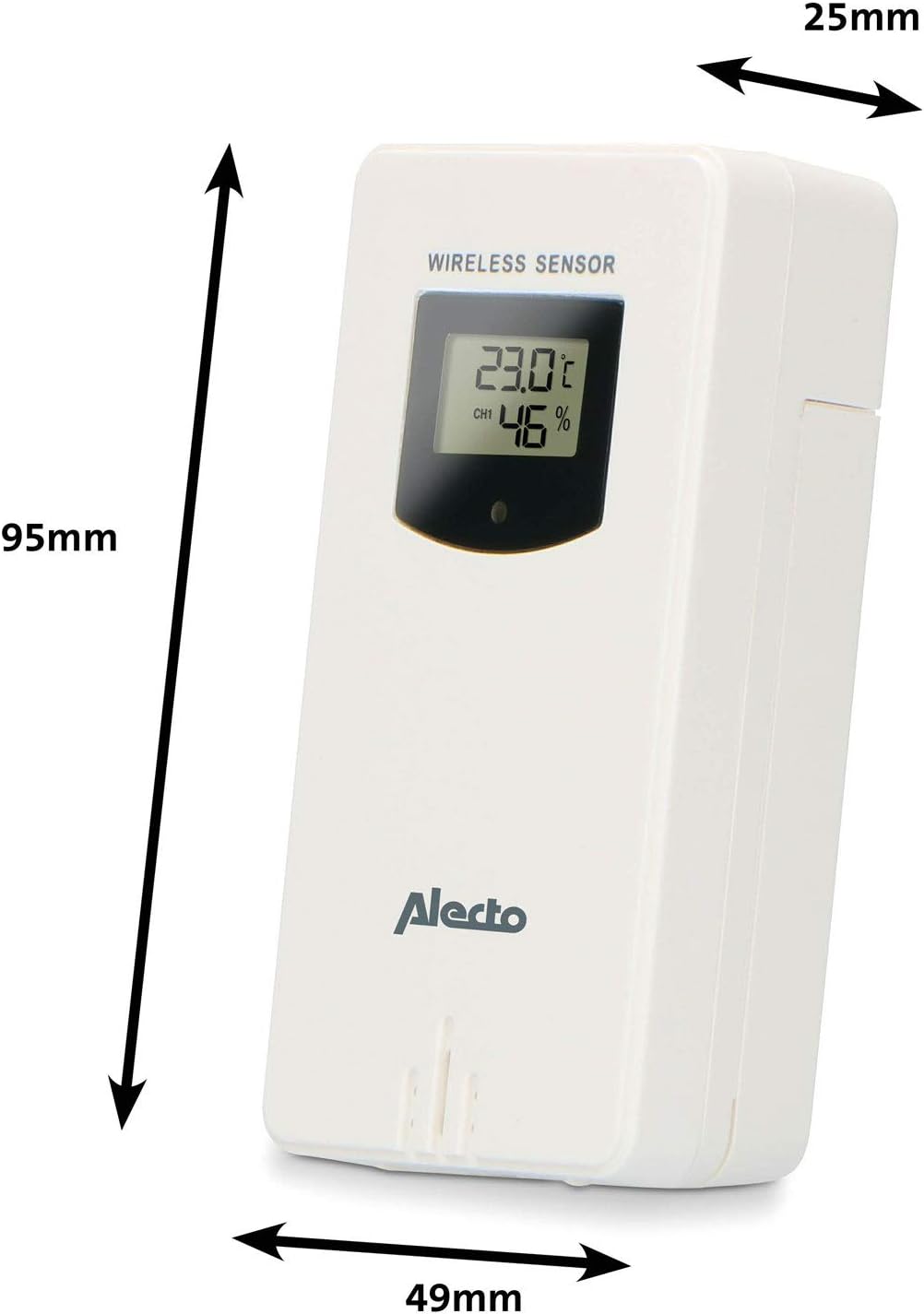
Figure 3.1: Wireless Outdoor Sensor dimensions and battery compartment location.
- יחידה ראשית:
- פתחו את תא הסוללות בגב היחידה הראשית.
- Insert 2x AA batteries (not included) according to the polarity markings (+/-). These serve as backup batteries.
- סגור היטב את תא הסוללות.
- Connect the main unit to a power outlet using the provided power adapter (if included).

Figure 3.2: Main Unit dimensions and power input.
3.2. מיקום חיישן
For accurate outdoor readings, proper placement of the wireless sensor is crucial:
- Place the sensor in a shaded area, away from direct sunlight, to prevent inaccurate temperature readings.
- Ensure good air circulation around the sensor.
- Mount the sensor vertically, approximately 1.5 to 2.5 meters (5 to 8 feet) above the ground.
- Avoid placing the sensor near heat sources (e.g., vents, windows) or moisture sources.
- The maximum transmission range is 100 meters (328 feet) in open air. Walls and other obstacles will reduce this range.

איור 3.3: דוגמהample of outdoor sensor placement on a wall.
3.3. צימוד החיישן עם היחידה הראשית
The main unit and sensor should automatically pair once both are powered on. If pairing does not occur:
- Ensure both units have fresh batteries and are within range.
- Press the "TX" button inside the outdoor sensor's battery compartment to manually send a signal.
- On the main unit, you may need to initiate a search for the outdoor sensor (refer to the "Operation" section for specific button functions).
4. תפעול
4.1. פריסת תצוגה
צג הצבע בגודל 5.7 אינץ' מספק תמונה ברורהview of all measured data. Key areas include:
- טמפרטורה ולחות חיצוניים: Displays current outdoor conditions.
- טמפרטורה ולחות פנימיים: מציג את תנאי הבית הנוכחיים.
- Animated Weather Forecast: Icons predict upcoming weather (sunny, partly cloudy, cloudy, rainy, snowy).
- זמן תאריך: השעה, היום והתאריך הנוכחיים.
- לחץ ברומטרי: לחץ אטמוספרי נוכחי.
- שלב הירח: ייצוג גרפי של שלב הירח הנוכחי.
- Temperature/Ice Alarm Indicators: Alerts for specific temperature thresholds or potential ice conditions.

איור 4.1: מפורט view of the main unit's color display.
4.2. פונקציות כפתור
The main unit features several buttons for setting and adjusting functions. Common buttons include:
- מַעֲרֶכֶת: כניסה למצב הגדרה עבור שעה, תאריך והגדרות אחרות.
- מצב: Switches between display modes or confirms settings.
- למעלה/למטה (או +/-): Adjusts values during setup or cycles through channels.
- אזעקה: Sets or activates the alarm function.
- מ: Displays maximum/minimum temperature and humidity records. Long press to clear records.
- נודניק / אור: Activates snooze during an alarm or adjusts backlight brightness.
Video 4.2: Illustrative video demonstrating various features and settings of a weather station. (Note: This video is for a related product and may not show the exact Alecto WS-1560 model.)
4.3. הגדרת שעה ותאריך
- Press and hold the "SET" button until the time display starts flashing.
- Use the "UP" or "DOWN" buttons to adjust the hour, then press "SET" to confirm and move to minutes.
- חזור על הפעולה עבור דקות, שנה, חודש ויום.
- Press "SET" again to exit the setting mode.
4.4. הגדרות אזעקה
- Press the "ALARM" button once to view זמן האזעקה.
- לחץ והחזק את כפתור "ALARM" עד שזמן האזעקה יתחיל להבהב.
- Use the "UP" or "DOWN" buttons to set the desired alarm hour and minute.
- לחץ על "אזעקה" כדי לאשר.
- To activate/deactivate the alarm, press the "ALARM" button briefly when the alarm time is displayed. An alarm icon will appear/disappear.
4.5. Max/Min Records
The weather station automatically records the maximum and minimum temperature and humidity values over a 24-hour period.
- Press the "MEM" button briefly to view the maximum recorded values.
- Press "MEM" again to view the minimum recorded values.
- Press "MEM" a third time to return to current readings.
- To clear the records, press and hold the "MEM" button for a few seconds.
5. תחזוקה
- ניקוי: נגבו את משטחי התצוגה והיחידה בעזרת מטלית רכהamp בַּד. אין להשתמש בחומרי ניקוי שוחקים או ממסים.
- החלפת סוללה: Replace batteries in both the main unit and the outdoor sensor when the low battery indicator appears on the display. Always replace all batteries at the same time with new ones of the same type.
- טיפול בחיישנים: Periodically check the outdoor sensor for debris or obstructions that might affect its readings. Ensure it remains in a shaded, well-ventilated area.
6. פתרון תקלות
| בְּעָיָה | סיבה אפשרית | פִּתָרוֹן |
|---|---|---|
| No outdoor temperature/humidity reading (or "---" displayed) |
|
|
| קריאות טמפרטורה/לחות לא מדויקות |
|
|
| התצוגה עמומה או ריקה |
|
|
7. מפרטים
| מספר דגם | WS-1560 |
| מותג | אלקטו |
| מקור כוח (יחידה ראשית) | Power Adapter (if included) + 2x AA batteries (backup) |
| מקור כוח (חיישן חיצוני) | 2x סוללות AA |
| מידות מוצר (יחידה ראשית) | 5.1 x 16.5 x 12.3 ס"מ |
| משקל המוצר | 440 גרם |
| טווח חיישן אלחוטי | עד 100 מטרים (בחוץ) |
| גודל תצוגה | 5.7 אינץ' / 14.5 ס"מ |
| מָקוֹר | סִין |
8. אחריות ותמיכה
For warranty information, technical support, or service inquiries, please refer to the warranty card included with your product or visit the official Alecto webאתר. שמור את קבלת הרכישה כהוכחת קנייה.
אלקטו Webאֲתַר: www.alecto.nl (General Alecto website, specific support page may vary)