
1. הקדמה
תודה על הרכישהasing the Vonyx CVB215 Active Speaker. This powerful 1600W speaker features dual 15-inch woofers, Bluetooth connectivity, and MP3 playback capabilities, making it ideal for various audio applications including music playback, parties, and public announcements. This manual provides essential information for safe operation, setup, and maintenance of your speaker. Please read it thoroughly before use and retain it for future reference.
2. הוראות בטיחות
- ספק כוח: Ensure the speaker is connected to a power outlet with the correct voltage (230V AC / 50Hz).
- לַחוּת: Do not expose the speaker to rain or moisture to prevent electric shock.
- אוורור: ודאו אוורור נאות סביב הרמקול. אין לחסום פתחי אוורור.
- מקורות חום: הרחק את הרמקול ממקורות חום כגון רדיאטורים, אוגרי חום, תנורים או מכשירים אחרים המייצרים חום.
- ניקוי: נתק את המכשיר מהחשמל לפני הניקוי. השתמש במטלית יבשה.
- שֵׁרוּת: אל תנסו לטפל ברמקול בעצמכם. כל טיפול ותחזוקה נדרשים לאנשי שירות מוסמכים.
- מיקום: הנח את הרמקול על משטח יציב ושטוח כדי למנוע ממנו ליפול.
3. המוצר נגמרview
The Vonyx CVB215 is a robust active speaker designed for high-quality audio output. It features a durable enclosure with a metal grille protecting the dual 15-inch woofers and tweeters. Integrated handles allow for easier transport.
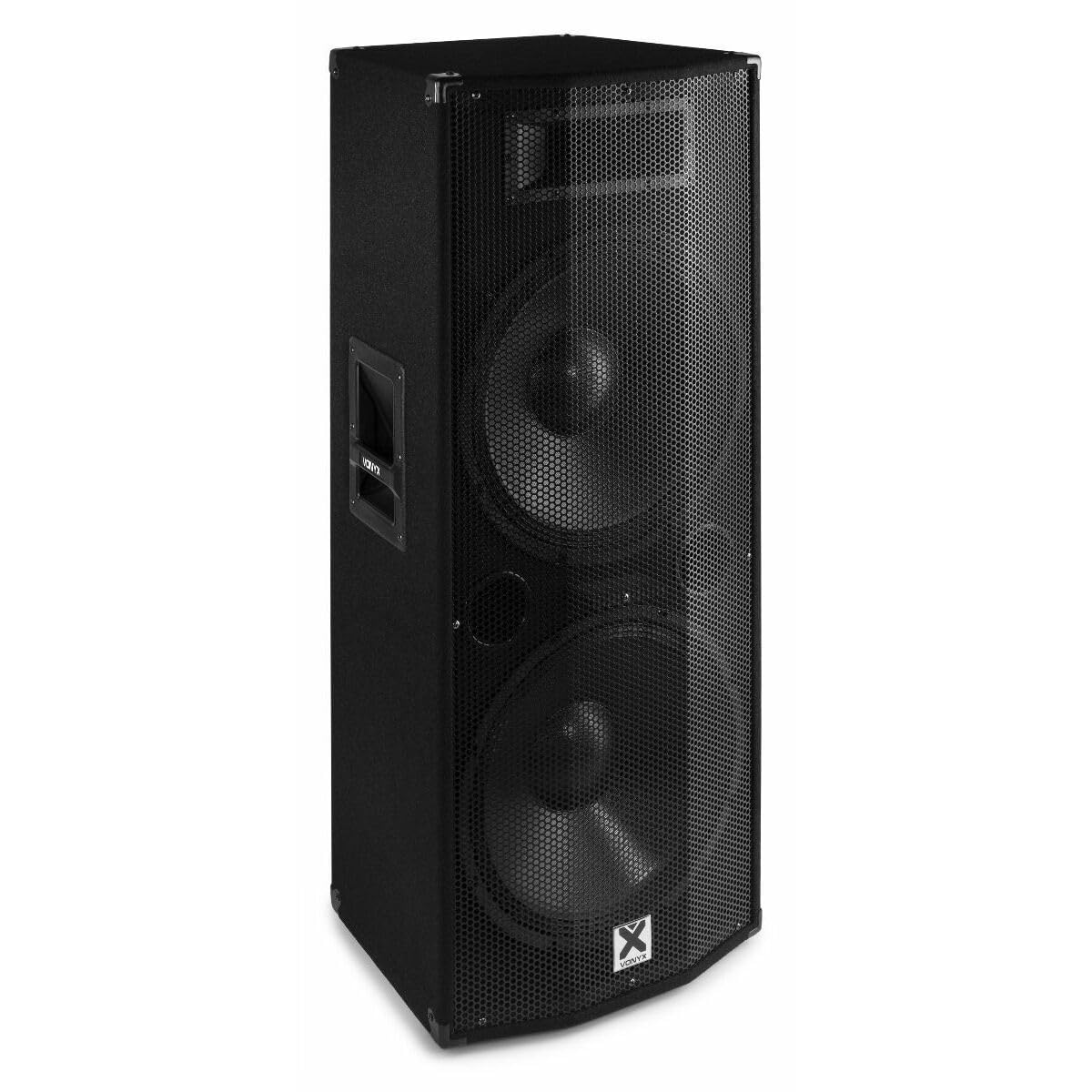
תמונה 3.1: חֲזִית view of the Vonyx CVB215 active speaker. This image displays the speaker's front, highlighting the protective metal grille and the Vonyx logo.
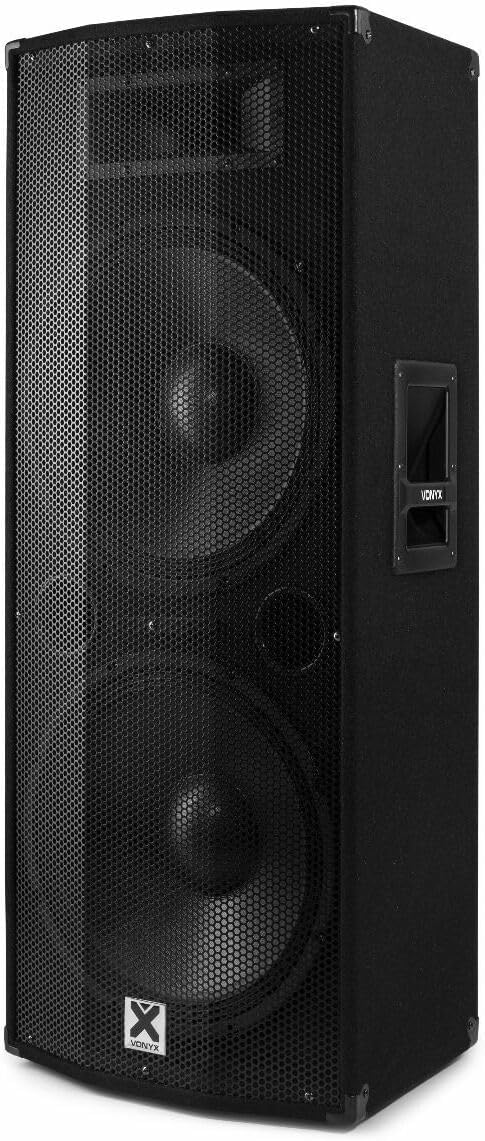
תמונה 3.2: בזווית view of the Vonyx CVB215 active speaker. This perspective shows the speaker's side with an integrated handle, designed for portability.
פקדים וחיבורים בפאנל האחורי
The rear panel houses all input/output connections and control knobs for audio adjustment.

תמונה 3.3: Rear panel of the Vonyx CVB215 active speaker. This image provides an overview of all connections and controls located on the back of the unit.
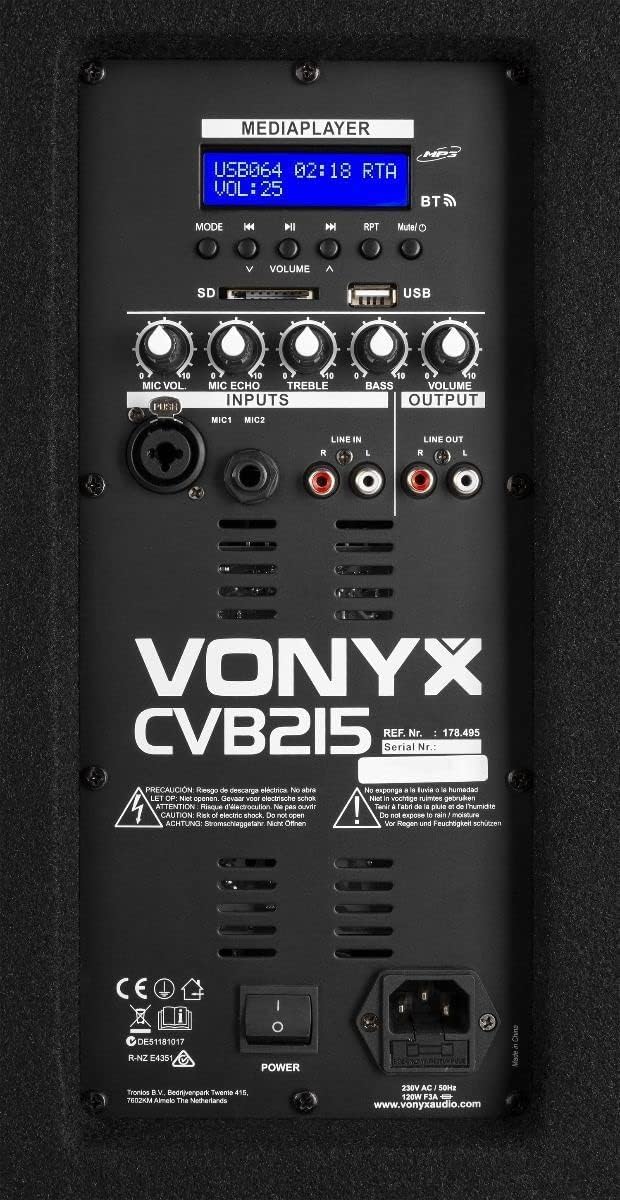
תמונה 3.4: מְפוֹרָט view of the Vonyx CVB215 rear panel controls. This close-up highlights the media player interface, USB and SD card slots, microphone inputs (MIC1, MIC2), Line In (RCA), Line Out (RCA), and various adjustment knobs.
- MEDIAPLAYER Display: Shows current mode, track information, and volume level.
- חריצי כרטיס USB/SD: For MP3 playback from USB drives or SD cards.
- לחצן MODE: Switches between Bluetooth, USB, SD, and Line-in modes.
- VOLUME Knobs: Adjusts overall volume, microphone volume (MIC VOL), microphone echo (MIC ECHO), treble, and bass.
- כניסות MIC1/MIC2: 6.3mm jack inputs for microphones.
- כניסת קו (RCA): Stereo RCA inputs for connecting external audio sources (e.g., mixer, CD player).
- יציאת קו (RCA): Stereo RCA outputs for connecting to another active speaker or ampחיים יותר.
- מתג הפעלה: מדליק/מכבה את הרמקול.
- AC IN: חיבור כבל חשמל.
שְׁלַט רָחוֹק
The speaker comes with a remote control for convenient operation of the media player functions.

תמונה 3.5: Remote control for the Vonyx CVB215 speaker. This image displays the layout of the remote control, including buttons for media playback, volume adjustment, and mode selection.
4. התקנה
- פריקת אריזה: הוצא בזהירות את הרמקול מאריזתו. שמור את האריזה להובלה או אחסון עתידיים.
- מיקום: Place the speaker on a stable, level floor. Ensure there is sufficient space around the speaker for proper ventilation. The speaker is designed for floorstanding use.
- חיבור חשמל: Connect the supplied power cable to the AC IN socket on the rear panel of the speaker and then to a suitable power outlet.
- הפעלה ראשונית: Ensure all volume controls are set to minimum before turning on the speaker using the POWER switch.
5. הפעלה
5.1. חיבור Bluetooth
- הפעל את הרמקול.
- הקש על MODE button on the rear panel or remote control until "BT" (Bluetooth) appears on the MEDIAPLAYER display. The speaker will enter pairing mode.
- במכשיר התומך ב-Bluetooth שלך (סמארטפון, טאבלט, מחשב נייד), חפש התקני Bluetooth זמינים.
- Select "Vonyx" or a similar name from the list.
- Once paired, you will hear a confirmation sound, and the display will indicate a successful connection.
- You can now play audio from your device through the speaker. The Bluetooth range is approximately 10 meters (33 feet).
5.2. MP3 Playback (USB/SD)
- Insert a USB flash drive or SD card (containing MP3 files) into the corresponding slot on the rear panel.
- The speaker will automatically switch to USB or SD mode and begin playing the first track. If not, press the MODE כפתור כדי לבחור מצב USB או SD.
- Use the playback controls (Play/Pause, Previous, Next) on the rear panel or remote control to manage your music.
- התאם את כֶּרֶך knob to control the playback level.
5.3. Line-in Connection (RCA)
- Connect your external audio source (e.g., mixer, CD player, TV) to the LINE IN (RCA) inputs on the rear panel using appropriate RCA cables.
- הקש על MODE button until "LINE" or "AUX" appears on the display.
- Play audio from your connected device and adjust the main כֶּרֶך knob on the speaker.
5.4. שימוש במיקרופון
- Connect your microphone(s) to the MIC1 or MIC2 6.3mm jack inputs.
- התאם את MIC VOL כפתור לשליטה על עוצמת המיקרופון.
- השתמש ב- MIC ECHO knob to add an echo effect to the microphone signal, if desired.
5.5. בקרת טונים
- השתמש ב- לְשַׁלֵשׁ knob to adjust the high frequencies of the audio.
- השתמש ב- בס knob to adjust the low frequencies of the audio.
6. תחזוקה
- ניקוי: Disconnect the speaker from the power supply before cleaning. Use a soft, dry cloth to wipe the exterior surfaces. Do not use abrasive cleaners or solvents.
- אִחסוּן: If not in use for an extended period, store the speaker in a dry, dust-free environment. It is recommended to use the original packaging for protection.
- בְּדִיקָה: בדקו מעת לעת את כבל החשמל לאיתור סימני נזק. אם ניזוק, החליפו אותו מיד בכבל מאושר.
7. פתרון תקלות
| בְּעָיָה | סיבה אפשרית | פִּתָרוֹן |
|---|---|---|
| אין כוח | Power cable not connected; Power switch off; Outlet fault | Check power cable connection; Turn power switch on; Test outlet with another device |
| אין פלט קול | Volume too low; Incorrect input mode selected; Audio source issue; Cables not connected properly | Increase master volume; Select correct input mode (Bluetooth, USB, Line); Check audio source; Ensure all cables are securely connected |
| בלוטות' לא מתחבר | Speaker not in pairing mode; Device too far; Bluetooth off on source device | Ensure speaker is in BT mode; Move device closer (within 10m); Enable Bluetooth on your device and re-scan |
| שמע מעוות | Volume too high (clipping); Poor audio source quality; Damaged cables | Reduce volume on speaker and source; Use high-quality audio files; Replace damaged cables |
| בעיות בהשמעת MP3 | לא נתמך file format; Corrupt USB/SD card; Incorrect mode | לְהַבטִיחַ files are MP3 format; Try a different USB/SD card; Select USB/SD mode |
8. מפרטים

תמונה 8.1: Dimensions of the Vonyx CVB215 active speaker. This diagram illustrates the height, width, and depth of the speaker for placement planning.
- מותג: ווניקס
- מספר דגם: 178.495
- כוח פלט מקסימלי: 1600 וואט
- סוג רמקול: Multimedia, Active, Floorstanding
- קוטר וופר: 2 x 15 אינץ'
- מצב פלט אודיו: סטריאו
- טכנולוגיית קישוריות: בלוטות', RCA, USB
- טווח Bluetooth: 10 מטר
- Total USB 2.0 Ports: 1
- מכשירים תואמים: Laptop, MP3-player, Smartphone, Tablet, Television
- שיטת בקרה: שְׁלַט רָחוֹק
- מקור כוח: Corded Electric (230V AC / 50Hz)
- מידות המוצר (L x W x H): 46.5 x 40 x 112.5 ס"מ
- רכיבים כלולים: Handles, metal grille, remote control
9. אחריות ותמיכה
למידע על אחריות ותמיכה טכנית, אנא עיין בתיעוד המצורף לרכישה שלך או פנה לספק שלך. שמור את הוכחת הרכישה שלך עבור כל תביעת אחריות.