
מָבוֹא
This manual provides essential information for the safe and efficient operation of your Domo DO157A Tower Fan. Please read these instructions carefully before use and retain them for future reference.
The Domo DO157A is a versatile appliance combining the functions of an air cooler, fan, and humidifier, designed to enhance your indoor comfort.

תמונה: חזית view of the Domo DO157A Tower Fan.
מידע בטיחות
יש להקפיד תמיד על אמצעי זהירות בסיסיים בעת שימוש במכשירי חשמל כדי להפחית את הסיכון לשריפה, התחשמלות ופגיעה גופנית.
- ודא את הכרךtagה המצוין במכשיר תואם את רשת החשמל המקומית שלךtagה לפני החיבור.
- אין לטבול את המכשיר, התקע או הכבל במים או בנוזלים אחרים.
- נתקו את המכשיר מהשקע כאשר אינו בשימוש, לפני ניקויו או לפני הזזתו.
- הרחק את המכשיר מהישג ידם של ילדים.
- אין להפעיל כל מכשיר עם כבל או תקע פגומים, או לאחר שהמכשיר פגום או ניזוק בכל דרך שהיא.
- Refer to the official safety document for detailed safety guidelines: מידע בטיחות (PDF).
רכיבי מוצר
Familiarize yourself with the main parts of your Domo DO157A Tower Fan:
- Main Unit (Tower Fan)
- מיכל מים בנפח 7 ליטר
- Washable Filter System (Honeycomb Cooling Membrane)
- שְׁלַט רָחוֹק
- Coolpack (for enhanced cooling)
- לוח בקרה עם תצוגת LED
תְמוּנָה: View of the tower fan with the filter system removed, showing the honeycomb cooling membrane.
הגדרה
- פריקת אריזה: Carefully remove the appliance from its packaging. Retain packaging for storage or disposal.
- מיקום: Place the tower fan on a firm, level surface. Ensure there is adequate space around the unit for proper airflow.
- מילוי מיכל מים:
- משוך את מיכל המים מהחלק התחתון האחורי של היחידה.
- Fill the 7-liter water tank with clean, cold water. For enhanced cooling, place the included Coolpack (after freezing) into the water tank.
- Ensure the water level does not exceed the maximum fill line.
- החלק את מיכל המים בחזרה לתוך היחידה עד שייכנס למקומו בנקישה.
- חיבור חשמל: חברו את כבל החשמל לשקע חשמלי מתאים (230V).
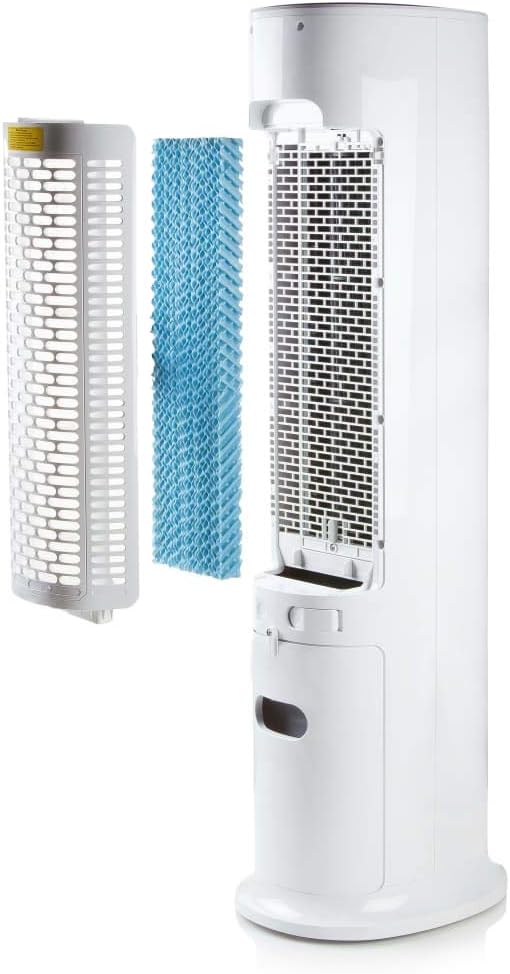
Image: Demonstrating the process of filling the water tank of the tower fan.
הוראות הפעלה
The Domo DO157A can be operated using the control panel on top of the unit or the included remote control.
פונקציות לוח בקרה ושלט רחוק

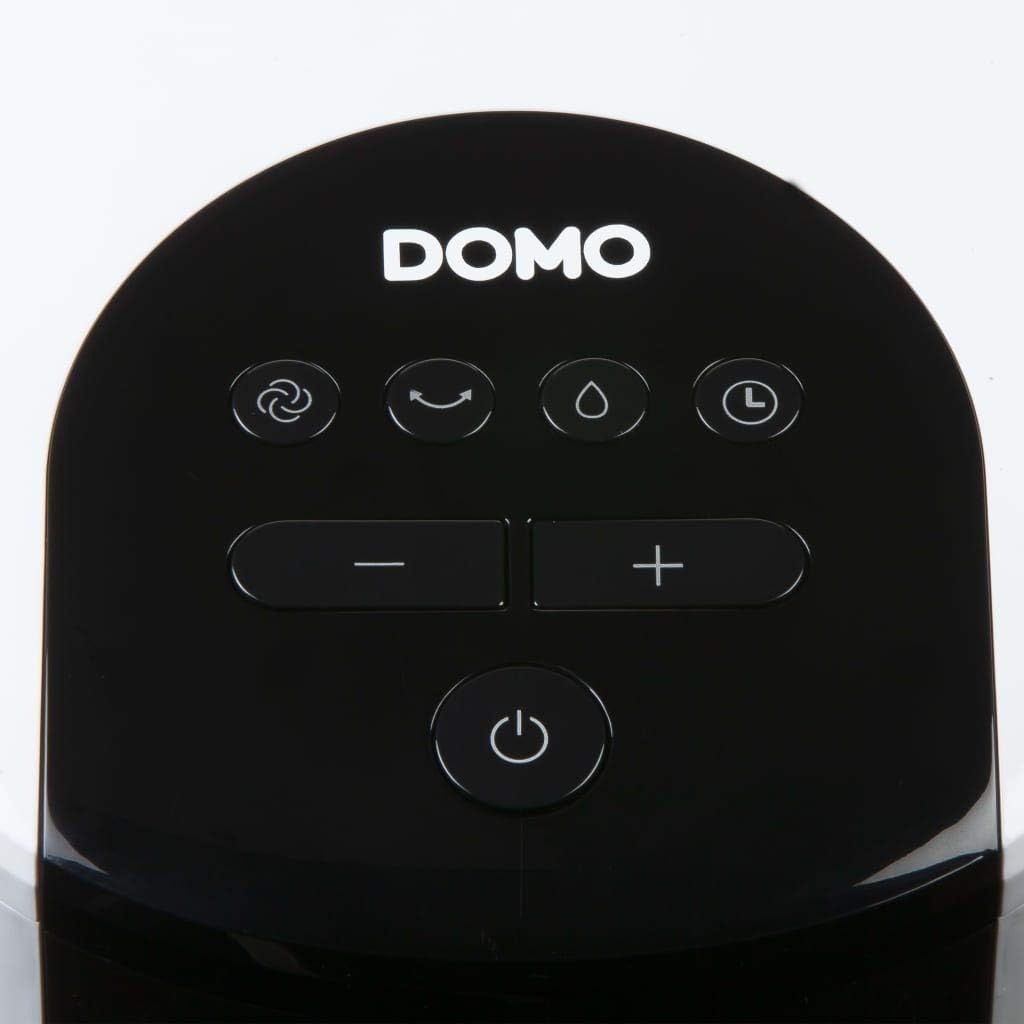
תמונה: תקריב view of the control panel on the top of the tower fan.
- כפתור הפעלה (⏻): מפעיל או מכבה את היחידה.
- כפתור מצב (☺): Cycles through 3 ventilation modes:
- נוֹרמָלִי: זרימת אוויר קבועה במהירות שנבחרה
- טִבעִי: מדמה בריזה טבעית עם מהירויות מאוורר משתנות.
- לִישׁוֹן: מפחית את מהירות המאוורר ואת הרעש לפעולה שקטה במהלך שינה.
- Speed Buttons (− / +): כוונון מהירות המאוורר (4 רמות).
- כפתור קירור/מכשיר אדים (💧): Activates or deactivates the air cooling and humidifying function. This function requires water in the tank.
- כפתור טיימר (⏱): Sets the operating timer for up to 10 hours. Each press adds 1 hour.
- כפתור תנודה (↻): Activates or deactivates the oscillation function, allowing the fan to rotate and distribute air over a wider area.
מבצע ראשוני
- Press the Power button to turn on the unit. The default mode is usually Normal.
- Use the Speed buttons to select your desired fan speed (1-4).
- To activate cooling/humidifying, press the Cooling/Humidifier button. Ensure the water tank is filled.
- Select a ventilation mode (Normal, Natural, Sleep) using the Mode button.
- Press the Oscillation button for wider air distribution.
- Set the timer if desired using the Timer button.

Image: The tower fan operating in a living room, illustrating the airflow direction.
תַחזוּקָה
תחזוקה שוטפת מבטיחה ביצועים אופטימליים ומאריכה את תוחלת החיים של המכשיר שלכם.
ניקוי החלק החיצוני
- נתק תמיד את היחידה לפני הניקוי.
- נגב את המשטחים החיצוניים עם רך, דamp בַּד. אין להשתמש בחומרי ניקוי שוחקים או ממסים.
- ודא שאין מים שנכנסים לרכיבים הפנימיים.
ניקוי מיכל המים
- הסר את מיכל המים מהיחידה.
- רוקנו את כל המים שנותרו.
- Clean the tank with mild soap and water. Rinse thoroughly.
- יש לאפשר למיכל להתייבש לחלוטין באוויר לפני הכנסתו מחדש.
- Clean the water tank regularly, especially if using the humidifying function frequently, to prevent mold or mildew buildup.
ניקוי מערכת הסינון
- The high-quality filter system is washable.
- Carefully remove the filter (honeycomb cooling membrane) from the unit as shown in the "Product Components" section.
- שטפו את המסנן תחת מים זורמים כדי להסיר אבק ופסולת.
- אפשר למסנן להתייבש לחלוטין לפני הכנסתו מחדש ליחידה.
- Regular cleaning of the filter is recommended, especially for allergy sufferers, to maintain hygiene and efficiency.
פתרון בעיות
If you encounter issues with your Domo DO157A, refer to the following common problems and solutions:
| בְּעָיָה | סיבה אפשרית | פִּתָרוֹן |
|---|---|---|
| היחידה לא נדלקת. | אין ספק כוח. | בדוק אם כבל החשמל מחובר היטב לשקע תקין. |
| אין אפקט קירור. | Water tank is empty or cooling function is not activated. | Fill the water tank. Press the Cooling/Humidifier button to activate the function. Ensure Coolpack is frozen and placed in the tank if desired. |
| זרימת אוויר חלשה. | Fan speed is too low; air filter is dirty. | Increase the fan speed. Clean the air filter as per maintenance instructions. |
| ריח לא נעים. | Stagnant water in the tank or dirty filter. | Empty and clean the water tank. Clean the filter. Use fresh water. |
מפרטים
| תכונה | פְּרָט |
|---|---|
| מותג | דומו |
| שם / מספר הדגם | DO157A |
| סוּג | Tower Fan, Air Cooler, Humidifier |
| חוֹמֶר | פּלָסטִי |
| סוג הרכבה | בודד |
| צֶבַע | לָבָן |
| קיבולת זרימת אוויר | 294.29 Cubic Feet per Minute (500 m³/h) |
| סוג בקרה | שלט רחוק, לוח בקרה על היחידה |
| קיבולת מיכל מים | 7 ליטר |
| שטח רצפה מומלץ | 25 מ"ר |
| משקל המוצר | 11.2 קילוגרם |
| מהtage | 65 W |
| רמת רעש | 40 דציבלים |
| מספר מהירויות | 4 |
| כרך ידtage | 230 וולט |
| מידות (D x B x H) | 34 ס"מ x 26 ס"מ x 106.5 ס"מ |
| שָׁעוֹן עֶצֶר | עד 10 שעות |
| מצבי אוורור | רגיל, טבעי, שינה |
| תכונות מיוחדות | Sleep mode, Washable filter system, Oscillation, Coolpack included |
אחריות ותמיכה
For warranty information, please refer to the documentation provided with your purchase or contact Domo customer support. Keep your proof of purchase for warranty claims.
If you require further assistance or have questions not covered in this manual, please contact Domo customer service through their official webאתר או פרטי הקשר שסופקו עם המוצר שלך.