
1. הקדמה
The Aerocool LUXPRO550 is a 550W power supply unit designed for desktop computers, offering reliable and efficient power delivery. This unit is 80 Plus 230V EU Bronze certified, ensuring over 88% efficiency. It features high-quality 105°C Japanese capacitors and a 14cm FDB fan for enhanced durability and optimized thermal performance. This manual provides essential information for the safe and correct installation, operation, and maintenance of your LUXPRO550 power supply.

Image 1.1: The Aerocool LUXPRO550 Power Supply Unit, highlighting its high efficiency and 80 Plus Bronze certification.
2. אמצעי בטיחות
- Always disconnect the power cord from the wall outlet before installing or removing the power supply.
- אין לפתוח את ספק הכוח גasinז. נפח גבוהtagנמצאים בפנים חומרים שעלולים לגרום להתחשמלות.
- ודא הארקה נכונה כדי למנוע סכנות חשמליות.
- התקן את ספק הכוח באזור מאוורר היטב, הרחק ממקורות חום ולחות.
- השתמשו רק בכבלים המצורפים לספק הכוח.
- מוצר זה מיועד לשימוש במערכות מחשב בלבד. אין להשתמש בו לכל מטרה אחרת.
3. מדריך התקנה
The LUXPRO550 power supply supports all Intel ATX12V formats and features flat, black cables for optimized internal airflow and ease of installation.
3.1. הכנה להתקנה
- Turn off your computer and disconnect the power cord from the wall outlet.
- פתח את מארז המחשב. עיין במדריך למארז המחשב לקבלת הוראות ספציפיות.
- If replacing an existing power supply, disconnect all cables from the old PSU and remove it from the case.
3.2. התקנת ספק הכוח
- Carefully place the LUXPRO550 into the power supply bay of your computer case.
- Secure the power supply to the case using the provided screws.
- Connect the 20+4 pin ATX motherboard power connector to your motherboard.
- Connect the 4+4 pin CPU power connector to your motherboard.
- Connect SATA power connectors to your storage drives (HDDs, SSDs) and optical drives.
- Connect PCIe 6+2 pin connectors to your graphics card(s) if required.
- Connect any other peripheral connectors (e.g., Molex) as needed for case fans or other components.
- Ensure all connections are secure. Use cable ties to manage cables for better airflow.
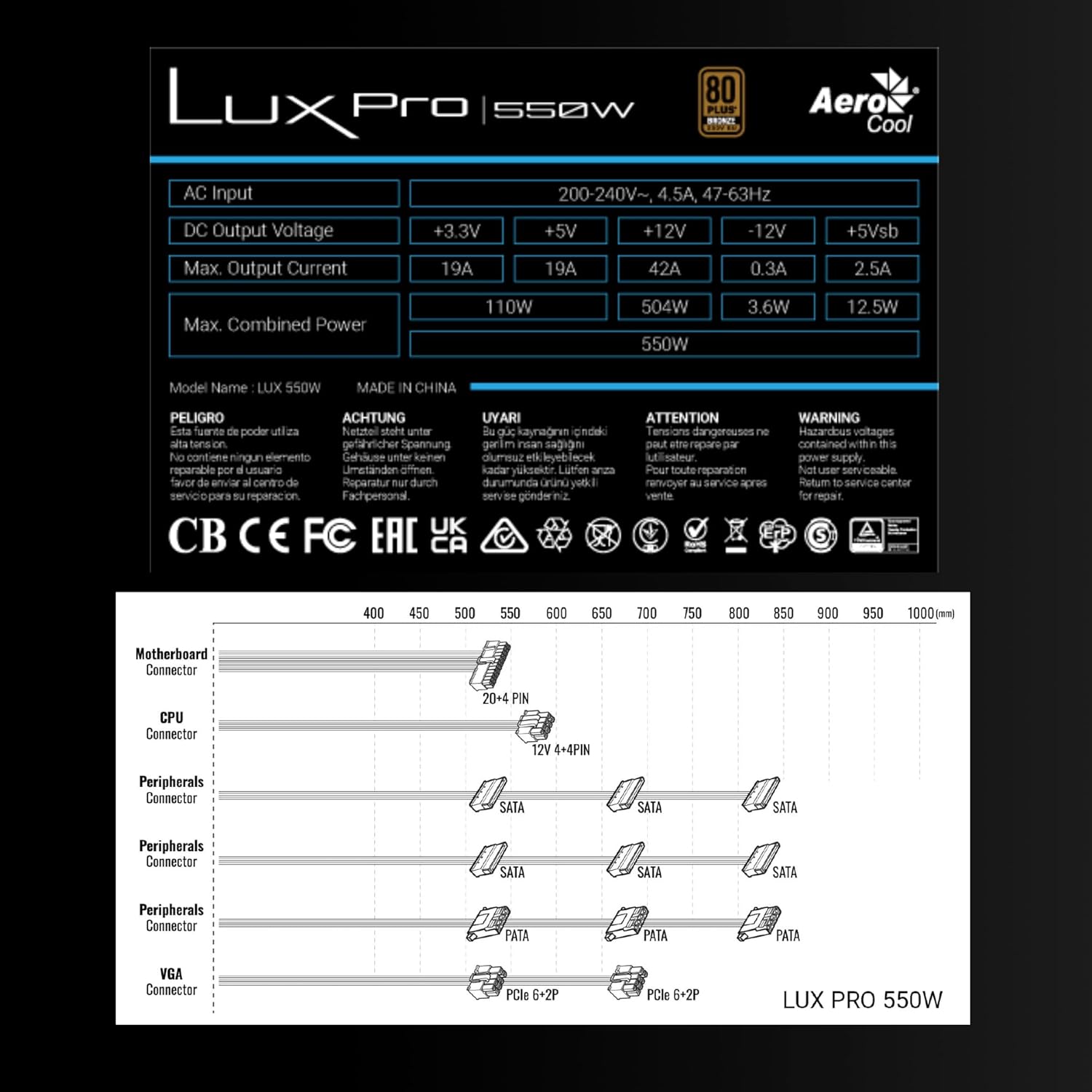
Image 3.1: Connector types and lengths for the LUXPRO550 power supply. This diagram illustrates the available connectors including Motherboard (20+4 PIN), CPU (12V 4+4 PIN), Peripherals (SATA, PATA), and VGA (PCIe 6+2 PIN).
3.3. שלבים אחרונים
- סגור את מארז המחשב שלך.
- חבר את כבל המתח AC לאספקת החשמל ולאחר מכן לשקע בקיר.
- סובב את מתג ההפעלה בגב ספק הכוח למצב 'ON'.
- הפעל את המחשב שלך.
4. הוראות הפעלה
The Aerocool LUXPRO550 is designed for continuous and stable operation once correctly installed. Its 80 Plus Bronze certification ensures high energy efficiency, reducing power consumption and heat generation.
4.1. Active PFC Technology
The integrated Active Power Factor Correction (APFC) technology ensures efficient and reliable power distribution, contributing to overall system stability and energy savings.
4.2. תפעול מאוורר
The 14cm FDB (Fluid Dynamic Bearing) fan features optimized thermal speed control. It operates silently, starting at less than 700 RPM, and only increases speed as the load approaches 40% at ambient temperatures of 25°C, ensuring quiet operation under typical loads.

Image 4.1: The 14cm FDB fan of the LUXPRO550, illustrating its optimized thermal speed control for efficient cooling.
5. תחזוקה
The LUXPRO550 is built with high-quality components, including 105°C Japanese capacitors, designed for maximum reliability and a long operational lifespan with minimal maintenance.

Image 5.1: High-quality 105°C Japanese capacitors, contributing to the power supply's reliability and extended lifespan.
5.1. טיפול כללי
- Keep the power supply and computer case free from dust. Dust accumulation can hinder cooling and reduce efficiency.
- Use compressed air to gently clean the fan and ventilation grilles periodically. Ensure the computer is powered off and unplugged before cleaning.
- Do not obstruct the airflow around the power supply.
אין בפנים חלקים הניתנים לתיקון על ידי המשתמש. אל תנסה לפתוח או לתקן את היחידה בעצמך.
6. פתרון תקלות
If you encounter issues with your LUXPRO550 power supply, please follow these basic troubleshooting steps:
- אין כוח:
- ודא שכבל החשמל AC מחובר היטב הן לספק הכוח והן לשקע בקיר.
- ודא שמתג ההפעלה בגב ספק הכוח נמצא במצב 'ON'.
- ודא ששקע הקיר תקין על ידי חיבור מכשיר אחר.
- המערכת לא מאתחלת:
- Double-check all power connections to the motherboard, CPU, graphics card, and storage devices.
- Ensure all components are properly seated in their slots.
- If possible, test the power supply with another known working system or test another power supply with your system to isolate the issue.
- רעשים חריגים:
- A slight hum is normal. If you hear grinding or loud fan noises, ensure the fan is not obstructed by cables or dust.
- אם הרעש נמשך, פנו לתמיכת הלקוחות.
If these steps do not resolve the issue, please contact Aerocool customer support or your retailer for further assistance. Do not attempt to repair the unit yourself.
7. מפרטים
| תכונה | מִפרָט |
|---|---|
| שם הדגם | LUXPRO550 |
| מותג | AeroCool |
| מהtage | 550 וואט |
| הסמכת יעילות | 80 Plus Bronze 230V EU (over 88% efficiency) |
| גורם צורה | ATX |
| קבלים | Japanese 105°C |
| סוג מאוורר | 14cm FDB (Fluid Dynamic Bearing) with thermal speed control |
| PFC | פעיל PFC |
| מידות (LxWxH) | 16 x 15 x 8.5 ס"מ |
| מִשׁקָל | 1.4 ק"ג |
| מכשירים תואמים | PC |
7.1. DC פלט כרךtagטבלה
The following table details the DC output voltages and maximum currents for the LUXPRO550:
| פלט DC כרךtage | +3.3V | +5V | +12V | -12V | +5Vsb |
|---|---|---|---|---|---|
| מקסימלי זרם מוצא | 19A | 19A | 42A | 0.3A | 2.5A |
| מקסימום כוח משולב | 110W | 504W | 3.6W | 12.5W | |
| Total Combined Power | 550W | ||||
8. אחריות ותמיכה
8.1. מידע על אחריות
The Aerocool LUXPRO550 power supply comes with an extended אחריות לשנה, reflecting its high reliability and the quality of its components, such as the 105°C Japanese capacitors.
אנא שמור את הוכחת הרכישה שלך עבור תביעות אחריות.
8.2. תמיכת לקוחות
For technical assistance, warranty claims, or any questions regarding your Aerocool LUXPRO550 power supply, please contact Aerocool customer support through their official webהאתר או הקמעונאי המקומי שלך.
Do not attempt to open or repair the power supply unit, as this will void the warranty.