
1. הקדמה
תודה על הרכישהasing the Moukey MAMP1 220W Bluetooth Dual Channel Power Ampליפר. זֶה amplifier is designed to provide powerful and versatile audio amplification for various applications, including karaoke, home theater systems, and general audio playback. It features multiple input options, Bluetooth 5.0 connectivity, and intuitive controls for an enhanced audio experience. Please read this manual thoroughly before use to ensure proper operation and to maximize the product's performance.
2. הוראות בטיחות
כדי למנוע התחשמלות, שריפה או נזק ליחידה, אנא הקפידו על אמצעי הזהירות הבאים:
- אל תחשוף את היחידה לגשם או לחות.
- אל תפתח את ה-casinז. אין חלקים בפנים הניתנים לתיקון על ידי המשתמש. יש לפנות לכל טיפול וטיפול באנשי מקצוע מוסמכים.
- ודא את אספקת החשמל כרךtage תואם לדרישות שצוינו על היחידה.
- Place the unit on a stable, flat surface with adequate ventilation. Do not block ventilation openings.
- Keep the unit away from heat sources, direct sunlight, and excessive dust.
- Disconnect the power plug from the outlet if the unit will not be used for an extended period.
- אין להפעיל את היחידה בידיים רטובות.
3. תכולת החבילה
ודא שכל הפריטים נמצאים בחבילה:
- מוקי מAMP1 כוח Ampיחידת liifier
- שְׁלַט רָחוֹק
- אנטנת FM
- מדריך למשתמש (מסמך זה)
4. המוצר נגמרview
4.1 Front Panel Controls and Functions
The front panel provides access to all primary controls and input ports for easy operation.

Image: Detailed diagram of the Moukey MAMP1 front panel, highlighting each control and port with corresponding numbers.
- מתג הפעלה: מפעיל או מכבה את היחידה.
- USB / SD Slot: להשמעת אודיו files from USB drives (max 32GB) or SD cards (max 16GB).
- לחצן מצב: Cycles through input modes (Bluetooth, USB, SD, AUX, FM).
- כפתור BT: עובר ישירות למצב בלוטות'.
- Prev Button: דילוג לרצועה/תחנה הקודמת.
- כפתור הפעלה / השהיה: מנגן או משהה את השמעת האודיו.
- הכפתור הבא: מדלג לרצועה/תחנה הבאה.
- תצוגת לד: Shows current mode, track information, or frequency.
- Folder / Track: Navigates through folders or tracks on USB/SD.
- כפתור עוצמת הקול הראשי: מכוונן את עוצמת הפלט הכוללת.
- שקע אוזניות: 3.5mm output for monitor headphones.
- Microphone 1 Input: שקע 6.35 מ"מ לחיבור מיקרופון.
- Microphone 2 Input: 6.35mm jack for a second microphone connection.
- כפתור עוצמת הקול של המיקרופון: כוונון עוצמת הקול של המיקרופונים המחוברים.
- ידית הד: שולט באפקט ההד עבור מיקרופונים.
- כפתור בס: מכוונן את פלט השמע בתדרים נמוכים.
- כפתור טרבל: מכוונן את פלט השמע בתדר גבוה.
- ידית איזון: כוונון איזון הערוץ הימני/שמאלי.
- שקע כניסת AUX: כניסת 3.5 מ"מ עבור התקני שמע חיצוניים.
- בורר קלט: Rotary switch to select between CD, AUX, DVD, and MP3/W inputs.
4.2 חיבורי לוח אחורי
The rear panel houses the main audio input and output connections.

תמונה: אחורי view of the Moukey MAMP1 amplifier, המציג את כל יציאות הקלט והפלט.

Image: Detailed diagram of the Moukey MAMP1 rear panel, highlighting each connection point.
- Audio Input for DVD (RCA): Connect DVD players or other audio sources.
- Audio Input for CD (RCA): Connect CD players or other audio sources.
- Line Out Jack (RCA): לצורך חיבור לאחר ampמכשיר חי או הקלטה.
- FM Antenna Jack: חבר את אנטנת ה-FM המצורפת לקליטת רדיו.
- Speaker Output Jacks: Connect passive speakers (4-16 Ohm impedance).
- כניסת כבל חשמל: חבר את כבל החשמל AC.
5. התקנה
5.1 מיקום
מניחים את amplifier on a flat, stable surface. Ensure there is sufficient space around the unit for proper ventilation to prevent overheating.
5.2 חיבור מתח
Connect the power cable to the Power Cable Input on the rear panel of the amplifier, then plug the other end into a suitable AC power outlet (115V AC).
5.3 חיבור רמקולים
ה-MAMP1 amplifier supports two sets of passive speakers with an impedance of 4-16 Ohms. Use appropriate speaker wire to connect your speakers to the Speaker Output Jacks on the rear panel.

Image: Diagram illustrating how to connect speakers to the amplifier's binding posts.
- Rotate and loosen the speaker knob on the binding post.
- Insert the bare wire (remove approximately 10mm of insulation) into the hole. Ensure correct polarity (+ to + and - to -).
- Tighten the knobs to secure the wires firmly.
5.4 Input Device Connection
Connect your audio sources (CD player, DVD player, tuner, etc.) to the corresponding RCA Audio Input jacks on the rear panel. For microphones, use the 6.35mm jacks on the front panel. For 3.5mm AUX devices, use the front panel AUX Input Jack.
6. הוראות הפעלה
6.1 הפעלה/כיבוי
הקש על מתג הפעלה בפאנל הקדמי כדי להפעיל את amplifier on or off. The LED display will illuminate when the unit is powered on.
6.2 בחירת קלט
השתמש ב- כפתור מצב on the front panel or the remote control to cycle through available input sources (Bluetooth, USB, SD, AUX, FM). Alternatively, use the בורר קלט knob on the front panel for RCA inputs (CD, AUX, DVD, MP3/W).
6.3 בקרת עוצמת הקול
- נפח מאסטר: סובב את ה ידית עוצמת הקול הראשית to adjust the overall output level of the ampחיים יותר.
- עוצמת הקול של המיקרופון: השתמש ב- כפתור עוצמת הקול של המיקרופון to control the volume of connected microphones independently.
בקרת 6.4 צלילים
Adjust the audio characteristics using the ידית בס ו ידית טרבל to suit your preference. The ידית איזון allows adjustment of the left and right channel output levels.

Image: Close-up of the Moukey MAMP1 showing the Bass and Treble adjustment knobs.
6.5 Echo Control
סובב את ידית הד to add or reduce the echo effect on the microphone inputs, suitable for karaoke applications.
6.6 זיווג בלוטות '
כדי לחבר מכשיר בלוטות':
- הקש על כפתור BT or cycle through modes until "BLUE" appears on the LED display.
- הפעל את בלוטות' בטלפון החכם, בטאבלט או במחשב שלך.
- חפש "Moukey MAMP1" in your device's Bluetooth settings and select it to pair.
- Once paired, you can stream audio wirelessly. Playback will temporarily pause during phone calls to protect privacy.
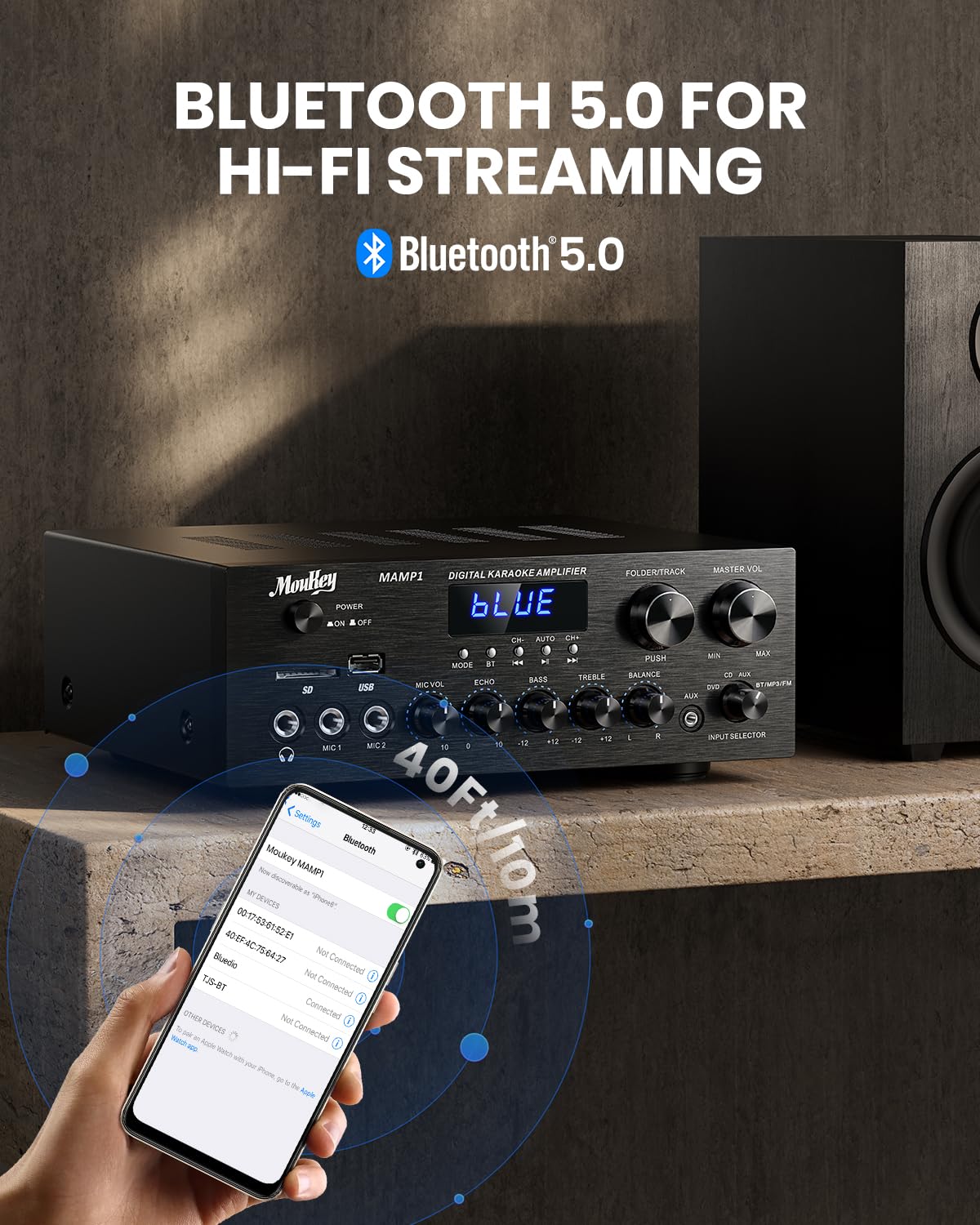
Image: The Moukey MAMP1 amplifier displaying "BLUE" on its screen, indicating Bluetooth mode, with a smartphone showing pairing options.
6.7 השמעת USB/SD
Insert a USB drive (max 32GB) or SD card (max 16GB) into the respective slot on the front panel. The amplifier will automatically switch to USB/SD mode and begin playback. Use the הקודם, הפעל/השהה, הַבָּא, ו Folder/Track לחצנים לשליטה בהפעלה.
6.8 רדיו FM
Ensure the FM antenna is connected to the rear panel. Select FM mode using the כפתור מצב. השתמש ב- הקודם ו הַבָּא buttons to tune to radio stations. The LED display will show the current frequency.
7. תחזוקה
כדי לשמור על הביצועים והמראה של ampחיים יותר:
- ניקוי: Use a soft, dry cloth to wipe the exterior of the unit. Do not use liquid cleaners or abrasive chemicals.
- אוורור: ודאו שפתחי האוורור נקיים מאבק ופסולת.
- אִחסוּן: אם מאחסנים את המכשיר לתקופה ממושכת, יש לנתק אותו מהחשמל ולאחסן אותו במקום קריר ויבש.
8. פתרון תקלות
If you encounter issues with your Moukey MAMP1 ampמפיץ אנרגיה, עיין בטבלה הבאה לקבלת בעיות נפוצות ופתרונות:
| בְּעָיָה | סיבה אפשרית | פִּתָרוֹן |
|---|---|---|
| אין כוח | כבל חשמל לא מחובר; שקע חשמל תקול; מתג ההפעלה כבוי. | Ensure power cable is securely connected. Try a different power outlet. Press the power switch to ON. |
| אין פלט קול | Incorrect input selected; Volume too low; Speakers not connected; Speaker wires loose; Mute function active. | Select the correct input source. Increase Master Volume. Check speaker connections and polarity. Ensure mute is off. |
| בלוטות' לא מתחבר | Amplifier not in Bluetooth mode; Device too far; Device already paired to another unit. | לְהַבטִיחַ ampהמכשיר נמצא במצב Bluetooth ("כחול" בתצוגה). קרב את המכשיר ל amplifier. Disconnect from other devices. |
| המיקרופון לא עובד | Microphone not connected; Mic volume too low; Echo knob set to minimum. | Connect microphone securely. Increase Microphone Volume. Adjust Echo knob. |
| בעיות נגינה ב-USB/SD | לא נתמך file format; USB drive/SD card corrupted; Capacity exceeded. | ודא אודיו files are in supported formats (e.g., MP3). Try a different USB drive/SD card. Check capacity limits (USB max 32G, SD max 16G). |
אם הבעיה נמשכת לאחר ניסיון פתרונות אלה, אנא צור קשר עם תמיכת הלקוחות.
9. מפרטים
| תכונה | מִפרָט |
|---|---|
| מותג | מוקי |
| דֶגֶם | MAMP1 |
| כוח פלט | 220 וואט |
| ערוצים | 2 |
| כרך ידtage | 115 וולט (AC) |
| עכבת רמקול | 4-16 אוהם |
| גרסת בלוטות' | 5.0 |
| טווח בלוטות' | מעל 12 מטרים (40 רגל) |
| תמיכה בכרטיסי USB/SD | USB: Max 32GB, SD: Max 16GB |
| מידות (L x W x H) | 25 ס"מ x 21.3 ס"מ x 9.5 ס"מ (כ-10 אינץ' x 8 אינץ' x 4 אינץ') |
| UPC | 715802779039 |
| ארץ מוצא | סִין |

Image: The Moukey MAMP1 amplifier with its dimensions labeled.
10. אחריות ותמיכה
This Moukey MAMP1 כוח Ampliifier מגיע עם א אחריות לשנה מתאריך הרכישה. אחריות זו מכסה פגמי ייצור וביצוע תחת שימוש רגיל.
האחריות אינה מכסה:
- Damage caused by accident, abuse, misuse, flood, fire, or other natural causes.
- נזק שנגרם עקב שינוי או תיקון בלתי מורשים.
- Damage caused by improper installation or connection.
- Cosmetic damage, such as scratches, dents, and broken plastic on ports.
For warranty claims or technical support, please contact the retailer where you purchased the product or visit the official Moukey website for contact information. Please have your purchase receipt and product model number (MAMP1) ready when contacting support.