
מָבוֹא
The Aula S6 Multi-Mode Wireless Gaming Headset is designed to provide a versatile audio experience for gaming and multimedia. This headset features three connection options: 2.4GHz wireless, Bluetooth 5.3, and a traditional 3.5mm wired connection. Its ultra-lightweight design, weighing only 180 grams, ensures comfort during extended use. The integrated microphone with smart noise reduction technology delivers clear communication, and the headset offers up to 22 hours of battery life.
תוכן החבילה
אנא סמן את התיבה עבור הפריטים הבאים:
- 1 x Aula S6 Multi-Mode Wireless Gaming Headset
- 1 x 2.4GHz Wireless Connection Dongle
- 1 x Type-C to 3.5mm Audio Connection Cable (1.5 meters)
- 1 x כבל USB מסוג C-Charging
- 1 x מדריך למשתמש
המוצר נגמרview
הכירו את רכיבי האוזניות והבקרות שלהן.
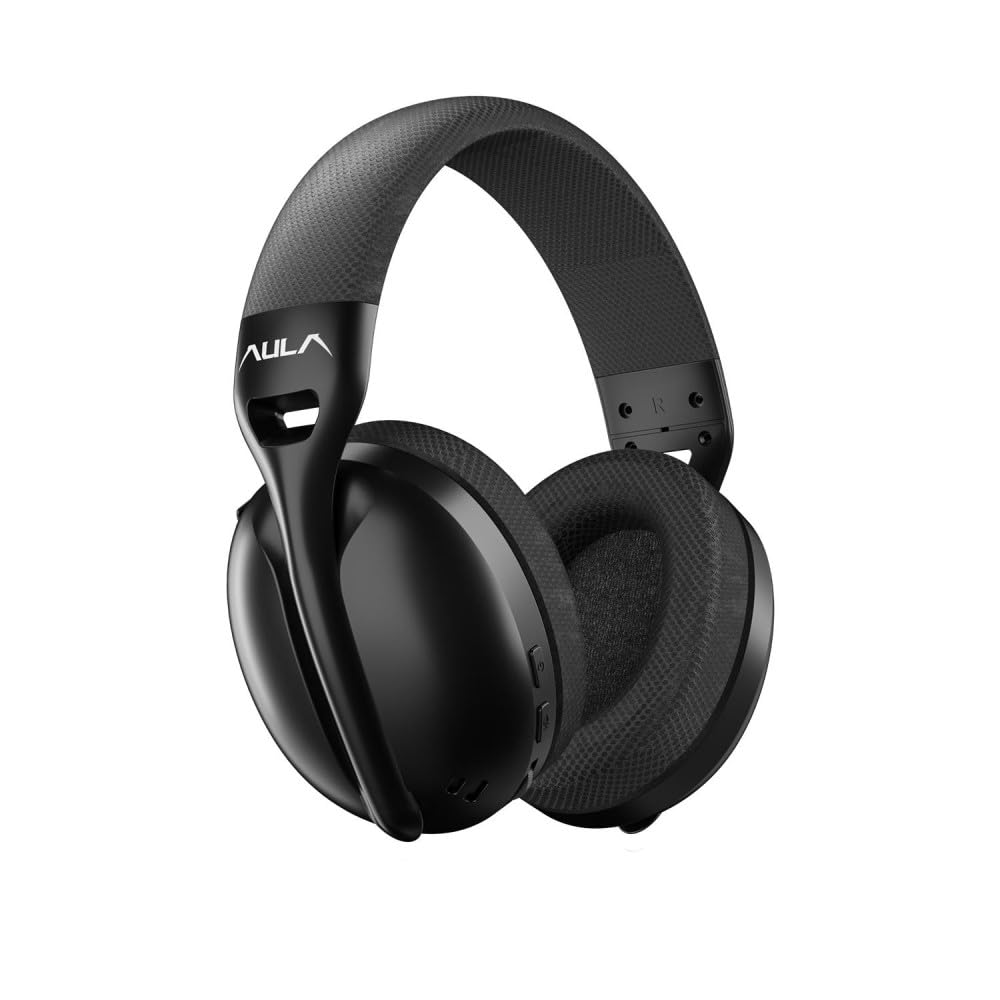
תְמוּנָה: חֲזִית view of the Aula S6 Multi-Mode Wireless Gaming Headset. This image displays the overall design of the headset, highlighting its earcups and headband.
בקרות ויציאות

תְמוּנָה: תַחתִית view of the Aula S6 headset. This image illustrates the location of the Type-C charging port, 3.5mm audio jack, volume wheel, and other control buttons on the earcups.
- לחצן הפעלה: Used to power the headset on/off and for pairing.
- לחצן החלפת מצב: Toggles between Game Mode and Music Mode for optimized audio profiles.
- גלגל נפח: מכוונן את עוצמת השמע.
- כפתורים רב תכליתיים: For call management (accept/reject) and switching between Bluetooth and 2.4GHz connections.
- מיקרופון נשלף: Mute by retracting into the earcup, unmute by extending.
- סוג C נמל: לטעינת האוזניות.
- שקע שמע 3.5 מ"מ: For wired connection using the provided Type-C to 3.5mm cable.
הגדרה
טעינת האוזניות
Before first use, fully charge the headset. Connect the provided USB Type-C charging cable to the headset's Type-C port and the other end to a USB power source (e.g., computer, wall adapter). The LED indicator will show charging status and turn off when fully charged.
חיבור האוזניות
The Aula S6 offers three connection methods:
1. 2.4GHz Wireless Connection (via Dongle)
- Insert the 2.4GHz wireless dongle into a USB port on your computer or compatible device.
- הפעילו את האוזניות על ידי לחיצה ממושכת על לחצן ההפעלה.
- The headset should automatically connect to the dongle. The LED indicator will confirm a successful connection.
2. חיבור בלוטות' 5.3
- הפעל את האוזנייה.
- לחץ והחזק את לחצן ההפעלה עד שנורית ה-LED תהבהב במהירות, כדי לציין מצב צימוד.
- במכשיר שלך (סמארטפון, טאבלט, מחשב נייד), הפעל את Bluetooth וחפש מכשירים זמינים.
- Select "Aula S6" from the list of devices to pair. The LED indicator will show a solid light upon successful connection.
3. Wired 3.5mm Connection
- Connect the Type-C end of the provided audio cable to the headset's Type-C port.
- Connect the 3.5mm end of the cable to the audio jack of your device.
- האוזניות יפעלו במצב קווי, תוך עקיפת פונקציות אלחוטיות.
הוראות הפעלה
הפעלה/כיבוי
- כדי להפעיל: לחץ והחזק את לחצן ההפעלה למשך כ-3 שניות עד שנורית ה-LED תידלק.
- כדי לכבות: לחץ והחזק את לחצן ההפעלה למשך כ-5 שניות עד שנורית ה-LED יכבה.
Mode Switching (Game/Music)
Press the Mode Switch button to toggle between Game Mode and Music Mode. Each mode optimizes audio settings for its intended use.
שימוש במיקרופון

תְמוּנָה: בזווית view of the Aula S6 headset with its retractable microphone extended. This shows the microphone in its active position for communication.
- כדי לבטל את ההשתקה: Extend the microphone from the earcup.
- להשתיק: Retract the microphone fully into the earcup.
The smart noise reduction technology helps minimize ambient noise for clearer voice transmission.
ניהול שיחות
When connected via Bluetooth or 2.4GHz wireless, use the multi-function buttons on the headset to manage calls:
- לקבל שיחה: לחץ פעם אחת על הלחצן הרב-פונקציונלי.
- דחה שיחה: לחץ לחיצה ארוכה על הלחצן הרב-פונקציונלי למשך 2 שניות.
- סיום שיחה: לחץ על כפתור הרב-תכליתי פעם אחת במהלך שיחה.
בקרת עוצמת הקול
Rotate the Volume Wheel up or down to precisely adjust the audio output level.
חיבור למכשירים מרובים
The headset supports simultaneous wireless connection to two different devices. Use the multi-function buttons to switch between the connected devices as needed.
תַחזוּקָה
כדי להבטיח את אורך החיים והביצועים האופטימליים של אוזניות ה-Aula S6 שלכם, יש לפעול לפי הנחיות התחזוקה הבאות:
- ניקוי: השתמשו במטלית רכה ויבשה לניקוי האוזניות. הימנעו משימוש בכימיקלים חזקים או בחומרים שוחקים.
- אִחסוּן: יש לאחסן את האוזניות במקום קריר ויבש, הרחק מאור שמש ישיר וטמפרטורות קיצוניות.
- הימנע מלחות: האוזניות אינן עמידות למים. יש להרחיק אותן ממים ולחות גבוהה.
- טיפול בכבלים: טפלו בכבלים בעדינות. הימנעו מכיפופים חדים או משיכה מוגזמת כדי למנוע נזק.
פתרון בעיות
If you encounter issues with your Aula S6 headset, refer to the following common solutions:
- אין צליל/עוצמת קול נמוכה:
- בדוק את עוצמת הקול הן באוזניות והן במכשיר המחובר.
- ודא שהאוזניות מחוברות כראוי (חוטית, Bluetooth או דונגל 2.4GHz).
- ודא שהתקן פלט השמע הנכון נבחר בהגדרות הצליל של המכשיר שלך.
- המיקרופון לא עובד:
- Ensure the microphone is extended and not muted.
- בדוק את הגדרות קלט המיקרופון במכשיר המחובר שלך.
- בדוק את המיקרופון באמצעות אפליקציה או מכשיר אחר.
- בעיות חיבור:
- עבור Bluetooth: Ensure the headset is in pairing mode and within range. Forget the device on your phone and re-pair.
- עבור 2.4GHz: Ensure the dongle is securely plugged in and the headset is powered on. Try a different USB port.
- עבור קווי: Ensure the 3.5mm cable is fully inserted into both the headset and the device.
- האוזניות לא נדלקות:
- טען את האוזניות למשך 30 דקות לפחות.
- נסה כבל טעינה ומקור חשמל אחרים.
מפרטים
| מותג | אולה |
| דֶגֶם | S6 |
| קישוריות | Bluetooth 5.3, 2.4GHz Wireless, 3.5mm Wired |
| גודל דרייבר | 40 מ"מ |
| עַכָּבָּה | 120 אוהם |
| רגישות לאוזניות | 120 dB |
| רגישות למיקרופון | -38 ± 2db |
| תגובת תדר | 20Hz - 20kHz |
| מִשׁקָל | 180 גרם |
| חיי סוללה | עד 22 שעות |
| חוֹמֶר | Breathable Fabric and ABS Plastic |
| מכשירים תואמים | Mobile Phone, Laptop, Desktop Computer, Game Console, Tablet, Television |
אחריות ותמיכה
The Aula S6 Multi-Mode Wireless Gaming Headset comes with a 2-Year Aula Turkey Warranty.
For warranty claims, technical support, or further assistance, please contact your local Aula authorized dealer or visit the official Aula webאתר ליצירת קשר עם התמיכה.