
1. הקדמה
The Lowell UPS8-1100 is a high-efficiency line interactive uninterruptible power supply (UPS) designed to provide advanced power protection for sensitive electronic equipment such as AV electronics, servers, and network devices. This manual provides essential information for the safe and efficient installation, operation, and maintenance of your UPS unit.
2. מידע בטיחות
Please read all instructions carefully before installing or operating the UPS. Retain this manual for future reference.
- בטיחות חשמל: Connect the UPS to a grounded AC power outlet. Do not remove the grounding prong. Do not open the UPS casinז; אין בפנים חלקים הניתנים לתחזוקה על ידי המשתמש.
- בטיחות סוללה: The UPS contains sealed lead-acid batteries. Do not dispose of batteries in a fire as they may explode. Do not open or mutilate batteries. Battery servicing should be performed or supervised by personnel knowledgeable of batteries and the required precautions.
- סְבִיבָה: Install the UPS in a controlled environment, free from excessive dust, humidity, and extreme temperatures. Ensure adequate ventilation around the unit.
- מִשׁקָל: The UPS unit is heavy (approximately 31 pounds). Use caution when lifting and installing to prevent injury.
3. תכולת החבילה
ודא שכל הפריטים נמצאים בעת הוצאת האריזה:
- Lowell UPS8-1100 Line Interactive UPS Unit
- 4-Point Steel Rail Kit for Rack Installation
- מדריך למשתמש (מסמך זה)
- כבל חשמל
4. המוצר נגמרview
The Lowell UPS8-1100 features a robust design for reliable power delivery and protection. Below are images illustrating the main unit and its included accessories.
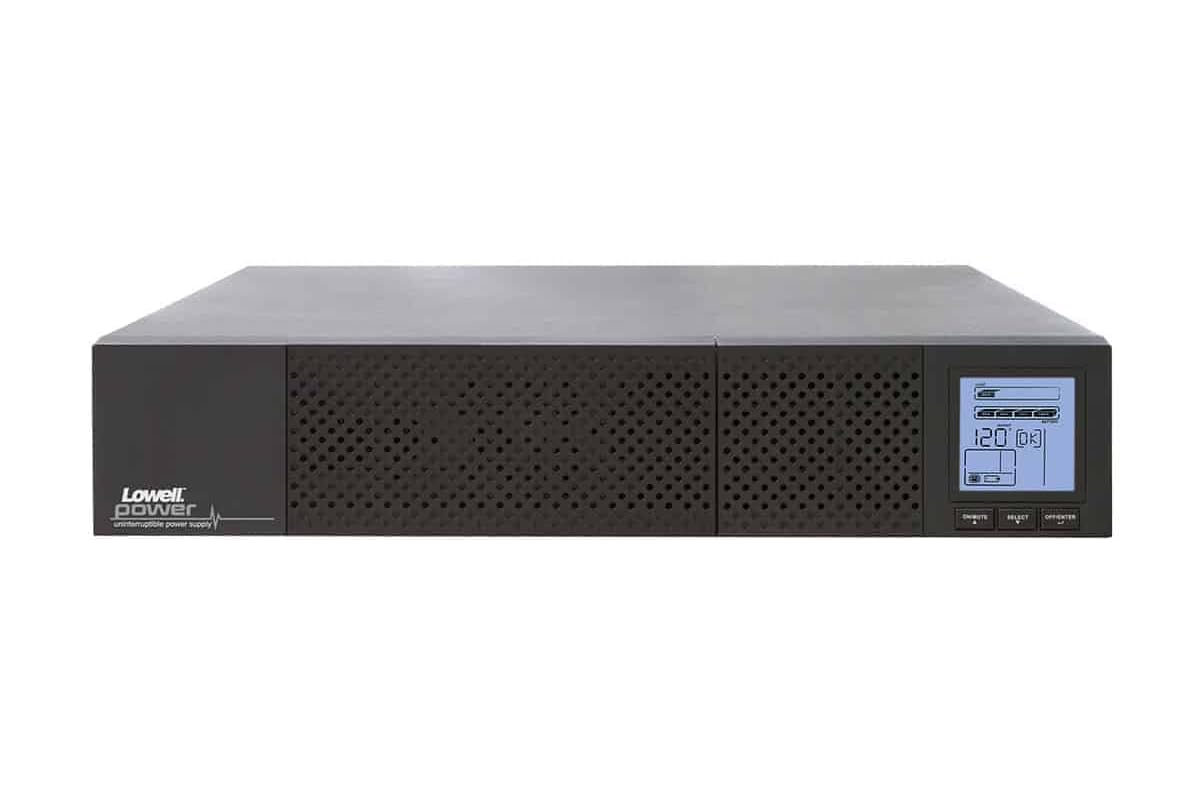
איור 4.1: חזית view of the Lowell UPS8-1100 UPS unit, showing the ventilation grille and the integrated LCD display panel with control buttons.
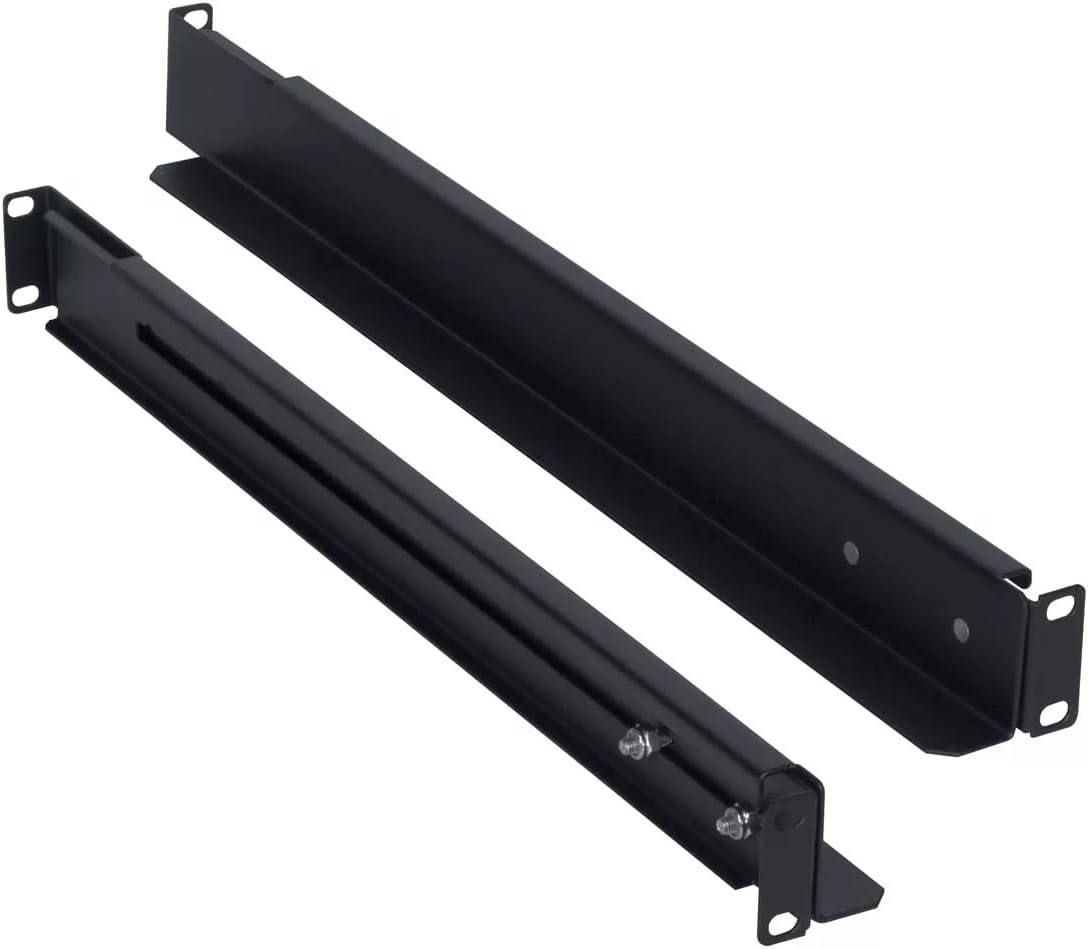
Figure 4.2: The included 4-point steel rail kit, designed for secure rack installation of the UPS unit.
תכונות פאנל קדמי:
- תצוגת LCD: Provides real-time status information including input/output voltage, battery level, load capacity, and operational mode.
- לחצני שליטה: Typically include Power On/Off, Select, and Enter for navigating the LCD menu and controlling the unit.
תכונות לוח אחורי:
- כניסת AC: For connecting the UPS to the utility power outlet.
- שקעי פלט: Provide battery backup and surge protection for connected equipment.
- יציאות תקשורת: May include USB, RS-232, or network ports for monitoring and management.
- External Battery Connector (if applicable): For connecting optional external battery packs.
5. התקנה
5.1 פריקה ובדיקה
פרקו בזהירות את ה-UPS ובדקו אותו לאיתור נזקים כלשהם בעת המשלוח. אם נמצא נזק, אל תפעילו את היחידה ופנו לסוכן שלכם.
5.2 התקנת מתלה
The UPS8-1100 is designed for rack installation using the included 4-point steel rail kit. Follow these general steps:
- Attach the inner rails to the sides of the UPS unit using the provided screws.
- Mount the outer rails to the front and rear posts of your server rack at the desired height.
- Carefully slide the UPS unit, with its attached inner rails, into the mounted outer rails until it locks securely into place.
- Secure the front of the UPS to the rack posts with additional screws if required by the rail kit design.
5.3 חיבור לחשמל
- ודא שמערכת ה-UPS כבויה.
- Connect the UPS power cord to the AC input on the rear panel of the UPS.
- Plug the other end of the UPS power cord into a grounded wall outlet.
- Allow the UPS to charge for at least 8 hours before initial use to ensure optimal battery runtime.
5.4 ציוד חיבור
Plug your critical electronic devices into the output receptacles on the rear panel of the UPS. Ensure that the total load does not exceed the UPS's capacity (990W).
6. הוראות הפעלה
6.1 הפעלת ה-UPS
Press and hold the Power On/Off button on the front panel for approximately 2-3 seconds until you hear a beep and the LCD display illuminates. The UPS will perform a self-test and then enter Line Mode, providing power to connected equipment.
6.2 כיבוי ה-UPS
To turn off the UPS, press and hold the Power On/Off button for approximately 2-3 seconds until you hear a beep and the LCD display turns off. This will remove power from all connected equipment.
6.3 LCD Display and Control
Use the Select and Enter buttons to navigate through the LCD menu. The display provides information on:
- קלט/פלט כרךtage ותדירות
- רמת טעינת סוללה וזמן ריצה משוער
- אחוז טעינהtage
- Operational Mode (Line Mode, Battery Mode, Bypass Mode)
- Event Logs and Warnings
7. תחזוקה
7.1 טיפול בסוללה
The UPS batteries are designed for a specific lifespan. To maximize battery life:
- Keep the UPS connected to AC power to keep batteries charged.
- Avoid operating the UPS in extreme temperatures.
- Perform a battery self-test periodically (if available via LCD menu or software).
- Replace batteries when their capacity significantly diminishes. Refer to Lowell support for replacement battery information.
7.2 ניקוי
Clean the exterior of the UPS with a soft, dry cloth. Do not use liquid or aerosol cleaners. Ensure ventilation openings are free from dust and obstructions.
8. פתרון תקלות
This section addresses common issues you might encounter with your UPS. For more complex problems, contact Lowell technical support.
| בְּעָיָה | סיבה אפשרית | פִּתָרוֹן |
|---|---|---|
| UPS לא נדלק | No AC input power; Battery deeply discharged | בדוק את חיבור כבל החשמל ואת שקע הקיר; אפשר ל-UPS להיטען במשך מספר שעות. |
| UPS מצפצף ברציפות | Overload; On battery power; Low battery | Reduce connected load; Save work and shut down equipment; Allow UPS to recharge. |
| זמן פעולה קצר של סוללה | Battery not fully charged; Battery nearing end of life | Allow UPS to charge for 8+ hours; Consider battery replacement. |
| תצוגת LCD כבויה | UPS is off; Power saving mode | Press power button to turn on; Press any button to wake display. |
9. מפרטים
The following table details the technical specifications for the Lowell UPS8-1100:
| תכונה | פְּרָט |
|---|---|
| מותג | לואל |
| דֶגֶם | UPS8-1100 |
| יְכוֹלֶת | 1100VA (990W) |
| סוּג | Line Interactive UPS |
| גורם צורה | Tower (Rack-mountable with included kit) |
| משקל פריט | 31 פאונד |
| כרך ידtage | 12 Volts (Internal Battery System) |
| ASIN | B0821SPK48 |
| UPC | 811859034975 |
| תאריך ראשון זמין | 25 בנובמבר 2019 |
10. אחריות ותמיכה
For warranty information, technical support, or service inquiries, please contact Lowell customer service. Refer to the official Lowell webבאתר או במסמכי הרכישה שלך לקבלת פרטי הקשר ותנאי האחריות העדכניים ביותר.
משאבים מקוונים: Visit the Lowell official webאתר לעדכוני מוצרים, שאלות נפוצות וחומרי תמיכה נוספים.