
1. הקדמה
Welcome to the user manual for your Merten MEG5935-0000 Wiser Radiator Thermostat. This document provides essential information for the safe and efficient installation, operation, and maintenance of your device. Please read this manual thoroughly before using the product and retain it for future reference.
The Merten MEG5935-0000 is a smart radiator thermostat designed to provide precise temperature control for individual rooms, enhancing comfort and energy efficiency within your home. It integrates with the Wiser smart home system for convenient app-based control.
2. מידע בטיחות
- בטיחות חשמל: Installation should only be performed by a qualified electrician or competent person in accordance with national wiring regulations.
- טיפול בסוללה: Use only the specified battery type (3 Volt). Do not mix old and new batteries, or different types of batteries. Dispose of used batteries according to local regulations.
- תנאים סביבתיים: Do not expose the device to extreme temperatures, direct sunlight, moisture, or corrosive environments.
- יְלָדִים: יש להרחיק את המכשיר ורכיביו מהישג ידם של ילדים.
- שימוש מיועד: This device is intended for controlling radiator heating systems in residential environments. Any other use is considered improper.
3. תכולת החבילה
אנא ודאו שכל הפריטים נמצאים בחבילה שלכם:
- Merten MEG5935-0000 Wiser Radiator Thermostat
- חומרת התקנה
- מדריך למשתמש (מסמך זה)
4. המוצר נגמרview
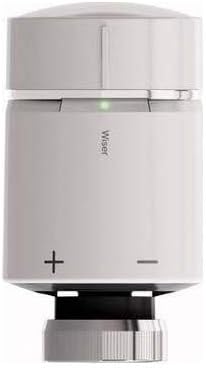
The image displays the Merten MEG5935-0000 Wiser Radiator Thermostat. It is a compact, cylindrical device, primarily light grey with a darker grey base. The top section is a rotatable cap for manual temperature adjustment. A small green LED indicator is visible below the cap. The word 'Wiser' is printed vertically on the main body. Below this, '+' and '-' symbols indicate manual temperature adjustment buttons or areas. The base features a threaded connection for mounting onto a radiator valve.
The Merten MEG5935-0000 Wiser Radiator Thermostat features a sleek design with intuitive controls. It includes a rotatable cap for manual temperature adjustments, an LED indicator for status feedback, and integrated buttons for fine-tuning settings. Its primary function is to regulate the flow of hot water into your radiator, maintaining your desired room temperature.
5. התקנה
5.1. התקנה פיזית
- Prepare the Radiator Valve: Ensure your radiator valve is compatible with the thermostat. If necessary, use appropriate adapters from the included installation hardware.
- הכנס סוללות: Open the battery compartment (usually located at the back or bottom of the device). Insert the required 3 Volt batteries, ensuring correct polarity. Close the compartment securely.
- התקנת התרמוסטט: Carefully screw the radiator thermostat onto the radiator valve. Tighten it firmly but do not overtighten.
- כיול ראשוני: The thermostat may perform an initial calibration cycle after installation. Follow any on-screen prompts or LED indicators.
5.2. צימוד וחיבור ראשוניים
The Merten MEG5935-0000 uses Wi-Fi connectivity and app control for smart functionality. To pair your device:
- Download the Wiser App: חפש the 'Wiser' app on your Android or iOS device's app store and install it.
- צור חשבון: Open the app and follow the instructions to create a new user account or log in to an existing one.
- הוסף מכשיר: In the Wiser app, navigate to the 'Add Device' section. Select 'Radiator Thermostat' or a similar option.
- פעל לפי ההוראות בתוך האפליקציה: The app will guide you through the pairing process, which typically involves putting the thermostat into pairing mode (refer to the device's LED indicators) and connecting it to your home Wi-Fi network.
- תן שם למכשיר שלך: Assign a descriptive name to your thermostat (e.g., 'Living Room Radiator').
6. הפעלה
6.1. בקרה ידנית
You can adjust the temperature directly on the thermostat:
- כוונון טמפרטורה: Rotate the top cap clockwise to increase the temperature or counter-clockwise to decrease it. Alternatively, use the '+' and '-' buttons/areas on the device body for fine adjustments.
- מחוון LED: Observe the LED indicator for feedback on the current status or temperature setting.
6.2. בקרת אפליקציות
For advanced control and scheduling, use the Wiser app:
- כוונון טמפרטורה מרחוק: Change the temperature from anywhere using your smartphone.
- תזמון: Set up heating schedules for different times of the day and week to optimize comfort and energy usage.
- מצבים: Utilize various heating modes (e.g., Away, Eco, Boost) available in the app.
- בקרת אזור: If you have multiple Wiser devices, manage different heating zones independently.
7. תחזוקה
- ניקוי: Clean the exterior of the thermostat with a soft, dry cloth. Do not use abrasive cleaners, solvents, or excessive moisture.
- החלפת סוללה: When the battery level is low (indicated by the app or a specific LED pattern on the device), replace the batteries promptly with new 3 Volt batteries. Follow the instructions for battery insertion carefully.
- עדכוני קושחה: Periodically check the Wiser app for available firmware updates for your thermostat to ensure optimal performance and access to new features.
8. פתרון תקלות
- המכשיר לא מגיב: Check battery level. Ensure the device is properly mounted and not obstructed.
- No App Connection: Verify your home Wi-Fi network is active and the thermostat is within range. Restart your Wi-Fi router and the thermostat. Re-attempt the pairing process if necessary.
- קריאת טמפרטורה שגויה: Ensure the thermostat is not exposed to direct heat sources (e.g., sunlight, other appliances) or drafts that could affect its sensor.
- רדיאטור לא מחמם/מקרר: Check if the valve is fully open/closed. Ensure the thermostat is correctly calibrated. Verify the desired temperature setting in the app or on the device.
- בעיות מחוון LED: Refer to the Wiser app or online support resources for specific LED pattern meanings.
9. מפרטים
| תכונה | מִפרָט |
|---|---|
| מותג | מרטן |
| מספר דגם | MEG5935-0000 |
| מידות המוצר | 58 x 23 x 23 ס"מ; 80 גרם |
| מקור אנרגיה | סוֹלְלָה |
| כרך ידtage | 3 וולט |
| טכנולוגיית קישוריות | Wi-Fi |
| סוג בקרה | App Control (Android) |
| רכיבים כלולים | חומרת התקנה |
| תאריך זמין ראשון | 15 בינואר 2020 |
10. מידע על אחריות
The Merten MEG5935-0000 Wiser Radiator Thermostat is covered by a manufacturer's warranty. Please refer to the warranty card included with your product or visit the official Merten website for detailed terms and conditions regarding warranty coverage, duration, and claims procedures. Keep your proof of purchase for warranty purposes.
11. תמיכה
For further assistance, technical support, or inquiries not covered in this manual, please contact Merten customer support. You can typically find contact information (phone numbers, email, support portals) on the official Merten website or within the Wiser app's help section. When contacting support, please have your product model number (MEG5935-0000) and purchase details ready.