
מָבוֹא
Welcome to your new EZICLEAN Map Robot Vacuum. This manual provides essential information for the setup, operation, and maintenance of your device to ensure optimal performance and longevity. Please read this manual thoroughly before using the robot vacuum.
מידע בטיחות חשוב
To reduce the risk of injury or damage, always observe basic safety precautions when installing, using, and maintaining your robot vacuum.
- קרא את כל ההוראות לפני הפעלת המכשיר.
- Do not allow children to play with the robot vacuum.
- השתמש רק כמתואר במדריך זה.
- Do not use the robot vacuum in wet environments or on wet surfaces.
- הרחק שיער, בגדים רפויים, אצבעות וכל חלקי הגוף מפתחים וחלקים נעים.
- אין להרים שום דבר בוער או מעשן, כגון סיגריות, גפרורים או אפר חם.
- אין להשתמש ללא פח אבק ו/או מסננים במקום.
- Ensure the charging base is placed on a level surface against a wall, with clear space around it.
תוכן החבילה
ודא שכל הפריטים נמצאים בחבילה:
- EZICLEAN Map Robot Vacuum
- בסיס טעינה
- מתאם מתח
- מברשות צד (2 זוגות)
- מסנן יעילות גבוהה (מותקן מראש)
- כלי ניקוי
- מדריך למשתמש
המוצר נגמרview
Familiarize yourself with the main components of your EZICLEAN Map Robot Vacuum.
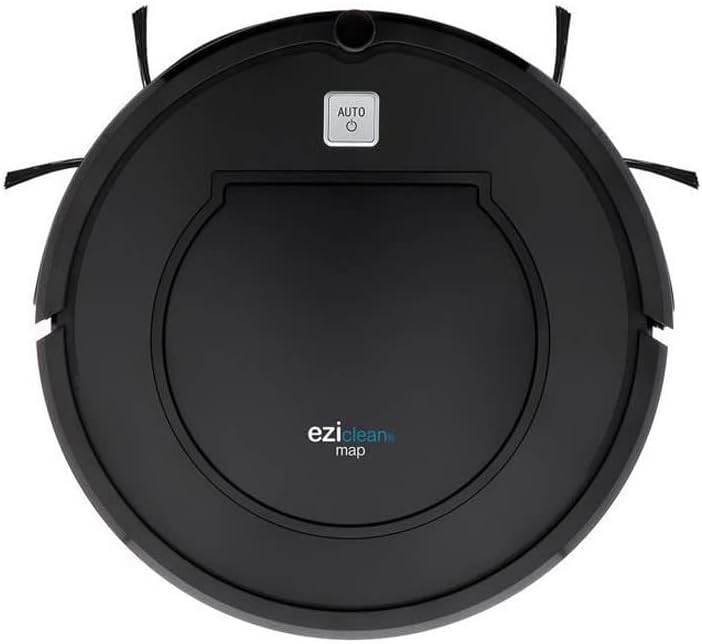
איור 1: רֹאשׁ view of the EZICLEAN Map Robot Vacuum. This image displays the circular robot vacuum from above, highlighting the central dustbin access panel and the 'AUTO' power button. The two side brushes are visible extending from the front sides of the unit.
The robot features a compact, circular design with integrated sensors for navigation and obstacle avoidance. The main power button is located on the top surface, providing easy access for starting and stopping cleaning cycles.
הגדרה
1. מיקום בסיס הטעינה
Place the charging base against a wall in an open, uncluttered area. Ensure there is at least 1 meter (3 feet) of clear space to the front and 0.5 meters (1.5 feet) to each side of the charging base. Plug the power adapter into the charging base and then into a wall outlet.
2. טעינה ראשונית
Place the robot vacuum on the charging base, ensuring the charging contacts align. The indicator light on the robot will illuminate to show it is charging. For first-time use, charge the robot for at least 5-6 hours until fully charged.
הפעלת שואב האבק הרובוטי שלך
התחלה ועצירה
- להתחיל: Press the 'AUTO' button on the top of the robot. The robot will begin cleaning in automatic mode.
- לעצור: Press the 'AUTO' button again during cleaning.
- לעצור: Press and hold the 'AUTO' button for a few seconds, or place the robot back on its charging base.
מצבי ניקוי
The EZICLEAN Map Robot Vacuum is designed to clean various floor types efficiently.
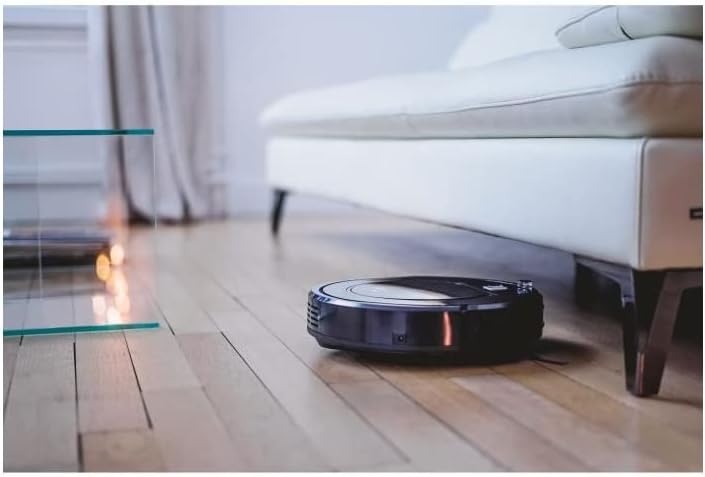
איור 2: The robot vacuum cleaning under a sofa. This image shows the low-profile design of the robot, allowing it to easily access and clean dust and debris in hard-to-reach areas beneath furniture.

איור 3: The robot vacuum operating in a bedroom. The robot is shown on a light-colored wooden floor, demonstrating its ability to navigate and clean open spaces effectively.
ניווט
The robot uses intelligent navigation to cover up to 120m² efficiently. It is equipped with sensors to detect obstacles and prevent falls.

איור 4: The robot vacuum performing edge cleaning. This image illustrates the robot's capability to clean close to walls and baseboards, ensuring thorough coverage of the room.

איור 5: The robot vacuum cleaning near a sleeping cat. This image highlights the quiet operation of the robot, allowing it to clean without disturbing pets or household activities.
תַחזוּקָה
Regular maintenance is crucial for the optimal performance and longevity of your robot vacuum.
1. ריקון פח האשפה
Empty the dustbin after each cleaning cycle or when the 'Dustbin Full' indicator (if available) illuminates. Open the top cover, remove the dustbin, and dispose of the collected debris.
2. מברשות ניקוי
Periodically check and clean the main brush and side brushes. Remove any tangled hair or debris using the provided cleaning tool. Replace worn-out side brushes as needed.
3. ניקוי מסננים
Tap the high-efficiency filter to remove dust. Do not wash the high-efficiency filter with water. The foam filter can be rinsed with water; ensure it is completely dry before reinserting.
4. ניקוי חיישנים
Wipe the cliff sensors, wall sensors, and charging contacts with a clean, dry cloth to ensure proper functionality.
פתרון בעיות
If your robot vacuum encounters an issue, refer to the table below for common problems and their solutions.
| בְּעָיָה | סיבה אפשרית | פִּתָרוֹן |
|---|---|---|
| הרובוט לא מתחיל לפעול | סוללה חלשה; כפתור ההפעלה לא נלחץ; חסימה | Charge the robot; Press the 'AUTO' button; Clear any obstructions. |
| הרובוט לא מוצא את בסיס הטעינה | Charging base obstructed; Robot too far from base | Ensure clear space around base; Manually place robot closer to base. |
| ביצועי ניקוי גרועים | Full dustbin; Clogged filter; Tangled brushes | רוקנו את מיכל האשפה; נקו/החליפו את המסנן; נקו את המברשות. |
| רובוט נתקע לעתים קרובות | Loose cables/rugs; Narrow spaces | Clear obstacles; Block off problematic areas. |
מפרט טכני
| מִפרָט | עֵרֶך |
|---|---|
| מותג | EZICLEAN |
| מספר דגם | EZI3760190144980 |
| צֶבַע | שָׁחוֹר |
| מידות המוצר (L x W x H) | 32 x 32 x 8.5 ס"מ |
| משקל פריט | 2.8 קילוגרם |
| חוֹמֶר | פּלָסטִי |
| רמת רעש | 60 dB |
| חיי סוללה | דקות 90 |
| תכונה מיוחדת | אלחוטי |
| סוג מסנן | מַחסָנִית |
| מקור כוח | מופעל על סוללה |
| רכיבים כלולים | Filter, Battery |
אחריות ותמיכת לקוחות
Your EZICLEAN Map Robot Vacuum comes with a standard manufacturer's warranty. For detailed warranty information, please refer to the warranty card included in your product packaging or visit the official EZICLEAN website. If you encounter any issues not covered in the troubleshooting section or require further assistance, please contact EZICLEAN customer support through their official channels. Keep your purchase receipt as proof of purchase for warranty claims.