
EARISE M37
EARISE M37 Wooden Box PA System User Manual
דגם: M37
1. המוצר נגמרview
The EARISE M37 is a portable 100W PA system designed for various audio applications, including home parties, small events, and karaoke. It features a wooden cabinet for enhanced acoustics, built-in Bluetooth connectivity, and comes with two wireless microphones for immediate use. The system supports multiple audio inputs including AUX and USB, offering versatile playback options.

Image: The EARISE M37 PA system, showcasing its wooden box design and two included wireless microphones.
2. מידע בטיחות
- אין לחשוף את המכשיר לגשם או לחות כדי למנוע שריפה או התחשמלות.
- Do not open the cabinet. There are no user-serviceable parts inside. Refer all servicing to qualified personnel.
- יש לוודא אוורור נאות מסביב ליחידה. אין לחסום פתחי אוורור.
- הימנעו מהצבת היחידה בקרבת מקורות חום כגון רדיאטורים, אוגרי חום, תנורים או מכשירים אחרים (כולל ampמחצבים) המייצרים חום.
- הגן על כבל החשמל מפני הליכה או צביטה, במיוחד בתקעים, בשקעי נוחות ובנקודה שבה הם יוצאים מהמכשיר.
- נתק את המכשיר מהחשמל במהלך סופות ברקים או כאשר אינו בשימוש לפרקי זמן ארוכים.
3. תכולת החבילה
אנא בדקו את החבילה עבור הפריטים הבאים:
- EARISE M37 PA System Unit
- 2 x מיקרופונים אלחוטיים
- שלט רחוק
- מתאם מתח
- מדריך למשתמש (מסמך זה)

Image: A visual representation of key features and included accessories: wireless microphone, Bluetooth 4.2, USB auto-play, and remote controller.
4. תכונות ורכיבי המוצר
Familiarize yourself with the main components and controls of your EARISE M37 PA System.

Image: The control panel of the EARISE M37, showing various inputs and adjustment knobs. Key controls include: Mode, Previous/Next Track, Play/Pause, Record, EQ, Light, Mic 1/2 inputs, AUX In/Out, USB, TF card slot, DC Power In, ON/OFF switch, Charging indicator, ECHO, DELAY, MIC VOL, MASTER VOL, TREBLE, EXTRA BASS, and BASS.
פונקציות לוח הבקרה:
- מצב: Switches between input modes (Bluetooth, AUX, USB, TF Card).
- הרצועה הקודמת/הבאה: Navigates tracks during media playback.
- הפעל/השהה: שולט בהפעלת מדיה.
- רְשׁוּמָה: Initiates or stops recording (requires USB/TF storage).
- EQ: Adjusts equalization settings.
- אוֹר: שולט בתאורת ה-LED המשולבת.
- MIC 1 / MIC 2: Inputs for wired microphones (if used).
- AUX IN / AUX OUT: Audio input and output jacks for external devices.
- USB: USB port for media playback or recording.
- TF: TF (MicroSD) card slot for media playback or recording.
- DC Power IN: כניסת חשמל לטעינה ותפעול.
- דולק כבוי: Power switch for the unit.
- מחוון טעינה: Light indicating charging status.
- הֵד: כוונון אפקט ההד עבור מיקרופונים.
- לְעַכֵּב: כוונון אפקט העיכוב עבור מיקרופונים.
- נפח מיקרופון: מכוונן את עוצמת הקול של המיקרופונים.
- כרך מאסטר: Controls the overall master volume of the system.
- לְשַׁלֵשׁ: מכוונן את פלט השמע בתדר גבוה.
- אקסטרה בס: משפר פלט שמע בתדר נמוך.
- בַּס: מכוונן את פלט השמע בתדרים נמוכים.
5. התקנה
5.1 Charging the PA System
Before first use, fully charge the PA system. Connect the provided power adapter to the "DC Power IN" port on the unit and plug it into a standard wall outlet. The charging indicator light will show the charging status. A full charge provides up to 7 hours of play time.

Image: Illustration highlighting the 3600mAh battery capacity, providing up to 7 hours of continuous play time.
5.2 הגדרת מיקרופון אלחוטי
The two wireless microphones are pre-paired with the PA system. Insert AA batteries (not included) into each microphone. Turn on the microphones using their respective power switches. They should automatically connect to the PA system.
5.3 חיבור מקורות שמע
חיבור Bluetooth:
- Turn on the EARISE M37 PA system.
- הקש על MODE button until the display shows "Bluetooth" or a Bluetooth icon.
- במכשיר הנייד שלך (סמארטפון, טאבלט וכו'), הפעל את Bluetooth וחפש מכשירים זמינים.
- Select "EARISE M37" from the list. Once connected, you will hear a confirmation sound.

Image: A hand holding a smartphone displaying a Bluetooth connection screen, indicating the ease of pairing with the EARISE M37 PA system.
הפעלת כרטיס USB/TF:
הכנס כונן הבזק מסוג USB או כרטיס TF (MicroSD) המכיל קבצי שמע MP3 files into the respective port. The system will automatically detect and begin playing music. Use the Previous/Next Track and Play/Pause buttons to control playback.
כניסת AUX:
חברו התקן שמע חיצוני (למשל, נגן MP3, מחשב) ל AUX IN באמצעות כבל שמע 3.5 מ"מ (לא כלול). לחץ על MODE button until AUX input is selected.
6. הוראות הפעלה
6.1 הפעלה/כיבוי
To turn the unit on or off, use the הפעלה/כיבוי מתג הממוקם בלוח הבקרה.
6.2 Adjusting Volume and Effects
- כרך מאסטר: Rotate this knob to adjust the overall volume of the PA system.
- נפח מיקרופון: כוונון עוצמת הקול של המיקרופונים המחוברים.
- ECHO / DELAY: Use these knobs to add or reduce echo and delay effects to the microphone sound.
- TREBLE / BASS / EXTRA BASS: Adjust these knobs to fine-tune the high and low frequencies of the audio output.
6.3 Using Microphones
Once the wireless microphones are powered on and connected, speak into them. Adjust the MIC VOL, הֵד, ו לְעַכֵּב knobs on the PA system to achieve the desired sound. For optimal performance, hold the microphone a few inches from your mouth.

Image: Two individuals enjoying karaoke with the EARISE M37 PA system and its wireless microphones, demonstrating typical usage.
6.4 פונקציית הקלטה
To record audio (e.g., microphone input or music playback), ensure a USB flash drive or TF card is inserted into the corresponding slot. Press the רְשׁוּמָה button to start recording. Press it again to stop. Recorded files will be saved to the inserted storage device.
7. תחזוקה
- נקו את היחידה בעזרת מטלית רכה ויבשה. אין להשתמש בחומרי ניקוי שוחקים או ממסים.
- Store the PA system in a cool, dry place away from direct sunlight and extreme temperatures.
- If the unit will not be used for an extended period, fully charge the battery before storage and recharge it every few months to maintain battery health.
8. פתרון תקלות
| בְּעָיָה | סיבה אפשרית | פִּתָרוֹן |
|---|---|---|
| אין כוח | סוללה ריקה; כבל החשמל לא מחובר. | טען את היחידה; ודא שכבל החשמל מחובר היטב. |
| אין צליל ממיקרופונים | Microphones off; Batteries low/dead; MIC VOL too low. | Turn on microphones; Replace batteries; Increase MIC VOL. |
| בלוטות' לא מתחבר | PA system not in Bluetooth mode; Device too far; Interference. | Press MODE button to select Bluetooth; Move device closer; Restart both devices. |
| כרטיס USB/TF לא מתנגן | לֹא נָכוֹן file פרמט; כרטיס/כונן לא הוכנס כראוי; פגום files. | לְהַבטִיחַ files are MP3; Reinsert card/drive; Try different files/device. |
9. מפרטים
| תכונה | פְּרָט |
|---|---|
| מותג | להרוויח |
| דֶגֶם | M37 |
| פלט וואטtage | 100 וואט |
| מקור כוח | מופעל על סוללה |
| טכנולוגיית קישוריות | בלוטות', USB, AUX |
| גרסת בלוטות' | 4.2 (from image) |
| קלט שמע | Wireless Microphone, AUX |
| מספר ערוצים | 2 |
| משקל פריט | 11.62 פאונד |
| מידות חבילה | 18.7 x 12 x 11.9 אינץ' |
| מידות מוצר (בקירוב) | 32.5 cm (12.8 in) H x 25.5 cm (10 in) W x 23.8 cm (9.4 in) D |
| צֶבַע | שָׁחוֹר |
| סוג הרכבה | משטח שולחן |
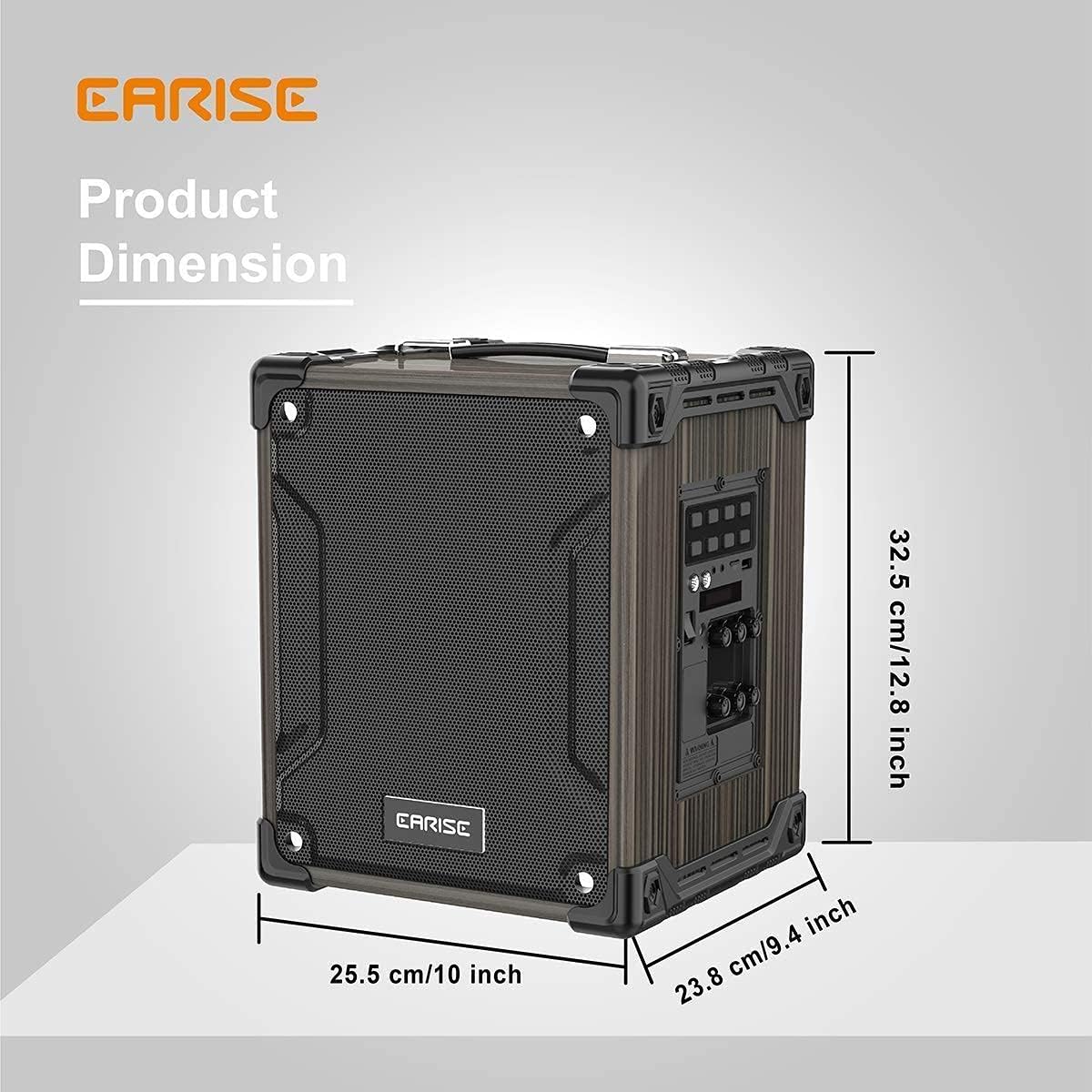
Image: Product dimensions of the EARISE M37, measuring approximately 32.5 cm (12.8 inches) in height, 25.5 cm (10 inches) in width, and 23.8 cm (9.4 inches) in depth.
10. אחריות ותמיכה
For warranty information or technical support, please refer to the contact details provided with your purchase or visit the official EARISE webאתר. שמור את הוכחת הרכישה שלך לצורך תביעות אחריות.
Ask a question about this manual
Ask about setup, troubleshooting, compatibility, parts, safety, or missing instructions. Manuals+ will review the question and use this page’s manual context to help answer it.