
1. הקדמה
This manual provides essential information for the installation, operation, maintenance, and troubleshooting of your Chieftec Polaris 650W 80Plus Certified Power Supply Unit (PSU). Please read this manual thoroughly before installing and using the product to ensure proper function and safety. The Chieftec Polaris 650W PSU is designed to provide stable and efficient power to your personal computer system.
2. מידע בטיחות
יש להקפיד תמיד על אמצעי הזהירות הבאים כדי למנוע פגיעה או נזק לציוד שלך:
- אל תעשה פתח את ספק הכוח casinז. נפח גבוהtages inside can cause electric shock. There are no user-serviceable parts inside.
- אל תעשה insert any objects into the PSU's ventilation openings.
- אל תעשה expose the PSU to water, moisture, or high humidity.
- Ensure the PSU is installed in a well-ventilated area, free from obstructions to airflow.
- יש לנתק תמיד את כבל החשמל AC משקע הקיר לפני התקנה, הסרה או ניקוי של ספק הכוח.
- Use only the modular cables provided with your Chieftec Polaris 650W PSU. Using incompatible cables may damage the PSU or connected components.
- Ensure all cable connections are secure before powering on the system.
3. תכולת החבילה
ודא שכל הפריטים נמצאים בחבילה שלך:
- Chieftec Polaris 650W Power Supply Unit
- Modular Cable Set (e.g., 24-pin ATX, 8-pin EPS/CPU, PCIe, SATA, Molex)
- כבל מתח AC
- ברגי הרכבה
- מדריך למשתמש (מסמך זה)
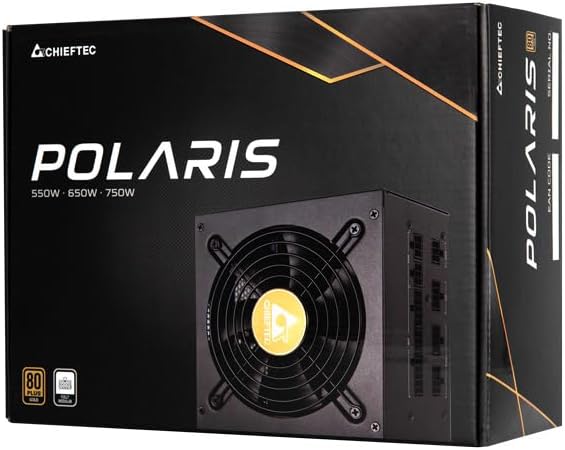
Image: The Chieftec Polaris 650W Power Supply Unit and its retail packaging.
4. התקנה והתקנה
Follow these steps to install your Chieftec Polaris 650W PSU into your personal computer system:
- הכן את המערכת שלך: ודא שהמחשב כבוי לחלוטין ומנותק משקע החשמל בקיר. פתח את מארז המחשב כדי לגשת לאזור ההרכבה של ספק הכוח.
- הסר את ספק הכוח הישן (אם רלוונטי): If replacing an existing PSU, disconnect all cables from the components and motherboard, then unscrew and remove the old PSU.
- התקן את ספק הכוח החדש: Carefully slide the Chieftec Polaris 650W PSU into the designated PSU bay in your computer case. Ensure the fan faces the correct direction (typically downwards for bottom-mounted PSUs, or as per case design for optimal airflow). Secure the PSU with the provided mounting screws.
- חיבור כבלים מודולריים: Identify the necessary modular cables for your system components (motherboard, CPU, graphics card, storage drives). Connect these cables to the corresponding ports on the back of the PSU. Refer to the image below for connector identification.
- חיבור לרכיבים: Connect the other end of the modular cables to your motherboard (24-pin ATX and 8-pin EPS/CPU), graphics card(s) (PCIe), and storage devices (SATA/Molex). Ensure all connections are firm and fully seated.
- ניהול כבלים: Route cables neatly to improve airflow and aesthetics within your case.
- בדיקות סופיות: Double-check all connections. Ensure no loose cables are obstructing fans. Close your computer case.
- חבר מתח AC: Plug the AC power cord into the PSU's power inlet and then into a wall outlet.

תמונה: אחורי view of the Chieftec Polaris 650W PSU showing modular cable connection ports for M/B, SATA, PCIe, and CPU.

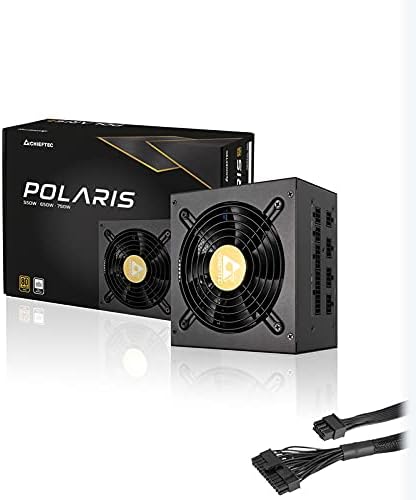
Image: The Chieftec Polaris 650W Power Supply Unit with its modular cables connected, ready for installation.
5. הוראות הפעלה
Once the Chieftec Polaris 650W PSU is correctly installed and all connections are secure:
- הפעלה: Locate the power switch on the back of the PSU (next to the AC power inlet). Ensure it is in the 'I' (On) position.
- הפעלת מערכת: Press the power button on your computer case. The system should power on, and the PSU fan will begin to spin, indicating normal operation.
- מבצע מעריצים: The PSU features an air cooling method. The fan will operate to dissipate heat generated by the power supply components. Its speed may vary depending on the load and temperature to maintain optimal cooling and noise levels.
- כיבוי: To shut down your system, use the operating system's shutdown procedure. For a complete power cut, switch the PSU's power switch to the 'O' (Off) position and unplug the AC power cord.
תמונה: מלמעלה למטה view of the Chieftec Polaris 650W Power Supply, highlighting the cooling fan and protective grille.
6. תחזוקה
Proper maintenance ensures the longevity and optimal performance of your PSU:
- ניקוי אבק: Periodically (e.g., every 3-6 months), power off your computer, unplug the AC cord, and open the case. Use compressed air to gently blow dust out of the PSU's fan and ventilation grilles. אל תעשה use a vacuum cleaner directly on the PSU as it can generate static electricity.
- תנאים סביבתיים: Ensure the computer operates in a clean, dry, and well-ventilated environment. Avoid extreme temperatures and direct sunlight.
- שלמות כבל: Occasionally check that all modular cables are securely connected and not frayed or damaged.
7. פתרון תקלות
If you encounter issues with your Chieftec Polaris 650W PSU, consider the following troubleshooting steps:
- אין כוח:
- ודא שכבל החשמל AC מחובר היטב גם לספק הכוח וגם לשקע בקיר.
- Check that the PSU's power switch on the back is in the 'I' (On) position.
- ודא ששקע הקיר תקין על ידי חיבור מכשיר אחר.
- Confirm all internal power cables (24-pin ATX, 8-pin EPS/CPU) are firmly connected to the motherboard.
- חוסר יציבות מערכת/כיבויים אקראיים:
- Ensure the PSU is adequately ventilated and not overheating.
- Check all power connections to components (graphics card, storage) for looseness.
- If possible, test the PSU with a different set of components or in another system to rule out other hardware issues.
- רעשים חריגים:
- A rattling or grinding noise may indicate a fan issue. Power off the system and inspect the PSU fan for obstructions (e.g., loose cables).
- If the noise persists and is not due to an obstruction, contact support.
אם שלבים אלה אינם פותרים את הבעיה, אנא עיין בסעיף האחריות והתמיכה.
8. מפרטים
| תכונה | מִפרָט |
|---|---|
| מותג | Chieftec |
| שם הדגם | פולאריס |
| מספר דגם של פריט | IN-ACT-ZDLCHFOBU0087 |
| פלט וואטtage | 650 וואט |
| גורם צורה | ATX |
| שיטת קירור | אֲוִיר |
| סוג מחבר | ATX |
| מכשירים תואמים | מחשב אישי |
| מידות המוצר (L x W x H) | 8.66 x 3.15 x 1.18 אינץ' (22 x 8 x 3 ס"מ) |
| משקל פריט | 4.4 פאונד (2 קילוגרם) |
| הסמכה | 80Plus מוסמך |
9. אחריות ותמיכה
Chieftec products are manufactured to high-quality standards. For specific warranty terms and conditions, please refer to the warranty card included with your product or visit the official Chieftec website. Warranty periods and coverage may vary by region and product.
For technical support, product inquiries, or warranty claims, please contact Chieftec customer service through their official website or the contact information provided in your product documentation. When contacting support, please have your product model number (IN-ACT-ZDLCHFOBU0087) and proof of purchase readily available.