
מָבוֹא
Thank you for choosing the Zelotes F-35 2.4GHz Vertical Wireless Rechargeable Gaming Mouse. This ergonomic mouse is designed to provide a comfortable and efficient user experience, reducing wrist strain during extended use. Featuring multiple connectivity options and customizable buttons, it is ideal for both productivity and gaming on various devices.
תכונות המוצר
- עיצוב אנכי ארגונומי: Positions the hand in a natural handshake posture to minimize wrist and forearm strain.
- קישוריות רב-מצבית: Supports 2.4GHz wireless via USB dongle, Bluetooth 1, and Bluetooth 2 for versatile device pairing.
- סוללה נטענת: Built-in rechargeable battery for convenience.
- DPI מתכוונן: Up to 2400 DPI for precise cursor control, suitable for various tasks and gaming.
- 6 לחצנים ניתנים לתכנות: Includes left/right click, scroll wheel, DPI button, and forward/backward buttons for enhanced functionality.
- חיישן אופטי: Reliable and accurate tracking on most surfaces.
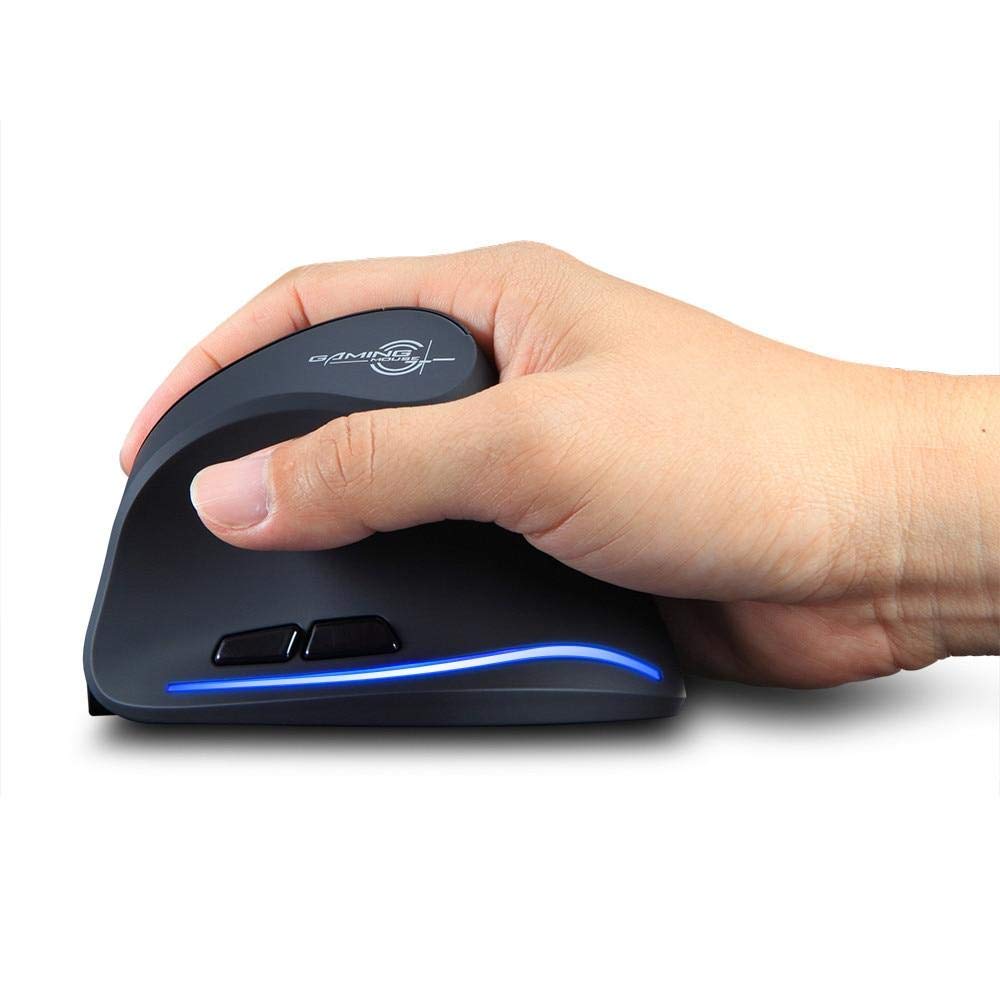
Image: The Zelotes F-35 Vertical Wireless Gaming Mouse, showcasing its unique ergonomic shape and illuminated accents.

Image: A visual comparison illustrating the natural hand position with a vertical mouse versus the twisted wrist position with a traditional horizontal mouse, highlighting the ergonomic benefits.
הוראות התקנה
- הפעלה: אתר את מתג ההפעלה/כיבוי בתחתית העכבר והחלק אותו למצב 'ON'.
- בחר מצב חיבור: The mouse supports three connection modes: 2.4GHz wireless (via USB dongle), Bluetooth 1, and Bluetooth 2. Use the 'Mode Switch' button on the bottom of the mouse to cycle through these options. The corresponding indicator light will illuminate.
- חיבור אלחוטי 2.4GHz:
- Remove the USB receiver dongle from its storage slot on the bottom of the mouse.
- חבר את מקלט ה-USB ליציאת USB זמינה במחשב או במחשב הנייד שלך.
- העכבר אמור להתחבר אוטומטית.
- חיבור בלוטות' (BT1/BT2):
- Switch the mouse to either Bluetooth 1 or Bluetooth 2 mode using the 'Mode Switch'.
- On your computer or laptop, go to Bluetooth settings and search for new devices.
- Select 'Zelotes F-35' from the list of available devices to pair.

Image: The underside of the Zelotes F-35 mouse, highlighting the ON/OFF switch, mode switch, and the integrated storage slot for the 2.4GHz USB receiver dongle.
הוראות הפעלה
The Zelotes F-35 mouse features 6 buttons designed for intuitive control and enhanced productivity:
- כפתור לחיצה שמאלי: פונקציית לחיצה ראשית סטנדרטית.
- כפתור לחיצה ימנית: פונקציית לחיצה משנית סטנדרטית.
- גלגל גלילה: Scroll up or down for navigation. Can also be pressed for a middle-click function.
- כפתור כוונון DPI: Located near the scroll wheel, press to cycle through different DPI settings (e.g., 800/1200/1600/2400) to adjust cursor sensitivity.
- לחצן קדימה: Located on the thumb rest, typically navigates forward in web דפדפנים או file חוקרים.
- לחצן אחורה: Located on the thumb rest, typically navigates backward in web דפדפנים או file חוקרים.
טעינה וסוללה
The Zelotes F-35 mouse is equipped with a rechargeable battery for continuous use.
- יציאת טעינה: The mouse features a USB-C charging port, typically located at the front base of the mouse.
- טְעִינָה: Connect the provided USB-C cable to the mouse and the other end to a USB power source (e.g., computer USB port, wall adapter).
- מחוון סוללה: The mouse may have an indicator light to show charging status or low battery. Refer to the product packaging for specific indicator behavior.
- חיי סוללה: The average battery life is approximately 12 months, depending on usage.
תַחזוּקָה
- ניקוי: השתמשו במטלית רכה ויבשה לניקוי משטח העכבר. במקרה של לכלוך עיקש, שטפו מעטamp ניתן להשתמש בבד, תוך הקפדה על כך שלא תיכנס לחות לרכיבים הפנימיים.
- טיפול בחיישנים: שמרו על ניקיון החיישן האופטי בתחתית העכבר וללא אבק או פסולת כדי להבטיח מעקב מדויק.
- אִחסוּן: When not in use for extended periods, turn off the mouse to conserve battery life. Store the USB receiver in its designated slot to prevent loss.
פתרון בעיות
- עכבר לא מגיב:
- ודא שהעכבר מופעל.
- בדוק את רמת הסוללה וטען במידת הצורך.
- For 2.4GHz connection, ensure the USB receiver is securely plugged into the computer.
- For Bluetooth connection, ensure Bluetooth is enabled on your device and the mouse is correctly paired. Try re-pairing if issues persist.
- מעקב לא מדויק:
- נקו את החיישן האופטי בתחתית העכבר.
- ודא שאתה משתמש בעכבר על משטח מתאים (לא מחזיר אור, לא זכוכית).
- התאם את הגדרת ה-DPI לרמה נוחה.
- ירידות קישוריות:
- Ensure the mouse is within the effective range of your device (typically up to 10 meters for wireless).
- מזער הפרעות ממכשירים אלחוטיים אחרים.
מפרטים
| תכונה | פְּרָט |
|---|---|
| מותג | Zelotes |
| דֶגֶם | F-35 |
| סוּג | 2.4GHz אלחוטי, בלוטות' |
| מצב פעולה | אופטו-אלקטרוני |
| מספר כפתורים | 6 |
| מספר רולים | 1 |
| כיוון יד | יָמִינָה |
| סוג ממשק | USB |
| DPI | 2400 |
| תכונה מיוחדת | נטען, אלחוטי |
| איתור תנועה | אוֹפּטִי |
| מכשירים תואמים | מחשב נייד, מחשב אישי |
| מַעֲרֶכֶת הַפעָלָה | לינוקס, חלונות 7 (וחדשים יותר) |
| חיי סוללה ממוצעים | 12 חודשים |
| מקור כוח | מופעל על סוללה |
| צֶבַע | שָׁחוֹר |
| ארץ מוצא | סִין |
אחריות ותמיכה
For warranty information and technical support, please refer to the documentation included with your product or visit the official Zelotes webאתר. באפשרותך גם ליצור קשר עם הקמעונאי שממנו רכשת את המוצר לקבלת סיוע.