
מָבוֹא
This manual provides comprehensive instructions for the setup, operation, and maintenance of your Zerone Universal Remote Control. This remote is designed to function with various Pioneer DVD player models, offering a convenient replacement or secondary control unit.
תְאִימוּת
The Zerone Universal Remote Control is compatible with the following Pioneer DVD player models:
- פיוניר VXX2811
- פיוניר VXX2914
- פיוניר VXX3218
- פיוניר VXX2801
- פיוניר VXX2800
- פיוניר VXX2913
For optimal performance, ensure your DVD player model is listed above.
הגדרה
1. התקנת סוללה
- אתר את תא הסוללות בגב השלט הרחוק.
- החלק את מכסה הסוללה כלפי מטה או לחץ על התפס והרם כדי לפתוח.
- Insert two (2) AA 1.5V batteries, ensuring the positive (+) and negative (-) terminals align correctly with the markings inside the compartment.
- החזר את מכסה הסוללה למקומו על ידי החלקתו בחזרה עד שיישמע נקישה.
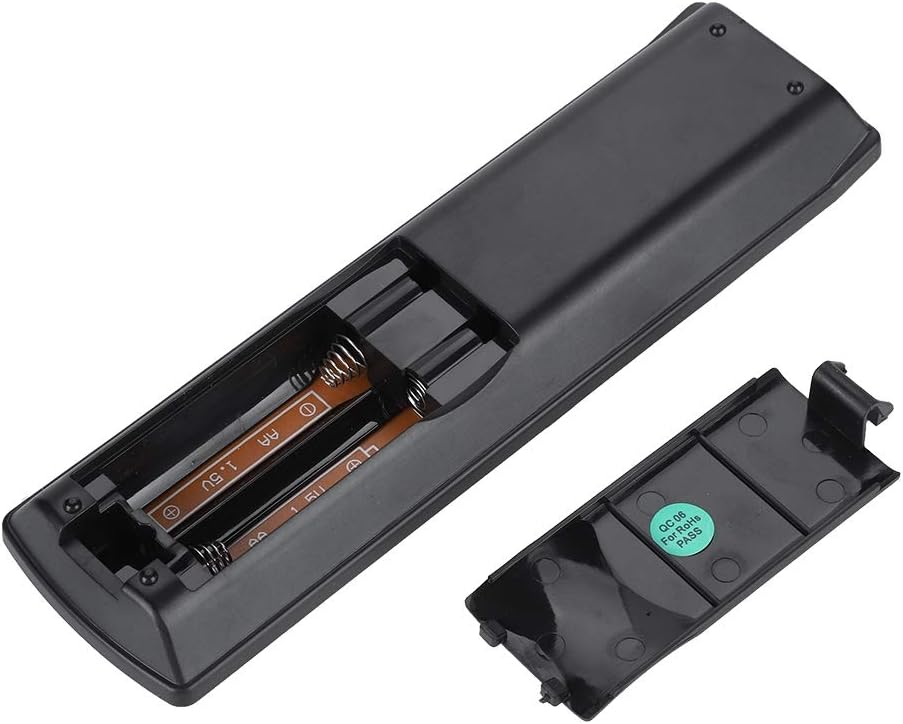
תמונה: אחורי view of the Zerone remote control, showing the battery compartment cover.

Image: The battery compartment of the remote control with two AA batteries correctly inserted.
No programming or setup is required. Once batteries are installed, the remote is ready for use with compatible Pioneer DVD players.
הוראות הפעלה
Point the remote control directly at your Pioneer DVD player. The effective control distance is typically over 8 meters (approximately 26 feet), though this may vary based on environmental factors and the specific DVD player model.

תמונה: חזית view of the Zerone Universal Remote Control, displaying all buttons and their labels.
פונקציות מפתח:
- המתנה/מופעל: Powers the DVD player on or off.
- פתוח סגור: פותח או סוגר את מגש התקליטורים.
- שֶׁמַע: בחירת רצועות שמע או שפות.
- כתוביות: Toggles or selects subtitle options.
- זָוִית: משנה את viewing angle if supported by the DVD.
- לחצני מספרים (0-9): Direct track selection or input.
- בָּרוּר: Clears numerical input.
- להיכנס: מאשר בחירות.
- תפריט עליון: Accesses the main menu of the DVD.
- תפריט: גישה לתפריט הדיסק.
- HOME MENU: Navigates to the home menu of the DVD player.
- לַחֲזוֹר: חוזר למסך או לתפריט הקודם.
- משטח כיוונים (למעלה, למטה, שמאלה, ימינה) ו-ENTER: ניווט בתפריטים ואישור בחירות.
- Playback Controls (Play, Pause, Stop, Fast Forward, Rewind, Skip Forward, Skip Backward): פונקציות השמעת מדיה סטנדרטיות.
- מצב משחק: Selects playback modes (e.g., repeat, shuffle).
- לְהַקִיף: Adjusts surround sound settings.
- ZOOM: מגדיל או מקטין את הסרטון.
- לְהַצִיג: Shows on-screen display information.

Image: A hand holding the Zerone remote control, demonstrating its ergonomic design and ease of use.

Image: The remote control positioned in front of a television displaying content, illustrating its intended use.

Image: A visual representation of the remote control's effective operating distance, indicating a range of over 8 meters.
תַחזוּקָה
- ניקוי: נגבו את השלט הרחוק בעזרת מטלית רכה ויבשה. אין להשתמש בחומרי ניקוי נוזליים או בחומרים שוחקים.
- החלפת סוללה: החלף סוללות כאשר תגובת השלט רחוק הופכת איטית או מפסיקה לעבוד. החלף תמיד את שתי הסוללות בו זמנית בחדשות.
- אִחסוּן: יש לאחסן את השלט במקום קריר ויבש, הרחק מאור שמש ישיר וטמפרטורות קיצוניות.
- הימנע מנזק: Do not drop the remote or expose it to water.
פתרון בעיות
- השלט לא מגיב:
- ודאו שהסוללות מותקנות כהלכה עם הקוטביות הנכונה.
- החליפו סוללות ישנות בסוללות AA חדשות.
- בדוק אם יש חסימות בין השלט רחוק לחיישן האינפרא אדום של נגן ה-DVD.
- Ensure you are within the effective operating range (typically within 8 meters).
- פונקציות מסוימות לא פועלות:
- Verify that your Pioneer DVD player model is listed in the compatibility section.
- Some advanced functions may be specific to the original remote or not supported by all DVD player models.
מפרטים
| חומר מעטפת | High-grade ABS |
| מרחק שליטה | > 8 meters (316 inches) |
| סוג סוללה | 2 x AA 1.5V Batteries (Not included) |
| מידות | כ-174 x 49 x 20 מ"מ (6.85 x 1.93 x 0.79 אינץ') |
| מִשׁקָל | כ-75 גרם (2.46 אונקיות) |
| מספר דגם | 743562180017 |
אחריות ותמיכה
For warranty information or technical support, please refer to the documentation provided with your purchase or contact the manufacturer, Zerone, directly through their official channels. Keep your purchase receipt as proof of purchase.