
1. הקדמה
Thank you for choosing the Lowell JM Plus PL3300 Digital Watch. This watch is designed to provide accurate timekeeping along with advanced fitness tracking features, including optical heart rate monitoring, a pedometer, and calorie calculation. This manual will guide you through the setup, operation, and maintenance of your new watch.
2. מידע בטיחות
- Do not attempt to open or modify the watch. This may damage the device and void the warranty.
- Keep the watch away from extreme temperatures, direct sunlight for prolonged periods, and strong magnetic fields.
- נקו את השעון בעזרת מטלית רכה ויבשה. הימנעו משימוש בחומרי ניקוי כימיים.
- The watch is water resistant to 3 ATM (30 meters). This means it is suitable for daily use, splashes, and brief immersion in water. It is not suitable for swimming, diving, or showering with hot water.
- If irritation occurs from wearing the watch, discontinue use and consult a physician.
3. תכולת החבילה
אנא ודאו שהחבילה שלכם מכילה את הפריטים הבאים:
- Lowell JM Plus PL3300 Digital Watch
- מדריך למשתמש (מסמך זה)
4. שמור מעלview
Familiarize yourself with the watch's display and button functions.
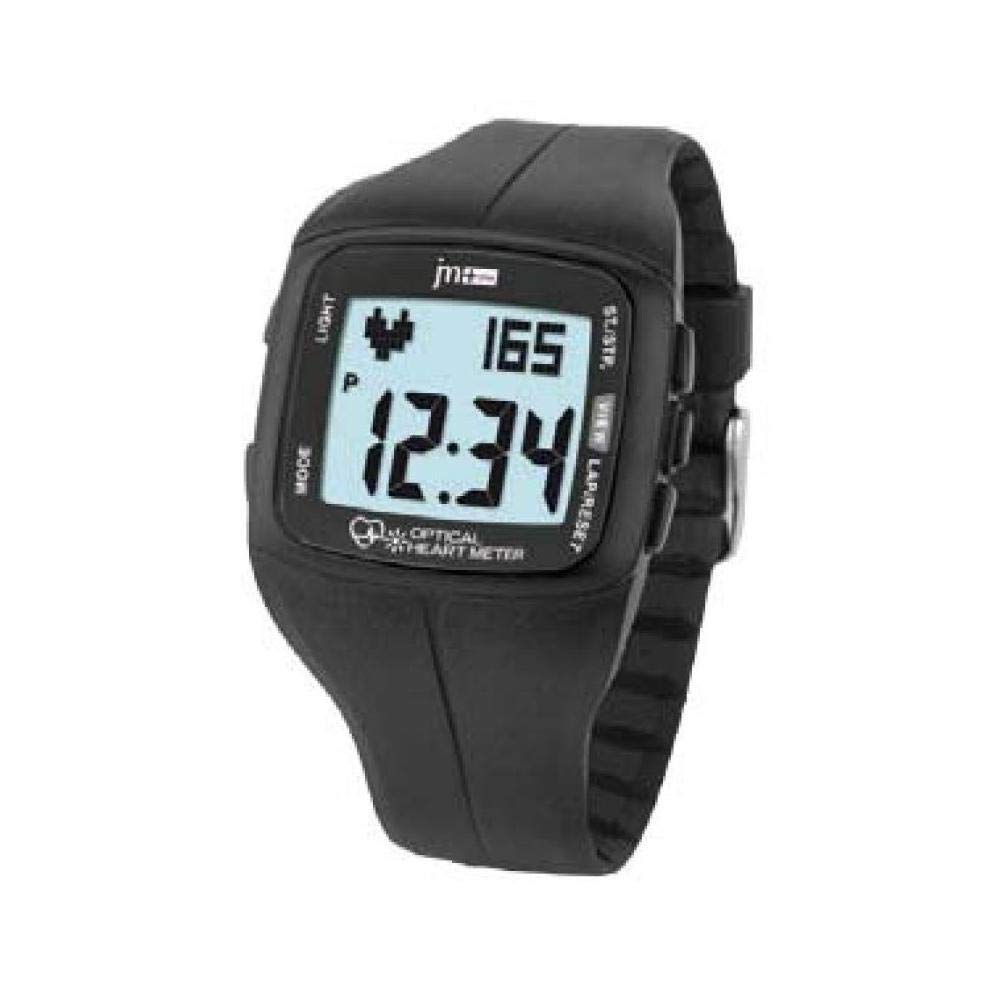
Figure 4.1: Lowell JM Plus PL3300 Digital Watch Display and Buttons
This image displays the Lowell JM Plus PL3300 digital watch. The watch features a black plastic case and strap. The digital display shows the time as 12:34, a heart rate reading of 165 beats per minute, and a 'P' indicator, likely for Pedometer or Pulse. Buttons are labeled 'LIGHT' on the top left, 'MODE' on the bottom left, 'ST./STP.' on the top right, and 'VIEW LAP/RESET' on the bottom right. The phrase 'OPTICAL HEART METER' is visible at the bottom of the display.
פונקציות כפתור:
- אוֹר: Activates the EL backlight for the display.
- מצב: Cycles through different operating modes (Time, Heart Rate, Pedometer, Training, Stopwatch, Countdown, Alarm).
- ST./STP. (Start/Stop): Starts or stops functions like stopwatch, countdown, or training mode.
- VIEW LAP/RESET: Views lap times in stopwatch mode or resets values. Also used for setting adjustments.
5. התקנה
5.1 הפעלה ראשונית
The watch typically comes pre-charged or with a battery installed. If the display is blank, press any button to activate it.
5.2 הגדרת שעה ותאריך
- ממצב תצוגת זמן, לחצו והחזיקו את המקש MODE עד שספרות הזמן יתחילו להבהב.
- הקש על VIEW הקפה/איפוס כפתור כדי לכוונן את הערך המהבהב (למשל, שעות, דקות, שנה, חודש, יום).
- הקש על ST./STP. כדי לעבור לפריט ההגדרה הבא.
- Repeat steps 2 and 3 until all desired settings (time, date, 12/24-hour format) are configured.
- הקש על MODE לחצן שוב כדי לצאת ממצב ההגדרה.
5.3 משתמש פרוfile Setup (for accurate fitness tracking)
For accurate heart rate, calorie, and distance calculations, it is recommended to set up your personal profile. This typically includes age, gender, height, and weight. Refer to the watch's on-screen prompts or specific menu options accessed via the MODE button to enter these details.
6. מצבי הפעלה
6.1 מצב זמן
This is the default display mode, showing the current time and date. Press אוֹר כדי להאיר את התצוגה.
6.2 ניטור דופק
The watch features an optical heart rate sensor.
- Ensure the watch is worn snugly on your wrist, with the sensor making good contact with your skin.
- הקש על MODE button until you reach the Heart Rate mode (indicated by a heart icon or "HR").
- The watch will begin to measure your heart rate. Your current heart rate in beats per minute (BPM) will be displayed.
6.3 Pedometer (Step Counter)
The integrated pedometer tracks your daily steps.
- הקש על MODE button to navigate to the Pedometer mode (often indicated by a 'P' or a step icon).
- Your current step count for the day will be displayed.
- The watch automatically resets the step count at midnight.
6.4 Training Mode (Calories, Distance, Pace)
This mode allows you to track specific workout sessions.
- הקש על MODE button until you reach the Training mode.
- לִלְחוֹץ ST./STP. to start a new training session. The watch will begin recording duration, heart rate, speed, pace, distance, and estimated calories burned.
- במהלך פגישה, לחץ VIEW הקפה/איפוס אֶל view lap data if applicable.
- לִלְחוֹץ ST./STP. again to pause or end the training session.
- To reset the training data, press and hold VIEW הקפה/איפוס after stopping the session.
6.5 שעון עצר
- הקש על MODE button to enter Stopwatch mode.
- לִלְחוֹץ ST./STP. להפעלת שעון העצר.
- לִלְחוֹץ ST./STP. again to pause. Press again to resume.
- לִלְחוֹץ VIEW הקפה/איפוס to record a lap time while the stopwatch is running.
- When paused, press and hold VIEW הקפה/איפוס כדי לאפס את שעון העצר.
6.6 טיימר ספירה לאחור
- הקש על MODE button to enter Countdown Timer mode.
- כדי להגדיר את זמן הספירה לאחור, לחצו והחזיקו את VIEW הקפה/איפוס until the digits flash. Use VIEW הקפה/איפוס כדי להתאים ערכים ו ST./STP. כדי לעבור בין שעות, דקות ושניות.
- לִלְחוֹץ MODE כדי לאשר את ההגדרה.
- לִלְחוֹץ ST./STP. כדי להתחיל את הספירה לאחור.
- תישמע אזעקה כאשר הספירה לאחור תגיע לאפס.
6.7 אזעקה
- הקש על MODE button to enter Alarm mode.
- כדי להגדיר את זמן ההתראה, לחצו והחזיקו את VIEW הקפה/איפוס until the digits flash. Use VIEW הקפה/איפוס כדי להתאים ערכים ו ST./STP. כדי לעבור בין שעות לדקות.
- לִלְחוֹץ MODE כדי לאשר את ההגדרה.
- כדי להפעיל או לבטל את האזעקה, לחצו ST./STP. while in Alarm mode. An alarm icon will appear on the display when activated.
7. תחזוקה
7.1 ניקוי
Wipe the watch case and strap regularly with a soft, slightly damp cloth. For the optical sensor on the back, ensure it is clean and free of debris for accurate readings. Avoid using harsh chemicals or abrasive materials.
7.2 החלפת סוללה
The watch uses a standard watch battery. When the display dims or functions become erratic, it may be time to replace the battery. It is recommended to have the battery replaced by a qualified watch technician to ensure the water resistance seal is maintained.
8. פתרון תקלות
- Watch not turning on / Display blank: Press any button. If still blank, the battery may be depleted. Refer to Section 7.2 for battery replacement.
- קריאות דופק לא מדויקות: Ensure the watch is worn snugly on your wrist, not too loose or too tight. Clean the optical sensor on the back of the watch. Avoid excessive movement during measurement.
- קריאות מד צעדים לא מדויקות: Ensure your user profile (height, weight) is correctly set up. Arm movements can sometimes affect step counting; try to keep your arm relatively still during walking for best accuracy.
- Water Resistance Concerns: Always ensure the watch's back cover is securely fastened after any maintenance. Avoid pressing buttons underwater.
- כפתורים לא מגיבים: Try pressing firmly. If unresponsive, the watch may require a reset (consult support) or battery replacement.
9. מפרטים
| תכונה | פְּרָט |
|---|---|
| מספר דגם | PL3300 |
| סוג תצוגה | Digital, EL Backlit |
| סוג תנועה | קְוָרץ |
| חומר מארז | Plastic (40 x 35 mm) |
| סוג קריסטל | Plexi (Plastic) |
| חומר רצועה | פּלָסטִי |
| צבע רצועה | שָׁחוֹר |
| עמידות במים | 3 כספומט (30 מטר) |
| מִשׁקָל | 42 גרם |
| תכונות מיוחדות | Optical Heart Rate Monitor, Pedometer, Calorie Counter, Training Mode, Stopwatch, Countdown Timer, Alarm, Calendar |
10. אחריות ותמיכה
For warranty information and customer support, please refer to the documentation provided at the time of purchase or visit the official Lowell webאתר. שמור את הוכחת הרכישה שלך לצורך תביעות אחריות.