
1. הקדמה
Thank you for choosing the Greadio Retro Bluetooth Speaker and Vintage FM Radio. This manual provides essential information for the safe and efficient operation of your device. Please read it thoroughly before use and retain it for future reference.
2. מידע בטיחות
- אין לחשוף את המכשיר למים, לחות או לטמפרטורות קיצוניות.
- הימנע מנפילה או הכפיפה של המכשיר למכות חזקות.
- אל תנסה לפרק או לתקן את המכשיר בעצמך. פנה לאנשי שירות מוסמכים.
- הרחק מהישג ידם של ילדים.
- השתמש רק בכבל הטעינה המצורף.
3. תכולת החבילה
ודא שכל הפריטים נמצאים בחבילה:
- Greadio Retro Bluetooth Speaker (Model GR919P)
- כבל טעינה USB
- כבל AUX
- מדריך למשתמש

Image: Greadio Retro Bluetooth Speaker (Pink) with its charging cable, AUX cable, and user manual.
4. המוצר נגמרview
Familiarize yourself with the main components and controls of your Greadio Retro Bluetooth Speaker.

Image: Front panel of the speaker, showing the speaker, frequency scale, tuning knob, volume knob, and ON/OFF & Function knob.

Image: Rear panel of the speaker, showing the Micro USB port, TF card socket, Play/Pause button, and Previous/Next buttons.
תכונות עיקריות:
- גודל קומפקטי: Measures 4.4 x 2.7 x 2 inches, making it highly portable.
- עוצמת קול חזקה: Equipped with a five-watt amplifier for rich and clear audio.
- Bluetooth 5.0: Advanced wireless connectivity for quick pairing.
- ניגון רב-מצבי: Supports FM Radio, Bluetooth, TF Card, and AUX input.
- סוללה נטענת מובנית: Provides up to 9 hours of playtime.
5. התקנה
5.1 טעינה ראשונית
Before first use, fully charge the speaker. Connect the provided USB charging cable to the Micro USB port on the back of the speaker and plug the other end into a USB power adapter (not included) or a computer's USB port. The charging indicator light will illuminate during charging and turn off when fully charged.
5.2 הפעלה/כיבוי
To power on the speaker, rotate the ON/OFF & Function knob clockwise until you hear a click and the display lights up. To power off, rotate the knob counter-clockwise until it clicks off.
6. מצבי הפעלה
The Greadio Retro Bluetooth Speaker supports multiple playback modes. Rotate the ON/OFF & Function knob to switch between modes.
6.1 מצב Bluetooth
In Bluetooth mode, the speaker can connect wirelessly to your smartphone, tablet, or other Bluetooth-enabled devices.
- Turn on the speaker and switch to Bluetooth mode. The display will show a blue light, indicating it's ready for pairing.
- On your device, enable Bluetooth and search for "Greadio" or "R919".
- בחר את הרמקול מהרשימה לצימוד. צליל אישור יציין צימוד מוצלח.
- כעת ניתן להשמיע אודיו מהמכשיר דרך הרמקול.

Image: The speaker's dial illuminated in blue, signifying Bluetooth mode is active.
Video: Demonstrates how to connect the Greadio Bluetooth Speaker to a smartphone via Bluetooth, showing the pairing process and audio playback.
מצב רדיו 6.2 FM
Enjoy your favorite FM radio stations with the vintage-style tuner.
- Turn on the speaker and switch to FM Radio mode. The display will show an orange light.
- Rotate the Tuning Knob (large central knob) to scan for available FM stations.
- Adjust the Volume Knob (smaller knob) to your desired listening level.

Image: The speaker's dial illuminated in orange, signifying FM radio mode is active.
6.3 מצב כרטיס TF
Play music directly from a TF (MicroSD) card.
- Insert a TF card (up to 32GB, not included) with MP3 audio files into the TF card socket on the back of the speaker.
- The speaker will automatically switch to TF Card mode and begin playback.
- Use the Play/Pause button and Previous/Next buttons on the back to control playback.

Image: The TF card slot located on the rear of the speaker for direct music playback.
6.4 מצב AUX
חברו התקני שמע חיצוניים באמצעות כבל AUX.
- Connect one end of the provided AUX cable to the AUX port on the back of the speaker.
- חבר את הקצה השני ליציאת השמע של המכשיר החיצוני שלך (למשל, נגן MP3, מחשב).
- The speaker will automatically switch to AUX mode. Play audio from your external device.

Image: The AUX port on the rear of the speaker for wired audio connections.
7. טעינה
The speaker features a built-in 1100mAh rechargeable Lithium Ion battery. When the battery is low, the speaker will indicate this (e.g., voice prompt). Connect the Micro USB charging cable to a 5V/1A USB power source to recharge. A full charge typically takes 3-4 hours and provides up to 9 hours of playback time, depending on volume and mode.
8. תחזוקה
- נקו את הרמקול בעזרת מטלית רכה ויבשה. אין להשתמש בחומרי ניקוי שוחקים או ממסים.
- יש לאחסן את הרמקול במקום קריר ויבש, הרחק מאור שמש ישיר וטמפרטורות קיצוניות.
- If not used for extended periods, charge the battery at least once every three months to prolong its lifespan.
9. פתרון תקלות
| בְּעָיָה | סיבה אפשרית | פִּתָרוֹן |
|---|---|---|
| הרמקול לא נדלק. | סוללה חלשה. | טען את הרמקול במלואו. |
| אין צליל במצב Bluetooth. | Not paired or volume too low. | Ensure device is paired and volume is up on both speaker and source device. |
| קליטת רדיו FM גרועה. | אות חלש או הפרעות. | Adjust the speaker's position or rotate for better reception. The charging cable can act as an antenna. |
| כרטיס TF לא מתנגן. | Card not inserted correctly or unsupported file פוּרמָט. | Reinsert TF card. Ensure fileהם בפורמט MP3. |
10. מפרטים
- מספר דגם: GR919P
- מידות המוצר: 4.4 x 2.7 x 2 אינץ'
- משקל פריט: 7.7 אונקיות
- טכנולוגיית קישוריות: בלוטות' 5.0
- טכנולוגיית טיונר: FM
- מקור כוח: מופעל על סוללה (סוללת ליתיום יון אחת כלולה)
- תכונה מיוחדת: נטענת
- יַצרָן: גראדיו
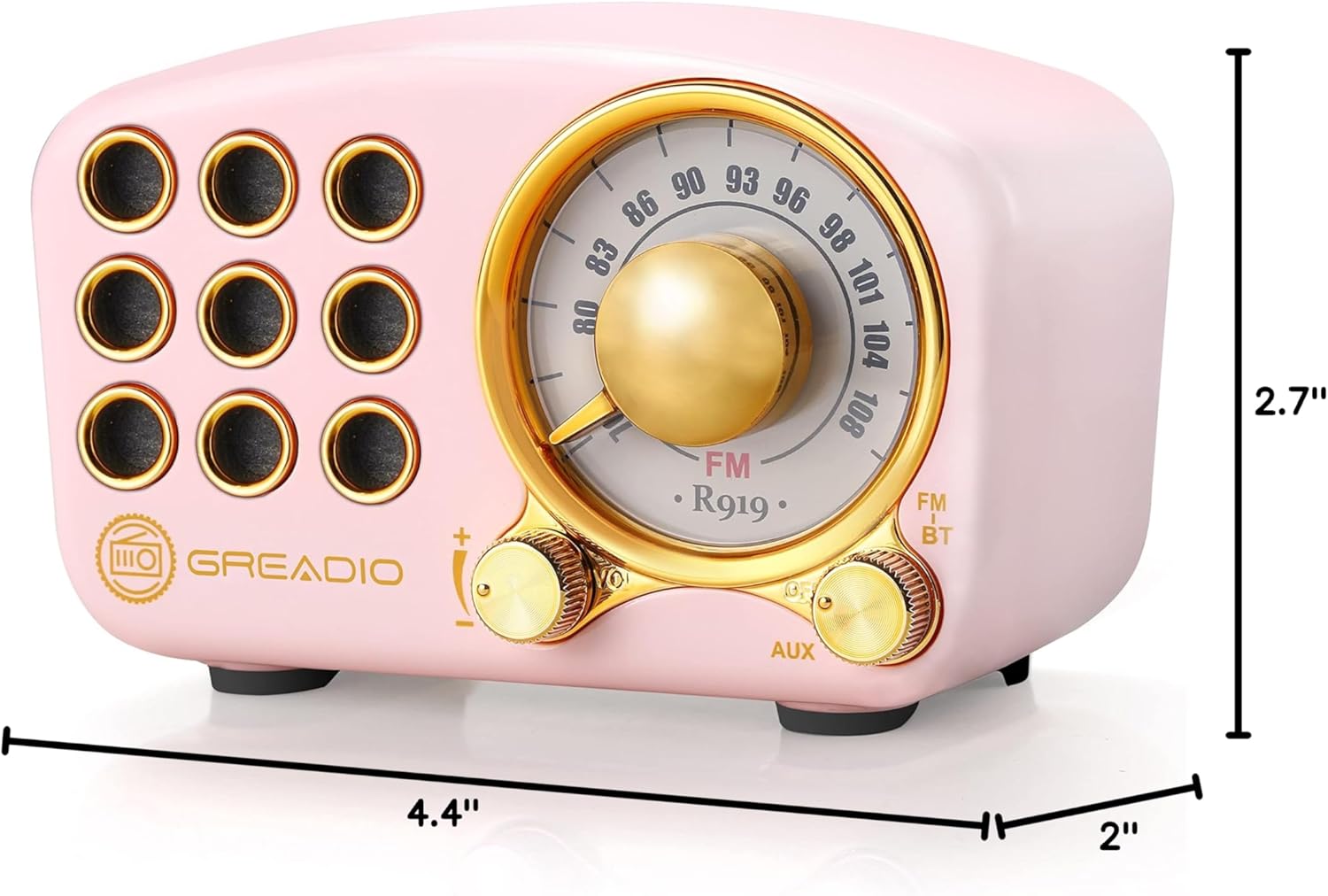
Image: Dimensions of the Greadio Retro Bluetooth Speaker.
11. אחריות ותמיכה
Greadio products are designed for reliability and performance. For warranty information or technical support, please refer to the contact details provided on the product packaging or visit the official Greadio webאתר. שמור את קבלת הרכישה כהוכחת קנייה.