
מָבוֹא
The Jasco 45852 Smart Dimmer is a Zigbee-certified plug-in device designed for wireless control of your home's plug-in lights. It allows for remote dimming and on/off functionality, integrating with various Zigbee-compatible gateways and smart home systems. This manual provides instructions for setup, operation, and maintenance of your smart dimmer.
תכונות המוצר
- Zigbee Compatibility: Works with Zigbee-certified gateways, including Amazon Echo Plus, Echo Show (2nd gen), SmartThings, Wink, PEQ, and Logitech Harmony Home Hub Extender.
- עיצוב שקע כפול: Features one Zigbee-controlled, polarized outlet for dimming and one always-on, grounded outlet.
- הפעלה מרחוק: Control ON/OFF and brightness functions of indoor plug-in dimmable LED, CFL, incandescent, and halogen lighting from mobile devices.
- ניטור אנרגיה: Provides energy reporting to help reduce electrical costs.
- עיצוב חוסך מקום: Side-access outlets and compact construction allow for discreet placement without blocking the second outlet of a duplex receptacle.
- שליטה ידנית: Includes a manual On/Off and program button on the device.
- טווח אלחוטי: Up to 150ft from the controller or closest Zigbee device.

תְמוּנָה: The Jasco 45852 Smart Dimmer showing its polarized wirelessly controlled outlet, grounded always-on outlet, and the manual On/Off & Program button. Its design ensures the second wall outlet remains free for use.
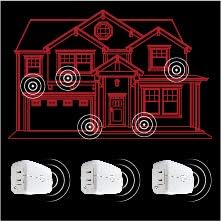
תְמוּנָה: A diagram illustrating how multiple Jasco Smart Dimmers can extend the Zigbee wireless range throughout a home, creating a mesh network for reliable control.
התקנה והתקנה
- מיקום: Plug the Jasco 45852 Smart Dimmer into a standard 120V AC wall outlet. Ensure it is placed within range of your Zigbee gateway or another Zigbee device to ensure proper network connectivity. The compact design allows it to fit behind furniture and leave the second outlet free.
- חבר מכשיר: Plug the dimmable light fixture you wish to control into the polarized smart outlet of the dimmer. The other grounded outlet provides continuous power and is not dimmable.
- Pairing with a Zigbee Gateway:
- Follow the instructions provided by your specific Zigbee gateway (e.g., Amazon Echo Plus, SmartThings, Wink) to add a new device.
- Typically, this involves putting your gateway into "discovery" or "pairing" mode.
- Once your gateway is in pairing mode, press the manual On/Off & Program button on the Jasco Smart Dimmer. The LED indicator on the dimmer will flash to indicate pairing mode and then turn solid when successfully paired.
- פֶּתֶק: When pairing with SmartThings, it may be recognized as a "GE" device.
- בּוֹחֵן: After successful pairing, test the dimmer by using your gateway's app or voice commands (if applicable) to turn the connected light on/off and adjust its brightness.
The Jasco 45852 Smart Dimmer is compatible with Amazon Alexa devices when connected through a certified hub, or directly with Echo Plus and Echo Show (2nd gen). It is not compatible with Philips Hue (Zigbee Light Link – ZLL).
הוראות הפעלה
שליטה ידנית
The manual On/Off & Program button on the front of the dimmer allows for direct control of the connected light.
- Press the button once to turn the connected light ON or OFF.
- To adjust brightness manually, press and hold the button. Release when the desired brightness level is reached.
Remote Control via Zigbee Gateway
Once paired with your Zigbee gateway, you can control the dimmer wirelessly using your gateway's mobile application, computer interface, or voice commands (if supported by your gateway and voice assistant).
- בקרת הפעלה/כיבוי: Use the app or voice command to toggle the light connected to the smart outlet.
- עמעום: Adjust the brightness level from 0-100% through your smart home app. Dimming lights can help reduce energy costs and extend bulb life.
- תזמון: Create custom schedules for your lights to turn on/off or dim at specific times.
- סצנות: Integrate the dimmer into custom scenes with other smart devices for automated lighting scenarios.

תְמוּנָה: The Jasco Smart Dimmer being controlled wirelessly by various devices such as a smartphone, tablet, and PC, demonstrating its integration into a smart home ecosystem for customized scenes and scheduled events.

תְמוּנָה: A graphic illustrating energy monitoring capabilities, showing a graph of energy usage over time, highlighting how dimming can reduce energy consumption and save money.
תַחזוּקָה
The Jasco 45852 Smart Dimmer requires minimal maintenance.
- ניקוי: Disconnect the dimmer from the power outlet before cleaning. Wipe the device with a soft, dry cloth. Do not use liquid cleaners or sprays.
- עדכוני קושחה: Periodically check your Zigbee gateway's application for any available firmware updates for connected devices. Follow the gateway's instructions for applying updates.
פתרון בעיות
| בְּעָיָה | סיבה / פתרון אפשרי |
|---|---|
| Light does not turn on or dim. |
|
| LED lights blink or glow dimly when off. |
|
| Dimmer cannot pair with gateway. |
|
| השלט רחוק אינו מגיב. |
|
מפרטים
| תכונה | פְּרָט |
|---|---|
| מספר דגם | 45852 |
| מקור כוח | 120 VAC, 60 הרץ |
| Maximum Load (Dimmable Outlet) | 300W Incandescent, 100W Dimmable LED/CFL |
| Maximum Load (Always-On Outlet) | 15 Amps, 1800W Resistive |
| פרוטוקול קישוריות | זיגבי |
| טווח אלחוטי | Up to 150 ft. from controller or closest Zigbee device |
| טמפרטורת הפעלה | 32-104°F (0-40°C) |
| מידות (L x W x H) | 4 x 1.4 x 2.4 אינץ' (101.6 x 35.6 x 60.9 מ"מ) |
| משקל פריט | 7.2 אונקיות |
| צֶבַע | לָבָן |
| נוֹהָג | שימוש פנימי בלבד |

תְמוּנָה: A diagram showing the physical dimensions of the Jasco 45852 Smart Dimmer, measuring 4 inches in length, 1.4 inches in width, and 2.4 inches in height.

תְמוּנָה: The product packaging for the Jasco Plug-In Smart Dimmer, displaying key specifications such as maximum load for incandescent and dimmable LED/CFL bulbs, amperage, כרךtage, wireless range, and operating temperature.
מידע על אחריות
The Jasco 45852 Smart Dimmer comes with a אחריות מוגבלת לשנה. For detailed terms and conditions, please refer to the warranty documentation included with your product or visit the official Jasco webאֲתַר.
תמיכת לקוחות
For further assistance, technical support, or to inquire about warranty claims, please contact Jasco customer support.
- Webאֲתַר: Visit the official Jasco Products webאתר לשאלות נפוצות, משאבי תמיכה ופרטי יצירת קשר.
- טלפון/דוא"ל: Refer to the product packaging or Jasco's webאתר לקבלת פרטי הקשר העדכניים ביותר.