
1. הקדמה
This manual provides detailed instructions for the installation, operation, and maintenance of your Sanpyl Bluetooth MP3 Decoder Board. Please read this manual thoroughly before using the product to ensure proper function and to prevent damage.
2. מידע בטיחות
- ודא את אספקת החשמל כרךtage matches the product's specifications (DC 7V-12V or Micro USB 5V). Incorrect voltagה יכול לגרום נזק.
- אין לחשוף את המכשיר ללחות, גשם או טמפרטורות קיצוניות.
- הימנעו מפירוק או שינוי של המכשיר, שכן הדבר עלול לבטל את האחריות ולהוות סיכוני בטיחות.
- הרחק מהישג ידם של ילדים.
- נתק את החשמל לפני ביצוע חיבורים או ניתוקים כלשהם.
3. תכולת החבילה
ודא שכל הפריטים נמצאים בחבילה:
- 1 x Sanpyl Bluetooth MP3 Decoder Board
- 1 x שלט רחוק
- 1 x 2-pin Power Cable
- 2 x 3-pin Audio Cables
4. המוצר נגמרview
The Sanpyl Bluetooth MP3 Decoder Board is a versatile audio module designed for integrating music playback and FM radio capabilities into various projects. It supports multiple audio sources including USB drives, SD/MMC cards, Bluetooth, and external line-in. It also features hands-free calling and comes with a remote control for convenient operation.
4.1 פריסת הפאנל הקדמי

איור 4.1: Front panel of the decoder board. This view shows the digital display, USB port, SD/MMC card slot, and control buttons for playback, volume, and mode selection.
- תצוגה דיגיטלית: מציג את המצב הנוכחי, מספר הרצועה, התדר וכו'.
- יציאת USB: לחיבור כונני הבזק מסוג USB.
- חריץ לכרטיס SD/MMC: For inserting Secure Digital or MultiMediaCards.
- לחצני שליטה: Play/Pause, Volume Up/Next Track, Volume Down/Previous Track, Mode.
4.2 חיבורים אחוריים

איור 4.2: Rear connections of the decoder board. This image highlights the various input and output terminals for power, audio, and the FM antenna.
- DC 12V+ / GND: Main power input (7V-12V DC).
- Micro USB 5V Input: Alternative 5V power input.
- L IN / R IN / GND: Stereo audio line input.
- L Output / R Output / GND: Stereo audio line output.
- אנטנת FM: Connection point for an external FM antenna.
4.3 מידות
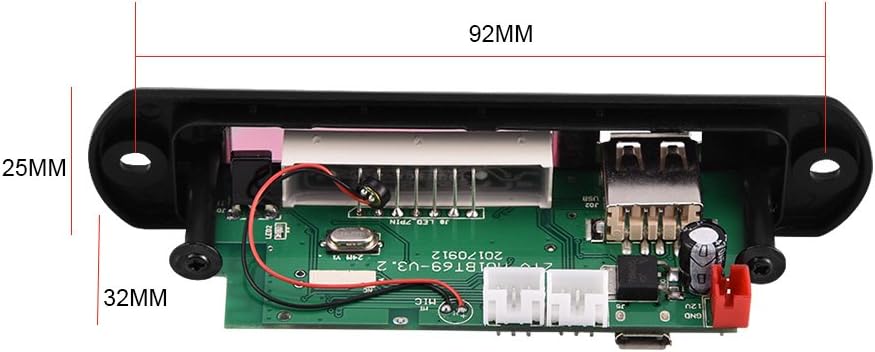
איור 4.3: Physical dimensions of the decoder board. The panel length is 107mm, height is 25mm, and depth is 32mm. The mounting hole spacing is 92mm.
5. מפרטים
| מספר דגם | Sanpylcw78yrodhs |
| כרך הפעלהtage | DC 7V to 12V (main), Micro USB 5V (alternative) |
| זרם הפעלה | 800mA עד 1A |
| Panel Dimensions (L x H x D) | 107 מ"מ x 25 מ"מ x 32 מ"מ |
| מרווח חור הרכבה | 92 מ"מ |
| גודל מסך | 45 מ"מ x 8 מ"מ |
| מדיה נתמכת | USB Disk, SD Card, MMC Card |
| קישוריות | Bluetooth, FM Radio, Line-in (AUX) |
| תכונות | Hands-free calls, Multiple EQ modes, Mute function, Digital display |
| משקל פריט | 2.08 אונקיות (כ-59 גרם) |
6. התקנה
6.1 חיבור מתח
The decoder board can be powered in two ways:
- DC 7V-12V: Connect the provided 2-pin power cable to the "DC 12V+" and "GND" terminals on the rear of the board (refer to Figure 4.2). Ensure correct polarity.
- מיקרו USB 5V: Alternatively, connect a standard Micro USB cable to the "Micro USB 5V Input" port. This is suitable for 5V power sources.
זְהִירוּת: Do not connect both 12V DC and Micro USB 5V power simultaneously. Choose one power source.
6.2 חיבורי שמע
- פלט שמע: Use the provided 3-pin audio cables to connect the "L Output", "R Output", and "GND" terminals to your ampלמכשיר או רמקולים פעילים.
- כניסת שמע (AUX): If you wish to use an external audio source (e.g., phone, computer), connect it to the "L IN", "R IN", and "GND" terminals. You will need to switch the mode to "LIN" for this input.
חיבור אנטנת FM 6.3
Connect a suitable FM antenna to the "FM Antenna" terminal for optimal radio reception (refer to Figure 4.2).
7. הוראות הפעלה
7.1 Power On / Automatic Playback
Once powered on, the decoder board will automatically start playing music if a USB disk, SD card, or MMC card is inserted. If no media is present, it will default to the last used mode.
7.2 בחירת מצבים
הקש על MODE button on the front panel or remote control to cycle through available modes: USB, SD, Bluetooth, FM, and LIN (Line Input).
7.3 זיווג בלוטות '
- Switch the decoder board to בלוטות' mode. The display will show "BT".
- On your mobile device, search for Bluetooth devices.
- בחר את המכשיר ששמו M01BT.
- If prompted for a password, enter 0000.
- Once paired, you can play audio from your device through the decoder board.
7.4 USB / SD / MMC Card Playback
- הכנס כונן הבזק מסוג USB ליציאת ה-USB או כרטיס SD/MMC לחריץ הכרטיס.
- The board will automatically switch to the corresponding mode (USB or SD) and begin playback.
- השתמש ב- הפעל/השהה, VOL- / Previous, ו VOL+ / הבא לחצנים לשליטה בהפעלה.
פעולת רדיו FM 7.5
- Switch the decoder board to FM מצב.
- לחץ והחזק את הפעל/השהה button to initiate an automatic scan for FM stations. The board will save found stations.
- השתמש ב- VOL- / Previous ו VOL+ / הבא כפתורים לניווט בין תחנות שמורות.
7.6 שיחות ללא ידיים
When in Bluetooth mode and paired with a phone, the decoder board supports hands-free calling. Incoming calls can be answered or ended using the remote control or specific buttons on the board (refer to remote control diagram if available, or typically the Play/Pause button).
7.7 פונקציות שלט רחוק
השלט הרחוק המצורף מספק גישה נוחה למגוון פונקציות:
- כּוֹחַ: הפעל / כבה את המכשיר.
- מצב: Switch between USB, SD, Bluetooth, FM, LIN.
- הפעל/השהה: Start or pause playback. Answer/End calls.
- הקודם הבא: Skip tracks or navigate FM stations.
- עוצמת הקול מעלה/הנמכת: כוונן את עוצמת השמע.
- EQ: Cycle through various equalizer sound modes.
- לְהַשְׁתִיק: השתקה או ביטול השתקת אודיו.
- לחצני מספר: Direct track selection (in USB/SD mode) or FM frequency input.
8. תחזוקה
- נקו את המכשיר בעזרת מטלית רכה ויבשה. אין להשתמש בחומרי ניקוי נוזליים או ממסים.
- Keep the USB port and SD card slot free from dust and debris.
- יש לאחסן את המכשיר במקום קריר ויבש כאשר אינו בשימוש למשך תקופות ממושכות.
9. פתרון תקלות
| בְּעָיָה | סיבה אפשרית | פִּתָרוֹן |
|---|---|---|
| אין חשמל / המכשיר לא נדלק. | Incorrect power connection; Insufficient voltage; Faulty power supply. | Check power cable connections and polarity. Ensure power supply is within 7V-12V DC or 5V Micro USB. Test with a different power source. |
| אין פלט קול. | Volume too low; Mute function active; Incorrect audio output connection; Ampבעיה של ליפר. | Increase volume. Press Mute button on remote. Verify audio output cables are correctly connected to amplifier/speakers. Test amplifier with another source. |
| בלוטות' לא מתחבר. | Device not in Bluetooth mode; Incorrect pairing password; Distance too far; Interference. | Ensure decoder is in Bluetooth mode ("BT" on display). Re-enter password "0000". Move device closer. Reduce interference from other wireless devices. |
| כרטיס USB/SD לא מתנגן. | כרטיס/כונן לא הוכנס כראוי; לא נתמך file format; Corrupted media. | Re-insert media. Ensure media contains supported audio files (e.g., MP3). Try a different USB drive or SD card. |
| קליטת רדיו FM גרועה. | No antenna connected; Weak signal; Interference. | Connect an external FM antenna. Reposition the antenna for better signal. Perform an auto-scan again. |
10. אחריות ותמיכה
Sanpyl products are designed for reliability and performance. For any issues or questions regarding your Bluetooth MP3 Decoder Board, please contact your retailer or Sanpyl customer support. Please retain your proof of purchase for warranty claims.
לסיוע נוסף, בקר ב- חנות סנפיל באמזון.