
1. מבוא ומעלהview
This manual provides comprehensive instructions for the setup, operation, maintenance, and troubleshooting of your SHARP 4T-C55BJ3EF2NB 55-inch 4K UHD Smart LED TV. Please read this manual thoroughly before using your television to ensure proper functionality and safety.
The SHARP 4T-C55BJ3EF2NB is a 55-inch 4K Ultra HD Smart LED TV, offering a resolution of 3840 x 2160 pixels. It features Active Motion 400, HDR10, HLG, Aquos UltraClear, and Aquos Motion technologies for smooth and clear image movements. The integrated Harman/Kardon speaker system, with 2 x 10W output, Dolby Digital, Dolby Digital Plus, DTS-HD, DTS Studio Sound, and Sound Equalizer, delivers an immersive audio experience. This TV also includes a Triple Tuner for satellite, cable, and antenna reception, along with a range of pre-installed smart applications.

איור 1.1: חזית view of the Sharp 4T-C55BJ3EF2NB 55-inch 4K UHD Smart LED TV, displaying colorful content and smart app logos.
2. מידע בטיחות
יש להקפיד תמיד על אמצעי זהירות בסיסיים בעת שימוש בטלוויזיה זו כדי להפחית את הסיכון לשריפה, התחשמלות ופציעה.
- אל תחשוף את הטלוויזיה לגשם או לחות.
- אל תחסום פתחי אוורור.
- ודא שלא דורכים על כבל החשמל או שהוא נלכד.
- נתק את הטלוויזיה מהחשמל במהלך סופות ברקים או כאשר אינה בשימוש למשך תקופות ארוכות.
- הפנה כל טיפול לצוות שירות מוסמך.
3. תכולת החבילה
פרקו בזהירות את הטלוויזיה שלכם וודאו שכל הפריטים הבאים כלולים:
- 1 x SHARP 4T-C55BJ3EF2NB 55-inch 4K UHD Smart LED TV
- 1 x Remote Control (including 2 x AAA batteries)
- 1 x TV Stand with Installation Package (screws, etc.)
- 1 x מדריך התחלה מהירה
- מדריך למשתמש אחד (מסמך זה)
4. התקנה
4.1 התקנה פיזית (מעמד או תלייה על קיר)
You can either install the TV on its included stand or mount it on a wall. Ensure the TV is placed on a stable, level surface if using the stand.
התקנת מעמד:
- הנח את הטלוויזיה כשמסך הטלוויזיה כלפי מטה על משטח רך ושטוח כדי למנוע נזק.
- Attach the stand components to the bottom of the TV using the provided screws from the installation package.
- ודא שכל הברגים מהודקים היטב.
הרכבה על הקיר:
The TV supports VESA standard mounting 400 x 200 mm. Use a compatible wall mount bracket (not included) and follow the instructions provided with the wall mount. Ensure the wall can support the TV's weight (approximately 21.4 kg).
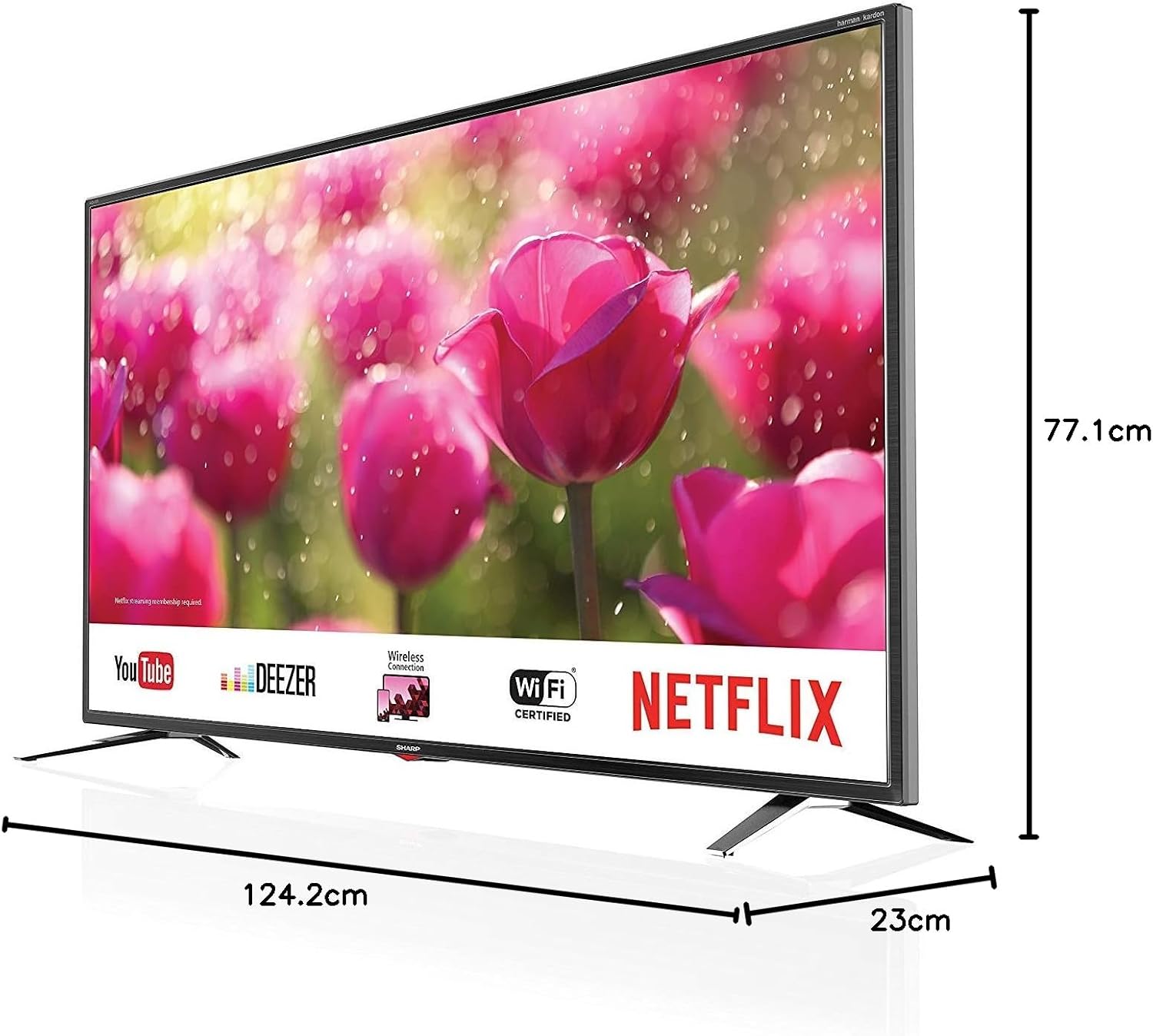
Figure 4.1: Product dimensions of the Sharp 4T-C55BJ3EF2NB 55-inch 4K UHD Smart LED TV.
4.2 חיבורים
חברו את ההתקנים החיצוניים שלכם לטלוויזיה באמצעות היציאות המתאימות הממוקמות בפאנל האחורי.

איור 4.2: אחורי view showing connection ports.
- HDMI: חבר עד 3 התקני HDMI (למשל, נגן Blu-ray, קונסולת משחקים).
- USB: Connect USB storage devices for media playback (3 ports available).
- אנטנה/כבלים/לוויין: Connect your antenna, cable, or satellite feed to the Triple Tuner input.
- רשת תקשורת מקומית (RJ-45): עבור חיבור אינטרנט קווי.
- פלט אודיו אופטי דיגיטלי: לחיבור למערכת שמע חיצונית.
- Audio/Headphone (3.5 mm jack): עבור אוזניות או רמקולים חיצוניים.
- חריץ CI+: עבור מודולי גישה מותנית (CAM) עבור ערוצים מוצפנים.
- חריץ לכרטיס SD: For media playback from SD cards.
4.3 התקנה ראשונה
After connecting all necessary cables and plugging in the power cord, press the power button on the remote control or TV. The TV will guide you through the initial setup process, including language selection, network connection (Wi-Fi or LAN), channel scanning, and time zone settings.
5. הפעלה
5.1 פעולה בסיסית
- הפעלה/כיבוי: לחץ על לחצן ההפעלה בשלט הרחוק.
- בקרת עוצמת הקול: השתמשו בכפתורי VOL +/-.
- בחירת ערוץ: Use the CH +/- buttons or number buttons.
- מקור קלט: Press the SOURCE button to select between HDMI, TV (Tuner), USB, etc.
- תפריט ניווט: השתמשו במקשי החצים ובלחצן אישור כדי לנווט בתפריטים.
5.2 תכונות טלוויזיה חכמה
Your SHARP TV is equipped with smart functionalities, allowing access to various online content and applications via the Sharp Aquos Net+ App Store.
- אפליקציות מותקנות מראש: Access popular services like YouTube, Deezer, Rakuten TV, Chili, Netflix, Eurosport Player, Joyn, and Prime Video directly from the home screen.
- Web דפדפן: גלישה באינטרנט ישירות דרך הטלוויזיה שלך.
- חיבור אלחוטי (WLAN): התחבר לרשת ה-Wi-Fi הביתית שלך כדי לגשת לאינטרנט.
5.3 הגדרות תמונה וקול
התאם אישית את שלך viewחוויית האזנה דרך תפריט ההגדרות של הטלוויזיה.
- מצבי תמונה: Select from various preset picture modes (e.g., Standard, Movie, Game) or customize brightness, contrast, color, and sharpness.
- תמיכה ב-HDR: The TV supports HDR10 and HLG for enhanced contrast and color with compatible content.
- מצבי סאונד: Choose from preset sound modes or adjust bass, treble, and balance. The Harman/Kardon speaker system provides high-quality audio.
- אקולייזר סאונד: Fine-tune audio frequencies for a personalized sound profile.
5.4 פעולת מקלט משולש
The integrated Triple Tuner supports DVB-T/T2 (terrestrial), DVB-C (cable), and DVB-S/S2 (satellite) signals. After initial channel scanning, you can access digital channels directly.
- רשימת ערוצים: View and manage your scanned channels.
- מדריך תוכניות אלקטרוני (EPG): גישה למידע על התוכנית ולוח הזמנים.
6. תחזוקה
6.1 ניקוי
- מָסָך: נגבו בעדינות את המסך בעזרת מטלית רכה ונטולת סיבים. עבור סימנים עקשניים, השתמשו בתמיסת ניקוי מסך המיועדת במיוחד לטלוויזיות, ומרחו אותה על המטלית, לא ישירות על המסך.
- קבינט: נגבו את ארון הטלוויזיה במטלית רכה ויבשה. אין להשתמש בחומרי ניקוי שוחקים או ממסים.
6.2 עדכוני תוכנה
Periodically check for software updates to ensure optimal performance and access to the latest features. Updates can typically be performed via the TV's settings menu when connected to the internet.
7. פתרון תקלות
אם נתקלת בבעיות עם הטלוויזיה שלך, עיין בבעיות הנפוצות ובפתרונות הבאים:
| בְּעָיָה | פתרון אפשרי |
|---|---|
| אין כוח | בדוק אם כבל החשמל מחובר היטב לטלוויזיה ולשקע בקיר. נסה שקע אחר. |
| אין תמונה, אבל יש קול | ודא שמקור הקלט הנכון נבחר. בדוק את חיבורי הכבלים להתקנים חיצוניים. |
| אין קול, אבל יש תמונה | בדוק את עוצמת הקול ואת מצב ההשתקה. ודא את חיבורי כבל השמע. בדוק את הגדרות פלט השמע של הטלוויזיה. |
| השלט רחוק לא עובד | החלף סוללות. ודא שאין חסימות בין השלט לחיישן ה-IR של הטלוויזיה. |
| לא ניתן להתחבר ל-Wi-Fi | בדוק את סיסמת ה-Wi-Fi. הפעל מחדש את הנתב. ודא שהטלוויזיה נמצאת בטווח קליטה של אות ה-Wi-Fi. |
For more complex issues, consult the full user manual (if available in print) or contact Sharp customer support.
8. מפרטים
| תכונה | תֵאוּר |
|---|---|
| מספר דגם | 4T-C55BJ3EF2NB |
| מותג | חַד |
| גודל מסך | 55 אינץ '(139 ס"מ) |
| טכנולוגיית תצוגה | LED |
| הַחְלָטָה | 4K Ultra HD (3840 x 2160 פיקסלים) |
| קצב רענון | 60 הרץ |
| תמיכה ב-HDR | HDR10, HLG |
| טכנולוגיית תנועה | Active Motion 400, Aquos UltraClear, Aquos Motion |
| מערכת סאונד | Harman/Kardon, 2 x 10W (8 Ohm), Dolby Digital, Dolby Digital Plus, DTS-HD, DTS Studio Sound, Sound Equalizer |
| מקלטים | Triple Tuner (DVB-T/T2/C/S/S2) with HEVC/H.265 (10-bit), MPEG4/H.264, VP9 support |
| קישוריות | 3x HDMI 4K, 3x USB, Audio/Headphone (3.5 mm jack), Digital Optical Audio Output, LAN (RJ-45), WLAN (2.412 GHz – 2.472 GHz), 1x SD Card Slot, CI+ Slot |
| תכונות חכמות | Web Browser, Sharp Aquos Net+ App Store, Pre-installed apps (YouTube, Netflix, Deezer, Prime Video, etc.) |
| מידות מוצר (עם מעמד) | 124.2 x 77.1 x 23 ס"מ (ב x H x D) |
| משקל מוצר (עם מעמד) | 21.4 ק"ג |
| תקן הרכבה VESA | 400 x 200 מ"מ |
| יַצרָן | חַד |
| תאריך זמין ראשון | 15 בינואר 2020 |
9. אחריות ותמיכה
למידע על אחריות, אנא עיינו בכרטיס האחריות המצורף למוצר שלכם או בקרו באתר הרשמי של Sharp. website. For technical support, troubleshooting assistance beyond this manual, or service requests, please contact Sharp customer service.
תמיכה מקוונת: www.sharp.eu