1. הקדמה
The LILYTECH ZL-7918A is an advanced intelligent temperature and humidity controller designed for precise environmental management. It offers stable and reliable performance, making it ideal for applications such as incubators, climate chambers, and warehouses. This manual provides comprehensive instructions for the installation, operation, and maintenance of your ZL-7918A controller.

Figure 1: LILYTECH ZL-7918A controller with connected temperature and humidity sensors, showing the main unit and external probes.
2. תכונות עיקריות
The ZL-7918A controller is equipped with a range of features to ensure optimal environmental control:
- בקרת טמפרטורה: Precise management of heating elements.
- בקרת לחות: Accurate regulation of humidity levels.
- בקרת תאורה: Manages illumination cycles.
- חימום עזר: Supports an additional heating output.
- Egg Turning Control: Configurable periods and durations for automatic egg turning (left and right).
- Timing Ventilation Control: Schedules ventilation cycles.
- בקרת אזעקה: Alerts for deviations from set parameters.
- כיול טמפרטורה ולחות: Allows for sensor calibration to maintain accuracy.
- Hatching Day Display: Tracks and displays the number of hatching days (up to 99 days).
3. התקנה והתקנה
3.1 מידות והתקנה של המכשיר
The ZL-7918A controller has a device size of 160x80x95 mm. The recommended installation drilling size for mounting is 151.5x76.5 mm.
3.2 הוראות חיווט
Proper wiring is crucial for the safe and correct operation of the controller. Refer to the wiring diagram below for connections. Ensure all connections are secure and follow local electrical codes.

איור 2: אחורי view of the ZL-7918A controller, displaying the terminal block for electrical connections.
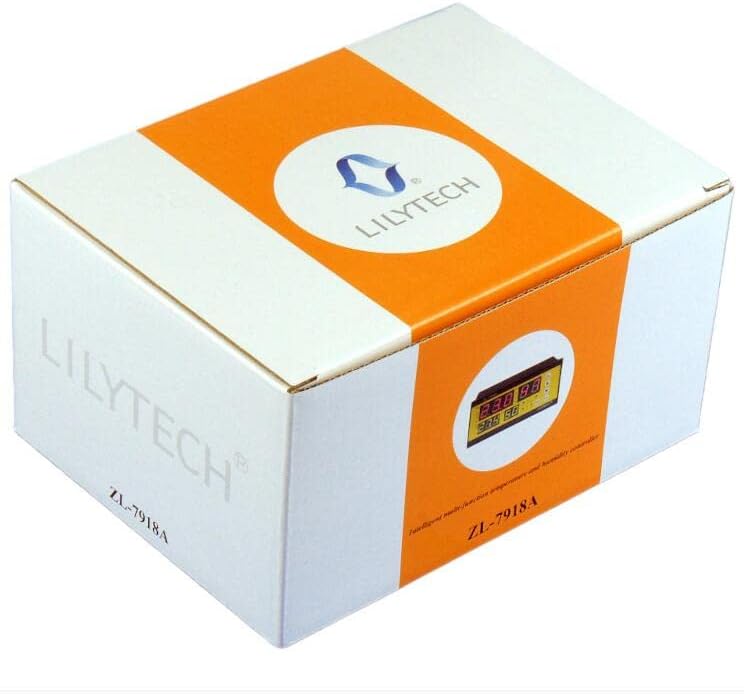
Figure 3: Detailed wiring diagram for the ZL-7918A controller, illustrating connections for power supply, sensors, and output loads.
ספק כוח: Connect AC100~240V 50/60Hz to terminals L and N (13 and 14).
חיישנים:
- חיישן לחות: Connect the Red, Yellow, Black, and Orange wires to terminals 1, 2, 3, and 4 respectively.
- חיישן טמפרטורה: חברו לטרמינלים 5 ו-6.

Figure 4: ZL-SHr05A Humidity Sensor, showing its compact design and connection points. This sensor is designed for accurate humidity measurement within a range of 0-80% RH.
בקרת פלט: The controller provides 7 output controls. Ensure the load for heaters does not exceed 1500W, illumination does not exceed 100W, and humidity, fan, and egg turning outputs do not exceed 1A/250Vac.
- אוהד: Terminals 15 (COM) and 16.
- Egg Turning Left: Terminals 15 (COM) and 17.
- Egg Turning Right: Terminals 15 (COM) and 18.
- לַחוּת: Terminals 15 (COM) and 19.
- Illumination (Lamp): Terminals 15 (COM) and 20.
- Auxiliary Heater (HEAT2): Terminals 21 and 22.
- Main Heater (HEAT1): Terminals 23 and 24.
4. תפעול
4.1 תצוגה נגמרתview
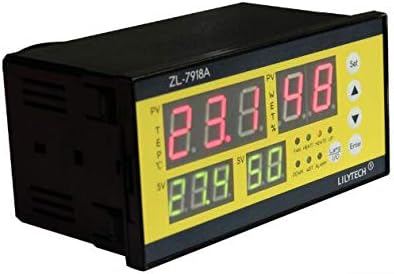
איור 5: חזית view of the ZL-7918A controller, highlighting the digital display and control buttons for setting parameters.
The controller features a clear digital display showing current temperature (PV TEMP), set temperature (SV TEMP), current humidity (PV WET%), and set humidity (SV WET%). Indicator lights show the status of various outputs (FAN, HEAT1, HEAT2, UP, DOWN, WET, ALARM, L/R for egg turning).
4.2 הגדרת פרמטרים
Use the "Set" button to enter the parameter setting mode and the arrow keys (Up/Down) to navigate and adjust values. The "Enter" button confirms selections.
- טווח הגדרת טמפרטורה: 1~65℃
- טווח הגדרת לחות: 10~80% RH
- Egg-Turning Control:
- Period: 1~999 minutes
- Turning Time: 0~999 seconds
- Turning Times: 0~999 times
- בקרת אוורור:
- Period: 1~999 minutes
- Ventilating Time: 0~999 seconds
- בקרת תאורה:
- Period: 1~999 minutes
- Illuminating Time: 0~999 seconds
Refer to the detailed programming guide (not included in this general manual) for specific parameter codes and advanced settings.
5. תחזוקה
To ensure the longevity and accuracy of your ZL-7918A controller, follow these maintenance guidelines:
- ניקוי: Regularly wipe the controller's surface with a soft, dry cloth. Do not use abrasive cleaners or solvents.
- טיפול בחיישנים: Keep the temperature and humidity sensors clean and free from dust or debris. Avoid exposing sensors to extreme physical shock or moisture beyond their operating limits.
- חיבורים: בדקו מעת לעת את כל חיבורי החיווט כדי לוודא שהם מאובטחים וחופשיים מקורוזיה.
- כִּיוּל: If accuracy issues are suspected, perform temperature and humidity calibration as per the advanced settings guide.
6. פתרון תקלות
This section addresses common issues you might encounter with your ZL-7918A controller. For problems not listed here, please contact customer support.
| בְּעָיָה | סיבה אפשרית | פִּתָרוֹן |
|---|---|---|
| הבקר לא נדלק. | אין אספקת חשמל; חיווט שגוי. | Check power source (AC100~240V). Verify L and N wiring connections. |
| קריאות טמפרטורה/לחות לא מדויקות. | Dirty or faulty sensor; need for calibration. | Clean sensors. Perform temperature and humidity calibration. Replace sensor if faulty. |
| Output (e.g., heater, fan) not activating. | Incorrect settings; faulty wiring; overloaded output. | Check set parameters. Verify output wiring. Ensure load does not exceed specified limits (e.g., heaters ≤ 1500W). |
| אזעקה פעילה כל הזמן. | Parameters outside set limits; alarm threshold too narrow. | Adjust set temperature/humidity or alarm thresholds. Ensure environmental conditions are within desired range. |
7. מפרט טכני
| פָּרָמֶטֶר | עֵרֶך |
|---|---|
| ספק כוח | AC100~240V 50/60Hz |
| חיישן טמפרטורה | 1 (L=2M) |
| חיישן לחות | 1 (L=2M) |
| טווח הגדרת לחות | 10~80% RH |
| טווח הגדרת טמפרטורה | 1~65℃ |
| טווח תצוגת לחות | 0~99% RH |
| טווח תצוגת טמפרטורה | -20~80℃ |
| Humidity Measuring Accuracy | ±3% (under temperature 20~60℃) |
| דיוק מדידת טמפרטורה | ±1% |
| בקרת תפוקה | 7 outputs (heater, aux-heater, fan, egg left-turning, egg right-turning, humidity, illumination) |
| Heater Output Load | ≤ 1500W |
| Illumination Output Load | ≤ 100W |
| Humidity, Fan, Egg Turning Output Load | ≤ 1A/250Vac |
| Hatching Day Record | מקסימום 99 ימים |
| מבצע סביבה | -10~45℃, <90%RH without dew |
| גודל מכשיר | 160x80x95 מ"מ |
| Installation Drilling Size | 151.5x76.5 מ"מ |
| חוֹמֶר | פּלָסטִי |
| סוג תצוגה | LCD או LED |
8. מידע על אחריות
LILYTECH products are manufactured to high quality standards. For specific warranty terms and conditions, please refer to the warranty card included with your product or contact LILYTECH customer support directly. Keep your purchase receipt as proof of purchase for any warranty claims.
9. תמיכת לקוחות
If you require further assistance or have questions regarding your ZL-7918A controller, please contact LILYTECH customer support. Contact details can typically be found on the product packaging or the official LILYTECH webאֲתַר.
For technical inquiries, please have your product model (ZL-7918A) and a detailed description of the issue ready.