
מָבוֹא
Thank you for choosing the ORSKEY Dash Cam S680. This manual provides detailed instructions for the installation, operation, and maintenance of your dash camera. Please read this manual thoroughly before use to ensure proper functionality and to maximize your experience with the product.
תוכן החבילה
אנא בדקו את החבילה עבור הפריטים הבאים:
- ORSKEY Dash Cam S680 Unit
- מטען לרכב
- הר יניקה
- מדריך למשתמש (מסמך זה)

The package contents of the ORSKEY Dash Cam S680, including the main camera unit, a suction cup mount for windshield attachment, and a car charger for power.
המוצר נגמרview
The ORSKEY Dash Cam S680 features a 3.0-inch LCD display, a 170-degree wide-angle lens, and records in 1080P Full HD. It is equipped with a Sony Exmor IMX 323 sensor and 6 glass lens elements for superior image quality, especially in low-light conditions with its WDR technology.
This image shows the advanced lens system of the ORSKEY Dash Cam, featuring a Sony Exmor IMX 323 sensor and 6 glass elements for clear 1080P video capture.
הגדרה
1. הכנסת כרטיס ה-Micro SD
Before using the dash cam, a Micro SD card (Class 10 or higher, up to 32GB) must be inserted. The Micro SD card is לא כלול בחבילה.
- ודא שמצלמת הרכב כבויה.
- Locate the Micro SD card slot on the side of the dash cam.
- הכנס את כרטיס ה-Micro SD כאשר המגעים הזהובים פונים לחלק האחורי של המצלמה עד שייכנס למקומו בנקישה.
- כדי להוציא, דחפו בעדינות את הכרטיס פנימה עד שיישמע קליק, לאחר מכן שחררו, והוא יקפוץ החוצה.
Note: It is recommended to format the Micro SD card within the dash cam settings before first use and periodically thereafter to ensure optimal performance.
2. הרכבת מצלמת הדאש
- נקו את האזור בשמשה הקדמית שבו אתם מתכוונים להתקין את מצלמת הרכב.
- Attach the suction mount to the dash cam.
- לחץ את כוס היניקה בחוזקה כנגד השמשה הקדמית וסובב את הידית כדי לקבע אותה. מקם את המצלמה כדי להבטיח צילום ברור view של הכביש מבלי להפריע לראות שלך בנהיגה.

A visual guide demonstrating how to properly install the dash cam onto your car's windshield using the suction mount and connect the power cable.
3. חיבור חשמל
- חבר את מטען הרכב לשקע החשמל של מצלמת הרכב.
- חבר את הקצה השני של מטען הרכב לשקע המצית של הרכב שלך.
- נתבו את כבל החשמל בצורה מסודרת לאורך קצה השמשה הקדמית ולוח המחוונים כדי למנוע חסימה. view או הפרעה לבקרות הנהיגה.
הוראות הפעלה
1. הפעלה/כיבוי
- The dash cam will automatically power on and begin recording when your vehicle's engine starts (and the cigarette lighter provides power).
- It will automatically power off when the engine is turned off.
- כדי להפעיל/לכבות באופן ידני, לחץ והחזק את לחצן ההפעלה.
2. מצבי הקלטה
The dash cam offers several recording features to ensure comprehensive coverage:
- הקלטת לולאה: This feature allows continuous recording. When the Micro SD card reaches its storage limit, the camera automatically overwrites the oldest unlocked footage with new recordings. This ensures that recording never stops due to a full card.

An illustration detailing the loop recording feature, where the camera continuously records and overwrites the oldest footage when the memory card is full, ensuring uninterrupted recording.
- חיישן G (הקלטת חירום): The built-in G-sensor detects sudden impacts or collisions. When triggered, it automatically locks the current video segment, preventing it from being overwritten by loop recording. This footage is saved in a separate folder to protect critical evidence.
- זיהוי תנועה: When enabled, the dash cam will automatically start recording if it detects movement in front of the vehicle while parked. This feature requires continuous power supply (e.g., hardwiring kit, not included) to function when the car is off.
- ניטור חניה: Similar to motion detection, this mode activates recording if an impact is detected while the vehicle is parked and the engine is off.

This image highlights the 24-hour monitoring capabilities, including motion detection and parking monitoring, which activate the camera when movement or impact is detected while parked.
3. Wide Dynamic Range (WDR) and Night Vision
The dash cam incorporates WDR technology and 6 unique infrared LED fill lights to enhance video quality in various lighting conditions, providing clear recordings both day and night.

A side-by-side comparison demonstrating the dash cam's clear video quality during the day and its enhanced night vision performance in low-light conditions.
4. ניווט והגדרות בתפריטים
Use the buttons on the side of the dash cam to navigate through the menu options displayed on the 3-inch LCD screen. Common settings include video resolution, loop recording duration, G-sensor sensitivity, motion detection on/off, date/time stamp, and Micro SD card formatting.

א מפורט view of the dash cam's 3-inch LCD screen displaying the menu options for configuration and settings.
5. השמעה
כדי לחזורview foo מוקלטtage:
- Stop recording by pressing the OK button (if currently recording).
- Enter playback mode via the menu.
- Browse through video files using the navigation buttons.
- בחר א file ולחץ על OK כדי לשחק.
- Alternatively, remove the Micro SD card and view פוtage on a computer using a card reader.
תַחזוּקָה
1. ניהול כרטיסי מיקרו SD
- Regularly format your Micro SD card (at least once a month) to prevent data corruption and ensure smooth operation.
- Use a high-quality Class 10 or higher Micro SD card from a reputable brand.
- Replace the Micro SD card if you experience frequent errors or recording issues.
2. ניקוי מצלמת הרכב
- Use a soft, dry cloth to clean the camera lens and screen. Avoid abrasive materials or chemical cleaners.
- Ensure the suction cup is clean for optimal adhesion to the windshield.
פתרון בעיות
- המצלמה לא נדלקת: Check if the car charger is properly connected to both the dash cam and the vehicle's cigarette lighter. Ensure the vehicle's ignition is on.
- Camera stops recording or does not record:
- Ensure a Micro SD card is inserted and properly formatted.
- The Micro SD card may be full; enable loop recording or format the card.
- The Micro SD card may be faulty or not Class 10 or higher. Try a different card.
- Check power connection; intermittent power can cause recording interruptions.
- איכות וידאו ירודה:
- Clean the camera lens and your car's windshield.
- ודא שהסרט המגן הוסר מהעדשה.
- בדוק את הגדרות רזולוציית הווידאו בתפריט.
- Motion Detection/Parking Monitoring not working effectively:
- These features require continuous power when the vehicle is off, typically via a hardwiring kit (not included).
- The 32GB Micro SD card capacity may limit the duration of parking mode recordings.
- Adjust sensitivity settings in the menu.
- Menu navigation is confusing: Refer to the detailed instructions in the 'Operating Instructions' section for specific button functions and menu layouts.
מפרטים
| מספר דגם | S680 |
| רזולוציית לכידת וידאו | 1080p (1920x1080) ב-30 פריימים לשנייה |
| גודל מסך | 3 אינץ' |
| זווית אמיתית של View | 170 מעלות |
| טכנולוגיית חיישן אופטי | CMOS (Sony Sensor) |
| סוג זיכרון פלאש | MicroSD (up to 32GB, Class 10 or higher) |
| טכנולוגיית קישוריות | HDMI, USB |
| סוג הרכבה | הר יניקה |
| סוג תא סוללה | ליתיום פולימר |
| רכיבים כלולים | Car Charger, Suction Mount, User Manual |

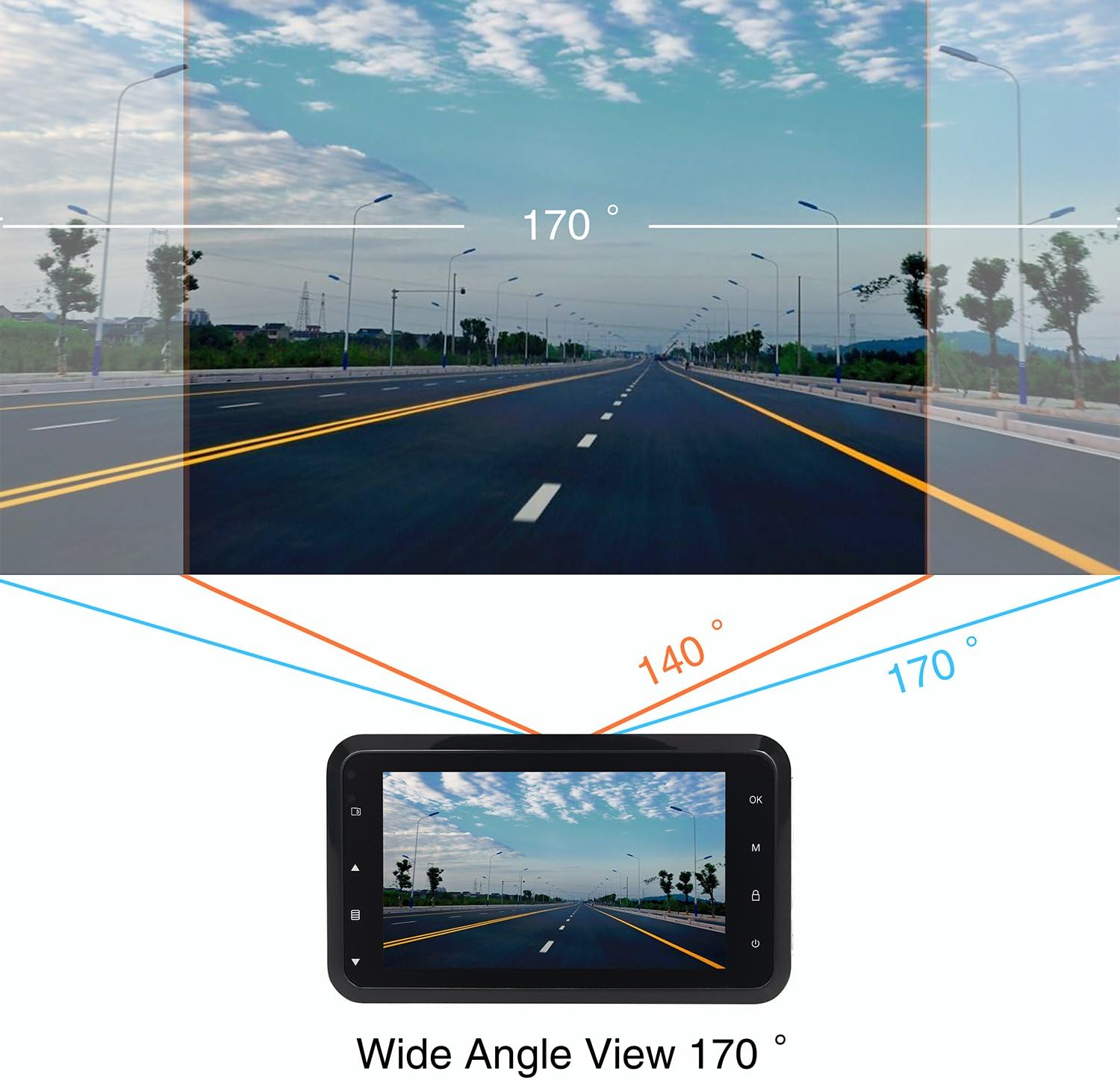
This diagram shows the expansive 170-degree wide-angle field of view captured by the dash cam, providing comprehensive road coverage.
אחריות ותמיכה
The ORSKEY Dash Cam S680 comes with a אחריות ל-12 חודשים מתאריך הרכישה. אחריות זו מכסה פגמי ייצור ומבטיחה שהמוצר יתפקד כמתוכנן בשימוש רגיל.
For technical support, warranty claims, or any questions regarding your dash cam, please contact ORSKEY customer service. Details for contacting support are typically found on the product packaging or the official ORSKEY webאֲתַר.
ORSKEY provides a qualified after-sale service team, available 7 days a week, 24 hours a day, to assist you.