
מָבוֹא
This manual provides detailed instructions for the installation, operation, and maintenance of your LoraTap WIFI Smart Roller Shutter Timer. Please read this manual carefully before installation and use to ensure proper function and safety.
מידע בטיחות
- יש לוודא ניתוק אספקת החשמל לפני התקנה או תחזוקה כדי למנוע התחשמלות.
- יש לבצע את ההתקנה על ידי חשמלאי מוסמך או בהתאם לתקנות החשמל המקומיות.
- אין להפעיל את המכשיר בידיים רטובות.
- הרחק את המכשיר ממים ומסביבות לחות גבוהה.
- אל תנסה לפרק או לתקן את המכשיר בעצמך. צור קשר עם התמיכה אם מתעוררות בעיות.
- מכשיר זה מיועד לשימוש פנימי בלבד.
תכונות המוצר
- שליטה חכמה: Upgrade traditional electric roller shutters or awnings for smart control via smartphone app or voice commands.
- Remote Access & Scheduling: Control your blinds from anywhere and set custom schedules for automatic opening and closing.
- Group Control & Family Sharing: Group multiple roller shutters for simultaneous control and share access with family members.
- עיצוב עמיד: Features a scratch-resistant tempered crystal glass panel, safe to touch with wet hands and easy to clean.
- Adjustable Motor Run Time: Configure the motor's operating time for precise control over shutter position (e.g., 50% open/close).
- תאימות שליטה קולית: Works with Google Home and Amazon Alexa for hands-free operation.
תוכן החבילה
ודא שכל הפריטים נמצאים בחבילה:
- 1 x LoraTap WIFI Smart Roller Shutter Timer
- 1 x User Manual (German/English)
- 1 x מברג
- 4 x ברגים
- 1 x Wiring Clamp
מפרטים
| פָּרָמֶטֶר | עֵרֶך |
|---|---|
| מידות | 86 x 86 x 34 mm (with cover frame) |
| חומר לוח | זכוכית קריסטל מחוסמת |
| חומר תחתון | Fire-retardant Polycarbonate (Plastic) |
| כרך הפעלהtage | AC 100-250 V 50/60 הרץ |
| Rated/Maximum Current | 3 A / 10 A. |
| Power per Speed | 300 W |
| Wi-Fi בתקן | 2.4 GHz, 802.11b/g/n |
| זרם המתנה | 0.001 א |
| צריכת המתנה | 0.25 W |
| שיטת התקנה | Screw-mounted, fits standard 60mm flush-mounted box |
| תוכנה תואמת | Smart Life App (Android 4.4+, iOS 8+) |
| הסמכות | CE |
התקנה והתקנה
1. תרשים חיווט
The smart roller shutter timer requires a neutral conductor for proper operation. Ensure your existing wiring includes a neutral wire. This switch is suitable for already motorized roller shutters.

Image: Detailed wiring diagram showing connections for Live (L), Neutral (N), and motor control wires (L1 for Up, L2 for Down). The diagram also indicates the input voltagטווח e של 100-250VAC.
- קֶלֶט: Connect the Neutral (N) and Live (L) wires from your power supply to the corresponding terminals on the switch.
- Output to Motor: Connect the motor's Neutral (N), Up (L1), and Down (L2) wires to the respective terminals on the switch.
- הערה חשובה: A neutral conductor must be present.
2. התקנה פיזית
- נתק חשמל: Before starting, turn off the main power supply to the circuit where you will install the switch.
- Prepare Mounting Box: The switch fits a standard 60mm diameter flush-mounted box.
- חיבור חוטים: Follow the wiring diagram carefully. Use the provided wiring clamp במידת הצורך.
- הרכב את המתג: Secure the switch into the flush-mounted box using the two provided screws (one on the left, one on the right).
- חיבור פאנל: Carefully attach the crystal glass panel to the switch module.
- החזר כוח: Once installation is complete and secure, restore power to the circuit.
3. התקנה וצימוד של אפליקציה
- הורד אפליקציה: Download the "Smart Life" application from the App Store (iOS 8 or higher) or Google Play Store (Android 4.4 or higher).
- הרשמה/התחברות: פתחו את האפליקציה ופתחו חשבון חדש או התחברו באמצעות חשבון קיים.
- הוסף מכשיר: In the Smart Life app, tap the "+" icon to add a new device. Select "Curtain Switch" or a similar category.
- הזן פרטי Wi-Fi: Follow the on-screen instructions to connect the switch to your 2.4 GHz Wi-Fi network. Ensure your phone is connected to the same 2.4 GHz network during pairing.
- אִשׁוּר: Once successfully paired, the device will appear in your app, ready for control.
הוראות הפעלה
1. בקרה ידנית
The touch panel allows for direct control of your roller shutters:
- חץ המורה למעלה: Tap to open the roller shutter.
- חץ למטה: Tap to close the roller shutter.
- Stop Button (Circle): Tap to pause the roller shutter at its current position.

תמונה: חזית view of the LoraTap Smart Roller Shutter Timer showing the touch-sensitive Up, Stop, and Down buttons. Also displays product dimensions (86x86x34mm) and a detailed wiring diagram on the back of the unit.
2. App Control (Smart Life)
After successful pairing, you can control your roller shutters via the Smart Life app:
- פתוח סגור: Use the virtual buttons in the app to open, close, or stop the roller shutter.
- Set Motor Run Time: The latest version of the switch allows you to set the motor's operating time. This enables partial opening or closing (e.g., 50%).

Image: Screenshot of the Smart Life app interface demonstrating the new function to set the motor's operating time in seconds (e.g., 10s, 120s) for precise control of roller shutter position.
3. תזמון וטיימרים
Set up automated schedules for your roller shutters:
- In the Smart Life app, navigate to the device settings and select "Schedule" or "Timer."
- Add new schedules by specifying the time, action (open/close), and repetition days.
- This feature allows for automatic operation, such as opening blinds in the morning.

Image: Demonstrates the Smart Life app's scheduling feature with various set times for opening and closing. Also highlights voice control compatibility with Amazon Alexa and Google Assistant.
4. שליטה קולית
Integrate your LoraTap switch with voice assistants:
- אמזון אלקסה: Enable the "Smart Life" skill in the Alexa app and link your account. You can then use commands like "Alexa, open the roller shutter" or "Alexa, close the roller shutter."
- Google Home: Link your Smart Life account in the Google Home app. Use commands such as "Hey Google, open the blinds" or "Hey Google, close the blinds."
5. Group Control and Family Sharing
- בקרה קבוצתית: In the Smart Life app, you can create groups of multiple LoraTap roller shutter timers to control them simultaneously with a single command.
- שיתוף משפחתי: Share control of your devices with family members through the Smart Life app, allowing everyone in the household to manage the roller shutters.
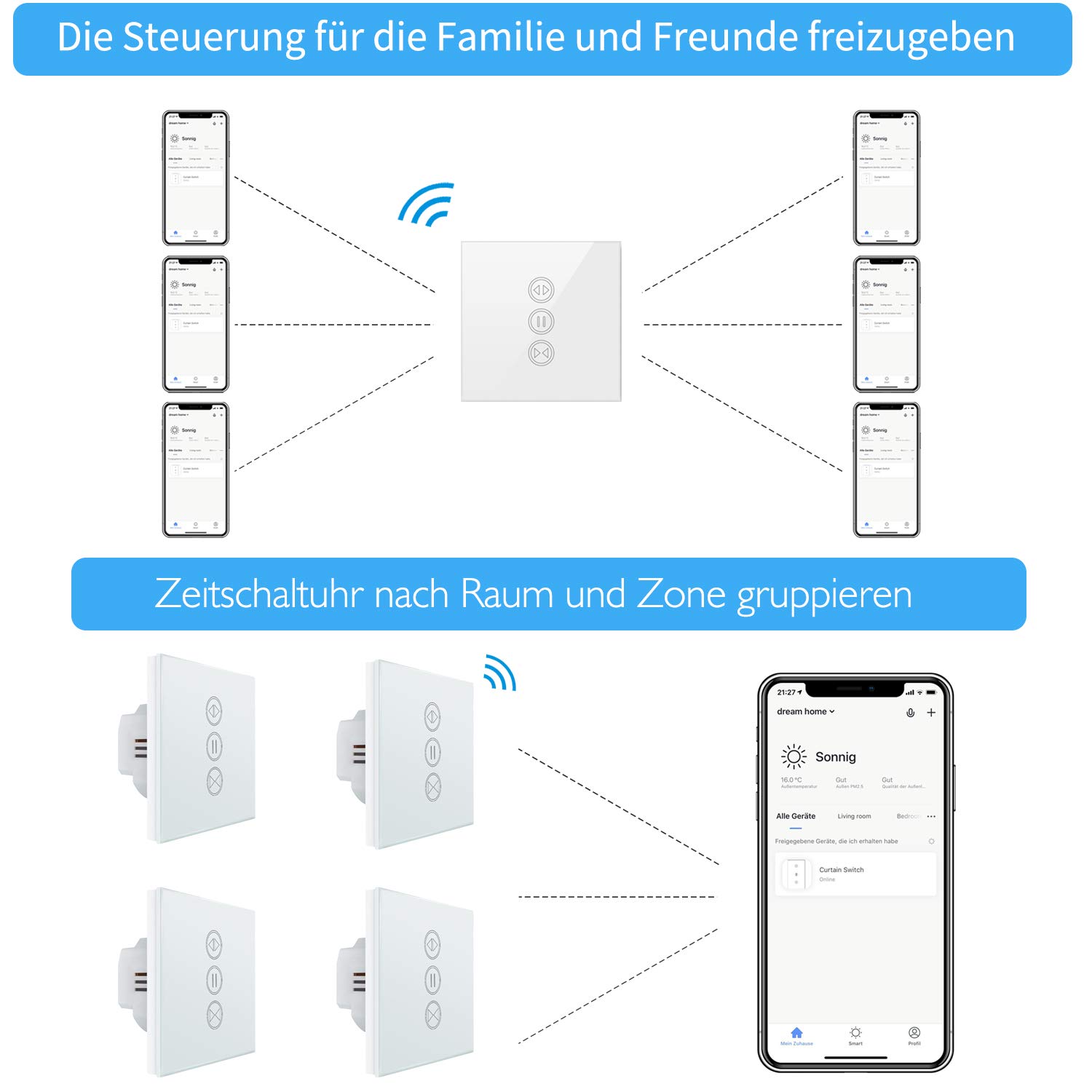
Image: Illustration of how multiple users can control the LoraTap Smart Roller Shutter Timer via the Smart Life app, demonstrating family sharing and the ability to group devices by room or zone for unified control.
תַחזוּקָה
- ניקוי: The crystal glass panel is easy to clean. Use a soft, damp מטלית לניגוב המשטח. הימנעו מחומרי ניקוי שוחקים או כימיקלים חזקים.
- בדיקות רגילות: בדוק מעת לעת את חיבורי החיווט כדי לוודא שהם מאובטחים.
פתרון בעיות
- המכשיר לא מגיב:
- בדוק אם ספק הכוח למתג פעיל.
- Ensure the switch is properly connected to your Wi-Fi network (2.4 GHz only).
- הפעל מחדש את המתג על ידי כיבוי והדלקה של מפסק החשמל.
- ודא שאפליקציית Smart Life מעודכנת.
- Roller Shutter Not Moving:
- Confirm that the motor is receiving power and is functioning correctly.
- Check the motor wiring connections to the switch.
- Ensure the motor run time is correctly configured in the app if using partial open/close functions.
- בקרת קול לא עובדת:
- Ensure your Smart Life account is correctly linked to Alexa or Google Home.
- בדוק את חיבור האינטרנט שלך ואת מצב מכשיר העוזר הקולי שלך.
- Try re-discovering devices in the Alexa or Google Home app.
- Automatic Stop Issue: This issue has been resolved in newer versions. If you experience unexpected stops, ensure your device firmware is updated via the Smart Life app.
אחריות ותמיכה
LoraTap specializes in the research, development, and manufacturing of wireless switches. All LoraTap products are CE certified, ensuring compliance with European safety, health, and environmental protection requirements.
For technical support or warranty inquiries, please contact your retailer or visit the official LoraTap website for further assistance. Please have your product model number (5d4cddd3-8a52-4746-8937-9fbf21a20273) ready when contacting support.