
COSTWAY EP23485BK
COSTWAY 28-Inch Oscillating Tower Fan User Manual
Model: EP23485BK
מָבוֹא
תודה על הרכישהasing the COSTWAY 28-Inch Oscillating Tower Fan. This manual provides important information regarding the safe operation, assembly, use, and maintenance of your fan. Please read it thoroughly before use and retain it for future reference.
הוראות בטיחות חשובות
- קרא את כל ההוראות לפני השימוש במאוורר זה.
- יש לנתק תמיד את המאוורר משקע החשמל לפני ניקויו, טיפולו או הזזתו.
- אין להפעיל את המאוורר עם כבל או תקע פגומים. אם הכבל או התקע פגומים, פנו לתמיכת הלקוחות.
- Keep fingers and other objects away from the air inlet and outlet openings.
- Do not use the fan near water or in wet conditions.
- ודאו שהמאוורר ממוקם על משטח יציב וישר כדי למנוע התהפכות.
- מכשיר זה אינו מיועד לשימוש על ידי אנשים (כולל ילדים) עם יכולות פיזיות, חושיות או נפשיות מופחתות, או חוסר ניסיון וידע, אלא אם כן הם קיבלו פיקוח או הדרכה לגבי השימוש במכשיר על ידי אדם האחראי לבטיחותם.
- יש לפקח על ילדים כדי להבטיח שהם לא ישחקו עם המכשיר.
- The dense netted air outlet is designed to protect fingers from injury. Do not attempt to bypass this safety feature.

תוכן החבילה
ודא שכל הרכיבים קיימים לפני ההרכבה.
- יחידת מאוורר מגדל
- בסיס עגול
- כבל חשמל (מחובר מראש)
התקנה והרכבה
The COSTWAY Tower Fan is designed for easy assembly with no tools required.
- הסר בזהירות את כל הרכיבים מהאריזה.
- Place the tower fan unit upside down on a soft, flat surface.
- Align the round base with the bottom of the fan unit.
- Secure the base to the fan unit using the provided wing nuts. Ensure they are tightened firmly for stability.
- הנח את המאוורר המורכב זקוף על משטח יציב ומאוזן.

הוראות הפעלה
Familiarize yourself with the controls for optimal use.
לוח הבקרה מעלview

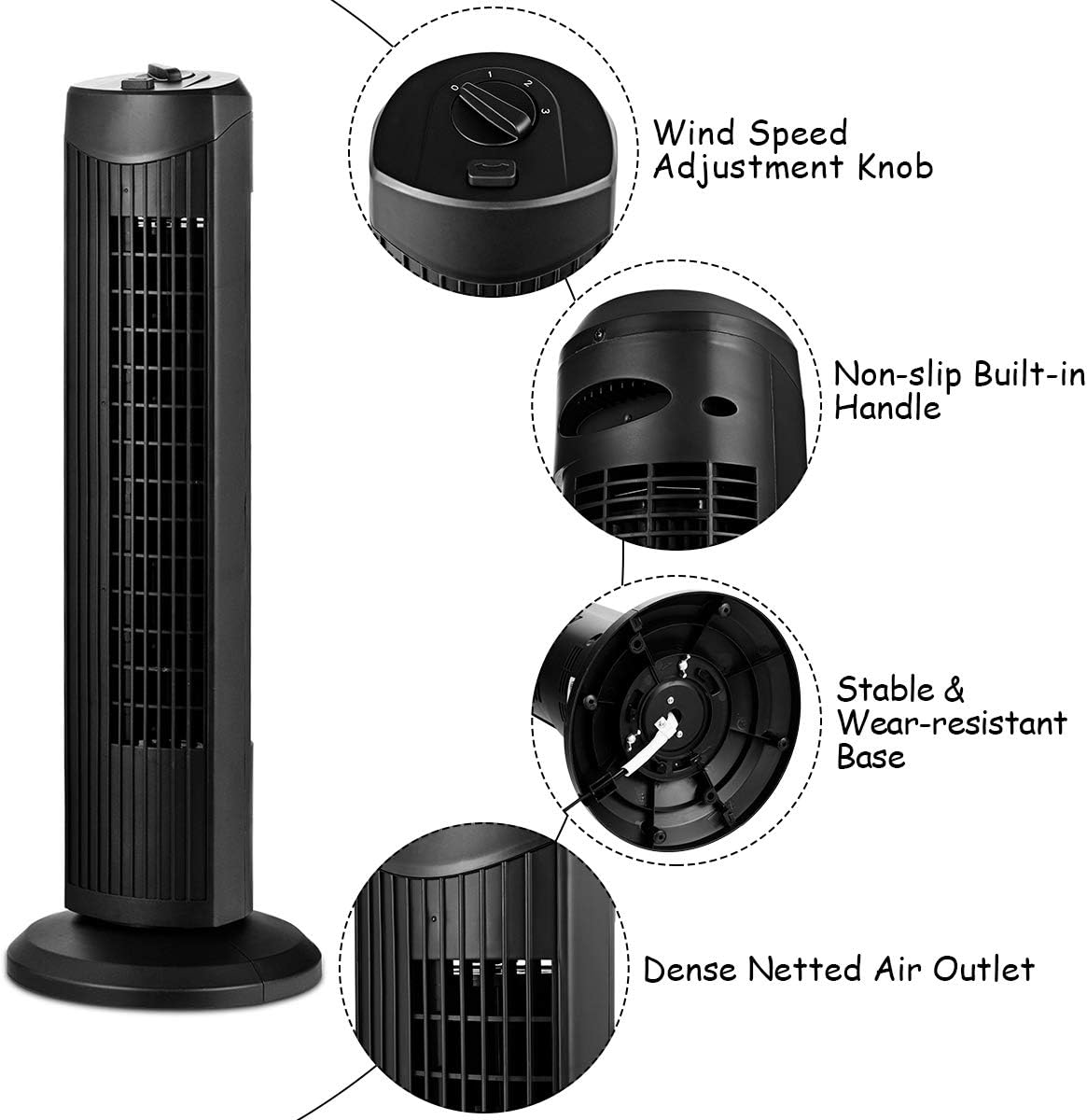
Powering On/Off and Speed Selection
- חבר את כבל החשמל לשקע חשמל רגיל של 120V AC.
- סובב את Wind Speed Adjustment Knob clockwise to select your desired fan speed:
- 0: כבוי
- 1: Low-grade Wind (Soft Wind)
- 2: Mid-grade Wind (Refreshing Wind)
- 3: High-grade Wind (Strong Winds)
- To turn the fan off, rotate the knob counter-clockwise to the "0" position.

פונקציית תנודה
- להפעלת תכונת התנודה, לחץ על כפתור תנודה located next to the speed knob. The fan head will begin to rotate from side to side, distributing air across a wider area.
- To stop oscillation, press the כפתור תנודה שׁוּב.
- Note: The oscillation function operates independently of the fan speed. Ensure both the fan speed knob is set to "0" and the oscillation button is disengaged to fully power off the unit.

תחזוקה וניקיון
ניקוי קבוע מסייע בשמירה על ביצועי המאוורר ומאריך את תוחלת החיים שלו.
- נתק תמיד את המאוורר לפני הניקוי.
- השתמש רך, דamp מטלית לניגוב המשטחים החיצוניים של המאוורר. אין להשתמש בחומרי ניקוי שוחקים או ממסים.
- For dust accumulation in the air outlet, use a vacuum cleaner with a brush attachment or compressed air to gently remove dust. Do not insert any objects into the air outlet.
- ודא שהמאוורר יבש לחלוטין לפני חיבורו מחדש לחשמל והפעלתו.
- יש לאחסן את המאוורר במקום קריר ויבש כאשר אינו בשימוש, רצוי באריזתו המקורית.
פתרון בעיות
| בְּעָיָה | סיבה אפשרית | פִּתָרוֹן |
|---|---|---|
| המאוורר לא נדלק. | Not plugged in; power outlet not working; speed knob set to "0". | Ensure the fan is securely plugged into a working outlet. Rotate the speed knob to a setting other than "0". |
| Fan is oscillating but not blowing air. | Oscillation button engaged, but speed knob set to "0". | Turn the speed knob to a setting (1, 2, or 3) to activate airflow. |
| זרימת אוויר מופחתת. | פתחי כניסת/יציאת האוויר חסומים או מאובקים. | Unplug the fan and clean the air inlets and outlets as described in the Maintenance section. |
| רעש יוצא דופן במהלך הפעולה. | Fan not on a stable surface; internal obstruction. | Place the fan on a firm, level surface. If noise persists, unplug and inspect for any visible obstructions. Do not attempt to disassemble the unit. |
מפרטים
- מותג: קוסטוויי
- מספר דגם: EP23485BK
- מידות המוצר: 9.5" D x 9.5" W x 28" H
- משקל פריט: 5.5 פאונד
- צֶבַע: שָׁחוֹר
- מקור כוח: חשמלי עם כבלים
- כרך ידtage: 120 וולט
- מהtage: 35 וואט
- מספר מהירויות: 3
- מאפיינים מיוחדים: ללא להבים, מתנדנד
- שיטת בקרה: בקרת כפתורים (מגע)
- חוֹמֶר: מתכת, פלסטיק
- שימוש בפנים/חוץ: מקורה
אחריות ותמיכת לקוחות
למידע על אחריות או תמיכה טכנית, אנא צרו קשר עם שירות הלקוחות של COSTWAY. עיינו במסמכי הרכישה שלכם לקבלת תנאי אחריות ספציפיים ופרטי קשר.
Webאֲתַר: www.costway.com
Ask a question about this manual
Ask about setup, troubleshooting, compatibility, parts, safety, or missing instructions. Manuals+ will review the question and use this page’s manual context to help answer it.