
Vivanco 25175
Vivanco MOOOVE AIR 25175 Bluetooth HiFi On-Ear Foldable Headphones User Manual
1. הקדמה
Thank you for choosing the Vivanco MOOOVE AIR 25175 Bluetooth HiFi On-Ear Foldable Headphones. This manual provides essential information for the proper setup, operation, and maintenance of your new headphones. Please read it carefully before use and retain it for future reference.
2. תכולת החבילה
ודא שכל הפריטים נמצאים בחבילה:
- Vivanco MOOOVE AIR 25175 Bluetooth Headphones (1 piece)
- כבל טעינה (USB)
- כבל אודיו (שקע 3.5 מ"מ) (Assumed based on connectivity specifications)
- מדריך למשתמש (מסמך זה)
3. המוצר נגמרview
Familiarize yourself with the components of your Vivanco MOOOVE AIR 25175 headphones.
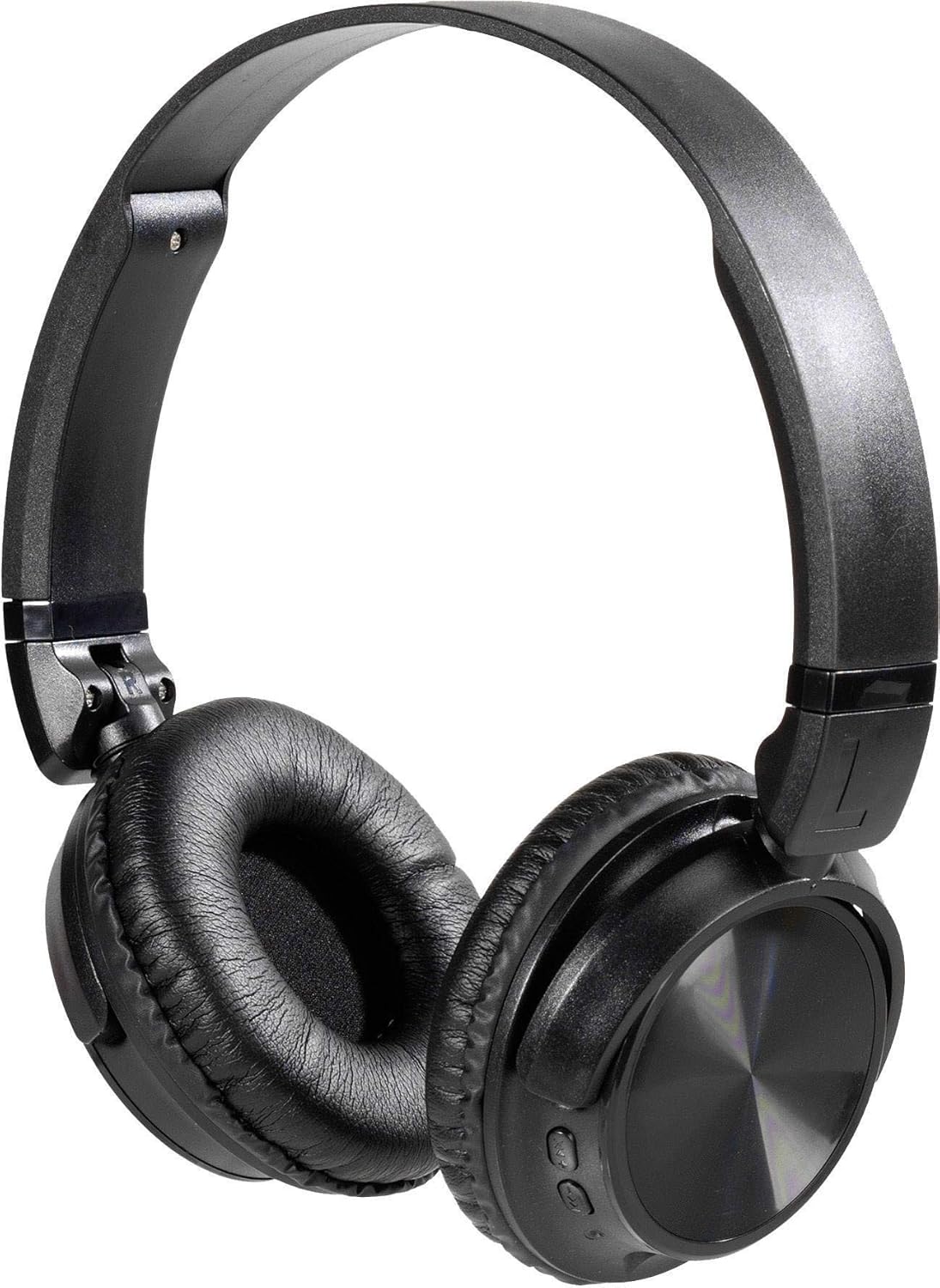
תיאור תמונה: A pair of black Vivanco MOOOVE AIR 25175 headphones, featuring an adjustable headband, soft cushioned earcups, and control buttons visible on the right earcup. The headphones are shown in an unfolded, ready-to-use position.
מרכיבי מפתח:
- סרט מתכוונן לראש: להתאמה נוחה.
- כיסויי אוזניים מרופדים: Provide comfort for extended listening.
- לחצני שליטה: Typically located on one earcup for power, volume, playback, and call management.
- מִיקרוֹפוֹן: לשיחות דיבורית.
- יציאת טעינה (USB): לטעינת הסוללה הפנימית.
- Audio Input Port (3.5mm/2.5mm Jack): עבור חיבור קווי.
4. התקנה
4.1. טעינת האוזניות
- חברו את הקצה הקטן של כבל הטעינה מסוג USB לשקע הטעינה באוזניות.
- חבר את הקצה הגדול יותר של כבל הטעינה USB למתאם חשמל USB (לא כלול) או ליציאת USB של מחשב.
- The LED indicator on the headphones will illuminate, typically red, to show that charging is in progress.
- Once fully charged, the LED indicator will change color (e.g., turn blue or off). A full charge usually takes approximately 2-3 hours.
פֶּתֶק: לקבלת חיי סוללה אופטימליים, יש לטעון את האוזניות במלואן לפני השימוש הראשון.
4.2. הפעלה / כיבוי
- כדי להפעיל: Press and hold the Power button (usually marked with a power symbol) for approximately 3-5 seconds until the LED indicator flashes and you hear an audible prompt.
- כדי לכבות: לחץ והחזק את לחצן ההפעלה למשך כ-3-5 שניות עד שנורית ה-LED תכבה ותשמע הנחיה קולית.
5. קישוריות
5.1. זיווג Bluetooth
- ודא שהאוזניות טעונות במלואן וכבויות.
- לחץ והחזק את לחצן ההפעלה למשך כ-5-7 שניות עד שנורית ה-LED תהבהב לסירוגין באדום וכחול, כדי לציין מצב צימוד.
- במכשיר התומך ב-Bluetooth שלך (סמארטפון, טאבלט, מחשב), עבור אל הגדרות ה-Bluetooth.
- חפש available devices. The headphones should appear as "Vivanco MOOOVE AIR" or a similar name.
- Select the headphones from the list to connect. Once connected, the LED indicator will typically flash blue slowly or remain solid blue, and you may hear a confirmation tone.
- אם תתבקש להזין סיסמה, הזן "0000" (ארבעה אפסים).
פֶּתֶק: האוזניות ינסו להתחבר מחדש באופן אוטומטי למכשיר האחרון שזווג לאחר הפעלתן, אם ה-Bluetooth של מכשיר זה פעיל ונמצא בטווח קליטה.
5.2. חיבור קווי (אופציונלי)
The Vivanco MOOOVE AIR 25175 headphones can also be used with a wired connection, even if the battery is depleted.
- Connect one end of the 3.5mm audio cable (or 2.5mm if applicable) to the audio input jack on the headphones.
- Connect the other end of the audio cable to the audio output jack of your device (e.g., smartphone, MP3 player, computer).
- The headphones will operate in passive mode, meaning Bluetooth functions and built-in controls may be disabled, and audio will be controlled directly from your connected device.
6. הפעלת האוזניות
6.1. השמעת מוזיקה
- הפעל/השהה: לחץ פעם אחת על כפתור הרב-תכליתי (לעתים קרובות כפתור ההפעלה או כפתור ייעודי להפעלה/השהיה).
- הרצועה הבאה: Press and hold the Volume Up button or a dedicated "Next" button. (Specific button functions may vary; refer to device markings).
- רצועה קודמת: Press and hold the Volume Down button or a dedicated "Previous" button. (Specific button functions may vary; refer to device markings).
6.2. בקרת עוצמת הקול
- הגדל את עוצמת הקול: לחץ על כפתור הגברת עוצמת הקול (+).
- הפחת עוצמת הקול: לחץ על כפתור הנמכת עוצמת הקול (-).
6.3. ניהול שיחות
- מענה/סיום שיחה: לחץ על לחצן הרב-תכליתי פעם אחת במהלך שיחה נכנסת או שיחה פעילה.
- דחה שיחה: לחץ והחזק את לחצן הרב-תכליתי למשך כ-2 שניות במהלך שיחה נכנסת.
- חיוג חוזר למספר האחרון: לחץ פעמיים על לחצן הרב-תכליתי כאשר אין שיחה פעילה.
7. תחזוקה
- ניקוי: נגבו את האוזניות בעזרת מטלית רכה, יבשה ונטולת סיבים. אין להשתמש בחומרי ניקוי שוחקים, אלכוהול או ממסים כימיים.
- אִחסוּן: כאשר האוזניות אינן בשימוש, יש לאחסן אותן במקום קריר ויבש, הרחק מאור שמש ישיר וטמפרטורות קיצוניות. העיצוב המתקפל מאפשר אחסון קומפקטי.
- עמידות במים: The headphones are rated as waterproof. However, avoid prolonged submersion or exposure to high-pressure water jets. Ensure charging ports are dry before connecting cables.
8. פתרון תקלות
| בְּעָיָה | סיבה אפשרית | פִּתָרוֹן |
|---|---|---|
| האוזניות לא נדלקות. | סוללה חלשה. | טען את האוזניות במלואן. |
| לא ניתן לבצע צימוד דרך בלוטות'. | האוזניות אינן במצב צימוד; בלוטות' של המכשיר כבוי; רחוק מדי זו מזו. | Ensure headphones are in pairing mode (flashing red/blue). Turn on Bluetooth on your device. Keep devices within 1 meter during pairing. Forget previous pairings on your device and try again. |
| אין קול. | עוצמת קול נמוכה מדי; אוזניות לא מחוברות; מקור שמע שגוי. | Increase volume on both headphones and connected device. Verify Bluetooth connection or wired connection. Check audio output settings on your device. |
| איכות צליל ירודה. | Weak Bluetooth signal; interference; low-quality audio source. | Move closer to the connected device. Avoid obstacles. Try a different audio source. |
9. מפרטים
| מותג | Vivanco |
| שם הדגם | 25175 |
| טכנולוגיית קישוריות | אלחוטי (בלוטות'), קווי |
| גורם צורה | Supra-aural (On-Ear) |
| מיקום אוזניים | Extra-aural |
| עַכָּבָּה | 32 אוהם |
| תכונות מיוחדות | קל משקל, מתקפל |
| חוֹמֶר | פּלָסטִי |
| סוג בקרה | התאמת עוצמת הקול |
| פונקציית כבל | נָסִיג (Refers to included audio cable) |
| רמת עמידות במים | אֲטִימוּת |
| שקע אוזניות | USB, 3.5mm Jack, 2.5mm Jack (USB primarily for charging, 3.5mm/2.5mm for audio input) |
| רכיבים כלולים | 1 piece (headphones) |
10. אחריות ותמיכה
Information regarding specific warranty terms and customer support for the Vivanco MOOOVE AIR 25175 headphones is not available in this document. Please refer to the product packaging or the Vivanco official webאתר לקבלת מידע מפורט על האחריות ופרטי קשר לתמיכה.
Ask a question about this manual
Ask about setup, troubleshooting, compatibility, parts, safety, or missing instructions. Manuals+ will review the question and use this page’s manual context to help answer it.