
Siku 6730
Siku 6730 Bluetooth Remote Control
מדריך הוראות
המוצר נגמרview
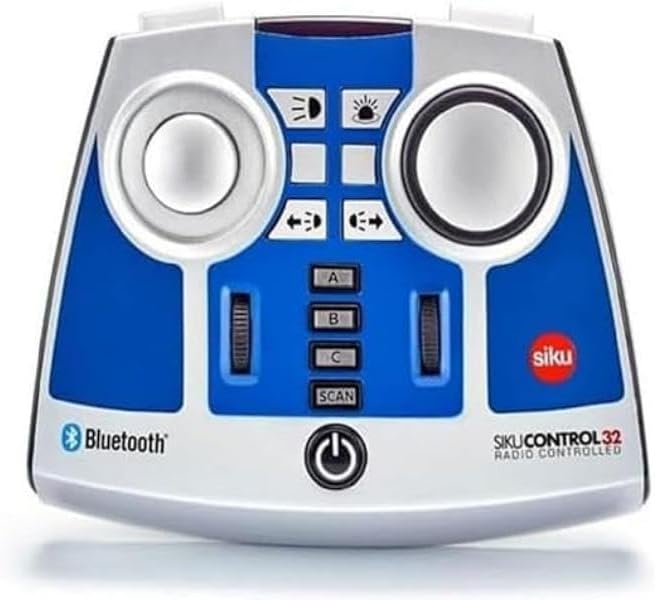
The Siku 6730 Bluetooth Remote Control is designed for precise operation of SIKU Control Bluetooth vehicles, including the John Deere 7310R (Art. No. 6792), Fendt 933 Vario (Art. No. 6793), and Claas Xerion 5000 TRAC VC (Art. No. 6791). This remote allows for comprehensive control over various vehicle functions, enhancing the interactive experience with your SIKU Control models.
תכונות מפתח
- Compatible with SIKU Control Bluetooth vehicles: John Deere 7310R (Art. No. 6792), Fendt 933 Vario (Art. No. 6793), and Claas Xerion 5000 TRAC VC (Art. No. 6791).
- Enables control of multiple functions including steering, driving, electronic rear clutch, and lights.
- Features multi-session functionality, allowing simultaneous control of several vehicles with a single remote control.
- Powered by 4 AA batteries or equivalent rechargeable battery packs (batteries not included).
- בנוי מפלסטיק עמיד.
הנחיות בטיחות
Please note: Choking hazard. Contains small parts. Not suitable for children under 3 years due to small parts that could be swallowed.
תוכן החבילה
- 1 x Siku 6730 Bluetooth Remote Control module
תחילת העבודה
התקנת סוללה
- אתר את תא הסוללות בחלקו האחורי של השלט רחוק.
- פתח את מכסה תא הסוללות.
- Insert 4 AA batteries (or equivalent rechargeable battery packs) ensuring correct polarity (+/-) as indicated inside the compartment.
- סגור היטב את מכסה תא הסוללות.
Pairing with SIKU Control Vehicles
- Ensure your SIKU Control Bluetooth vehicle is powered on and in pairing mode (refer to your vehicle's specific manual for details).
- Press and hold the power button on the Siku 6730 remote control until the indicator light begins to flash, indicating it is searching for a connection.
- Once the remote control connects to the vehicle, the indicator light will become solid.
- For multi-session control, repeat the pairing process for additional SIKU Control vehicles. Use the A, B, C, and SCAN buttons to manage multiple connections.
מִבצָע
פונקציות בקרה
- היגוי: Use the left joystick to control the steering of the vehicle.
- נְהִיגָה: Use the right joystick to control the forward and backward movement, and speed.
- Electronic Rear Clutch: Activate or deactivate the electronic rear clutch using the designated button.
- אורות: Control the vehicle's lights (headlights, taillights, etc.) using the light function buttons.
Multi-Session Control
The Siku 6730 remote control supports multi-session functionality, allowing you to control several SIKU Control vehicles simultaneously. Use the 'A', 'B', and 'C' buttons to switch between paired vehicles. The 'SCAN' button can be used to search for and connect to new vehicles or re-establish connections.
טיפול ותחזוקה
- נקו את השלט הרחוק בעזרת מטלית רכה ויבשה. אין להשתמש בחומרי ניקוי שוחקים או ממסים.
- Avoid exposing the remote control to extreme temperatures, direct sunlight, or moisture.
- אם השלט רחוק לא יהיה בשימוש למשך תקופה ממושכת, הוציאו את הסוללות כדי למנוע דליפה.
- Store the remote control in a dry, dust-free environment.
פתרון בעיות
- השלט לא נדלק: בדוק את התקנת הסוללות וודא שהסוללות טריות.
- לא ניתן להתחבר לרכב: Ensure both the remote and vehicle are powered on and within range. Re-attempt the pairing process. Check the vehicle's manual for its specific pairing instructions.
- הפקדים אינם מגיבים: Verify the connection. If controlling multiple vehicles, ensure you have selected the correct vehicle channel (A, B, or C).
- הַפרָעָה: Move away from other electronic devices that might cause signal interference.
מפרט טכני
| מִפרָט | פְּרָט |
|---|---|
| מידות המוצר | 4.88 x 5.98 x 2.05 אינץ' |
| משקל פריט | 7.4 אונקיות |
| מספר דגם | 6730 |
| גיל מומלץ על ידי יצרן | 3 שנים ומעלה |
| תאריך יציאה | 1 באפריל, 2019 |
| יַצרָן | Sieper GmbH |
אחריות ותמיכת לקוחות
For warranty information or technical support regarding your Siku 6730 Bluetooth Remote Control, please contact Sieper GmbH customer service directly. Refer to the packaging or the official Siku webבאתר לקבלת פרטי הקשר ותנאי האחריות העדכניים ביותר.
Ask a question about this manual
Ask about setup, troubleshooting, compatibility, parts, safety, or missing instructions. Manuals+ will review the question and use this page’s manual context to help answer it.