
1. הקדמה
Thank you for choosing the Proscenic M7 Robot Vacuum Cleaner. This device is designed to provide efficient and thorough cleaning for your home, featuring advanced laser navigation, powerful suction, and intelligent mopping capabilities. Please read this manual carefully before using the product to ensure proper operation and maintenance.
2. הוראות בטיחות חשובות
- קרא את כל ההוראות לפני השימוש במכשיר זה.
- אין לאפשר לילדים להפעיל את שואב האבק הרובוטי. יש לפקח על ילדים וחיות מחמד כאשר הרובוט פועל.
- Ensure the charging dock is placed against a wall on a level surface, away from water or heat sources.
- הסר כבלים רופפים, חפצים קטנים או פריטים שבירים מהרצפה לפני ההפעלה כדי למנוע הסתבכות או נזק.
- Do not use the robot vacuum in wet environments or to clean up liquids.
- Do not use the robot vacuum near open flames or flammable materials.
- Only use the original power adapter and charging dock provided by the manufacturer.
- Turn off the robot and unplug the charging dock before performing any maintenance or cleaning.
3. המוצר נגמרview
3.1 תכונות עיקריות
- Laser Navigation (LDS): Scans your home in 360 degrees to create real-time maps for efficient cleaning paths.
- App & Alexa Control: Manage cleaning modes, schedules, virtual no-go zones, and spot cleaning via the ProscenicHome app or Alexa voice commands.
- מגב בצורת Y: Emulates manual mopping for thorough dirt and grime removal with a 500ml electronically controlled water tank.
- יניקה עוצמתית: Up to 2000Pa suction power with three adjustable modes for various floor types.
- טעינה וחידוש: Automatically returns to the charging dock when the battery is low and resumes cleaning from where it left off.
3.2 רכיבי הרובוט
Familiarize yourself with the main components of your Proscenic M7 robot vacuum.

Image: Proscenic M7 Robot Vacuum highlighting its navigation and safety features like SLAM, Anti-Collision, LDS, Anti-falling, and Jam-resistant technology. A map overlay illustrates its ability to plan cleaning routes.
- חיישן LDS: Located on top for 360-degree scanning and mapping.
- פָּגוֹשׁ: פגוש קדמי עם חיישני נגד התנגשויות.
- מברשות צד: Two side brushes to sweep debris into the main brush path.
- מברשת ראשית: Underside brush for deep cleaning.
- פח אשפה/מיכל מים: Removable compartments for dry vacuuming and wet mopping.
- טעינת אנשי קשר: On the underside, for connecting to the charging dock.
- חיישני נפילה: On the underside, to prevent falling down stairs.
4. מדריך התקנה
4.1 טעינת הרובוט
- Place the charging dock against a wall in an open area, ensuring there are no obstacles within 1 meter (3 feet) to the sides and 2 meters (6 feet) in front.
- חבר את ספק הכוח לתחנת הטעינה וחבר אותו לשקע בקיר.
- Place the robot onto the charging dock, ensuring the charging contacts align. The robot will begin charging. Allow it to fully charge before first use (approximately 5 hours).
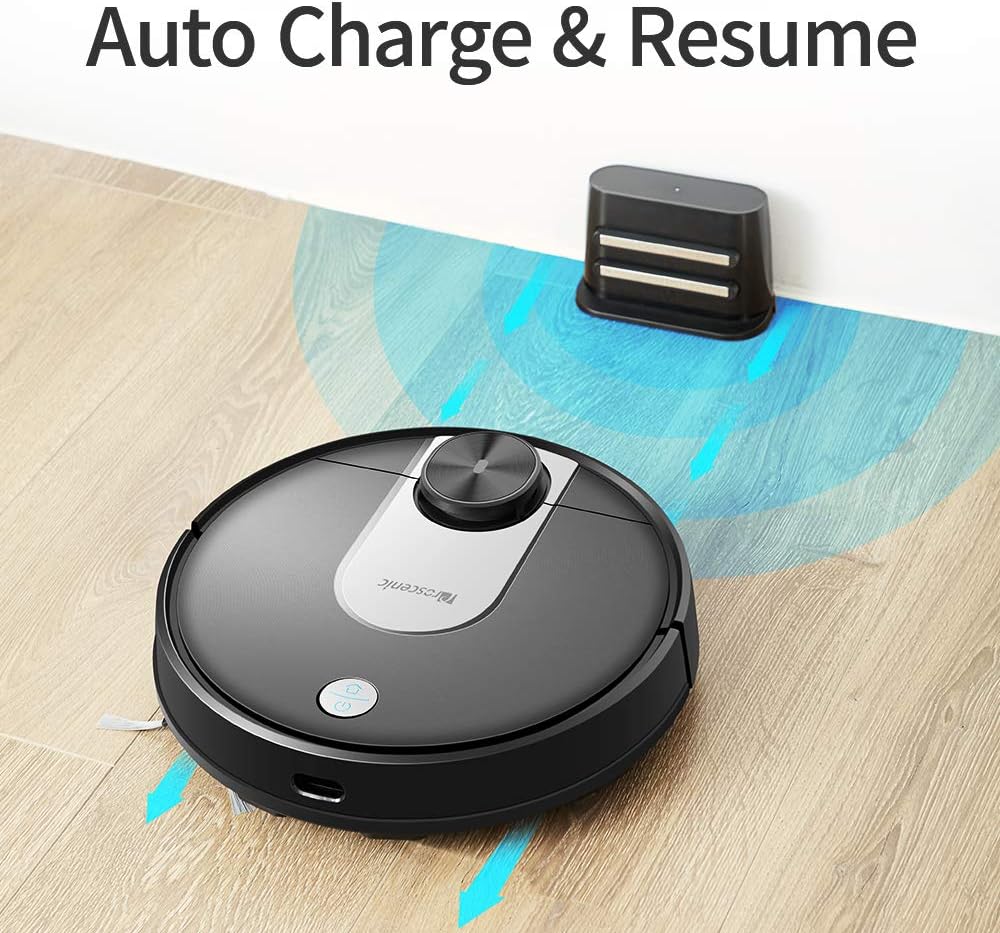
Image: The Proscenic M7 robot vacuum approaching its charging station, demonstrating its auto-charge and resume function.
4.2 Installing the ProscenicHome App
The ProscenicHome app allows you to control your robot vacuum remotely and access advanced features.
- Download the "ProscenicHome" app from the App Store (iOS) or Google Play Store (Android).
- רשום חשבון והיכנס.
- Follow the in-app instructions to add your Proscenic M7 device. Ensure your phone is connected to a 2.4GHz Wi-Fi network, as the robot does not support 5GHz networks.
- During the binding process, ensure the robot is fully charged and near your Wi-Fi router for optimal connection. If you encounter issues, try restarting your router or moving the robot closer.

Image: A smartphone screen displaying the ProscenicHome app interface. It shows a generated cleaning map, current cleaned area, battery level, and cleaning time. Icons for scheduling, map saving, zoned cleaning, mopping, no-go zones, spot cleaning, and remote control are visible, along with compatibility logos for Alexa, Android, and iPhone.
5. הוראות הפעלה
5.1 התחלת מחזור ניקוי
- התחלה ידנית: לחץ פעם אחת על כפתור ההפעלה ברובוט כדי להתחיל מחזור ניקוי מלא.
- בקרת אפליקציה: Open the ProscenicHome app and tap "Start" to initiate cleaning.
- The robot will use its laser navigation to map your home and plan an efficient cleaning path.
5.2 מצבי ניקוי
The Proscenic M7 offers various cleaning modes accessible via the ProscenicHome app:
- ניקוי אוטומטי: הרובוט מנקה בצורה חכמה את כל האזור הנגיש.
- ניקוי נקודות: מכוון את הרובוט לניקוי אינטנסיבי של אזור קטן ספציפי.
- Zoned Cleaning: Define a rectangular area on the app's map for the robot to clean. This requires a saved map.
- ניקוי קצוות: The robot cleans along the perimeter of your rooms.
- מצב ניקוי: חברו את מיכל המים ואת כרית הניקוי לניקוי רטוב.
5.3 פונקציית ניקוי
The M7 features a Y-shaped mopping pattern for effective wet cleaning.
- Fill the 500ml electronically controlled water tank with clean water.
- חברו את כרית הניקוי היטב למיכל המים.
- Replace the dustbin with the filled water tank assembly.
- Select "Mopping Mode" in the app or allow the robot to detect the water tank and switch automatically.
- Adjust the water flow level via the app if desired.

תמונה: תקריב view of the Proscenic M7 robot vacuum, showcasing its large 500ml water tank, designed for extensive mopping coverage.

תמונה: תקורה view of the Proscenic M7 robot vacuum on a wooden floor, illustrating its Y-shaped mopping movement pattern with arrows.
5.4 Map Management and Virtual Walls
- Map Memorization: After completing a full cleaning cycle and successfully returning to the charging dock, the robot will save the generated map. Ensure this feature is enabled in the app.
- אזורים וירטואליים אסורים: Use the app to draw virtual boundaries or "no-go lines" on the map to prevent the robot from entering specific areas.
- ניקוי אזור: Once a map is saved, you can define specific areas for cleaning.
6. תחזוקה
תחזוקה שוטפת מבטיחה ביצועים אופטימליים ומאריכה את תוחלת החיים של שואב האבק הרובוטי שלך.
6.1 ניקוי מיכל האשפה והמסנן
- לחץ על לחצן שחרור פח האשפה והסר את פח האשפה.
- רוקנו את תוכן פח האשפה לפח אשפה.
- Remove the filter and tap it gently to dislodge dust. Rinse the filter with water if necessary, ensuring it is completely dry before reinstallation.
- Wipe the inside of the dustbin with a dry cloth.
- התקן מחדש את המסנן ואת מיכל האבק.
6.2 ניקוי מיכל המים ומשטח הניקוי
- הסר את מיכל המים מהרובוט.
- רוקנו את כל המים שנותרו מהמיכל.
- Remove the mopping pad and rinse it thoroughly with water. Allow it to air dry.
- נקה את מיכל המים עם מודעהamp cloth and allow it to dry completely before storage or refilling.
6.3 מברשות ניקוי וחיישנים
- מברשת ראשית: Remove the main brush cover and lift out the brush. Use the cleaning tool (if provided) to remove hair and debris.
- מברשות צד: Periodically check side brushes for tangled hair or debris. Remove and clean them as needed. Replace if worn.
- חיישנים: Gently wipe the LDS sensor, anti-drop sensors, and charging contacts with a clean, dry cloth to ensure they are free of dust and debris.
7. פתרון תקלות
If you encounter issues with your Proscenic M7, refer to the following common problems and solutions.
| בְּעָיָה | סיבה אפשרית | פִּתָרוֹן |
|---|---|---|
| הרובוט לא מתחיל ולא מגיב. | סוללה חלשה; כבה את המכשיר. | Ensure the robot is fully charged; Check if the main power switch is on. |
| רובוט נתקע לעתים קרובות. | Obstacles (cables, rugs, furniture); Drop sensors dirty. | Clear the cleaning area of obstacles. Use virtual no-go zones for problematic areas. Clean drop sensors. |
| App connection issues (Binding Error). | Incorrect Wi-Fi band (5GHz); Weak Wi-Fi signal; Robot not fully charged. | Ensure your phone is on a 2.4GHz Wi-Fi network. Move the robot closer to the router. Ensure the robot is fully charged before binding. Try restarting your router. |
| הרובוט לא חוזר לתחנת הטעינה. | Charging dock obstructed; Charging contacts dirty. | Ensure the charging dock area is clear. Clean the charging contacts on both the robot and the dock. |
| ביצועי ניקוי גרועים. | פח אשפה מלא; מברשות סבוכים; פילטר סתום. | רוקנו את מיכל האבק. נקו את המברשת הראשית והצדדית. נקו או החליפו את המסנן. |
| Mopping leaves streaks or misses spots. | Mopping pad dirty or dry; Water tank empty; Water flow setting too low. | Clean or wet the mopping pad. Refill the water tank. Adjust water flow in the app. |
| Map not saving or virtual walls not working. | First full cleaning cycle not completed; App glitch. | Ensure the robot completes a full cleaning cycle and returns to the dock successfully to generate and save the map. Restart the app or robot if issues persist. |
8. מפרטים
| תכונה | פְּרָט |
|---|---|
| מותג | פרוסני |
| שם הדגם | M7 |
| תכונה מיוחדת | אזור אסור להיכנס |
| צֶבַע | שָׁחוֹר |
| רכיבים כלולים | סוֹלְלָה |
| סוג מסנן | מַחסָנִית |
| חיי סוללה | Up to 1.5 Hours (3200mAh capacity) |
| קיבולת פח אשפה | 0.5 ליטר |
| קיבולת מיכל מים | 500 מ"ל |
| מקור כוח | מופעל על סוללה |
| שיטת בקרה | Voice (Alexa), App |
| מכשירים תואמים | אמזון אקו (אלכסה) |
| גורם צורה | רובוטי |
| מידות המוצר | 16.5 x 13.4 x 5.5 אינץ' |
| משקל פריט | 12.62 פאונד |
| המלצת משטח | שטיח, רצפות קשות |
9. אחריות ותמיכה
For warranty information or technical support, please refer to the warranty card included with your product or visit the official Proscenic website. You may also contact Proscenic customer service directly for assistance with product operation, maintenance, or troubleshooting beyond this manual.