
1. הקדמה
This manual provides instructions for the Zerone Universal Remote Control, designed as a replacement for various Haier TV models. It is compatible with Haier HTR-A18M, 55D3550, 40D3500M, and 48D3500 series televisions. This remote control offers direct access to digital TV functions without complex programming.

Image 1.1: The Zerone Universal Remote Control in use, demonstrating its compatibility with Haier HTR-A18M, 55D3550, 40D3500M, and 48D3500 TV models.
2. התקנה
2.1 התקנת סוללה
השלט רחוק דורש שתי (2) סוללות AAA (לא כלולות) לפעולה. בצע את השלבים הבאים כדי להתקין את הסוללות:
- אתר את תא הסוללות בגב השלט הרחוק.
- לחץ כלפי מטה על התפס והחלק את מכסה הסוללה החוצה.
- הכנס שתי סוללות AAA, וודא שהקוטבים החיוביים (+) והשליליים (-) מיושרים כהלכה עם הסימונים בתוך התא.
- החלק את מכסה הסוללה בחזרה למקומו עד שיינעל היטב.
The remote is ready for use immediately after battery installation; no additional programming is required for compatible Haier TV models.

תמונה 2.1: מפורט view of the remote control, highlighting the battery compartment for AAA battery installation.
3. הוראות הפעלה
3.1 פונקציות בסיסיות
This remote control provides standard functions for your Haier TV. Point the remote directly at your television's infrared receiver for optimal performance.
- כפתור הפעלה (U): מדליק או מכבה את הטלוויזיה.
- קֶלֶט: Selects video input sources (HDMI, AV, etc.).
- לחצני מספרים (0-9)בחירת ערוצים ישירה.
- VOL +/-: Adjusts volume up or down.
- CH +/-: מעלה או מוריד ערוצים.
- לְהַשְׁתִיק: משתיק או מבטל את השתקת שמע הטלוויזיה.
- תַפרִיט: גישה לתפריט הראשי של הטלוויזיה.
- כפתורי ניווט (למעלה, למטה, שמאלה, ימינה, אישור): ניווט בין תפריטים ואישור בחירות.
- חזרה / יציאה: חזרה למסך הקודם או יציאה מהתפריט הנוכחי.
- לְהַצִיג: Shows current channel information.
- SAP / AUDIO: Selects audio language or mode.
- לִישׁוֹן: מגדיר את טיימר השינה.
- PICTURE / WIDE: Adjusts picture mode or aspect ratio.
- CH.LIST / FAVORITE: Accesses channel list or favorite channels.
- Media Control Buttons (Play, Pause, Fast Forward, Rewind): שולט בהפעלת מדיה.
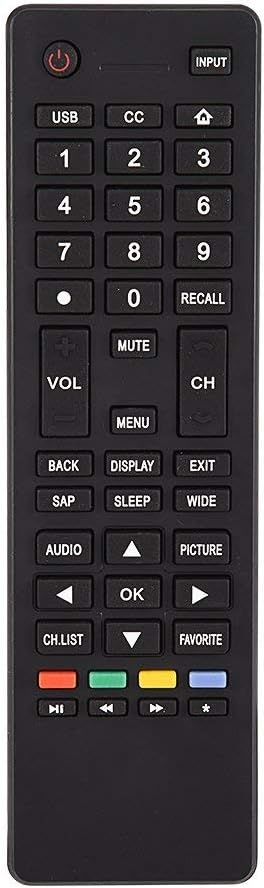
תמונה 3.1: נגמרview of the remote control's button layout for easy identification of functions.
3.2 טווח פעולה
The remote control has a stable signal transmission distance of up to 10 meters (33 feet). Actual remote distance may vary depending on environmental factors and the specific model of your TV.
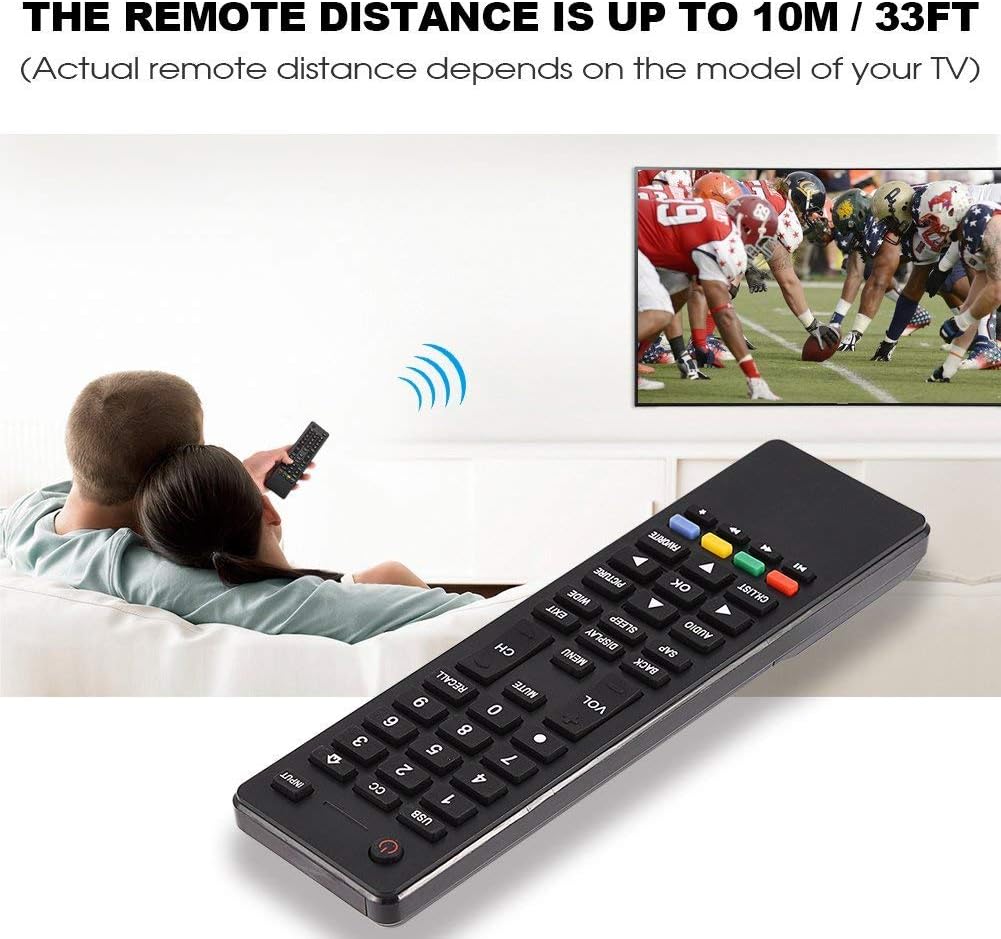
Image 3.2: Visual representation of the remote control's effective operating distance to the television.
4. תחזוקה
4.1 ניקוי
לניקוי השלט רחוק, השתמשו במטלית רכה ויבשה. במקרה של לכלוך עיקש, נגבו קלותampen the cloth with water or a mild cleaning solution. Avoid using harsh chemicals or abrasive cleaners, as these can damage the remote's surface or internal components.
4.2 טיפול בסוללה
- החלף סוללות כאשר תגובת השלט הופכת איטית או מפסיקה לעבוד.
- אין לערבב סוללות ישנות וחדשות, או סוגים שונים של סוללות.
- הוציאו את הסוללות אם השלט רחוק לא יהיה בשימוש למשך תקופה ממושכת כדי למנוע דליפה.
- השלך סוללות משומשות בצורה אחראית בהתאם לתקנות המקומיות.
5. פתרון תקלות
5.1 השלט רחוק אינו מגיב
- בדוק סוללות: Ensure batteries are inserted correctly with the correct polarity (+/-) and are not depleted. Replace with fresh AAA batteries if necessary.
- קו ראייה: Make sure there are no obstructions between the remote control and the TV's infrared sensor.
- מֶרְחָק: Confirm you are within the effective operating range (up to 10 meters / 33 feet).
- תאימות לטלוויזיה: Verify that your TV model is listed as compatible (Haier HTR-A18M, 55D3550, 40D3500M, 48D3500).
5.2 Buttons Not Working Correctly
- ניקוי שלט: Dust or debris under buttons can cause malfunction. Refer to the Maintenance section for cleaning instructions.
- בדיקת סוללה: Weak batteries can lead to inconsistent button responses. Replace batteries.
6. מפרטים
| תכונה | פְּרָט |
|---|---|
| מותג | אפס |
| מכשירים תואמים | Haier HTR-A18M, 55D3550, 40D3500M, 48D3500 TVs |
| טכנולוגיית קישוריות | אינפרא אדום |
| טווח מקסימלי | 10 מטר (33 רגל) |
| סוג סוללה | 2 x AAA (לא כלול) |
| סוג בקר | בקרת כפתור |
| חוֹמֶר | ABS |
| מספר דגם | Zerone9rnag3b5y4-cr |
| UPC | 647213811490 |

Image 6.1: Physical dimensions of the Zerone Universal Remote Control.
7. מידע על אחריות
מוצר זה מוצע כפריט Amazon Renewed. מוצרי Amazon Renewed נבדקים ונבדקים באופן מקצועי כדי לוודא שהם פועלים ונראים כמו חדשים. אם אינך מרוצה מהרכישה שלך, מוצרים מחודשים זכאים להחלפה או החזר כספי במסגרת אחריות Amazon Renewed.
Additionally, the manufacturer provides a אחריות מוגבלת ל-90 יום. For specific details regarding the terms and conditions of this warranty, please refer to the documentation provided at the time of purchase or contact customer support.
8. תמיכת לקוחות
If you encounter any issues or have questions regarding your Zerone Universal Remote Control that are not addressed in this manual, please contact the seller or Amazon Renewed customer service for assistance.
For Amazon Renewed Guarantee claims, please visit the Amazon Renewed program page or contact Amazon customer support directly.