
1. הקדמה
The GameMax Mirage 120mm PC Cooling Fan is designed to provide efficient cooling for computer components while offering customizable RGB lighting. This fan features a dual-ring Rainbow LED design, a hydraulic bearing for quiet operation, and a 7-blade fan structure. It is compatible with 5V addressable 3-pin Aura Sync systems, allowing for synchronized lighting effects with compatible motherboards or controllers.

תמונה 1.1: חזית view of the GameMax Mirage fan with active Rainbow LED lighting.
2. מידע בטיחות
- ודא שמערכת המחשב שלך כבויה ומנותקת משקע החשמל לפני התקנה או תחזוקה.
- טפלו ברכיבים בזהירות כדי למנוע נזק מחשמל סטטי. שקלו להשתמש ברצועת יד אנטי-סטטית.
- אין להפעיל כוח על המחברים. יש לוודא את הכיוון הנכון לפני חיבור הכבלים.
- הרחיקו את המאוורר מנוזלים ולחות מוגזמת.
- Do not attempt to disassemble the fan unit beyond what is described in this manual.
3. תכולת החבילה
ודא שכל הפריטים נמצאים בחבילה שלך:
- 1 x GameMax Mirage 120mm PC Cooling Fan
- 4 x ברגי הרכבה
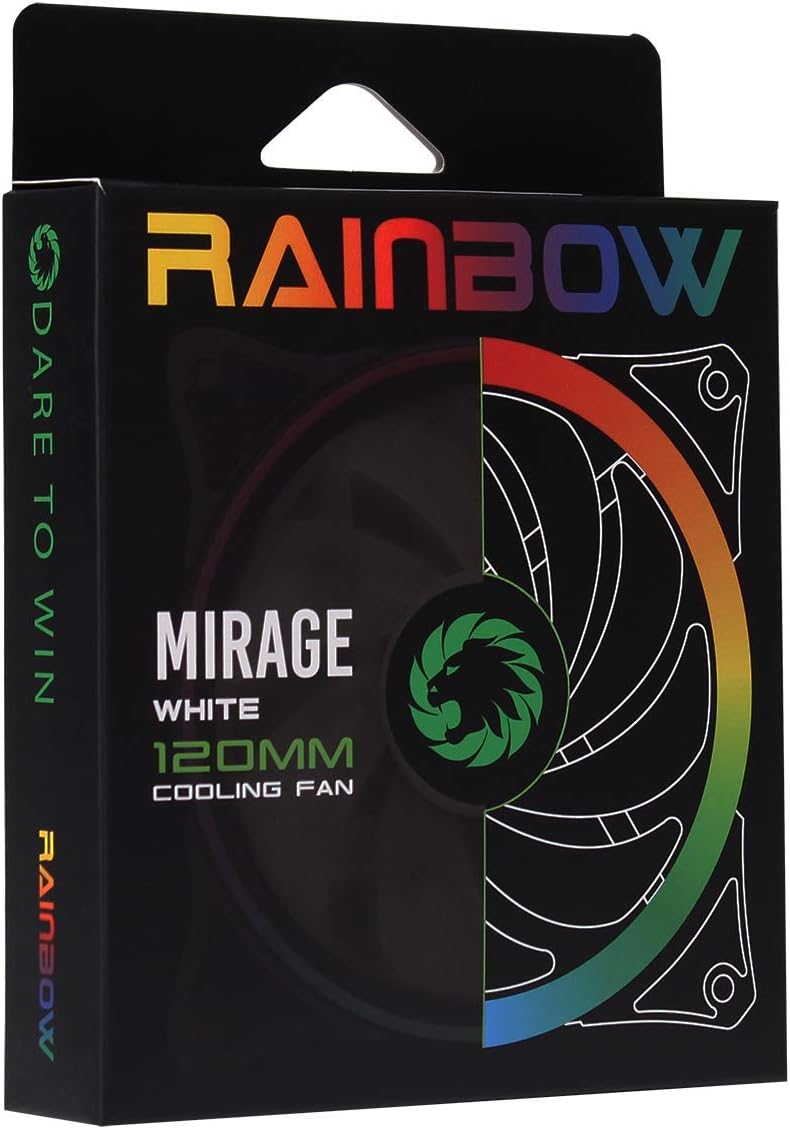
Image 3.1: Retail packaging for the GameMax Mirage fan.
4. התקנה והתקנה
Follow these steps to install your GameMax Mirage 120mm PC Cooling Fan:
- הכן את המערכת שלך: Power off your computer and unplug it from the power outlet. Open your computer case to access the fan mounting locations.
- התקן את המאוורר: Position the fan in your desired location (e.g., case front, rear, top, or radiator). Ensure the airflow direction is correct for your cooling setup. Use the four included mounting screws to secure the fan to the chassis or radiator. The fan features rubber pads on the corners to help reduce vibration.
- Connect Fan Power: Locate the 3-pin power connector on the fan cable. Connect this cable to an available 3-pin fan header on your motherboard or a fan controller.
- חבר תאורת RGB: Locate the 5V addressable 3-pin Aura connector on the fan cable. Connect this to a compatible 5V ARGB header on your motherboard (often labeled 'VDG' or 'ARGB') or an external RGB controller/hub. Warning: Do not connect this to a 12V RGB header, as it will damage the LEDs.

Image 4.1: The 3-pin power connector (top) and 5V addressable 3-pin Aura connector (bottom).
The fan cables are braided for improved aesthetics and durability, helping to keep your build neat and tidy.
5. הוראות הפעלה
Once installed, the GameMax Mirage fan operates as follows:
- בקרת מהירות מאוורר: The fan speed is controlled via the 3-pin power connector. If connected to a motherboard fan header, the speed can typically be adjusted through your motherboard's BIOS/UEFI settings or dedicated software.
- בקרת תאורת RGB: The Rainbow LED lighting is controlled via the 5V addressable 3-pin Aura connector.
- If connected to a compatible motherboard (e.g., ASUS Aura Sync, MSI Mystic Light, Gigabyte RGB Fusion, ASRock Polychrome Sync), you can use the motherboard's software to customize lighting effects, colors, and synchronization with other ARGB components.
- If connected to an external RGB hub/controller, refer to the instructions provided with your specific hub/controller for lighting customization options.

תמונה 5.1: בזווית view of the GameMax Mirage fan showcasing its dual-ring Rainbow LED lighting.
6. תחזוקה
Regular maintenance helps ensure optimal performance and longevity of your cooling fan:
- ניקוי אבק: Periodically inspect the fan blades and frame for dust accumulation. Use compressed air or a soft brush to gently remove dust. Ensure the fan is powered off and unplugged before cleaning.
- בדיקת כבלים: Occasionally check the power and RGB cables for any signs of wear or damage.
7. פתרון תקלות
- המאוורר לא מסתובב:
- Ensure the 3-pin power connector is securely plugged into a functional fan header on the motherboard or controller.
- Check motherboard BIOS/UEFI settings to ensure the fan header is enabled and configured correctly.
- LEDs Not Lighting Up or Incorrect Colors:
- Verify the 5V addressable 3-pin Aura connector is securely connected to a compatible 5V ARGB header (not 12V RGB).
- Ensure your motherboard's RGB software or external controller is properly installed and configured.
- If using a splitter or hub, ensure it is powered and functioning correctly.
- רעש מוגזם:
- בדוק אם יש כבלים או חסימות המפריעות ללהבי המאוורר.
- Ensure the fan is securely mounted and the rubber pads are properly seated to absorb vibrations.
- Dust accumulation can cause imbalance and noise; clean the fan as described in the Maintenance section.
8. מפרטים
| תכונה | מִפרָט |
|---|---|
| דֶגֶם | MIRAGEWHITE FINS |
| גודל מאוורר | 120 מ"מ x 120 מ"מ x 25 מ"מ (0.98 x 4.72 x 4.72 אינץ') |
| סוג מיסבים | מיסב הידראולי |
| להבי מאוורר | 7 להבים |
| סוג LED | Addressable Rainbow LED (Dual-Ring) |
| מחבר מתח למאוורר | 3 פינים |
| מחבר RGB | 5V Addressable 3-Pin Aura Connector |
| כרך הפעלהtage | 5 Volts (for RGB) / 12 Volts (for fan motor, typical for 3-pin) |
| דירוג וואטtage | 3 וואט |
| מהירות סיבוב מקסימלית | 1800 סל"ד |
| רמת רעש | בערך 25 dB(A) |
| חוֹמֶר | Rubber (for vibration dampening) |

תמונה 8.1: חזרה view of the GameMax Mirage fan, displaying the product label with model and electrical specifications.
9. אחריות ותמיכה
For warranty information and technical support, please refer to the official GAMEMAX webאתר או צור קשר עם הקמעונאי שלך. שמור את הוכחת הרכישה שלך לצורך תביעות אחריות.