
1. הקדמה
תודה על הרכישהasing the Infocus 24-inch 720p LED TV, model IM24ED800. This manual provides essential information for setting up, operating, and maintaining your television. Please read this manual thoroughly before using the product and retain it for future reference.
מידע בטיחות
- אל תחשוף את הטלוויזיה לגשם או לחות.
- אל תחסום פתחי אוורור.
- ודא אספקת חשמל נאותה כרךtage.
- הגן על כבל החשמל מפני הליכה או צביטה.
- הפנה כל טיפול לצוות שירות מוסמך.
- הרחק את הטלוויזיה מאור שמש ישיר, מקורות חום ושדות מגנטיים חזקים.
2. תכולת החבילה
אנא סמן את התיבה עבור הפריטים הבאים:
- Infocus 24-inch 720p LED TV (IM24ED800)
- שלט רחוק (עם סוללות, אם כלולות)
- כבל חשמל
- מעמד טלוויזיה (2 יחידות)
- ברגים למעמד טלוויזיה
- מדריך למשתמש (מסמך זה)
3. התקנה
3.1 חיבור מעמד הטלוויזיה
To attach the stand to your Infocus TV:
- הנח בזהירות את הטלוויזיה כשמסך הטלוויזיה כלפי מטה על משטח רך ונקי כדי למנוע שריטות.
- יישר כל חלק מעמד עם החריצים המתאימים בתחתית הטלוויזיה.
- אבטחו כל חלק מעמד באמצעות הברגים המצורפים. ודאו שהם מהודקים היטב.
- הרם בזהירות את הטלוויזיה והנח אותה על משטח יציב ומאוזן.
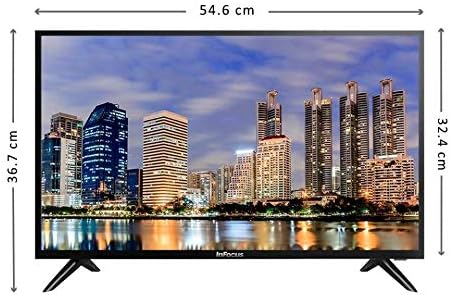
תמונה: חזית view of the Infocus 24-inch LED TV with dimensions indicated. The TV measures approximately 54.6 cm in width and 36.7 cm in height with the stand.
3.2 חיבור התקנים
Your Infocus TV features multiple input ports for connecting external devices.

תמונה: אחורי view of the Infocus 24-inch LED TV, highlighting the location of various input ports including HDMI and USB.
- חיבורי HDMI: Connect Blu-ray players, game consoles, or cable/satellite boxes to the HDMI ports. The TV has 2 HDMI inputs.
- חיבורי USB: Connect USB flash drives for media playback to the USB ports. The TV has 2 USB inputs.
- אנטנה/כבל: Connect an antenna or cable TV signal to the RF input (if available, not explicitly listed but standard for TVs).
- כּוֹחַ: חבר את כבל החשמל לשקע החשמל של הטלוויזיה ולאחר מכן לשקע בקיר.
3.3 הפעלה ראשונית
לאחר חיבור כל הכבלים הדרושים:
- Ensure the power cord is securely plugged into both the TV and a power outlet.
- לחץ על כפתור ההפעלה בשלט רחוק או בטלוויזיה עצמה.
- Follow the on-screen instructions for initial setup, which may include language selection, time zone, and channel scanning.
4. הפעלת הטלוויזיה שלך
4.1 שלט רחוק מעלview
The remote control allows you to access all TV functions. While specific button layouts may vary, common functions include:
- כּוֹחַ: מפעיל או מכבה את הטלוויזיה.
- קלט/מקור: בחירת מקור הקלט (HDMI 1, HDMI 2, USB, טלוויזיה).
- עוצמת הקול מעלה/הנמכת: מתאים את רמת הקול.
- ערוץ למעלה/למטה: משנה ערוצי טלוויזיה.
- לְהַשְׁתִיק: משתיק את שמע הטלוויזיה.
- תַפרִיט: פותח את התפריט הראשי להתאמות הגדרות.
- כפתורי ניווט (למעלה/למטה/שמאלה/ימינה/אישור): משמש לניווט בתפריטים ולאישור בחירות.
- יציאה/חזרה: חזרה למסך הקודם או יציאה מהתפריט.
4.2 פונקציות בסיסיות
- שינוי מקור קלט: הקש על קֶלֶט or מָקוֹר button on your remote control. Use the navigation buttons to select the desired input (e.g., HDMI 1, USB) and press OK.
- כוונון עוצמת הקול: השתמש ב- הגברת עוצמת הקול (+) or להנמיך קול (-) כפתורים.
- שינוי ערוצים: השתמש ב- למעלה ערוץ (CH+) or ערוץ למטה (CH-) כפתורים.
4.3 הפעלת מדיה באמצעות USB
כדי לנגן מדיה files from a USB flash drive:
- Insert a USB flash drive into one of the TV's USB ports.
- הקש על קֶלֶט or מָקוֹר כפתור בשלט רחוק ובחר USB.
- The TV's media browser should appear. Navigate through your files (photos, music, videos) using the remote control.
- בחר א file ולחץ OK לשחק בו.
5. תחזוקה
5.1 ניקוי המסך
- Turn off the TV and unplug the power cord before cleaning.
- השתמש במטלית רכה ונטולת סיבים (למשל, מטלית מיקרופייבר) כדי לנגב בעדינות את המסך.
- עבור סימנים עקשניים, ליטוש קלותampשטפו את המטלית במים או בחומר ניקוי מיוחד למסכים. לעולם אל תרססו חומר ניקוי ישירות על המסך.
- הימנעו משימוש בחומרי ניקוי שוחקים, אלכוהול, בנזן או מדללים, מכיוון שאלה עלולים לפגוע במסך.
5.2 טיפול כללי
- שמור את הטלוויזיה באזור מאוורר היטב.
- הימנע מהנחת חפצים כבדים על גבי הטלוויזיה.
- נתקו את הטלוויזיה מהחשמל במהלך סופות ברקים או כאשר היא לא תהיה בשימוש למשך תקופות ממושכות.
6. פתרון תקלות
אם נתקלת בבעיות עם הטלוויזיה שלך, עיין בבעיות הנפוצות ובפתרונות הבאים:
| בְּעָיָה | סיבה אפשרית | פִּתָרוֹן |
|---|---|---|
| אין כוח | כבל החשמל לא מחובר; בעיה בשקע החשמל | ודא שכבל החשמל מחובר היטב. בדוק את השקע עם מכשיר אחר. |
| אין תמונה, אבל יש קול | Incorrect input source selected; loose video cable | הקש על קלט/מקור button to select the correct input. Check video cable connections. |
| אין קול, אבל יש תמונה | Volume muted or too low; audio cable issue | הקש על לְהַשְׁתִיק כפתור או הגברת עוצמת הקול. בדוק את חיבורי כבל השמע. |
| השלט רחוק לא עובד | Batteries depleted; obstruction; remote sensor blocked | Replace batteries. Remove any obstructions between the remote and TV. Ensure the TV's remote sensor is clear. |
| הודעת "אין אות" | Incorrect input source; device not powered on; cable issue | Verify the correct input source is selected. Ensure the connected device is powered on. Check all cable connections. |
7. מפרטים
The following are the technical specifications for the Infocus 24-inch 720p LED TV model IM24ED800:
| תכונה | פְּרָט |
|---|---|
| מספר דגם | IM24ED800 |
| גודל מסך | 24 אינץ' (61 ס"מ) |
| טכנולוגיית תצוגה | LED |
| הַחְלָטָה | 1366 על 768 (רזולוציה של 720p) |
| קצב רענון | 60 הרץ |
| כניסות HDMI | 2 |
| כניסות USB | 2 |
| קישוריות | HDMI, USB |
| סוג הרכבה | מעמד לשולחן |
| מידות חבילה | 60.8 x 37.8 x 12 ס"מ |
| משקל החבילה | 5 ק"ג |
8. אחריות ותמיכה
This Infocus TV is sold as a renewed product, which typically comes with a limited warranty provided by the seller or refurbisher. Please refer to your purchase documentation or contact your retailer for specific warranty terms and conditions.
For technical support or service inquiries, please contact the customer support channel provided by your retailer or the Infocus support webאֲתַר.