
1. הקדמה
Thank you for choosing the Gembird MUS-6B-01 Optical USB Mouse. This manual provides essential information for setting up, operating, maintaining, and troubleshooting your new mouse. Please read these instructions carefully to ensure optimal performance and longevity of your device.

Image: The official Gembird brand logo, featuring the company name in a stylized font with a geometric design.
2. המוצר נגמרview
The Gembird MUS-6B-01 is a reliable 6-button optical USB mouse designed for comfortable and precise navigation. Its ambidextrous design makes it suitable for both left and right-handed users.
תכונות עיקריות:
- מעקב אופטי: Provides smooth and accurate cursor control.
- 6 כפתורים: Includes standard left/right click, scroll wheel, DPI adjustment, and two side buttons for enhanced functionality.
- קישוריות USB: Simple plug-and-play connection to your computer.
- עיצוב דו-דמי: נוח למשתמשים ימניים ושמאליים כאחד.
רכיבים:
- לחצן לחץ שמאל
- לחצן קליק ימני
- Scroll Wheel (also functions as a middle click button)
- לחצן התאמת DPI
- כפתור קדימה (צדדי)
- כפתור אחורה (צדדי)
- Optical Sensor (underside)
- USB Connector (at the end of the cable)
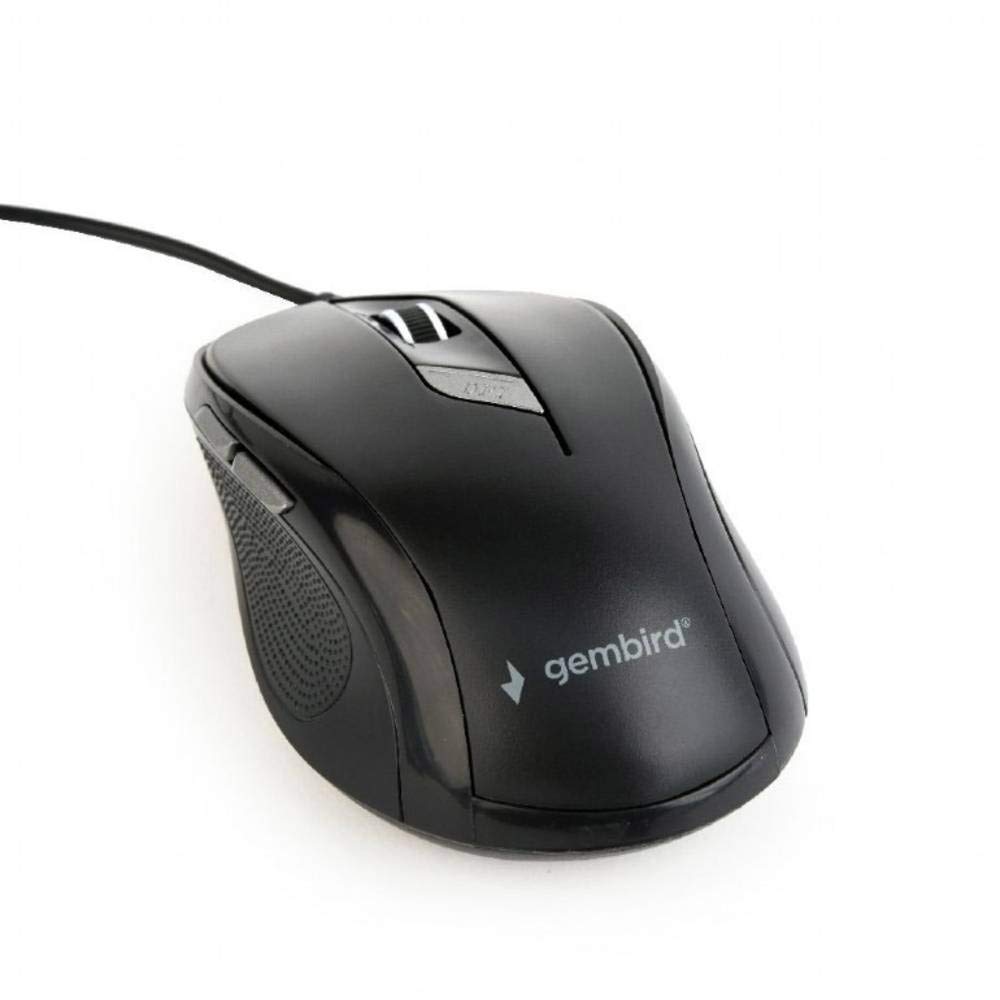
תמונה: מלמעלה למטה view of the Gembird MUS-6B-01 optical USB mouse. The mouse is black with a matte finish, featuring a scroll wheel, left and right click buttons, a DPI button, and two side buttons. A black USB cable extends from the front of the mouse.
3. התקנה
Setting up your Gembird MUS-6B-01 mouse is a simple plug-and-play process.
שלבי התקנה:
- אתר יציאת USB זמינה במחשב שלך.
- Plug the USB connector of the Gembird MUS-6B-01 mouse firmly into the USB port.
- Your operating system (Windows, Linux) will automatically detect and install the necessary drivers. This process may take a few moments.
- לאחר התקנת הדרייברים, העכבר מוכן לשימוש.
No additional software installation is typically required for basic functionality.
4. הוראות הפעלה
Familiarize yourself with the functions of each button on your Gembird MUS-6B-01 mouse.
פונקציות בסיסיות:
- לחיצה שמאלית: Primary action, selecting items, opening files.
- מקש ימני: Opens context menus, provides additional options.
- גלגל גלילה: גלילה למעלה או למטה בין מסמכים ו web דפים.
- לחיצה אמצעית (לחיצה על גלגל הגלילה): Often used to open links in new tabs or for specific application functions.
פונקציות מתקדמות:
- כפתור כוונון DPI: Located behind the scroll wheel, this button allows you to cycle through different sensitivity (DPI) settings. Press it to change the cursor speed to suit your preference.
- כפתור קדימה (צדדי): בדרך כלל מנווט קדימה ב web דפדפנים או file חוקרים.
- כפתור אחורה (צדדי): בדרך כלל מנווט אחורה ב web דפדפנים או file חוקרים.
The functionality of the side buttons may vary depending on the application or operating system settings. Some operating systems allow customization of these buttons.
5. תחזוקה
Proper care will help extend the life of your Gembird MUS-6B-01 mouse.
ניקוי:
- נתק את העכבר מהמחשב לפני ניקויו.
- השתמש רך, מעט דamp, lint-free cloth to wipe the surface of the mouse.
- For stubborn dirt, a small amount of mild soap solution can be applied to the cloth (not directly to the mouse).
- השתמש במקלון צמר גפן או באוויר דחוס כדי לנקות את סביב גלגל הגלילה ובין הכפתורים.
- Ensure the optical sensor on the underside is clean and free of dust or debris.
- אין להשתמש בכימיקלים חזקים, בחומרי ניקוי שוחקים או לטבול את העכבר במים.
אִחסוּן:
כאשר העכבר אינו בשימוש למשך תקופות ממושכות, יש לאחסן אותו בסביבה נקייה ויבשה הרחק מטמפרטורות קיצוניות ואור שמש ישיר.
6. פתרון תקלות
If you encounter issues with your Gembird MUS-6B-01 mouse, try the following troubleshooting steps:
| בְּעָיָה | פתרון אפשרי |
|---|---|
| העכבר לא מגיב |
|
| Erratic or jumpy cursor movement |
|
| כפתורים לא עובדים |
|
7. מפרטים
Detailed technical specifications for the Gembird MUS-6B-01 Optical USB Mouse:
| תכונה | מִפרָט |
|---|---|
| מותג | Gembird |
| שם הדגם | MUS-6B-01 |
| טכנולוגיית קישוריות | קווי (USB) |
| טכנולוגיית זיהוי תנועה | אוֹפּטִי |
| כמות הכפתורים | 6 |
| כיוון יד | אמבידקסטרואי |
| מערכות הפעלה תואמות | לינוקס, Windows 7, Windows XP (וגרסאות חדשות יותר) |
| פלטפורמת חומרה | מחשב אישי |
| אורך כבל | 5.0 מטר |
| משקל פריט | 74 גרם |
| חוֹמֶר | פּלָסטִי |
| צֶבַע | שָׁחוֹר |
| סוללות נדרשות | לֹא |
8. מידע בטיחות
אנא הקפידו על הנחיות הבטיחות הבאות:
- אין לחשוף את העכבר למים או ללחות מוגזמת.
- הימנע מהפלת העכבר או הכפיפה לפגיעות חזקות.
- אל תנסה לפרק או לתקן את העכבר בעצמך. פנה לאנשי שירות מוסמכים.
- הרחק את המכשיר מטמפרטורות קיצוניות ומאור שמש ישיר.
- יש להשליך פסולת אלקטרונית באחריות בהתאם לתקנות המקומיות.
9. אחריות ותמיכה
Gembird products are designed for reliability and performance. For specific warranty terms and conditions, please refer to the warranty card included with your product or visit the official Gembird website. For technical support or further assistance, please contact your retailer or the Gembird customer service department.