
1. הקדמה
This manual provides instructions for the installation, operation, and maintenance of the Cisco CP-68KEM-3PCC Expansion Module. This module is designed to enhance the functionality of your Cisco IP Phone 6851 by providing additional programmable keys.
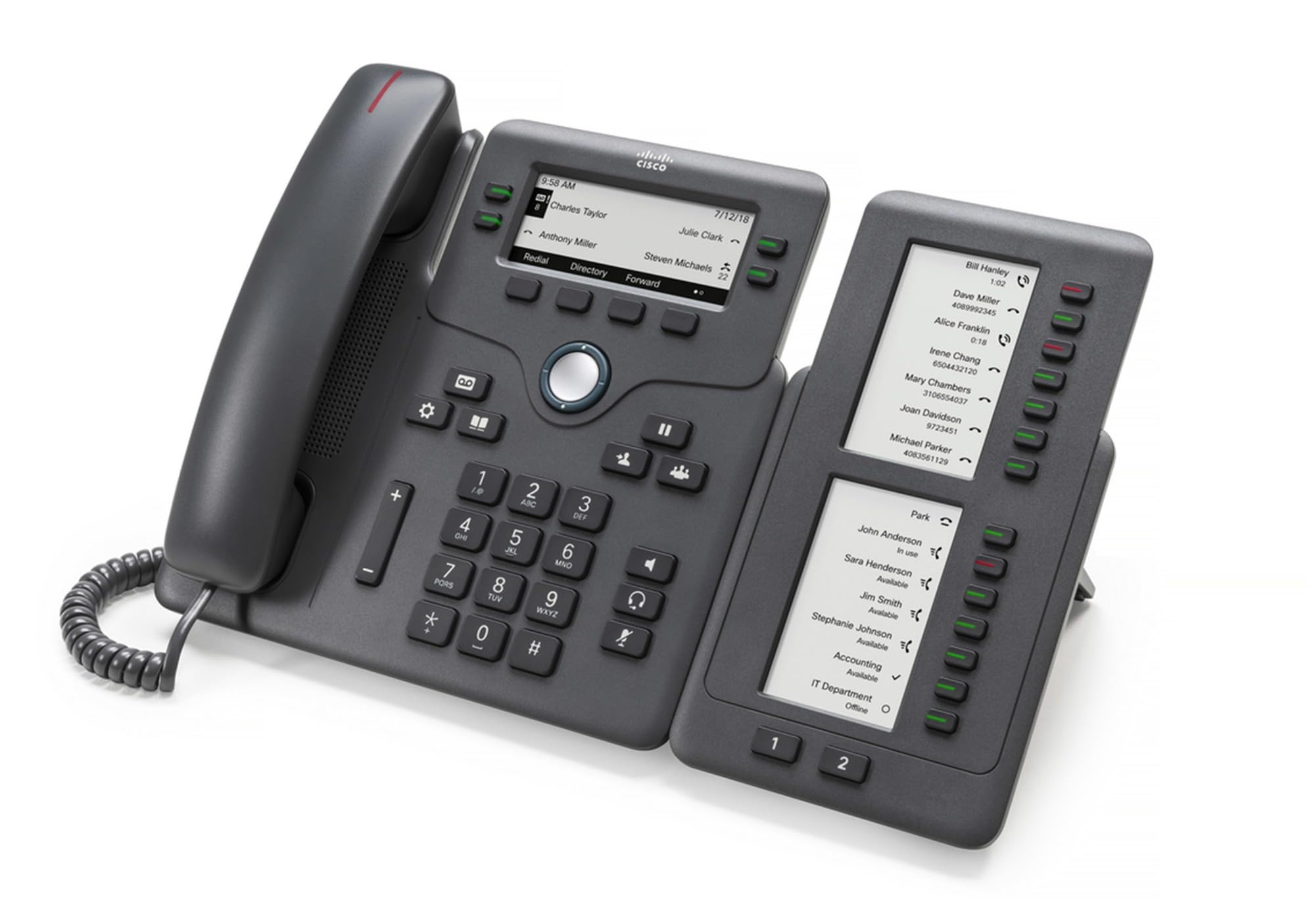
Figure 1: Cisco CP-68KEM-3PCC Expansion Module. This image shows the front view of the expansion module with its grayscale LCD screen and programmable keys.
The Cisco CP-68KEM-3PCC Expansion Module adds 14-line keys and 2-page keys, totaling 28 additional keys, with an easy-to-read grayscale LCD screen. It is ideal for monitoring and managing call status, directory numbers, and speed dial functions.
2. מה בקופסה
פרקו בזהירות את הקופסה וודאו שכל הפריטים נמצאים:
- Cisco CP-68KEM-3PCC Phone Expansion Module
- Connecting Cable (typically included for linking to the phone)
- Documentation (this user manual, safety information)
אם חסרים או ניזוקו פריטים כלשהם, אנא צרו קשר עם הספק או עם תמיכת סיסקו באופן מיידי.
3. הוראות התקנה
Follow these steps to connect your Cisco CP-68KEM-3PCC Expansion Module to your Cisco IP Phone 6851.
- Prepare the IP Phone: Ensure your Cisco IP Phone 6851 is powered off and disconnected from the network.
- Connect the Expansion Module: Locate the expansion port on the back or side of your Cisco IP Phone 6851. Connect the provided connecting cable from the expansion module to this port.
- אבטח את החיבור: Ensure the cable is securely fastened to prevent accidental disconnection.
- הפעלה: Reconnect your Cisco IP Phone 6851 to the network and power it on. The expansion module should be detected automatically.
- אימות פונקציונליות: Once the phone has booted, check the expansion module's display and keys to ensure they are responsive.
For detailed visual instructions, refer to the official Cisco documentation or support webאֲתַר.
4. Operating the Expansion Module
The expansion module provides additional keys for various functions, enhancing your call management capabilities.
4.1 מקשים ניתנים לתכנות
The 28 programmable keys (14 keys across 2 pages) can be configured for:
- Directory Numbers (DNs): Assign specific phone lines or extensions.
- חיוג מהיר: תכנת מספרים אליהם מתקשרים לעתים קרובות לגישה מהירה.
- מקשי תכונה: Assign functions like call transfer, conference, or call park.
- Call Status Monitoring: Monitor the status of other lines (e.g., busy, ringing).
4.2 Page Navigation
Use the dedicated page keys (usually located near the display) to switch between the two pages of programmable keys. The grayscale LCD screen will update to show the labels for the currently active page.
4.3 תצורה
Configuration of the programmable keys is typically managed through your organization's phone system administrator or via the web interface of the Cisco IP Phone 6851. Consult your IT department for specific configuration instructions.
5. תחזוקה
To ensure the longevity and optimal performance of your Cisco CP-68KEM-3PCC Expansion Module, follow these maintenance guidelines:
- ניקוי: Use a soft, dry, lint-free cloth to clean the exterior surfaces. For stubborn marks, slightly dampen the cloth with water. Avoid using harsh chemicals, abrasive cleaners, or solvents, as these can damage the finish and electronic components.
- סְבִיבָה: Keep the module in a clean, dry environment, away from direct sunlight, excessive heat, and moisture.
- טיפול: טפלו במודול בזהירות. הימנעו מהפלתו או מחשיפתו לפגיעות חזקות.
- ניהול כבלים: Ensure connecting cables are not kinked, pinched, or under strain.
There are no user-serviceable parts inside the expansion module. Do not attempt to open or repair the device yourself.
6. פתרון תקלות
If you encounter issues with your expansion module, try the following troubleshooting steps:
| בְּעָיָה | סיבה אפשרית | פִּתָרוֹן |
|---|---|---|
| Module not recognized by phone | Loose cable connection, phone not restarted, incompatible phone model. |
|
| המפתחות אינם מגיבים | Software glitch, configuration issue. |
|
| התצוגה ריקה או מהבהבת | בעיית חשמל, תקלה פנימית. |
|
If these steps do not resolve the issue, please contact Cisco technical support or your authorized reseller.
7. מפרטים
| תכונה | פְּרָט |
|---|---|
| מספר דגם | CP-68KEM-3PCC |
| מותג | סיסקו |
| מכשירים תואמים | טלפון IP של סיסקו 6851 |
| צֶבַע | שָׁחוֹר |
| חוֹמֶר | מַתֶכֶת |
| מידות פריט (LxWxH) | 5.1 x 10.2 x 20.3 ס"מ |
| מקור כוח | Corded (powered via host IP Phone) |
| מספר מפתחות | 28 (14 keys across 2 pages) |
| לְהַצִיג | Grayscale LCD |
| GTIN/UPC | 889728068383 |
8. מידע על אחריות
The Cisco CP-68KEM-3PCC Expansion Module comes with a 2 שנות אחריות למוצר from the date of purchase. This warranty covers defects in materials and workmanship under normal use. It does not cover damage caused by misuse, accidents, unauthorized modifications, or external causes.
For warranty claims or detailed terms and conditions, please refer to the official Cisco warranty policy available on their webאתר או צור קשר עם נקודת הרכישה שלך.
9. תמיכה
For technical assistance, product information, or to report issues, please contact Cisco support:
- תמיכת סיסקו Webאֲתַר: בקר אצל הפקיד תמיכת סיסקו webאֲתַר for documentation, downloads, and contact options.
- משווק מורשה: Contact the reseller from whom you purchased the product.
When contacting support, please have your product model (CP-68KEM-3PCC) and serial number ready.