
AuKing M8-F
מדריך למשתמש של מקרן AuKing
Model: M8-F
מָבוֹא
This manual provides essential information for the safe and efficient operation of your AuKing Mini Projector. Please read it thoroughly before use and retain it for future reference.
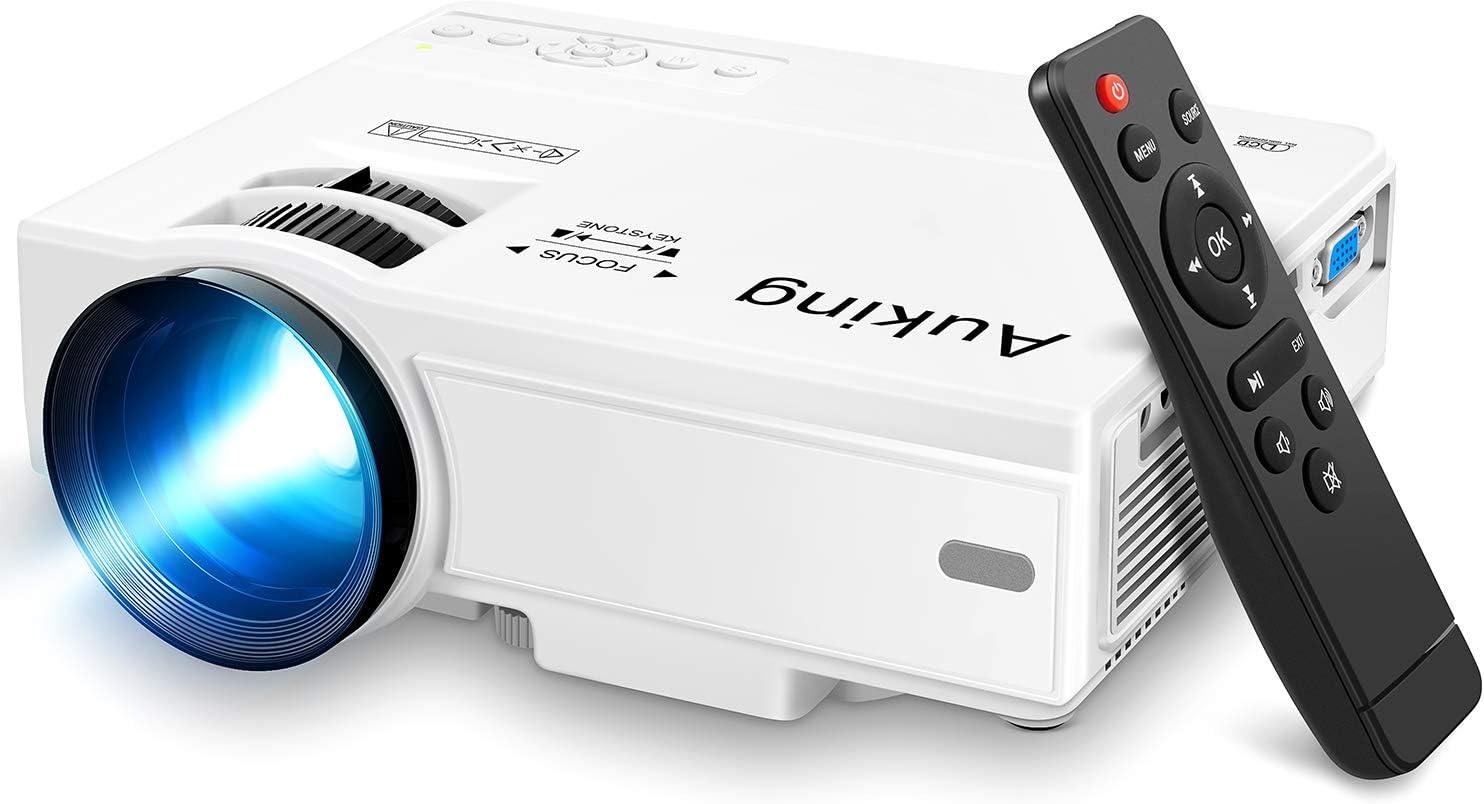
Image: The AuKing Mini Projector, a compact white device, is shown alongside its black remote control. The projector features a prominent lens and control buttons on its top surface.
תכונות המוצר
- Full HD 1080P Support: Experience clear and sharp detailed images with the latest color reproduction technology for a vibrant viewאפקט ing.
- Large Projection Screen: תהנה ממעמקים viewing experience with a projection size ranging from 35 to 200 inches, suitable for distances between 3.6ft and 16.4ft.
- חיי נורה ארוכים: The powerful cooling system effectively dissipates heat, extending the lamp's life up to 55,000 hours for over 15 years of use.
- Low Noise & Dual Stereo Speakers: Advanced noise reduction technology reduces fan noise by 80%. Built-in dual stereo speakers provide clear sound quality. External speakers can be connected for enhanced audio.
- חיבור למספר מכשירים: Equipped with HDMI, VGA, AV, and USB interfaces, compatible with smartphones, laptops, pads, USB drives, and TV boxes. (Note: An extra HDMI adapter may be needed for phone connection, and copyrighted apps like Netflix, Prime Video, Hulu require a TV Stick or Roku.)

Image: A split image demonstrating the AuKing projector's superior color reproduction and 1080P support compared to a generic projector.
מה יש בקופסה
Your AuKing Projector package includes:
- מקרן מיני של AuKing
- שְׁלַט רָחוֹק
- כבל חשמל
- כבל AV
- כבל HDMI
- מדריך למשתמש
מדריך התקנה
1. מיקום
Choose a suitable location for your projector. It can be placed on a table, mounted on a tripod, or ceiling-mounted. Ensure the projection surface is flat and clear.

Image: Demonstrates various placement options for the AuKing projector, including tripod installation, ceiling mount, and simple table placement.
2. חיבור חשמל
Connect the power cable to the projector and then to a power outlet.
3. חיבור התקן
Connect your desired input device (e.g., laptop, USB drive, smartphone) to the projector using the appropriate cable (HDMI, USB, AV, VGA). For smartphone connections, an additional HDMI adapter may be required (sold separately).

Image: Illustrates the projector's compatibility with multiple devices, showing connections for smartphones, laptops/PCs, PS4, DVD players, memory cards, and USB drives.
4. כוונון מיקוד ועקיבה
Use the FOCUS and KEYSTONE rings on the projector to adjust the image clarity and shape until it appears rectangular and sharp on your screen.
הוראות הפעלה
1. הפעלה/כיבוי
לחץ על לחצן ההפעלה במקרן או בשלט רחוק כדי להפעיל או לכבות את המכשיר.
2. בחירת מקור קלט
Use the "Source" button on the remote or projector to select the correct input source (HDMI, USB, AV, VGA) corresponding to your connected device.
3. השמעת מדיה
נווט בין המדיה שלך files using the remote control. For streaming services like Netflix, Prime Video, or Hulu, ensure you are using a compatible TV Stick or Roku device connected to the projector due to copyright restrictions.

Image: A living room setup showcasing the projector's ability to create a large 200-inch projection, providing an immersive home theater experience.
4. פלט שמע
The projector has built-in dual stereo speakers. For a higher sound quality, connect external speakers via the audio output port.
תַחזוּקָה
To ensure optimal performance and longevity of your AuKing projector:
- ניקוי אבק: Regularly clean the lens with a soft, lint-free cloth. Avoid abrasive cleaners.
- אוורור: Ensure the projector's ventilation ports are not blocked to allow proper airflow and prevent overheating. The advanced cooling system is designed to manage heat effectively.
- אִחסוּן: כאשר המקרן אינו בשימוש למשך תקופות ממושכות, יש לאחסן אותו במקום קריר ויבש, הרחק מאור שמש ישיר וטמפרטורות קיצוניות.

Image: An illustration highlighting the projector's advanced cooling system, showing arrows indicating airflow to prevent overheating and extend lamp חַיִים.
פתרון בעיות
| בְּעָיָה | סיבה אפשרית | פִּתָרוֹן |
|---|---|---|
| No image or "No Signal" | נבחר מקור קלט שגוי; חיבור כבל רופף; המכשיר אינו מופעל. | Select the correct input source. Check all cable connections. Ensure the input device is powered on. |
| תמונה מטושטשת | חוסר פוקוס; כוונון טרז' שגוי. | Adjust the FOCUS ring until the image is clear. Adjust the KEYSTONE ring to correct image distortion. |
| אין קול | Volume too low; Muted; External speakers not connected properly. | Increase volume. Unmute the projector. Check external speaker connections. |
| התחממות יתר של המקרן | אוורור חסום; שימוש ממושך בסביבה חמה. | Ensure vents are clear. Turn off and allow to cool. Use in a well-ventilated area. |
מפרטים
| תכונה | פְּרָט |
|---|---|
| מותג | AuKing |
| מספר דגם | M8-F |
| רזולוציית תצוגה | 1920 x 1080 (תמיכה ב-Full HD) |
| גודל הקרנה | 35-200 אינץ' |
| מרחק הקרנה | 3.6ft to 16.4ft |
| Lamp חַיִים | עד 55,000 שעות |
| טכנולוגיית קישוריות | VGA, USB, HDMI, AV |
| סוג רמקול | Built-In Dual Stereo Speakers |
| משקל פריט | 2.87 פאונד |
| מידות המוצר | 7.95 x 6.3 x 2.91 אינץ' |
אחריות ותמיכה
AuKing offers a אחריות להחלפת מוצר למשך 2 שנים and lifetime after-sales service for your projector. If you encounter any issues or have questions, please do not hesitate to contact our support team. We are committed to providing 100% customer satisfaction.
לתמיכה, אנא בקרו באתר AuKing Store on Amazon או עיינו בפרטי הקשר המופיעים באריזת המוצר.
Ask a question about this manual
Ask about setup, troubleshooting, compatibility, parts, safety, or missing instructions. Manuals+ will review the question and use this page’s manual context to help answer it.