
1. מידע בטיחות
אנא קרא בעיון את כל ההוראות לפני ההרכבה והשימוש. שמור מדריך זה לעיון עתידי.
- נדרשת הרכבה: This desk requires self-assembly. Follow the provided assembly instructions meticulously to prevent injuries.
- הגבלת משקל: This desk is not designed to carry heavy objects. The maximum weight capacity is approximately 17 kg (37.5 lbs) to ensure stability.
- הַשׁגָחָה: Children should be supervised while using the desk, especially during adjustments.
- מיקום: הנח את שולחן העבודה על משטח ישר ויציב.
2. המוצר נגמרview
The TecTake Children's Desk is designed to provide a comfortable and adaptable workspace for various activities such as drawing, homework, and crafts. Its thoughtful design allows for height and tilt adjustments to suit the user's needs.
תכונות עיקריות:
- שולחן עבודה מוטה: The work surface can be tilted to provide an ergonomic position for different tasks.
- גובה מתכוונן: The desk legs are adjustable in 7 steps, allowing the desk to grow with your child.
- מגירה משולבת: A convenient drawer provides storage for school supplies, drawing materials, and other items.
- Removable Stopper Strips: Two removable stopper strips on the lower edge of the desktop prevent materials from sliding off when the surface is tilted.
- בנייה יציבה: Built with robust materials for durability and stability during daily use.
- פינות מעוגלות: The desktop features rounded corners for enhanced safety.
- קל לניקוי: The surface is washable with a damp בַּד.

Figure 1: TecTake Children's Desk, showcasinהעיצוב והתכונות שלו.

איור 2: מעלview of key features including adjustable height, tilting desktop, and storage.
3. התקנה
The desk comes with detailed assembly instructions in the package. Please refer to the included manual for step-by-step guidance on assembling your TecTake Children's Desk.
שלבי האסיפה הכללית:
- הוצא את כל הרכיבים מהאריזה וודא מול רשימת החלקים במדריך המצורף.
- הרכיבו את מבנה המסגרת הראשית באמצעות החומרה המצורפת.
- Attach the desktop to the frame, ensuring the tilting mechanism is correctly installed.
- Install the storage drawer and stopper strips.
- ודא שכל הברגים והחיבורים מהודקים היטב לפני השימוש.

Figure 3: The desk's flexible design allows for various adjustments to suit user needs.
4. הוראות הפעלה
4.1 כוונון גובה שולחן העבודה
- Locate the height adjustment mechanisms on the desk legs.
- Carefully loosen the fasteners or pins that secure the legs at their current height.
- Adjust the desk to one of the 7 available height positions (from approximately 63 cm to 94 cm).
- Ensure both sides are adjusted to the same height and securely fasten the mechanisms before use.
4.2 Tilting the Desktop
- The desktop features a tilting mechanism for ergonomic positioning.
- To tilt, lift the desktop slightly and adjust it to the desired angle.
- Ensure the desktop is securely locked into place at the chosen angle.
- Utilize the two removable stopper strips to prevent items from sliding off the tilted surface.
4.3 Using the Storage Drawer
- The integrated drawer provides convenient storage.
- Pull the drawer out to access its contents.
- Push the drawer back in until it is fully closed to keep items secure and maintain a tidy workspace.
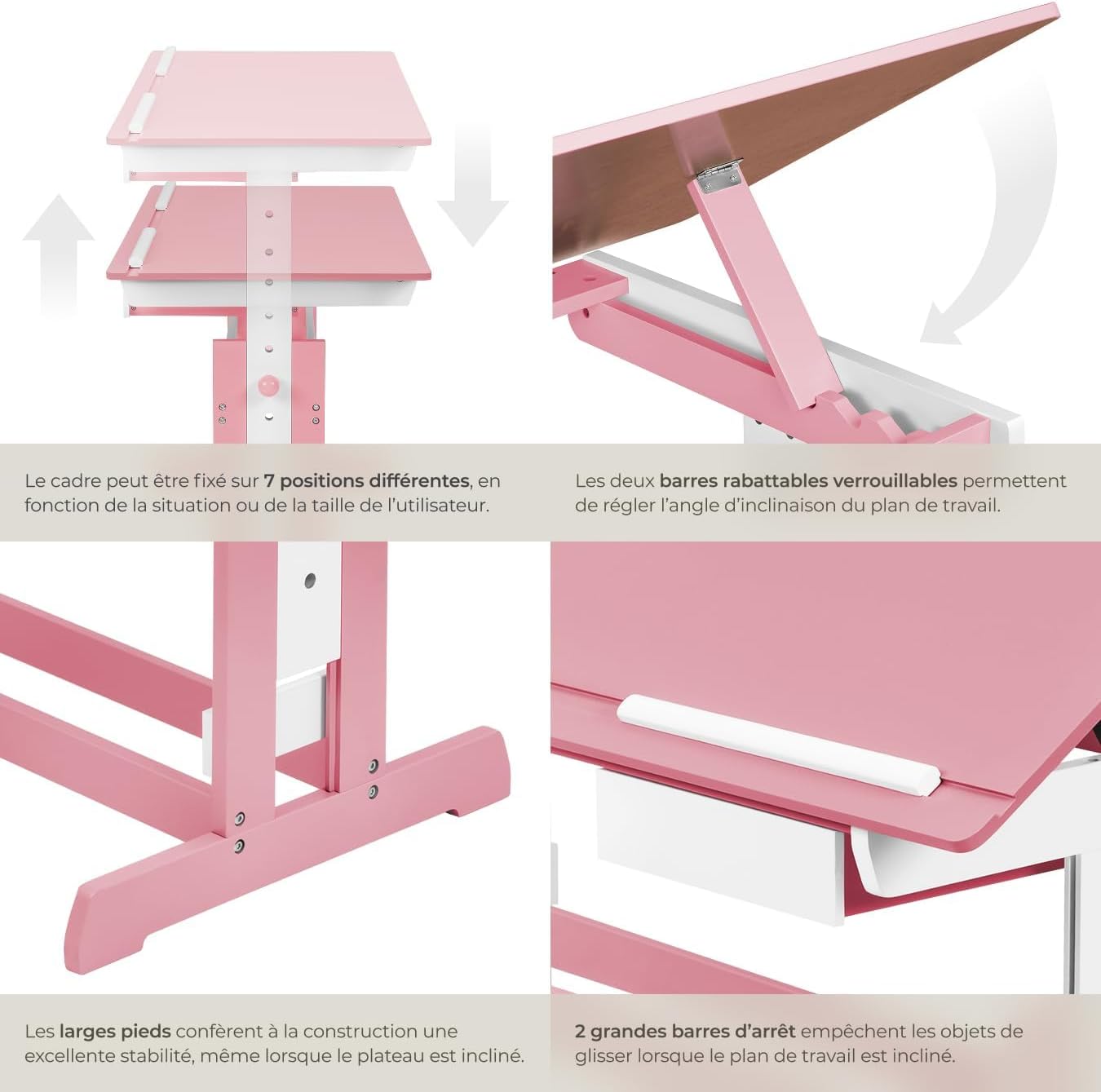
Figure 4: Close-up of the height adjustment and tilting mechanism.
5. תחזוקה
- ניקוי: נגבו את משטחי השולחן עם מודעהamp מטלית. הימנעו מחומרי ניקוי שוחקים או כימיקלים חזקים שעלולים לפגוע בגימור.
- בְּדִיקָה: בדקו מעת לעת את כל הברגים והחיבורים כדי לוודא שהם נשארים מהודקים היטב. הדקו מחדש לפי הצורך.
- הימנע מלחות יתר: Do not expose the desk to excessive moisture or direct sunlight for prolonged periods to prevent warping or discoloration.
6. פתרון תקלות
If you encounter any issues with your TecTake Children's Desk, please refer to the following common solutions:
- תנודות שולחן: Ensure the desk is placed on a level surface. Check that all assembly screws and bolts are securely tightened.
- קושי בהתאמת גובה/נטייה: Verify that no obstructions are present in the adjustment mechanisms. Ensure fasteners are sufficiently loosened before attempting to adjust.
- חלקים חסרים או פגומים: If any parts are missing or damaged upon arrival, please contact TecTake customer support for assistance.
7. מפרטים
| תכונה | מִפרָט |
|---|---|
| מותג | TecTake |
| מספר דגם | 800117 |
| מידות משטח עבודה | כ-109 x 55 ס"מ (43 x 21.7 אינץ') |
| טווח כוונון גובה | Approx. 63 cm to 94 cm (24.8 to 37 inches) in 7 steps |
| Drawer Interior Dimensions (HxWxD) | מידות בקירוב: 6 x 27 x 22 ס"מ (2.4 x 10.6 x 8.7 אינץ') |
| מִשׁקָל | כ. 17 ק"ג (37.5 פאונד) |
| חוֹמֶר | Plywood (lacquered) / Metal |
| תכונה מיוחדת | Adjustable, Tilting Desktop |
| הוראות טיפול | נגב עם מודעהamp בַּד |

Figure 5: Detailed dimensions and technical specifications of the desk.
8. אחריות ותמיכה
For warranty information, product support, or to order replacement parts, please refer to the documentation included with your purchase or visit the official TecTake webאתר. אנא ודאו כי מספר הדגם (800117) ותאריך הרכישה שלכם מוכנים בעת פנייה לתמיכה.