מָבוֹא
This manual provides detailed instructions for the installation, operation, and maintenance of the Gree XK-60 Wired Programmable Controller. This controller is designed to interface with Gree U-Match air conditioning systems, offering precise control over your indoor climate. Please read this manual thoroughly before installation and operation to ensure proper use and optimal performance.
המוצר נגמרview
The Gree XK-60 is a wired, programmable controller featuring a backlit LCD display and intuitive button controls. It allows users to manage various functions of their U-Match system, including operating modes, temperature settings, fan speeds, and programmable timers.
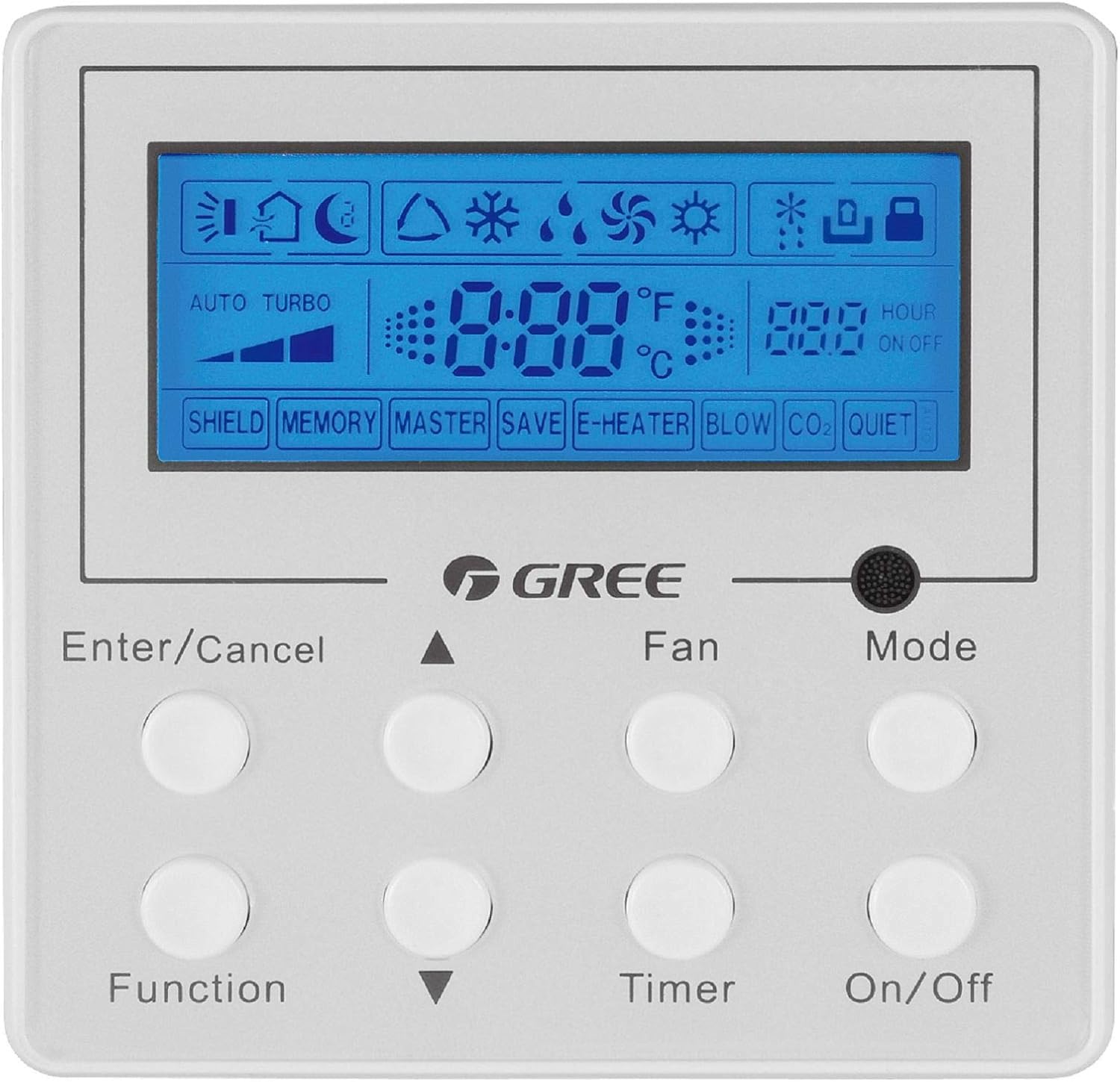
תיאור תמונה: חזית view of the Gree XK-60 wired programmable controller. The controller is white with a blue backlit LCD screen at the top. Below the screen are eight circular white buttons arranged in two rows of four. Text labels are printed below each button or pair of buttons. The GREE logo is centered between the screen and the buttons. The screen displays various icons for operating modes, fan speed, temperature, and timer settings.
מידע בטיחות
- Installation must be performed by a qualified and licensed HVAC technician.
- Disconnect all power to the indoor and outdoor units before performing any wiring or maintenance.
- ודאו שכל חיבורי החיווט תואמים לתקנות החשמל המקומיות והארציות.
- Do not attempt to repair or modify the controller yourself. Contact qualified service personnel.
- Keep the controller away from water and excessive humidity.
התקנה והגדרה
הרכבת הבקר
The XK-60 controller is designed for wall mounting. Choose a location that is easily accessible, away from direct sunlight, heat sources, and drafts, which could affect temperature readings.
הוראות חיווט
The controller connects to the indoor unit via a wired connection.
- Turn off the main power supply to the U-Match system.
- Open the wiring cover on the indoor unit and locate the control terminal block.
- Connect the communication wires from the XK-60 controller to the designated terminals on the indoor unit's control board. Refer to the U-Match system's indoor unit installation manual for specific wiring diagrams.
- ודא שכל החיבורים מאובטחים ומקוטבים כראוי.
- Close the wiring cover and restore power to the system.
פֶּתֶק: Incorrect wiring can damage the controller or the U-Match system. If you are unsure, consult a professional technician.
הוראות הפעלה
The Gree XK-60 controller features an LCD display and eight control buttons.
פונקציות כפתור
- הזן/בטל: מאשר בחירות או מבטל פעולות נוכחיות.
- חץ למעלה (▲): Increases temperature, fan speed, or navigates menu options upwards.
- חץ למטה (▼): Decreases temperature, fan speed, or navigates menu options downwards.
- פוּנקצִיָה: Accesses advanced settings or special functions.
- אוהד: כוונון מהירות המאוורר (אוטומטי, נמוך, בינוני, גבוה).
- שָׁעוֹן עֶצֶר: מגדיר את טיימר ההפעלה/כיבוי.
- מצב: מחזורי הפעלה בין מצבי הפעלה (אוטומטי, קירור, ייבוש, חימום, מאוורר).
- הפעלה/כיבוי: מפעיל או מכבה את היחידה.
מחווני תצוגת LCD
- תצוגת טמפרטורה: Shows the current room temperature or set temperature in °F or °C.
- Operating Mode Icons:
- Sun (Heat)
- Snowflake (Cool)
- Water Drop (Dry)
- Fan Blade (Fan Only)
- Auto (Automatic mode)
- מחוון מהירות מאוורר: Bar graph or specific icon showing current fan speed.
- מחוון טיימר: "HOUR ON OFF" with numerical display for programmed times.
- Special Function Indicators: "SHIELD", "MEMORY", "MASTER", "SAVE", "E-HEATER", "BLOW", "CO2", "QUIET" indicate active special features.
פעולה בסיסית
- הפעלה/כיבוי: הקש על הפעלה/כיבוי לחצן כדי להפעיל או לכבות את המערכת.
- בחר מצב: הקש על מצב button repeatedly to cycle through available operating modes (Auto, Cool, Dry, Heat, Fan).
- הגדר טמפרטורה: במצב קירור או חימום, השתמשו ב- חץ למעלה (▲) or חץ למטה (▼) כפתורים לכוונון הטמפרטורה הרצויה.
- התאם את מהירות המאוורר: הקש על מְנִיפָה button repeatedly to select the desired fan speed (Auto, Low, Medium, High).
- הגדר טיימר: הקש על שָׁעוֹן עֶצֶר button to enter timer setting mode. Use the חץ למעלה (▲) or חץ למטה (▼) buttons to set the desired ON or OFF time, then press הזן/בטל כדי לאשר.
פונקציות מתקדמות
To access advanced functions like "SHIELD" or "QUIET" mode, press the פוּנקצִיָה button. Use the arrow buttons to navigate through options and הזן/בטל to select or confirm. Refer to the U-Match system's specific feature documentation for detailed explanations of each advanced function.
תַחזוּקָה
ניקוי הבקר
- Wipe the surface of the controller with a soft, dry cloth.
- אין להשתמש בחומרי ניקוי שוחקים, ממיסים או תרסיסים כימיים, מכיוון שאלה עלולים לפגוע בפלסטיק וברכיבים האלקטרוניים.
- Ensure no liquid enters the controller casing.
תחזוקת מסנן מערכת
While the controller itself does not require filter maintenance, regular cleaning or replacement of the U-Match indoor unit's air filters is crucial for optimal system performance and air quality. Refer to your U-Match indoor unit manual for filter maintenance instructions.
פתרון בעיות
If you encounter issues with your Gree XK-60 controller, refer to the following common problems and solutions.
| בְּעָיָה | סיבה אפשרית | פִּתָרוֹן |
|---|---|---|
| תצוגת הבקר ריקה. | No power to the unit or controller. | Check the main power supply to the U-Match system. Ensure wiring connections are secure. |
| Controller not responding to button presses. | Temporary software glitch or communication error. | Turn off power to the system for a few minutes, then restore power. If the issue persists, check wiring. |
| קריאת טמפרטורה שגויה. | Controller located near a heat source or draft. | Relocate the controller if possible, or ensure no external factors are influencing the sensor. |
| System not operating in selected mode. | Communication error with indoor unit or system fault. | Check for error codes on the indoor unit. Consult a qualified technician if the problem persists. |
For complex issues or error codes not listed, contact a qualified HVAC technician or Gree customer support.
מפרטים
- דֶגֶם: Gree XK-60
- סוג בקרה: בקר קווי לתכנות
- תְאִימוּת: Gree U-Match Systems
- כרך ידtage: 230 וולט
- תכונה מיוחדת: Programmable, Backlight
- שיטת בקרה: בקרת כפתור
- מידות חבילה: 13.62 x 1.54 x 0.98 אינץ' בערך
- משקל פריט: בערך 6.7 אונקיות
אחריות ותמיכה
For warranty information and technical support, please refer to the documentation provided with your Gree U-Match system or contact Gree customer service directly. Keep your purchase receipt as proof of purchase for warranty claims.
Gree Customer Support: Visit the official Gree website or contact your local distributor for support.