
מָבוֹא
This manual provides detailed instructions for the setup, operation, and maintenance of your TFA Dostmann Digital Radio-Controlled Alarm Clock, model 60.2547.54. Please read this manual thoroughly before using the device to ensure proper function and to understand all features.
המוצר נגמרview & רכיבים
The TFA Dostmann Digital Radio-Controlled Alarm Clock is designed to provide accurate time, date, and indoor climate information. It features a highly precise radio-controlled clock, two independent alarm times, and an automatic night light function.
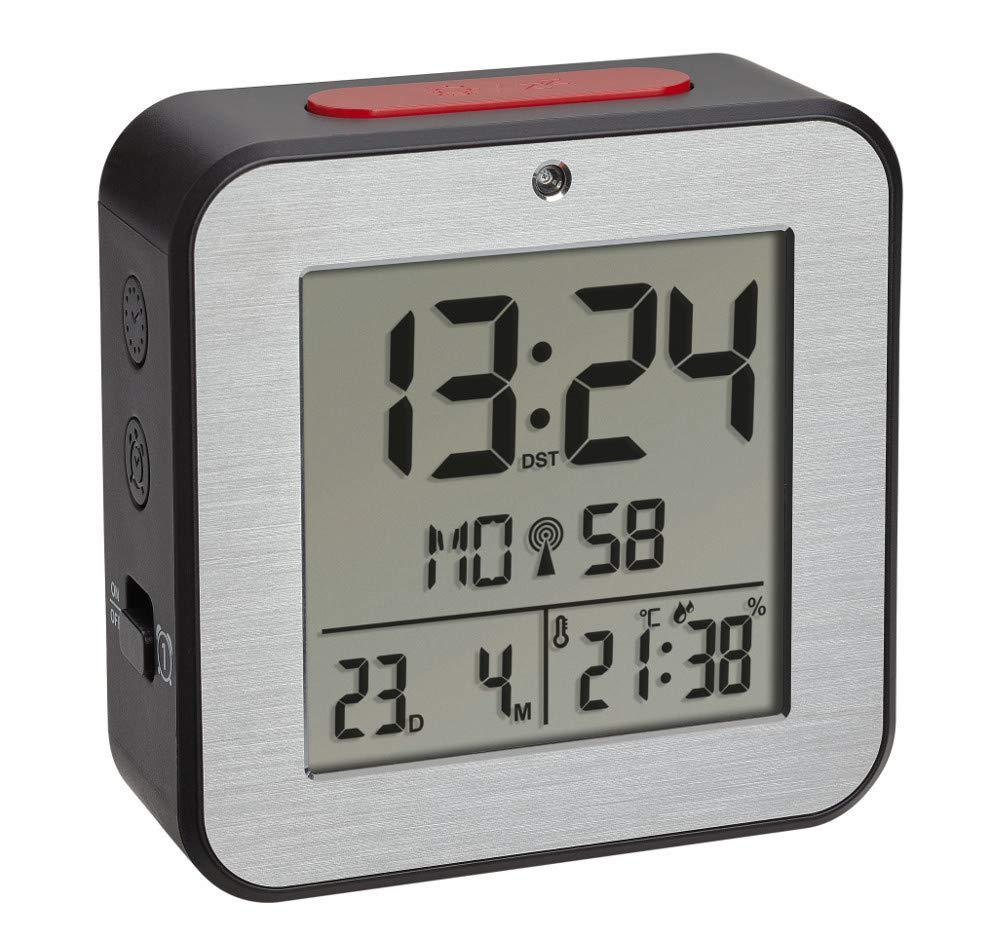


התקנת סוללה
- אתר את מכסה תא הסוללות בגב השעון המעורר.
- הסר את המכסה על ידי החלקתו או הרמתו.
- Insert two (2) 1.5 V AA batteries, ensuring correct polarity (+/-). Batteries are not included and must be purchased separately.
- החזר היטב את מכסה תא הסוללות.
- The device will power on and begin searching for the radio-controlled time signal.
הגדרה ראשונית
Upon battery installation, the clock will automatically attempt to receive the radio-controlled time signal. This process may take several minutes. If the signal is not received or for manual adjustments, follow these steps:
Manual Time and Date Setting
- Press and hold the 'SET' button (location may vary, refer to device diagram if available) to enter setup mode.
- השתמשו בלחצנים '+' או '-' כדי לכוונן את הערך המהבהב (למשל, שעה, דקה, שנה, חודש, יום).
- לחץ שוב על 'SET' כדי לאשר את ההגדרה ולעבור לפרמטר הבא.
- Repeat until all desired settings (time, date, year) are configured.
בחירת שפה
The display supports 7 languages for the day of the week: French, Spanish, Italian, Dutch, Danish, and English. During initial setup or in settings mode, select your preferred language using the '+' or '-' buttons.
התאמת אזור זמן
If you are in a region where the radio signal's standard time differs from your local time, you can adjust the time zone by +/- 12 hours. Access this setting in the setup mode and use the '+' or '-' buttons to set the offset.
הוראות הפעלה
הגדרת אזעקות (אזעקה 1 ואזעקה 2)
- Press the 'ALARM 1' or 'ALARM 2' button to display the current alarm time.
- Press and hold the respective 'ALARM' button until the alarm time flashes.
- Use the '+' or '-' buttons to adjust the hour, then press the 'ALARM' button to confirm and move to minutes.
- Adjust minutes with '+' or '-' and press 'ALARM' to confirm.
- To activate or deactivate an alarm, press the 'ALARM 1 ON/OFF' or 'ALARM 2 ON/OFF' switch (typically located on the side or back). An alarm icon will appear on the display when active.
פונקציית נודניק
When an alarm sounds, press the 'SNOOZE/LIGHT' button (usually a large button on top) to temporarily silence the alarm. The alarm will sound again after a few minutes (default snooze duration). To stop the alarm completely, press any other button or switch the alarm off using its dedicated ON/OFF switch.
Automatic Backlight and Light Sensor
The alarm clock features an automatic backlight that activates in low-light conditions. This function is controlled by a light sensor. To enable or disable the automatic backlight, locate the 'AUTO LIGHT' switch or setting (refer to your device's specific button layout).
Indoor Climate Display
The display continuously shows the indoor temperature in Celsius (°C) or Fahrenheit (°F) and the relative humidity (%). To switch between °C and °F, press the '°C/°F' button (if available) or cycle through display modes in the setup menu.
תַחזוּקָה
- ניקוי: נקו את המכשיר בעזרת מטלית רכה ויבשה. אין להשתמש בחומרי ניקוי שוחקים או ממסים.
- החלפת סוללה: Replace batteries when the display dims or the device stops functioning. Always replace both batteries simultaneously with new ones of the same type. Dispose of used batteries responsibly.
- אִחסוּן: אם מאחסנים את המכשיר לתקופה ממושכת, יש להוציא את הסוללות כדי למנוע דליפה.
פתרון בעיות
| בְּעָיָה | סיבה אפשרית | פִּתָרוֹן |
|---|---|---|
| התצוגה ריקה או עמומה. | הסוללות חלשות או שהן הוכנסו בצורה שגויה. | Replace batteries with new 1.5 V AA batteries, ensuring correct polarity. |
| השעה שגויה או שאינה מוגדרת אוטומטית. | Poor radio signal reception; device is out of range or obstructed. | Move the alarm clock to a location with better signal reception, away from electronic devices or metal objects. Perform manual time setting if necessary. |
| האזעקה לא נשמעת. | האזעקה לא מופעלת או שעוצמת הקול נמוכה מדי. | Ensure the alarm's ON/OFF switch is in the 'ON' position. Check alarm time settings. |
| קריאות הטמפרטורה/לחות נראות לא מדויקות. | Device is exposed to direct sunlight, heat sources, or drafts. | Place the alarm clock in a stable indoor environment, away from extreme temperature fluctuations. |
מפרטים
- דֶגֶם: 60.2547.54
- מותג: TFA דוסטמן
- סוג תצוגה: דִיגִיטָלי
- מקור כוח: 2 סוללות AA 1.5 וולט (לא כלולות)
- מידות (L x W x H): 82 x 33 x 82 מ"מ
- מִשׁקָל: 110 גרם
- חוֹמֶר: אלומיניום, פלסטיק
- טווח מדידת טמפרטורה: -9°C עד +50°C (+14°F עד +122°F)
- טווח מדידת לחות: 20% עד 95% RH
- מאפיינים מיוחדים: Radio-controlled time, Dual alarms, Snooze function, Automatic backlight, Indoor temperature and humidity display, 7-language weekday display, Time zone adjustment.
מידע על אחריות
TFA Dostmann products are manufactured with quality and care. For specific warranty terms and conditions, please refer to the warranty card included in your product packaging or visit the official TFA Dostmann webאתר. שמור את הוכחת הרכישה שלך עבור כל תביעת אחריות.
תְמִיכָה
If you encounter any issues not covered in this manual or require further assistance, please contact TFA Dostmann customer support. Contact details can typically be found on the official TFA Dostmann webבאתר או על אריזת המוצר.