
1. הקדמה
Thank you for choosing the Cecotec Ready Warm 6670 Cristal Electric Radiator. This modern and elegant crystal convector is designed to provide efficient and rapid heating for your living spaces. Featuring an adjustable thermostat, timer function, and Wi-Fi connectivity, it offers convenient control and optimized energy consumption. This manual provides essential information for safe operation, installation, maintenance, and troubleshooting.
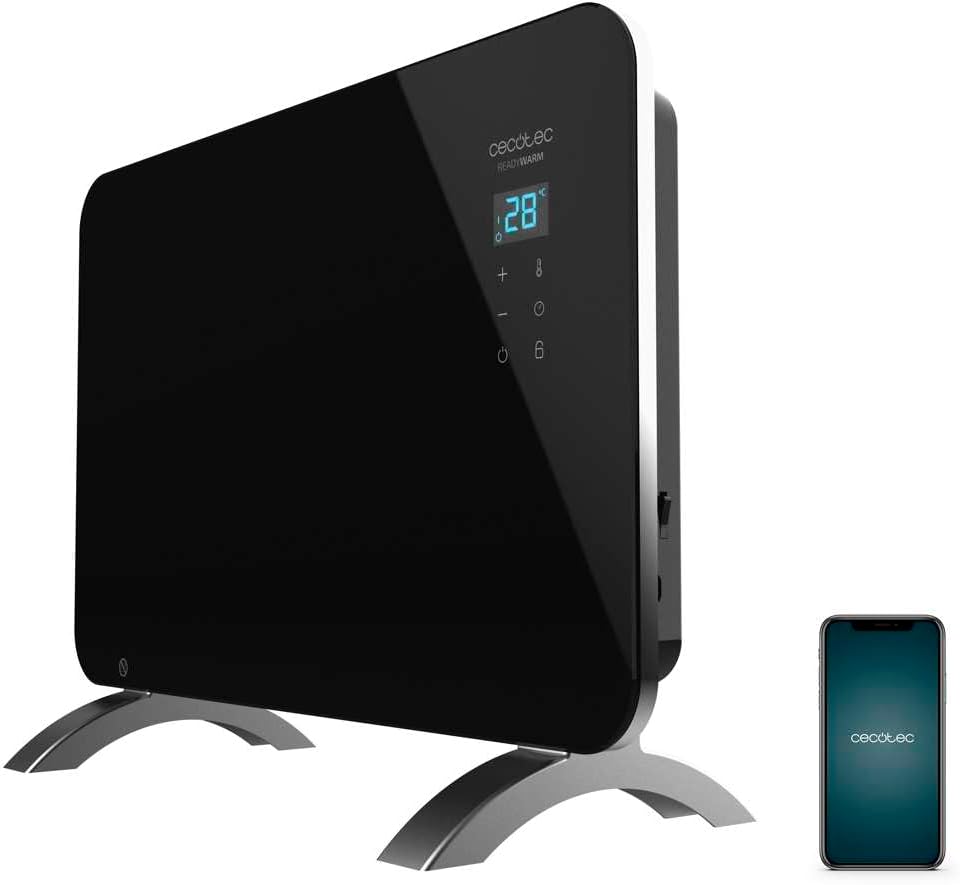
Figure 1: The Cecotec Ready Warm 6670 Cristal Electric Radiator, showcasing its sleek black design and digital display, alongside a smartphone indicating its Wi-Fi control capability.
2. הוראות בטיחות חשובות
אנא קראו בעיון את כל ההוראות לפני השימוש במכשיר ושמרו אותן לעיון עתידי. אי הקפדה על הוראות אלה עלולה לגרום להתחשמלות, שריפה או פציעה חמורה.
- ודא את הכרךtagעוצמת החשמל המצוינת בתווית הדירוג תואמת את עוצמת החשמל של החשמל שלךtagה לפני חיבור המכשיר.
- אין להשתמש במכשיר זה ליד מים או ב...amp environments, such as bathrooms, due to its IP24 splash protection rating.
- Always place the radiator on a stable, flat surface. Ensure adequate clearance from walls and furniture for proper ventilation.
- Do not cover the radiator, as this can lead to overheating and fire hazards.
- הרחיקו ילדים וחיות מחמד מהמכשיר במהלך הפעולה, מכיוון שמשטחים עלולים להתחמם מאוד.
- Unplug the appliance from the power outlet when not in use, before cleaning, or before moving it.
- Do not operate the appliance with a damaged cord or plug, or if it has malfunctioned or been dropped.
- Repairs should only be performed by qualified personnel. Improper repairs can be dangerous.
- מכשיר זה מיועד לשימוש פנימי בלבד.
3. רכיבי המוצר
Familiarize yourself with the main parts of your Cecotec Ready Warm 6670 Cristal Electric Radiator:
- Main Heating Unit (Glass Panel)
- פאנל תצוגה דיגיטלי
- Control Buttons (+, -, Power, Mode, Timer)
- כבל חשמל ותקע
- Detachable Pedestal Feet (for freestanding use)
- Wall Mounting Brackets (optional, not included in this model description but common for panel heaters)

איור 2: ניתוח מפורט view of the radiator's digital display and control buttons, showing temperature, mode, and timer indicators.
4. התקנה והתקנה
Your radiator can be used as a freestanding unit with the included pedestal feet.
4.1. Attaching the Pedestal Feet
- הוציאו בזהירות את הרדיאטור ואת כל הרכיבים.
- Place the radiator on a soft, flat surface to prevent scratching the glass panel.
- Align the pedestal feet with the mounting holes at the bottom of the radiator.
- אבטחו את הרגליים באמצעות הברגים המצורפים. ודאו שהן מחוברות היטב.
- Once the feet are attached, carefully place the radiator upright in your desired location. Ensure it is on a stable, level surface and away from flammable materials.

Figure 3: The radiator positioned in a room, demonstrating its freestanding setup with the pedestal feet.
5. הוראות הפעלה
5.1. פעולה בסיסית
- Plug the radiator into a suitable power outlet.
- הקש על כּוֹחַ כפתור (סמל: עיגול עם קו אנכי) on the control panel to turn the unit on. The digital display will illuminate.
- השתמש ב- + ו - buttons to adjust the desired temperature. The display will show the set temperature.
- הקש על מצב כפתור (symbol: thermometer) to cycle through heating modes (e.g., Eco, Max).
- To turn off the radiator, press the כּוֹחַ כפתור שוב.
5.2. Wi-Fi Connectivity and App Control
The Cecotec Ready Warm 6670 Cristal can be controlled via your smartphone using the Tuya Smart APP.
- Download the "Tuya Smart" app from your smartphone's app store (available for iOS and Android).
- הירשמו או התחברו לחשבון Tuya Smart שלכם.
- ודא שהסמארטפון שלך מחובר לרשת Wi-Fi במהירות 2.4 GHz.
- On the radiator, press and hold the Wi-Fi button (if available, or a combination of buttons as per app instructions) to enter pairing mode. The Wi-Fi indicator on the display will blink.
- In the Tuya Smart app, tap "+" to add a device. Select "Heater" or "Radiator" from the device list.
- Follow the on-screen instructions in the app to connect the radiator to your Wi-Fi network. This typically involves confirming the Wi-Fi indicator is blinking and entering your Wi-Fi password.
- Once connected, you can control the radiator's power, temperature, mode, and timer settings directly from the app.

Figure 4: A user interacting with a smartphone, illustrating the convenience of controlling the radiator remotely via the Tuya Smart application.
5.3. פונקציית טיימר
The timer allows you to set a specific duration for the radiator to operate.
- הקש על שָׁעוֹן עֶצֶר כפתור (סמל: שעון) on the control panel or in the app.
- השתמש ב- + ו - buttons to set the desired operating time in hours.
- The radiator will automatically turn off after the set time has elapsed.
6. תחזוקה וניקיון
Regular cleaning ensures optimal performance and extends the lifespan of your radiator.
- תמיד נתקו את הרדיאטור משקע החשמל ותנו לו להתקרר לחלוטין לפני ניקויו.
- נגב את המשטחים החיצוניים עם רך, דamp מטלית. אין להשתמש בחומרי ניקוי שוחקים, ממסים או כימיקלים חזקים, מכיוון שאלה עלולים לפגוע בגימור.
- Do not immerse the radiator in water or any other liquid.
- ודא שאין מים שנכנסים ללוח הבקרה או לרכיבים החשמליים.
- For storage, clean the unit and store it in a cool, dry place, preferably in its original packaging.
7. פתרון תקלות
אם נתקלתם בבעיות עם הרדיאטור שלכם, עיינו בבעיות הנפוצות ובפתרונות הבאות:
| בְּעָיָה | סיבה אפשרית | פִּתָרוֹן |
|---|---|---|
| הרדיאטור לא נדלק. | Not plugged in; power outlet faulty; power button not pressed; overheat protection activated. | Check power connection; try a different outlet; press power button; unplug and let cool for 30 minutes before restarting. |
| אין תפוקת חום. | Temperature setting too low; mode not set correctly. | Increase desired temperature; ensure correct heating mode (e.g., Max) is selected. |
| חיבור ה-Wi-Fi נכשל. | Incorrect Wi-Fi password; router too far; 5 GHz network used; pairing mode not active. | Verify password; move radiator closer to router; ensure 2.4 GHz network is used; re-enter pairing mode on radiator. |
| הרדיאטור נכבה באופן בלתי צפוי. | Timer function active; overheat protection activated. | Check timer settings; ensure radiator is not covered and has adequate ventilation. |
8. מפרט טכני
| תכונה | פְּרָט |
|---|---|
| מותג | Cecotec |
| מספר דגם | big-V1704474 (05350) |
| צֶבַע | שָׁחוֹר |
| כּוֹחַ | 1000 W |
| כרך ידtage | 220 וולט |
| חוֹמֶר | Aluminum (Heating element), Glass (Panel) |
| שיטת חימום | הולכת חום |
| תכונה מיוחדת | Adjustable Thermostat, Wi-Fi Connectivity, Timer, Overheat Protection, IP24 Splash Protection |
| מידות (L x W x H) | 47 x 13 x 64 cm (Product); 60 x 24 x 46 cm (Product, alternative) |
| משקל פריט | 5.1 קילוגרם |
| רמת רעש | 44 dB |
| שימוש מומלץ | Indoor (Home) |
9. אחריות ותמיכה
Cecotec products are manufactured to high-quality standards. This product comes with a standard manufacturer's warranty covering defects in materials and workmanship from the date of purchase. Please refer to the warranty card included with your product for specific terms and conditions.
לתמיכה טכנית, סיוע בפתרון בעיות או תביעות אחריות, אנא צרו קשר עם שירות הלקוחות של Cecotec דרך שירות הלקוחות הרשמי שלהם. website or the contact information provided in your product packaging. When contacting support, please have your model number (big-V1704474) and purchase date ready.
זמינות חלקי חילוף: 10 שנים.