
מָבוֹא
Thank you for choosing the MIFA A3 Soundbox Bluetooth Portable Speaker. This manual provides essential information for the safe and efficient use of your device. Please read it thoroughly before operating the speaker and retain it for future reference.
מידע בטיחות
- אין לחשוף את הרמקול לטמפרטורות קיצוניות, לאור שמש ישיר או לחות גבוהה.
- הימנע מהפלת הרמקול או הכפיפה למכות חזקות.
- אין לפרק או לנסות לתקן את הרמקול בעצמך. פנו לאנשי שירות מוסמכים.
- Keep the speaker away from water and liquids, despite its waterproof rating, to prevent damage to charging ports or internal components.
- השתמשו רק בכבל הטעינה ובמתאם שצוינו.
תוכן החבילה
אנא בדקו את החבילה עבור הפריטים הבאים:
- MIFA A3 Bluetooth Portable Speaker
- כבל טעינה USB
- כבל שמע AUX
- מדריך למשתמש (מסמך זה)
המוצר נגמרview
The MIFA A3 speaker features intuitive touch controls and multiple connectivity options. Familiarize yourself with the speaker's layout:
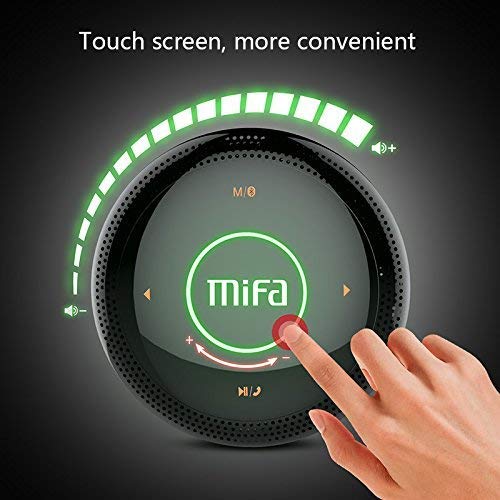
איור 1: רֹאשׁ view of the MIFA A3 speaker, highlighting the touch-sensitive control panel. The panel displays volume indicators, play/pause, and track navigation buttons. A central 'Mifa' logo is also visible.
- גע בלוח הבקרה: Located on the top surface for volume adjustment, playback control, and mode selection.
- מִיקרוֹפוֹן: לשיחות ללא ידיים.
- יציאת טעינה: יציאת מיקרו USB לטעינה.
- כניסת AUX: שקע שמע 3.5 מ"מ לחיבור קווי.
- חריץ לכרטיס מיקרו SD: להשמעת מוזיקה ישירות מכרטיס זיכרון.
הגדרה
1. טעינת הרמקול
לפני השימוש הראשון, טען את הרמקול במלואו. חבר את כבל הטעינה מסוג USB המצורף לשקע הטעינה של הרמקול ואת הקצה השני למתאם חשמל מסוג USB (לא כלול) או לשקע USB של מחשב.
- נורית חיווי הטעינה תידלק במהלך הטעינה.
- The indicator will turn off or change color once fully charged.
- A full charge provides approximately 8 hours of continuous playtime.
2. הפעלה/כיבוי
- כדי להפעיל: Press and hold the Power button (usually integrated into the touch panel or a dedicated button) for 2-3 seconds until you hear an audible prompt or see an indicator light.
- כדי לכבות: Press and hold the Power button again for 2-3 seconds.
הוראות הפעלה
1. זיווג Bluetooth
- Ensure the speaker is powered on and in Bluetooth pairing mode (indicated by a flashing blue light or audible prompt).
- במכשיר שלך (סמארטפון, טאבלט, מחשב), הפעל את Bluetooth וחפש מכשירים זמינים.
- Select "MIFA A3" from the list of devices.
- Once paired, the speaker will provide an audible confirmation, and the indicator light will become solid blue.
- The speaker will automatically connect to the last-paired device when powered on, if that device's Bluetooth is active and within range.
2. חיבור AUX
For devices without Bluetooth, use the provided 3.5mm AUX audio cable:
- חבר קצה אחד של כבל ה-AUX ליציאת קלט ה-AUX של הרמקול.
- חבר את הקצה השני לשקע האוזניות של מכשיר השמע שלך.
- הרמקול יעבור אוטומטית למצב AUX.
3. ניגון מכרטיס מיקרו SD
Insert a Micro SD card (up to 32GB, FAT32 format) with music files into the designated slot. The speaker will automatically detect the card and begin playback.
4. Touch Control Operations
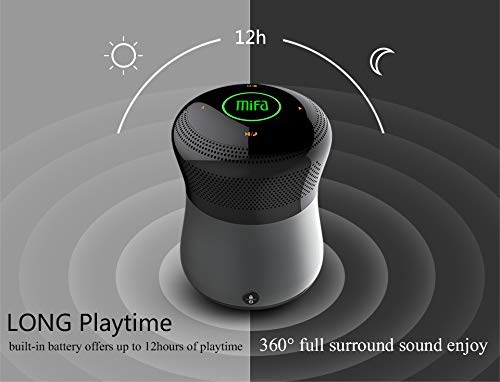
איור 2: The MIFA A3 speaker shown with an overlay indicating "LONG Playtime" (up to 12 hours) and "360° full surround sound enjoy." This image emphasizes the speaker's battery life and audio dispersion.
- בקרת עוצמת הקול: Slide your finger clockwise on the touch panel to increase volume, counter-clockwise to decrease.
- הפעל/השהה: Tap the central Play/Pause icon.
- הרצועה הבאה: Tap the "Next" arrow icon.
- רצועה קודמת: Tap the "Previous" arrow icon.
- מתג מצב: Tap the "M/O" icon to cycle between Bluetooth, AUX, and Micro SD card modes.
- לחצן נעילה: Press the lock icon to prevent accidental touch inputs.
5. Call Handling (Bluetooth Mode)
- תשובה לשיחה: Tap the Play/Pause icon when a call comes in.
- סיום שיחה: Tap the Play/Pause icon again.
- דחה שיחה: Press and hold the Play/Pause icon for 2 seconds.
תַחזוּקָה
- נקו את הרמקול בעזרת מטלית רכה ויבשה. אין להשתמש בחומרי ניקוי שוחקים או ממסים.
- אחסנו את הרמקול במקום קריר ויבש כאשר אינו בשימוש למשך תקופות ממושכות.
- Charge the battery at least once every three months to maintain battery health.
פתרון בעיות
| בְּעָיָה | פתרון אפשרי |
|---|---|
| הרמקול לא נדלק. | ודא שהסוללה טעונה. חבר למקור חשמל ונסה שוב. |
| לא ניתן לבצע צימוד דרך בלוטות'. |
|
| אין קול. |
|
| איכות צליל ירודה. |
|
מפרטים
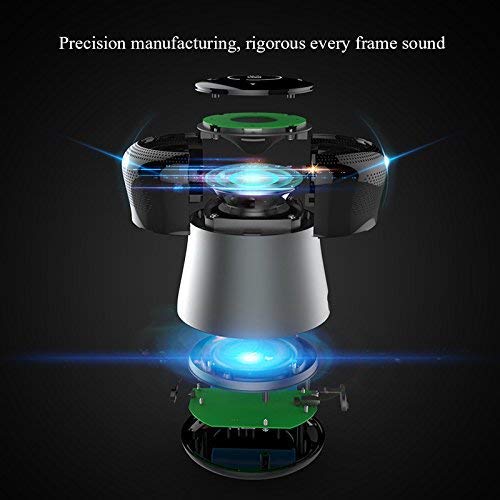
איור 3: An exploded diagram of the MIFA A3 speaker, illustrating its internal components and structural design, emphasizing precision manufacturing.
| דֶגֶם | MIFA A3 |
| כוח פלט | 10W |
| קישוריות | Bluetooth 4.2, AUX, Micro SD Card |
| סוֹלְלָה | 1800 mAh Li-ion |
| זמן משחק | עד 8 שעות (בנפח 60%) |
| זמן טעינה | בערך 3-4 שעות |
| מִיקרוֹפוֹן | מובנה לשיחות דיבורית |
| אֲטִימוּת | Yes (as per product specifications, but general caution advised for ports) |
| שיטת בקרה | לָגַעַת |
| מכשירים תואמים | מחשב נייד, מחשב אישי, סמארטפון, טאבלט |
אחריות ותמיכה
MIFA products are designed to provide reliable performance. For warranty information or technical support, please refer to the warranty card included with your purchase or visit the official MIFA webאתר. שמור את הוכחת הרכישה שלך לצורך תביעות אחריות.
For further assistance, you may contact MIFA customer support through their official channels.