
dl R1051-WHT-DE
מדריך למשתמש של רדיו דיגיטלי Mini dl DAB ו-FM
Model: R1051-WHT-DE
מָבוֹא
This user manual provides detailed instructions for the operation and maintenance of your Mini dl DAB and FM Digital Radio. Please read this manual thoroughly before using the device to ensure proper functionality and to maximize your listening experience.
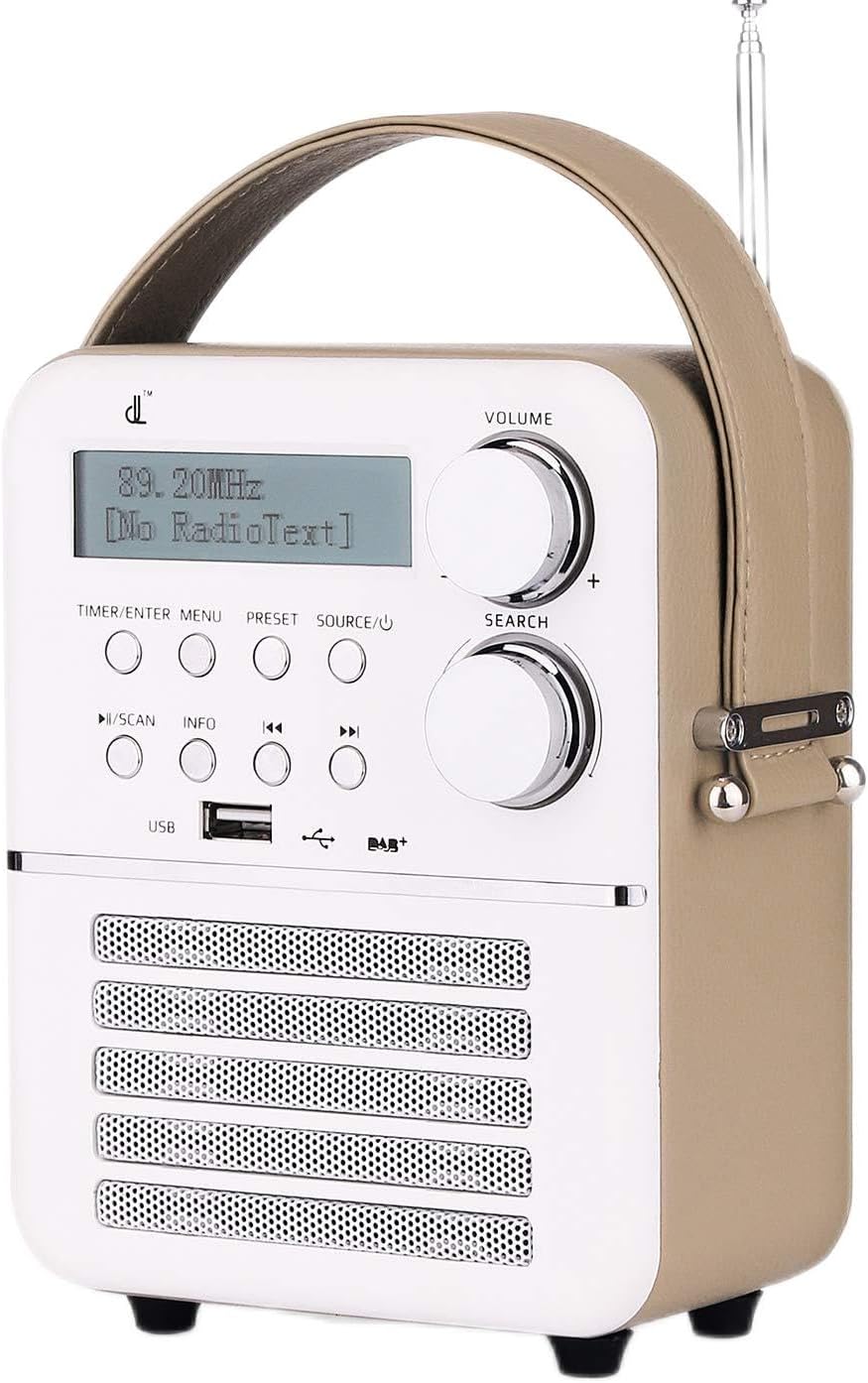
איור 1: חזית view of the Mini dl DAB and FM Digital Radio.
תוכן החבילה
עם פתיחת החבילה, אנא ודא שכל הפריטים המפורטים להלן נמצאים ובמצב תקין:
- 1 x Mini dl DAB and FM Digital Radio
- 1 x מתאם חשמל
- מדריך למשתמש אחד (מסמך זה)

Figure 2: Included accessories: the radio unit, power adapter, and an indication of the built-in battery.
הגדרה
הפעלה וטעינה
The radio features a built-in rechargeable battery (1800mAh) for portable use. Before first use, it is recommended to fully charge the battery.
- Connect the provided power adapter to the DC 5V port located on the back of the radio.
- חבר את מתאם החשמל לשקע רגיל בקיר.
- The radio will begin charging. A full charge takes approximately 30 minutes, providing up to 4 hours of standby time.
- כדי להפעיל את הרדיו, לחצו והחזיקו את המקש SOURCE/Power לַחְצָן.
התאמת אנטנה
For optimal radio reception, extend the telescopic antenna located on the top-rear of the unit. Adjust its position for the best signal quality.

איור 3: אחורי view of the radio, highlighting the DC 5V port, AUX IN, and antenna connection point.
הוראות הפעלה
השליטה נגמרהview
The radio features intuitive controls on its front panel:

איור 4: פקדים ותצוגה בלוח הקדמי.
- ידית VOLUME: סובבו כדי לכוונן את עוצמת השמע.
- SEARCH Knob: Rotate to navigate menus or tune frequencies. Press to confirm selections.
- TIMER/ENTER MENU Button: Access timer settings or enter the main menu.
- לחצן PRESET: Access or save preset radio stations.
- SOURCE/Power Button: Short press to cycle through input sources (DAB, FM, Bluetooth, USB, AUX). Long press to power on/off.
- PLAY/SCAN Button: Play/pause media or initiate a scan for radio stations.
- לחצן INFO: Display additional information about the current station or track.
- כפתורי דילוג (<< / >>): Navigate between tracks or adjust frequency/station.
- יציאת USB: For connecting USB storage devices for media playback.
DAB Digital Radio Operation
- הקש על מָקוֹר button until "DAB" is displayed.
- If this is the first time using DAB, or if you wish to rescan, press the הפעל/סרוק button to initiate an automatic scan for DAB stations. The radio will display "Scanning..." and show progress.
- Once the scan is complete, the radio will list available stations. Use the לְחַפֵּשׂ כפתור או לְדַלֵג buttons to navigate through the station list.
- הקש על לְחַפֵּשׂ כפתור לבחירת תחנה.
- To save a preset: Tune to the desired station, then long press the הגדרה מראש לַחְצָן. השתמש ב- לְחַפֵּשׂ knob to select a preset number, then press the לְחַפֵּשׂ כפתור כדי לאשר.
- To recall a preset: Short press the הגדרה מראש כפתור ולאחר מכן השתמש ב לְחַפֵּשׂ knob to select the desired preset.
תפעול רדיו FM
- הקש על מָקוֹר עד שיוצג "FM".
- To auto-scan for FM stations, long press the הפעל/סרוק כפתור. הרדיו יסרוק וישמור תחנות זמינות.
- כדי לכוונן ידנית, לחצו לחיצה קצרה על לְדַלֵג כפתורים לכוונון מדויק של התדר.
- Saving and recalling FM presets follows the same procedure as DAB presets.
מצב Bluetooth
- הקש על מָקוֹר button until "Bluetooth" or "BT" is displayed. The radio will enter pairing mode, indicated by a flashing Bluetooth icon or "Pairing" message on the display.
- במכשיר החיצוני שלך (סמארטפון, טאבלט וכו'), הפעל את Bluetooth וחפש מכשירים זמינים.
- Select "dl Radio" or a similar name from the list of devices.
- Once paired, the radio will confirm the connection, and you can play audio from your device through the radio.
הפעלת USB
- Insert a USB flash drive containing MP3, MP4, or WAV audio files into the USB port on the front of the radio.
- הקש על מָקוֹר עד שיוצג "USB".
- The radio will automatically begin playing the first compatible audio file.
- השתמש ב- הפעל/סרוק button to play/pause, and the לְדַלֵג כפתורים לניווט בין רצועות.
מצב AUX
- Connect an external audio device (e.g., MP3 player, CD player) to the AUX IN port on the back of the radio using a 3.5mm audio cable (not included).
- הקש על מָקוֹר עד להופעת "AUX".
- Audio from the connected device will now play through the radio's speakers. Control playback from the external device.
Alarm and Timer Functions
The radio supports dual alarms, snooze, and a sleep timer.
- הגדרת אזעקות: הקש על TIMER/ENTER MENU button. Navigate to "Alarm Setup" using the לְחַפֵּשׂ knob and press to select. Follow the on-screen prompts to set Alarm 1 and Alarm 2, including time, alarm source (DAB/FM/USB/BT/AUX or buzzer), and volume.
- פונקצית נודניק: When an alarm sounds, press any button (except power) to activate snooze. The alarm will temporarily stop and sound again after a set interval.
- טיימר שינה: הקש על TIMER/ENTER MENU button. Navigate to "Sleep Timer" and select the desired duration (e.g., 15, 30, 60 minutes). The radio will automatically turn off after the set time.
תַחזוּקָה
ניקוי
To clean the radio, use a soft, dry cloth. Do not use abrasive cleaners, waxes, or solvents as they may damage the finish. Ensure no liquids enter the device.
טיפול בסוללה
- הימנעו מפריקת הסוללה באופן מלא לעתים קרובות.
- If storing the radio for an extended period, charge the battery to approximately 50% and store in a cool, dry place. Recharge every few months to prevent deep discharge.
- אל תחשוף את הסוללה לטמפרטורות קיצוניות.
אִחסוּן
When not in use, store the radio in a dry environment, away from direct sunlight and extreme temperatures. Keep it away from dust and moisture.
פתרון בעיות
אם נתקלתם בבעיות עם הרדיו שלכם, אנא עיינו בבעיות הנפוצות ובפתרונות הבאות:
| בְּעָיָה | סיבה אפשרית | פִּתָרוֹן |
|---|---|---|
| אין חשמל / הרדיו לא נדלק. | הסוללה התרוקנה או שמתאם החשמל אינו מחובר כראוי. | Connect the power adapter and allow the battery to charge. Ensure the power outlet is functional. |
| קליטת רדיו גרועה (DAB/FM). | האנטנה לא מורחבת או שאזור הקליטה חלש. | Fully extend and adjust the telescopic antenna. Try moving the radio to a different location. Perform a new station scan. |
| בלוטות' לא מתחבר. | Radio not in pairing mode, or device is too far. | Ensure the radio is in Bluetooth mode and "Pairing" is displayed. Move your device closer to the radio. Forget the device on your phone and try pairing again. |
| No sound from USB playback. | לא נתמך file פורמט או פגום files. | לְהַבטִיחַ files are MP3, MP4, or WAV format. Try a different USB drive or different audio files. |
| Alarm volume too loud/soft. | Alarm volume not set correctly during setup. | Re-enter alarm setup via the TIMER/ENTER MENU button and adjust the alarm volume setting. |
מפרטים
| מותג | dl |
| דֶגֶם | R1051-WHT-DE |
| מידות המוצר | 13 x 18 x 25.8 ס"מ (5.1 x 7.1 x 10.2 אינץ ') |
| משקל פריט | 880 גרם (1.94 פאונד) |
| ממשק חומרה | USB |
| טכנולוגיית טיונר | DAB, FM |
| תכונות נוספות | Bluetooth, USB Playback, AUX Input, Alarm, Timer |
| מקור כוח | Battery Powered (Built-in Lithium-ion) |
| סוללה כלולה | כֵּן |
| סך כל יציאות USB | 1 |
| תדרי רדיו נתמכים | 2 bands (DAB, FM) |
| סוגי מדיה נתמכים | MP4, MP3, WAV |
| ממשק קלט | כפתורים |

איור 5: מידות המוצר לעיון.
אחריות ותמיכה
מידע על אחריות
Specific warranty details for the Mini dl DAB and FM Digital Radio are typically provided within the physical user manual included in the product packaging or on the manufacturer's official website. Please refer to those sources for comprehensive warranty terms and conditions.
תמיכת לקוחות
For further assistance, technical support, or inquiries not covered in this manual, please contact the manufacturer or your point of purchase. Keep your purchase receipt and product model number (R1051-WHT-DE) ready when contacting support.