
מָבוֹא
This manual provides detailed instructions for the operation and maintenance of your BOBLOV BT-S3 Helmet Headset. The BT-S3 is designed for motorcycle communication, offering hands-free calling, music playback, FM radio, and intercom functionality for riders. Please read this manual thoroughly before using the device to ensure proper function and safety.
תוכן החבילה
ודא שכל הפריטים המפורטים להלן כלולים בחבילה שלך:
- 1 x BOBLOV BT-S3 Helmet Intercom Unit
- 1 x Stereo Headphones (with microphone)
- 1 x Mounting Clip & Screws
- 1 x מברג
- 1 x כבל טעינה USB
- 1 x מדריך למשתמש
- 1 x Velcro Pad (for mounting)
- 1 x Audio Line

איור 1: All components included in the BOBLOV BT-S3 package.
המוצר נגמרview
כפתורי בקרה ויציאות

איור 2: BOBLOV BT-S3 control buttons and connection ports.
- לחצן טלפון: Used for answering/ending calls, redialing, and activating voice assistant.
- לחצן עוצמת הקול + Increases volume, navigates forward in music/FM.
- כפתור עוצמת קול: Decreases volume, navigates backward in music/FM.
- כפתור הפעלה/אינטרקום: Powers the device on/off, initiates/ends intercom, plays/pauses music, activates FM radio.
- Charger and Headset Socket: Multi-purpose port for charging and connecting the headset.
- Cable Input Interface: For connecting the headset cable.
הגדרה
1. טעינת ההתקן
Before initial use, fully charge the BT-S3 unit. Connect the provided USB cable to the charging port on the device and to a standard USB power adapter (not included). The LED indicator will show charging status. A full charge typically takes approximately 2-3 hours.
2. התקנת אוזניות הקסדה
The BT-S3 can be installed in various helmet types, including full-face, half-face, and open-face helmets.
- Attach the mounting clip to the side of your helmet using the provided screws and screwdriver, or use the adhesive Velcro pad for a tool-free installation. Ensure the clip is securely fastened.
- Slide the BT-S3 intercom unit onto the mounting clip until it clicks into place.
- Open the helmet's inner lining. Position the stereo headphones inside the helmet, ensuring they are aligned with your ears for optimal sound.
- Route the microphone to a position near your mouth, ensuring it is not obstructed.
- Connect the headset cable to the designated port on the BT-S3 unit.

איור 3: Helmet mounting clip and unit attachment.
הוראות הפעלה
הפעלה/כיבוי
- הפעלה: לחץ והחזק את כפתור הפעלה/אינטרקום for approximately 3 seconds until you hear an audible prompt and the LED indicator lights up.
- כיבוי: לחץ והחזק את כפתור הפעלה/אינטרקום for approximately 3 seconds until you hear an audible prompt and the LED indicator turns off.
צימוד Bluetooth עם טלפון נייד
- Ensure the BT-S3 is powered off.
- לחץ והחזק את כפתור הפעלה/אינטרקום for approximately 5-7 seconds until the LED indicator flashes red and blue alternately, indicating pairing mode.
- בטלפון הנייד שלך, הפעל את Bluetooth וחפש מכשירים זמינים.
- Select "BT-S3" from the list of devices. If prompted for a password, enter "0000".
- לאחר הצימוד, נורית ה-LED תהבהב בכחול באיטיות, ותשמעו צליל אישור.
פונקציונליות אינטרקום
The BT-S3 supports full-duplex wireless communication. It allows for 2 riders to intercom simultaneously, with a maximum talking range of 1000 meters. Up to 3 riders can be connected, but only two can actively communicate at any given time. If a third rider wishes to join, one of the active intercom participants must end their conversation.

איור 4: Intercom connection scenarios.
- צימוד יחידות אינטרקום:
- Ensure both BT-S3 units are powered off.
- On both units, press and hold the כפתור הפעלה/אינטרקום for approximately 5-7 seconds until the LED indicators flash red and blue alternately.
- לחץ לחיצה קצרה על כפתור הפעלה/אינטרקום on one of the units. The units will search and pair with each other.
- Once paired, the LED indicators will flash blue slowly, and you will hear a confirmation tone.
- הפעלת אינטרקום: After pairing, a short press of the כפתור הפעלה/אינטרקום on either unit will initiate an intercom conversation.
- סיום אינטרקום: לחיצה קצרה על ה כפתור הפעלה/אינטרקום will end the intercom conversation.
שיחות טלפון
- תשובה לשיחה: When a call comes in, the device will automatically answer after a few rings (auto-receiving phone calls feature). Alternatively, short press the כפתור טלפון לענות.
- סיום שיחה: לחץ קצר על כפתור טלפון to end an active call.
- דחה שיחה: לחץ והחזק את כפתור טלפון למשך 2 שניות כדי לדחות שיחה נכנסת.
- חיוג חוזר למספר האחרון: לחץ פעמיים על כפתור טלפון לחיוג חוזר למספר האחרון שחוייג.
השמעת מוסיקה
After pairing with your mobile phone, you can stream music to the BT-S3.
- הפעל/השהה: לחץ קצר על כפתור הפעלה/אינטרקום לנגן או להשהות מוסיקה.
- הרצועה הבאה: לחץ קצר על לחצן עוצמת קול +.
- רצועה קודמת: לחץ קצר על עוצמת הקול - כפתור.
רדיו FM
The BT-S3 includes an FM radio function.
- הדלקה/כיבוי של FM: לחץ פעמיים על כפתור הפעלה/אינטרקום to activate or deactivate FM radio.
- תחנות סריקה: While FM is active, short press the עוצמת קול + or כרך - כפתורים להחלפת תחנות.
GPS Voice Instructions
When paired with a smartphone running a GPS application, the BT-S3 can receive voice instructions directly to your headset.
תַחזוּקָה
- Keep the device dry. Do not expose it to extreme temperatures.
- נקה את היחידה בעזרת רך, דamp בַּד. הימנע משימוש בכימיקלים קשים או בחומרי ניקוי שוחקים.
- ודא שמכסה שקע הטעינה סגור היטב כאשר אינו נטען כדי לשמור על עמידות למים.
- יש לאחסן את המכשיר במקום קריר ויבש כאשר אינו בשימוש למשך תקופות ממושכות.
פתרון בעיות
| בְּעָיָה | סיבה אפשרית | פִּתָרוֹן |
|---|---|---|
| המכשיר לא נדלק. | סוללה חלשה. | טען את המכשיר במלואו. |
| לא ניתן להתאים לטלפון. | המכשיר לא במצב צימוד; בלוטות' כבוי בטלפון. | Ensure BT-S3 is flashing red/blue. Enable Bluetooth on phone and search again. |
| אינטרקום לא מתחבר. | Units not paired or out of range. | Re-pair intercom units. Ensure units are within 1000m range. |
| Poor audio quality / Wind noise. | Microphone placement; environmental factors. | Adjust microphone closer to mouth. The device features DSP cancellation for wind noise. |
| חיי סוללה קצרים מהצפוי. | Frequent use of high volume or intercom. | Battery life varies with usage. Ensure full charge before use. |
מפרטים
- דֶגֶם: BT-S3
- קישוריות: אלחוטי (Bluetooth)
- טווח אינטרקום: Up to 1000 meters (between 2 riders)
- מהירות עבודה: Up to 100 Km/h
- זמן דיבור: עד 8 שעות
- זמן המתנה: עד 300 שעות
- זמן שיחת טלפון: עד 10 שעות
- זמן השמעת מוזיקה: עד 6 שעות
- עמידות במים: Water-resistant (fully weather protection)
- ביטול רעש: Wind noise DSP cancellation
- תכונות: Auto-receiving phone calls, FM Radio, Stereo music (A2DP), GPS voice instructions
- תאימות לקסדה: Fits all kinds of helmets (full/half/open face)
- שיטת בקרה: כפתורי מגע
- שקע אוזניות: 3.5 mm Jack (for headset connection)
- UPC: 889251631535

איור 5: Estimated battery performance for various functions.
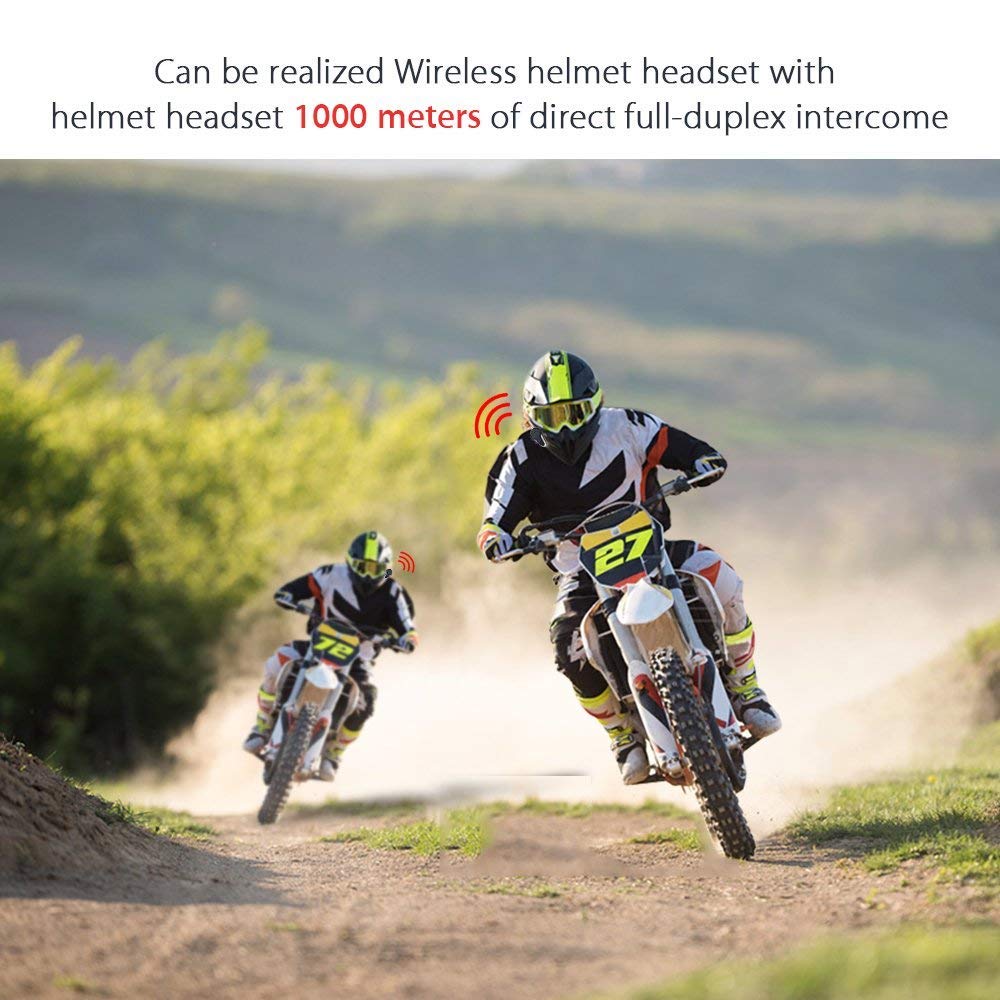
איור 6: Wireless helmet headset with 1000 meters direct full-duplex intercom.

איור 7: Versatile applications for the BT-S3 headset, including motorcycling and skiing.
אחריות ותמיכה
Specific warranty information is not provided in the product details. For warranty claims, technical support, or further assistance, please contact your retailer or the manufacturer directly. Retain your proof of purchase for any warranty-related inquiries.
Manufacturer: BOBLOV