
1. המוצר נגמרview
The Elecom M-FBL01DBXSBK is a 5-button wireless mouse designed for comfortable and quiet operation. It features a Blue LED sensor for versatile surface compatibility and a compact USB receiver.

Image 1.1: Elecom M-FBL01DBXSBK Wireless Mouse with its compact USB receiver.
2. תכולת החבילה
- Elecom M-FBL01DBXSBK Wireless Mouse
- מקלט USB אלחוטי
- AA Alkaline Battery (for operation confirmation)
- מדריך למשתמש (מסמך זה)
3. הוראות התקנה
3.1. התקנת סוללה
- אתר את מכסה תא הסוללה בחלק התחתון של העכבר.
- החלק או הרם את המכסה כדי לפתוח את התא.
- Insert one AA alkaline battery, ensuring the positive (+) and negative (-) terminals align correctly with the markings inside the compartment.
- סגור היטב את מכסה תא הסוללות.

Image 3.1: The underside of the mouse, indicating the battery compartment and power switch.
3.2. חיבור מקלט ה-USB
- Remove the compact USB receiver from its storage slot on the underside of the mouse.
- חבר את מקלט ה-USB ליציאת USB-A זמינה במחשב שלך.
- המחשב שלך אמור לזהות ולהתקין באופן אוטומטי את מנהלי ההתקנים הדרושים. פעולה זו עשויה להימשך מספר רגעים.
3.3. הפעלת העכבר
After installing the battery and connecting the receiver, locate the power switch on the underside of the mouse and slide it to the 'ON' position. The mouse is now ready for use.
3.4. OS Compatibility
The Elecom M-FBL01DBXSBK Wireless Mouse is compatible with:
- Windows 11, Windows 10, Windows RT8.1, Windows 8.1, Windows 7, Windows Vista
- macOS High Sierra 10.13 ואילך
Ensure your operating system is updated to the latest version and any service packs are installed for optimal performance.
4. הפעלת העכבר
4.1. פונקציות בסיסיות
The mouse features five buttons and a scroll wheel:
- כפתור שמאל: פונקציית קליק ראשונית.
- כפתור ימין: פונקציית לחיצה משנית (תפריט הקשר).
- גלגל גלילה: גלילה של מסמכים ו web pages vertically. Can also be pressed for a middle-click function.
- לחצן קדימה: מנווט קדימה ב web דפדפנים או file חוקרים.
- כפתור חזרה: מנווט אחורה ב web דפדפנים או file חוקרים.

Image 4.1: The five buttons of the Elecom M-FBL01DBXSBK mouse, including the scroll wheel.
4.2. תכונת קליק שקט
All five buttons incorporate a silent switch mechanism, significantly reducing clicking noise. This allows for quiet operation in various environments.

Image 4.2: The silent switch design minimizes operational noise.
4.3. Blue LED Sensor
The mouse is equipped with a Blue LED optical sensor, which provides accurate tracking on a variety of surfaces, including those with slight unevenness or dust. This enhances usability in diverse settings.

Image 4.3: The Blue LED sensor allows for comfortable use on various surfaces.
4.4. קישוריות אלחוטית
The mouse utilizes a 2.4 GHz wireless band for stable communication. The effective radio distance is approximately 3 meters (9.8 feet) on magnetic surfaces (e.g., steel desks) and up to 10 meters (32.8 feet) on non-magnetic surfaces (e.g., wooden desks).
4.5. מחוון סוללה
An integrated battery indicator light notifies you when the battery level is low, signaling that a replacement is needed.
4.6. Elecom Mouse Assistant Software
Button functions can be customized using the free downloadable Elecom Mouse Assistant software. This allows users to reassign functions to the mouse buttons for improved workflow efficiency.
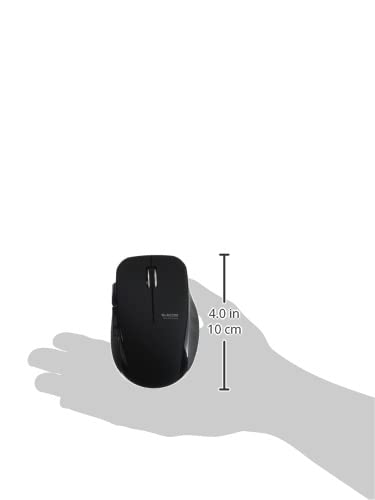
Image 4.4: The Elecom Mouse Assistant software enables button customization.
5. תחזוקה
5.1. החלפת סוללה
When the battery indicator signals low power, replace the AA battery with a new AA alkaline, manganese, or NiMH battery. Follow the battery installation steps outlined in Section 3.1.
5.2. ניקיון
To clean the mouse, gently wipe its surface with a soft, dry cloth. Avoid using harsh chemicals or abrasive materials, as these can damage the finish. Ensure no liquid enters the mouse.
5.3. Receiver Storage
The USB receiver can be stored inside the mouse body when not in use or during transport. This helps prevent loss of the receiver.
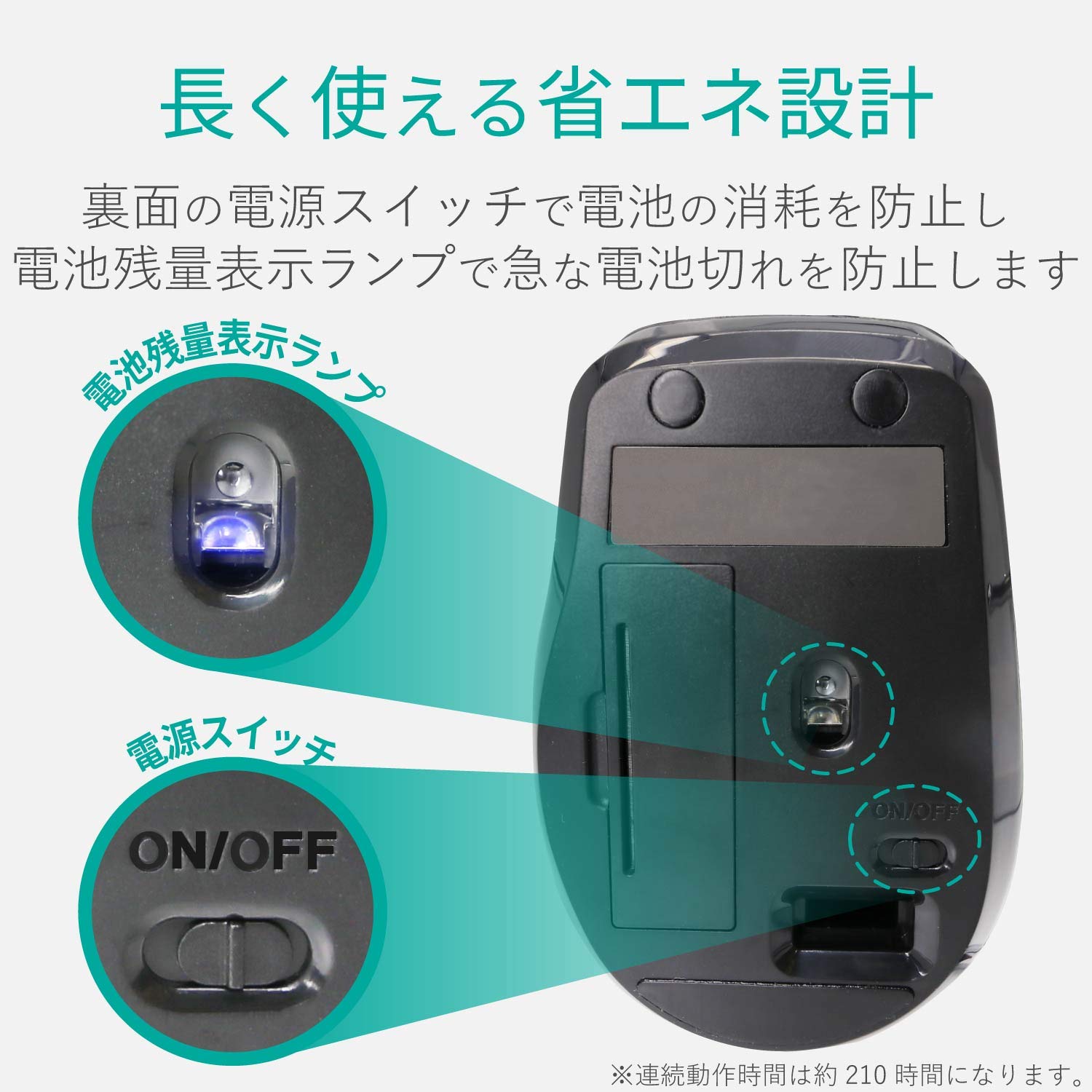
Image 5.1: The compact receiver can be stored within the mouse for convenience.
6. פתרון תקלות
- עכבר לא מגיב:
- Check if the mouse is powered on (power switch on the underside).
- ודא שהסוללה מותקנת כהלכה ואינה ריקה. החלף אותה במידת הצורך.
- ודא שמקלט ה-USB מחובר היטב ליציאת USB תקינה במחשב שלך. נסה יציאת USB אחרת.
- הפעל מחדש את המחשב.
- תנועת סמן לא יציבה:
- נקו את אזור החיישן האופטי בחלק התחתון של העכבר.
- ודא שאתה משתמש בעכבר על משטח מתאים. הימנע ממשטחים מחזירי אור או שקופים.
- Check for interference from other wireless devices. Move the mouse closer to the receiver.
- כפתורים לא פועלים כראוי:
- If using Elecom Mouse Assistant, ensure button assignments are correct.
- Reinstall the Elecom Mouse Assistant software if issues persist.
7. מפרטים
| מִמְשָׁק | USB |
| צורת מחבר | זכר USB-A |
| מערכת הפעלה תואמת | Windows 11, 10, RT8.1, 8.1, 7, Vista; macOS High Sierra 10.13+ |
| הַחְלָטָה | 1600 ספירה |
| שיטת תקשורת | שיטת GFSK |
| תדר רדיו | פס 2.4GHz |
| Radio Distance | Magnetic objects: 3m (9.8 ft); Non-magnetic objects: 10m (32.8 ft) |
| שיטת קריאה | מערכת חיישנים אופטיים (LED כחול) |
| מספר כפתורים | 5 (including wheel button) |
| מספר גלגלים | 1 |
| אחסון מקלט | כֵּן |
| זמן הפעלה רציף | כ. 210 שעות |
| זמן המתנה | משוער. 1666 ימים |
| זמן שימוש משוער בסוללה | משוער. 478 ימים |
| ספק כוח (יחידה ראשית) | 1 AA alkaline, manganese, or NiMH battery |
| מדורג כרךtage (Body) | 1.5V |
| צֶבַע | שָׁחוֹר |
| Weight (Mouse) | כ. 62 גרם (ללא סוללה) |
| מידות חיצוניות (מקלט) | 14.5 x 18.0 x 6.3 מ"מ |
| משקל (מקלט) | כ. 2 גרם |
8. אחריות ותמיכה
8.1. תקופת אחריות
מוצר זה מגיע עם אחריות של 6 חודשים מתאריך הרכישה.
8.2. Product Inquiries
For product inquiries or technical support, please contact the Elecom General Information Center:
- טל: 0570-084-465
- פַקס: 0570-050-012
- Reception Time: 10:00 - 19:00 (24/7)