
1. מבוא ומעלהview
The Xiaomi Mi Air Purifier 2S AC-M4-AA is designed to improve indoor air quality by efficiently filtering out pollutants. This intelligent air purifier is suitable for rooms up to 37m² and features a Clean Air Delivery Rate (CADR) of 310m³ per hour. It offers smart connectivity for app control and integrates with voice assistants for convenient operation, providing real-time air quality monitoring via its OLED display.
2. תכונות מוצר
- European Version for compliance with regional standards.
- Smart air purifier with Wi-Fi connectivity and mobile app control (Mi Home app).
- Effective for rooms up to 37m² (approximately 398 sq ft).
- High air purification capacity of 310m³/h CADR.
- Integrated OLED display for real-time air quality (PM2.5), temperature, humidity, and filter status.
- Equipped with a high-efficiency HEPA filter for comprehensive air purification.
- Low noise operation, especially in Night Mode (as low as 32 dB).
- Voice control compatibility with supported smart home platforms.
3. תכולת החבילה
ודא שכל הפריטים נמצאים בחבילה:
- Xiaomi Mi Air Purifier 2S (AC-M4-AA)
- כבל חשמל
- מדריך למשתמש
- HEPA Filter (pre-installed or separately packaged)
4. הוראות בטיחות
כדי להבטיח הפעלה בטוחה ולמנוע נזק, אנא קראו ופעל לפי הנחיות הבטיחות הבאות:
- Always unplug the air purifier before cleaning, maintenance, or moving it.
- Do not block the air inlet or outlet vents. Maintain at least 20 cm (8 inches) clearance from walls and other objects.
- Use only the power adapter provided with the device. Ensure the voltage תואם לספק הכוח המקומי שלך.
- Do not operate the air purifier in wet or humid environments, such as bathrooms. Keep it away from water and other liquids.
- מכשיר זה אינו מיועד לשימוש על ידי אנשים (כולל ילדים) עם יכולות פיזיות, חושיות או נפשיות מופחתות, או חוסר ניסיון וידע, אלא אם כן הם קיבלו פיקוח או הדרכה לגבי השימוש במכשיר על ידי אדם האחראי לבטיחותם.
- אין להכניס אצבעות או חפצים זרים לכניסת האוויר או ליציאת האוויר.
- Do not use the air purifier near heat sources, flammable gases, or volatile substances.
- אם כבל החשמל פגום, יש להחליפו על ידי היצרן, סוכן השירות שלו או אנשים מוסמכים דומים כדי למנוע סכנה.
5. התקנה
Follow these steps to set up your Xiaomi Mi Air Purifier 2S:
- פרק את המכשיר: Carefully remove the air purifier from its packaging. Remove any protective films or tapes.
- Install/Check Filter: Open the filter compartment cover, usually located at the back or bottom of the unit. Ensure the HEPA filter is correctly seated and any plastic packaging around the filter is removed. Close the cover securely.
- מקם את המטהר: Place the air purifier on a flat, stable surface. Ensure there is at least 20 cm (8 inches) of clear space around all sides and above the unit for optimal air circulation.
- חבר חשמל: Plug the power cable into the power port on the back of the purifier, then plug the other end into a suitable electrical outlet.
- הורד את אפליקציית Mi Home: Scan the QR code in the manual or search for "Mi Home" in your smartphone's app store (Google Play Store or Apple App Store). Download and install the app.
- התחבר לאפליקציה: Open the Mi Home app, create an account or log in. Follow the in-app instructions to add your Xiaomi Mi Air Purifier 2S. This typically involves selecting the device, connecting to its temporary Wi-Fi hotspot, and then connecting it to your home Wi-Fi network (2.4GHz only).

תמונה: חזית view of the Xiaomi Mi Air Purifier 2S, showing the main body and the circular OLED display.

תמונה: מלמעלה למטה view of the Xiaomi Mi Air Purifier 2S, highlighting the fan grille and control buttons on the top surface.
6. הוראות הפעלה
Your air purifier can be operated via the physical buttons on the unit or through the Mi Home app.
6.1. Using Physical Buttons
- לחצן הפעלה: Press the power button on the top of the unit to turn the air purifier on or off.
- לחצן מצב: Press the mode button (often integrated with the power button or a separate button) to cycle through operating modes: Automatic, Night, and Manual.
6.2. Using the Mi Home App
The Mi Home app provides comprehensive control and monitoring features:
- שְׁלַט רָחוֹק: Turn the purifier on/off, change modes, and adjust fan speed from anywhere.
- ניטור בזמן אמת: View current PM2.5 levels, temperature, and humidity in your room.
- תזמון: Set schedules for the purifier to turn on/off or change modes automatically.
- סטטוס מסנן: Monitor the remaining lifespan of your filter and receive notifications when it's time for replacement.
- הגדרות: Adjust display brightness, enable/disable sounds, and other device-specific settings.
6.3. מצבי הפעלה
- מצב אוטומטי: The purifier intelligently adjusts its fan speed based on the real-time air quality detected by its sensors.
- מצב לילה: Operates at the lowest fan speed with minimal noise and a dimmed OLED display to ensure undisturbed sleep.
- מצב ידני: Allows you to manually select a desired fan speed or purification intensity.
6.4. מידע על צג OLED
The circular OLED display provides key information at a glance:
- ריכוז PM2.5: Shows the current particulate matter level in µg/m³.
- טֶמפֶּרָטוּרָה: מציג את טמפרטורת הסביבה בחדר.
- לַחוּת: Shows the relative humidity level.
- סטטוס Wi-Fi: Indicates connection status to your home network.
- מצב הפעלה: Shows the currently active purification mode.
- תוחלת חיים של מסנן: Displays the remaining percentage of the filter's life.

Image: The Xiaomi Mi Air Purifier 2S positioned in a modern living room, demonstrating its compact design and how it blends with home decor.
7. תחזוקה
תחזוקה שוטפת מבטיחה ביצועים אופטימליים ומאריכה את תוחלת החיים של מטהר האוויר שלכם.
7.1. החלפת מסנן
The HEPA filter has a limited lifespan, typically 6-12 months, depending on usage and air quality. The Mi Home app and the OLED display will indicate when the filter needs replacement.
- Unplug the Purifier: Always disconnect the power before replacing the filter.
- פתח את תא המסנן: Locate and open the filter compartment cover (usually at the back or bottom).
- הסר את המסנן הישן: משכו בזהירות את המסנן המשומש. השליכו אותו בהתאם לתקנות המקומיות.
- הכנס מסנן חדש: Place a new, genuine Xiaomi HEPA filter into the compartment, ensuring it is correctly oriented and seated.
- סגור את המכסה: סגור היטב את מכסה תא המסנן.
- Reset Filter Lifespan: After replacement, open the Mi Home app and follow the prompts to reset the filter lifespan counter. This ensures accurate tracking of the new filter's usage.

תמונה: אחורי view of the Xiaomi Mi Air Purifier 2S, illustrating the location of the filter compartment cover for maintenance.
7.2. Cleaning the Purifier
- ניקוי חיצוני: Wipe the exterior surfaces of the air purifier with a soft, dry cloth. Do not use abrasive cleaners, solvents, or harsh chemicals, as these can damage the finish.
- סורגי כניסת/יציאת אוויר: Use a soft brush or a vacuum cleaner with a brush attachment to gently clean dust and debris from the air inlet and outlet grilles.
- חיישן חלקיקי לייזר: Periodically clean the laser particle sensor, usually located on the back of the unit. Refer to the detailed manual or Mi Home app for specific instructions on how to access and clean this sensor, as it is crucial for accurate air quality readings.
8. פתרון תקלות
אם אתם נתקלים בבעיות עם מטהר האוויר שלכם, עיינו בבעיות הנפוצות ובפתרונות הבאות:
| בְּעָיָה | סיבה אפשרית | פִּתָרוֹן |
|---|---|---|
| המכשיר לא נדלק | Power cable not connected; Filter compartment not closed properly; Power outlet issue. | Ensure power cable is securely plugged in. Close the filter compartment cover completely. Test the power outlet with another device. |
| No Wi-Fi connection / App control not working | Incorrect Wi-Fi password; Router too far; 5GHz Wi-Fi network; App pairing issue. | Ensure your Wi-Fi network is 2.4GHz. Move the purifier closer to the router. Restart the purifier and your router. Follow the Mi Home app's re-pairing instructions. |
| ביצועי טיהור גרועים | Filter lifespan expired; Air inlets/outlets blocked; Dirty laser particle sensor. | Check filter lifespan in the app and replace if necessary. Ensure no obstructions around the air inlets/outlets. Clean the laser particle sensor as per maintenance instructions. |
| רעש יוצא דופן במהלך הפעולה | Foreign object inside; Filter not seated correctly. | Unplug the device and check for any foreign objects. Ensure the filter is properly installed and secured. |
| OLED display not working or showing incorrect information | Temporary glitch; Sensor malfunction. | Try restarting the device by unplugging and plugging it back in. If the issue persists, contact customer support. |
9. מפרטים
Detailed technical specifications for the Xiaomi Mi Air Purifier 2S AC-M4-AA:
| מִפרָט | עֵרֶך |
|---|---|
| מספר דגם | AC-M4-AA |
| מידות (L x W x H) | 24 x 24 x 52 ס"מ (9.4 x 9.4 x 20.5 אינץ ') |
| מִשׁקָל | 4.5 ק"ג (9.9 פאונד) |
| מקור כוח | כבל חשמלי |
| כוח מדורג | 29 וואט |
| סוג מסנן | HEPA |
| אזור ישים | עד 37 מ"ר (398 רגל מרובע) |
| רמת רעש | 32 Decibels (in Night Mode) |
| סוג בקרה | Application and Physical Buttons |
| תכונות מיוחדות | Wi-Fi Connectivity, OLED Display |
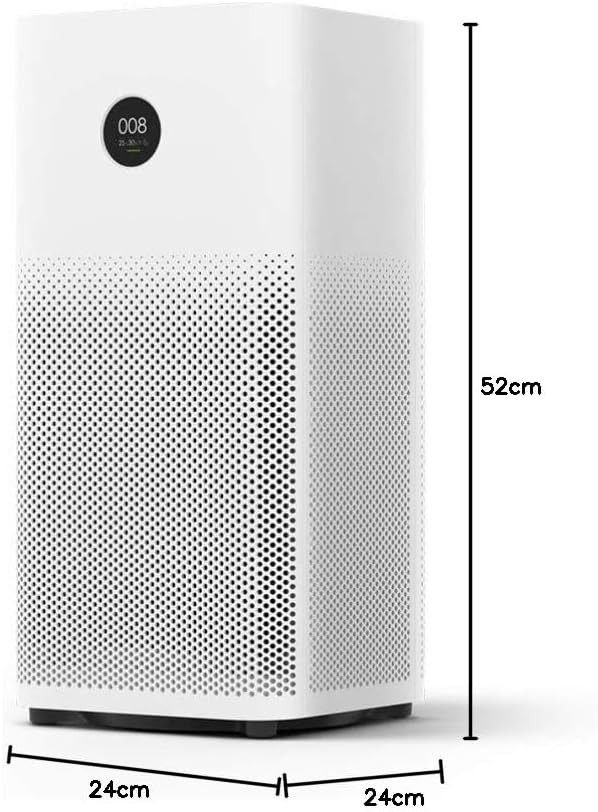
Image: Diagram illustrating the dimensions (height, width, depth) of the Xiaomi Mi Air Purifier 2S.
10. אחריות ותמיכה
For detailed warranty information, terms, and conditions, please refer to the warranty card included with your product or visit the official XIAOMI webאתר. שמור את קבלת הרכישה כהוכחת קנייה עבור כל תביעת אחריות.
For technical support, service, or inquiries regarding your Xiaomi Mi Air Purifier 2S, please contact XIAOMI customer service or your local authorized retailer. Contact information can typically be found on the official XIAOMI webבאתר או בתיעוד המוצר שלך.