
מָבוֹא
This manual provides instructions for the installation, operation, and maintenance of your Audiovox ELEAUDAX80EXT Wireless Extension. This device is designed to expand the functionality of compatible Audiovox phone models, specifically the AX8001, AX8001E, and AX8101AM, by providing an additional wireless handset.
תוכן החבילה
אנא ודא שכל הפריטים נמצאים בחבילה לפני שתמשיך בהתקנה.
- Audiovox ELEAUDAX80EXT Wireless Extension Unit
- מתאם מתח (אם רלוונטי)
- סוללה נטענת (מותקנת מראש או נפרדת)
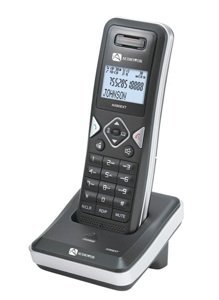
Image: The Audiovox ELEAUDAX80EXT Wireless Extension Unit. This image displays the compact design of the extension handset.
הגדרה
- טען את הסוללה: If the battery is not pre-installed, insert it into the extension unit according to the markings. Place the extension unit on its charging cradle (if included) or connect the power adapter directly to the unit and a power outlet. Allow the unit to charge for at least 12-16 hours before initial use.
- Register the Extension:
- Ensure your main Audiovox phone base (AX8001, AX8001E, or AX8101AM) is powered on.
- On the main phone base, locate and press the "Register" or "Page" button. Hold it until the indicator light on the base begins to flash (refer to your main phone's manual for exact instructions).
- While the base is in registration mode, on the ELEAUDAX80EXT extension unit, navigate to the "Menu" and select "Register Handset" or a similar option. Follow the on-screen prompts.
- Once registration is successful, the extension unit will display a confirmation message, and the indicator light on the base will stop flashing.
- בדיקת חיבור: Make a test call from the extension unit to ensure proper functionality.
הוראות הפעלה
ביצוע שיחה
- הרם את השפופרת או לחץ על לְדַבֵּר לַחְצָן.
- חייג את מספר הטלפון הרצוי.
- הקש על לְדַבֵּר button again or place the handset back on the cradle to end the call.
מענה לשיחה
- כאשר הטלפון מצלצל, הרימו את השפופרת או לחצו על הלחצן לְדַבֵּר לַחְצָן.
- כדי לסיים את השיחה, לחץ על סוֹף button or place the handset back on the cradle.
Intercom Function (if supported by base unit)
- הקש על אינטרקום לַחְצָן.
- Dial the number of the extension you wish to call (e.g., "2" for the second handset).
- לִלְחוֹץ לְדַבֵּר to initiate the intercom call.
תַחזוּקָה
- ניקוי: נגב את היחידה בעזרת רך, דamp בַּד. אין להשתמש בכימיקלים קשים או בחומרי ניקוי שוחקים.
- טיפול בסוללה: For optimal battery life, avoid fully discharging the battery frequently. Keep the unit on its charger when not in use.
- אִחסוּן: If storing the unit for an extended period, remove the battery and store it in a cool, dry place.
פתרון בעיות
| בְּעָיָה | פִּתָרוֹן |
|---|---|
| אין צליל חיוג / לא ניתן לבצע שיחות |
|
| המכשיר לא נטען |
|
| איכות שיחה ירודה / סטטי |
|
מפרטים
- מספר דגם: ELEAUDAX80EXT
- Compatible Base Units: Audiovox AX8001, AX8001E, AX8101AM
- מידות (L x W x H): 20 x 40 x 30 מילימטרים
- מִשׁקָל: 20 גרם
- UPC: 044476082719
אחריות ותמיכה
For specific warranty information and technical support, please refer to the documentation included with your original Audiovox phone system or visit the official Audiovox webאתר. שמור את קבלת הרכישה כהוכחת קנייה לתביעות אחריות.
For further assistance, please contact Audiovox customer service.