
מידע בטיחות חשוב
Read all instructions carefully before using this product. Keep this manual for future reference.
- הימנע מחשיפת האוזניות לטמפרטורות קיצוניות או לחות.
- אל תפרק או תנסה לתקן את האוזניות בעצמך.
- נקו את האוזניות בעזרת מטלית רכה ויבשה. אין להשתמש בחומרי ניקוי נוזליים.
- האזנה ממושכת בעוצמת קול גבוהה עלולה לגרום לנזק שמיעה.
תוכן החבילה
ודא שכל הפריטים נמצאים בחבילה:
- NUBWO HW02 USB Computer Headset
- כבל USB
- מדריך למשתמש (מסמך זה)
הגדרה
Connecting to a Computer (USB)
- אתר יציאת USB זמינה במחשב שלך.
- Plug the USB connector of the NUBWO HW02 headset into the USB port.
- The operating system will typically install the necessary drivers automatically. This may take a few moments.
- Once installed, the headset should be recognized as an audio input and output device.
- You may need to select the "NUBWO HW02" headset as your default audio device in your computer's sound settings.
Connecting to a Device (3.5mm Jack)
The NUBWO HW02 headset features a 3.5mm jack for broader compatibility.
- Locate the 3.5mm audio jack on your device (e.g., gaming console controller, smartphone, tablet).
- Insert the 3.5mm connector from the headset into the device's audio jack.
- ודא שהחיבור מאובטח.
- Adjust audio settings on your device as needed to select the headset for input and output.
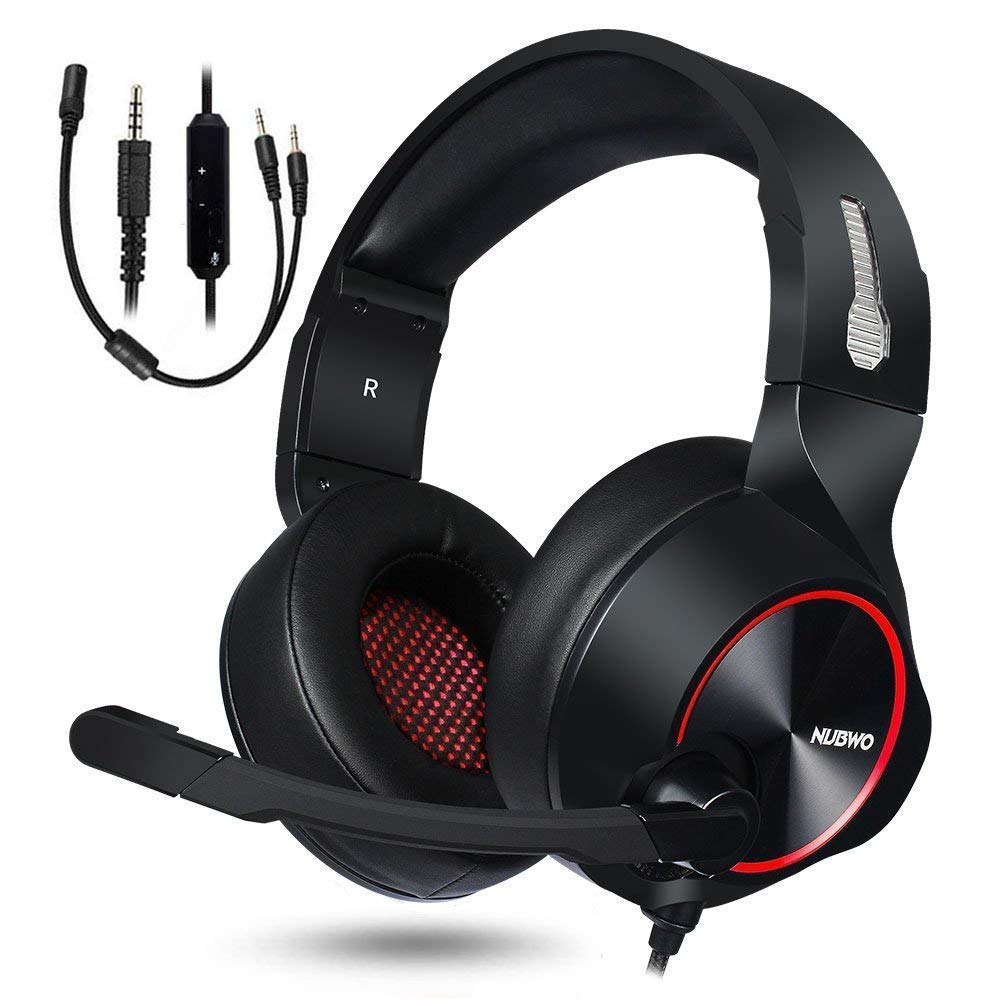
Image: NUBWO HW02 USB Computer Headset. This image displays the overall design of the headset, featuring orange accents on the earcups and headband, with a flexible microphone arm.
הוראות הפעלה
התאמת האוזניות
- התאמת סרט ראש: Gently slide the earcups up or down along the headband to achieve a comfortable fit over your ears.
- מיקום מיקרופון: Bend the flexible microphone arm to position the microphone approximately 1-2 inches from your mouth for optimal voice clarity.
בקרת עוצמת הקול
The NUBWO HW02 headset features an in-line volume control.
- הגדל את עוצמת הקול: סובבו את גלגלת עוצמת הקול כלפי מעלה.
- הפחת עוצמת הקול: סובבו את גלגלת עוצמת הקול כלפי מטה.
פונקציית השתקת מיקרופון
An in-line switch allows you to mute or unmute the microphone.
- השתקת מיקרופון: Slide the switch to the "Mute" position.
- ביטול השתקה של המיקרופון: Slide the switch to the "Unmute" position.
תַחזוּקָה
- ניקוי: Use a soft, dry, lint-free cloth to wipe down the earcups and headband. Do not use abrasive cleaners, alcohol, or solvents.
- אִחסוּן: When not in use, store the headset in a clean, dry place away from direct sunlight and extreme temperatures.
- טיפול בכבלים: הימנע מכיפופים חדים או משיכה מוגזמת של הכבל כדי למנוע נזק.
פתרון בעיות
| בְּעָיָה | סיבה אפשרית | פִּתָרוֹן |
|---|---|---|
| אין קול מהאוזניות | האוזניות לא מחוברות כראוי. עוצמת הקול נמוכה מדי. נבחר התקן פלט שמע שגוי. | Ensure USB or 3.5mm jack is fully inserted. Increase volume using in-line control and computer/device settings. Select "NUBWO HW02" as the default playback device in your sound settings. |
| המיקרופון לא עובד | המיקרופון מושתק. נבחר התקן קלט שמע שגוי. המיקרופון ממוקם בצורה שגויה. | Check the in-line mute switch. Select "NUBWO HW02" as the default recording device in your sound settings. Adjust microphone position closer to your mouth. |
| איכות הצליל ירודה או מעוותת | עוצמת הקול גבוהה מדי. חיבור רופף. הַפרָעָה. | להנמיך את הווליום. Re-seat the USB or 3.5mm connection. נסה לחבר ליציאת USB או התקן אחר. |
מפרטים
- דֶגֶם: HW02
- קישוריות: חוטי (USB, שקע 3.5 מ"מ)
- מיקום אוזניים: מעל אוזן
- בקרת רעש: ביטול רעשים אקטיבי
- תאימות פלטפורמה: קונסולת משחקים, מחשב
- חוֹמֶר: סיליקון
- משקל פריט: 1.11 פאונד
- מידות המוצר: 9 x 7 x 4 אינץ'
אחריות ותמיכה
For warranty information or technical support, please refer to the NUBWO official webאתר או צרו קשר עם שירות הלקוחות שלהם. שמרו את קבלת הרכישה כהוכחת קנייה.
NUBWO Official Webאֲתַר: Visit the NUBWO Store on Amazon