
מָבוֹא
This manual provides detailed instructions for the setup, operation, and maintenance of your Zerone BN59-01179A Replacement Remote Control. Please read this manual carefully before using the product to ensure proper functionality and longevity.
המוצר נגמרview
The Zerone BN59-01179A is a universal replacement remote control designed for compatible Smart TVs. It offers a compact design and a comprehensive set of buttons for various functions.
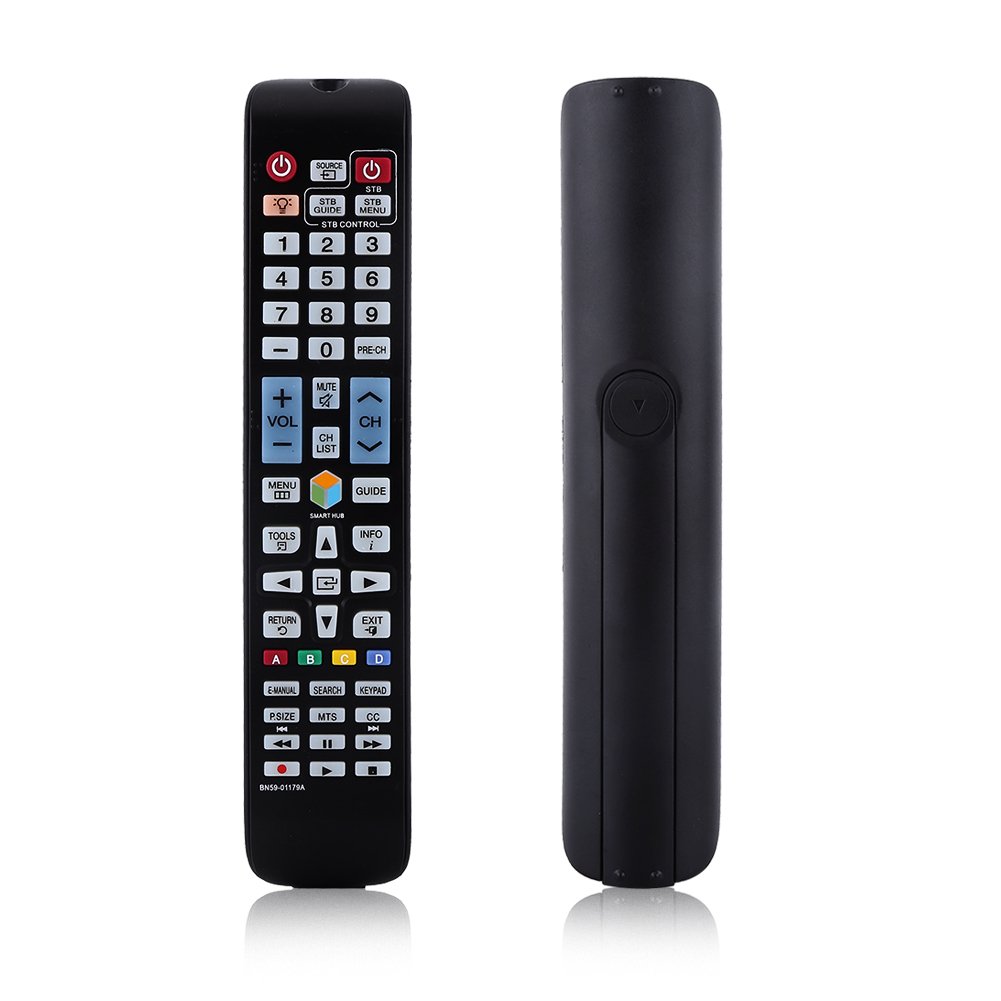
תמונה: חזית view of the Zerone BN59-01179A remote control, showing its full layout and approximate dimensions (23cm length, 4.7cm width, 2cm thickness).
הגדרה
התקנת סוללה
- אתר את תא הסוללות בגב השלט הרחוק.
- החלק את מכסה הסוללה כלפי מטה או לחץ על התפס והרם כדי לפתוח.
- הכניסו שתי (2) סוללות AAA, וודאו שהקוטבים החיוביים (+) והשליליים (-) מיושרים כהלכה עם הסימונים בתוך התא.
- החזר את מכסה הסוללה למקומו על ידי החלקתו בחזרה עד שיישמע נקישה.
פֶּתֶק: Batteries are not included with the remote control. Please use new AAA batteries for optimal performance.

Image: The back of the remote control with the battery cover removed, showing the empty battery compartment ready for two AAA batteries.
הוראות הפעלה
This remote control is designed for immediate use with compatible TVs without requiring programming. Simply insert batteries and point the remote towards your television.
פונקציות מפתח

Image: A hand holding the Zerone remote control, with inset close-ups highlighting the power/source buttons and the navigation/Smart Hub buttons.
- הפעלה (כפתור אדום): מפעיל או מכבה את הטלוויזיה.
- מָקוֹר: בחירת מקורות קלט (HDMI, AV וכו').
- STB/DTV: Switches between Set-Top Box and Digital TV modes.
- לחצני מספרים (0-9): בחירת ערוצים ישירה.
- PRE-CH: חוזר לערוץ הקודם.
- עוצמת הקול (+/-): מכוונן את עוצמת הקול.
- לְהַשְׁתִיק: משתיק או מבטל את השתקת צליל הטלוויזיה.
- ערוץ (ערוץ למעלה/למטה): מחליף ערוצי טלוויזיה ברצף.
- רשימת CH: מציג את רשימת הערוצים.
- תפריט: גישה לתפריט הראשי של הטלוויזיה.
- רכזת חכמה: פותח את ממשק Smart Hub עבור אפליקציות ושירותי סטרימינג.
- מַדְרִיך: מציג את מדריך התוכניות האלקטרוני.
- מידע: Shows information about the current program.
- כְּלֵי עֲבוֹדָה: גישה להגדרות מהירות או לאפשרויות הקשר.
- כפתורי ניווט (למעלה/למטה/שמאלה/ימינה/כניסה): מנווט בין תפריטים ובוחר אפשרויות.
- לַחֲזוֹר: חוזר למסך או לתפריט הקודם.
- יְצִיאָה: יציאה מהתפריט או היישום הנוכחיים.
- כפתורי צבע (A, B, C, D): הפונקציונליות משתנה בהתאם לדגם הטלוויזיה ולאפליקציה.
- מדריך אלקטרוני: גישה למדריך האלקטרוני של הטלוויזיה.
- לְחַפֵּשׂ: פותח את פונקציית החיפוש.
- מקלדת: Displays an on-screen keypad.
- גודל: כוונון גודל/יחס גובה-רוחב של התמונה.
- MTS: Multi-channel Television Sound (SAP).
- CC: כתוביות סגורות.
- כפתורי בקרת מדיה (הפעלה, השהיה, עצירה, הרצה אחורה, הרצה קדימה): שולט בהפעלת מדיה.
תַחזוּקָה
- ניקוי: השתמשו במטלית רכה ויבשה לניקוי השלט רחוק. אין להשתמש בחומרי ניקוי נוזליים או בחומרים שוחקים.
- החלפת סוללה: החלף סוללות כאשר תגובת השלט רחוק הופכת איטית או מפסיקה לעבוד. החלף תמיד את שתי הסוללות בו זמנית בחדשות.
- אִחסוּן: אם השלט רחוק לא יהיה בשימוש למשך תקופה ממושכת, הוציאו את הסוללות כדי למנוע דליפה ונזק.
- להימנע מחשיפה: הרחק את השלט הרחוק מאור שמש ישיר, מקורות חום ולחות.
פתרון בעיות
- השלט לא מגיב:
- ודאו שהסוללות מוכנסות בצורה נכונה עם הקוטביות הנכונה.
- החליפו סוללות ישנות בסוללות AAA חדשות.
- בדוק אם יש חסימות בין השלט לחיישן האינפרא אדום של הטלוויזיה.
- ודא שהשלט רחוק מכוון ישירות אל הטלוויזיה.
- טווח מוגבל:
- החלף סוללות.
- Ensure there are no strong light sources or electronic devices interfering with the signal.
- כפתורים ספציפיים שלא עובדים:
- נקו את השלט רחוק, במיוחד סביב הכפתורים שאינם מגיבים, כדי להסיר לכלוך או פסולת.
- If the issue persists after battery replacement and cleaning, the remote may be faulty.
מפרטים
| תכונה | תֵאוּר |
|---|---|
| מותג | אפס |
| שם הדגם | Zerone32687x9gqs (BN59-01179A compatible) |
| טכנולוגיית קישוריות | אינפרא אדום |
| מכשירים תואמים | Television (specifically for Samsung BN59-01179A compatible models) |
| מספר מרבי של מכשירים נתמכים | 8 (Universal functionality) |
| כמות הכפתורים | 12 (referring to main function groups, actual count is higher) |
| סוג בקר | בקרת כפתור |
| טווח מקסימלי | 8 מטר |
| סוג סוללה | AAA |
| מספר סוללות | נדרשות 2 סוללות AAA (לא כלולות) |
| תכונה מיוחדת | Universal replacement, no programming required |
אחריות ותמיכה
Zerone provides a service guarantee for this product. If you encounter any questions or issues regarding your remote control, please contact the seller or manufacturer for assistance. They will provide follow-up services to address your concerns.
For specific warranty details and support contact information, please refer to your purchase documentation or the retailer's webאֲתַר.