
1. הקדמה
Thank you for choosing the DEMA Digital Cube Level. This device is designed for precise horizontal and vertical alignment measurements. This manual provides essential information for safe and effective use, including setup, operation, calibration, and maintenance.
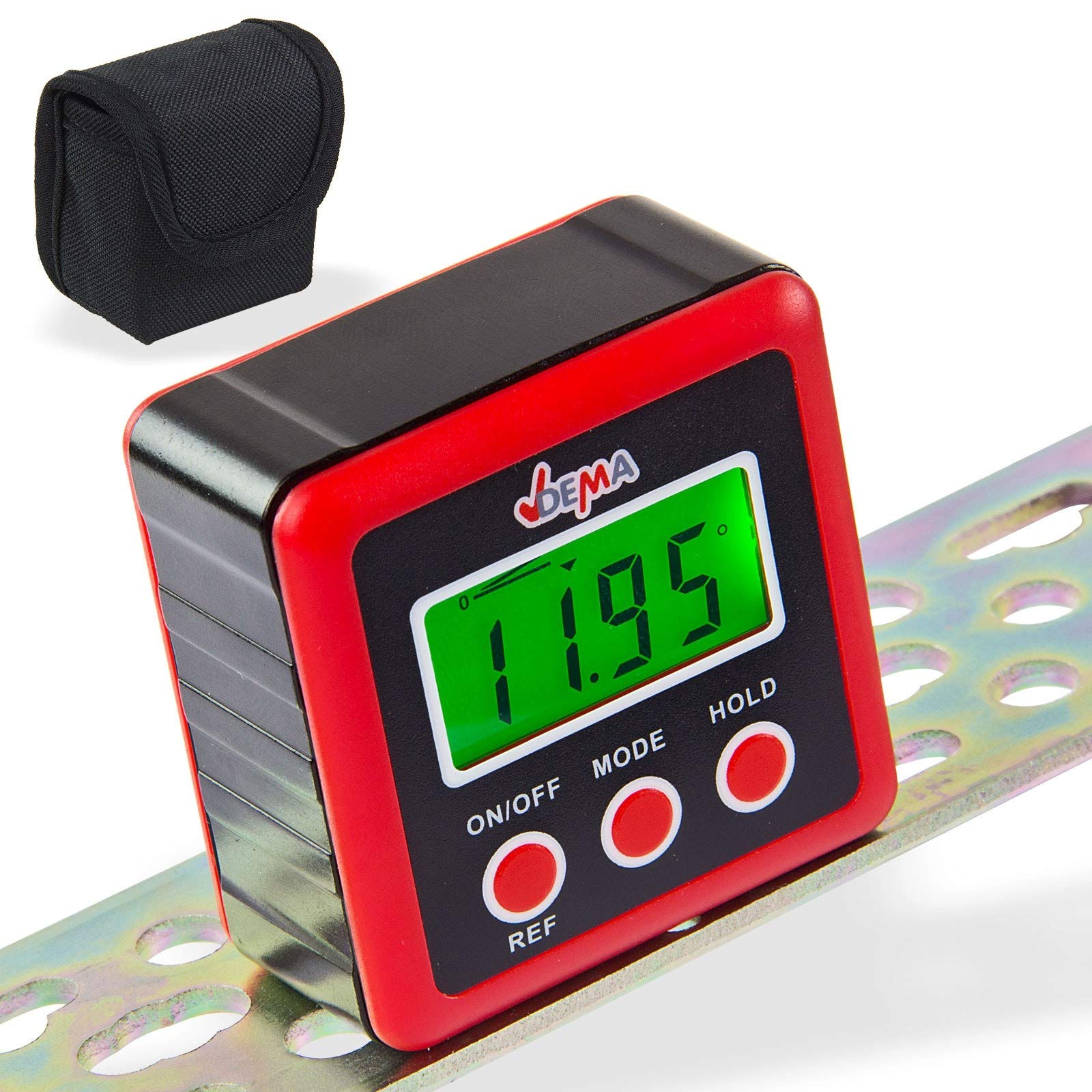
Figure 1: DEMA Digital Cube Level
2. הוראות בטיחות
- Technical advancements may lead to changes without prior notice from the manufacturer, which may not yet be reflected in this manual.
- Before initial operation, check the device for completeness and proper function.
- Never operate a defective or malfunctioning device. Contact the manufacturer or have the device inspected by a qualified mechanic.
- עבדו תמיד בזהירות ובזהירות הנדרשת.
- Never apply excessive force to the device.
- Ensure batteries are removed if the device will not be used for an extended period. Never touch leaking batteries with any part of your body.
- הרחק ילדים ואנשים לא מורשים מאזור העבודה.
- לעולם אל תעבדו כשאתם עייפים או תחת השפעת סמים, תרופות או אלכוהול.
- Store packaging materials (foils, plastic bags, Styrofoam, etc.) only in places inaccessible to children, especially infants, as packaging parts often pose unrecognized dangers (e.g., choking hazard).
3. שימוש מיועד
- The DEMA Digital Cube Level is suitable as a testing device for horizontal or vertical alignment of an object.
- The level is not designed for commercial purposes.
4. התקנה
4.1. התקנת סוללה
- אתר את מכסה הסוללה בגב המכשיר.
- Unscrew the three screws securing the battery cover.
- Insert two 1.5V AAA batteries (not included) into the compartment, ensuring correct polarity.
- Replace the battery cover and secure it by tightening the three screws.

איור 2: תא הסוללה בגב המכשיר
5. הוראות הפעלה
5.1. הפעלה/כיבוי
- הקש על הפעלה/כיבוי כפתור להפעלת המכשיר.
- The device will automatically turn off if not used for approximately three minutes to conserve battery life.
5.2. לקיחת מדידות
- הפעל את המכשיר.
- Place the device firmly on the surface to be measured. The display will show the incline in degrees.

איור 3: דוגמהamples of display readings
5.3. Changing Display Units
- הקש על MODE button to cycle through different display units: degrees (°), percentage (%), millimeters per meter (mm/m), and slope (ft,in).
- The slope is displayed in 1/8 increments.
- The '0°' symbol indicates the current angle.
5.4. Relative Angle Measurement (REF Function)
- If the device is not perfectly level, it will display a value. To set the current angle as a reference (zero), press the REF לַחְצָן.
- The device is now in relative angle measurement mode and will display 'S'.
- הקש על REF button again to exit the relative angle mode.
5.5. תצוגה אחורית
- The display backlight turns on automatically when any button is pressed.
- The backlight will automatically turn off after 20 seconds of no button activity.
5.6. פונקציית החזק
- הקש על לְהַחזִיק button to 'freeze' the current measurement result on the display. The 'H' symbol will be shown.
- לִלְחוֹץ לְהַחזִיק again to reactivate the measurement mode.
5.7. מחוון סוללה חלשה
- When the battery symbol appears on the screen, it is recommended to replace the batteries promptly.
6. כיול
For accurate measurements, periodic calibration is recommended.
- כבה את המכשיר.
- Place the level on a perfectly horizontal, flat, and stable surface.
- לחץ והחזק את שניהם הפעלה/כיבוי ו לְהַחזִיק buttons simultaneously until 'CAL' is displayed. The device is now in calibration mode.
- Leave the device still for a moment, then press the לְהַחזִיק button. The display will show 'CAL1'.
- Rotate the level 180° on the same surface and press the לְהַחזִיק button. 'CAL2' will be displayed.
- Once 'CAL2' is no longer displayed, the calibration process is complete.
תְשׁוּמַת לֵב: During the calibration process, the surface must not be tilted or moved. After calibration, the original data will be overwritten with the new calibration data.
7. תחזוקה
- שמור על המכשיר נקי ויבש. נגב את החלק החיצוני בעזרת מטלית רכהamp בַּד. אין להשתמש בחומרי ניקוי שוחקים או ממסים.
- הימנע מחשיפת המכשיר לטמפרטורות קיצוניות, לחות או לאור שמש ישיר.
- Remove batteries if the device is not used for an extended period to prevent leakage and damage.
- Store the device in its protective pouch (if included) when not in use to prevent scratches and damage.

Figure 4: Carrying pouch for the Digital Cube Level
8. פתרון תקלות
8.1. Device Does Not Turn On
- בדוק אם הסוללות מוכנסות כהלכה עם הקוטביות הנכונה.
- Replace the batteries with new 1.5V AAA batteries.
- ודא שמגעי הסוללה נקיים וללא קורוזיה.
8.2. קריאות לא מדויקות
- בצע כיול כמתואר בסעיף 6.
- ודא שמשטח המדידה יציב וחף מרעידות.
- Check for any physical damage to the device.
אם הבעיות נמשכות, אנא פנו לתמיכת הלקוחות.
9. מפרט טכני
| תכונה | מִפרָט |
|---|---|
| רזולוציית תצוגה | ±0.01° |
| דיוק תצוגה | ±0.1° ב-0° ו-90°, ±0.2° בזוויות אחרות |
| יחידות הניתנות לתצוגה | ° / %, mm/m, in/ft |
| טמפרטורת הפעלה | 0°C ~ 40°C |
| סוללות נדרשות | 2 x 1.5V AAA |
| מידות (L x W x H) | 58 x 58 x 32 מ"מ |
| משקל (ללא סוללות) | כ 70 גרם |
| חוֹמֶר | פוליוויניל כלוריד (PVC) |
10. סילוק
Do not dispose of this device with household waste. Please contact DEMA Vertriebs-GmbH, your local dealer, or a local recycling company for proper disposal. By disposing of the device correctly, you are making a valuable contribution to environmental protection.
11. אחריות ותמיכה
Warranty information for the DEMA Digital Cube Level is not provided within this manual. Please refer to your purchase documentation or contact your seller for details regarding warranty coverage.
For technical support, questions, or service requests, please contact the retailer from whom you purchased the product or the manufacturer directly. Contact information can typically be found on the product packaging or the seller's webאֲתַר.