
1. הקדמה
Thank you for choosing the Zerone LP-838 Small Power Amplifier. This manual provides essential information for the safe and efficient operation of your device. Please read these instructions thoroughly before use and retain them for future reference.
2. המוצר נגמרview
2.1 תכונות עיקריות
- עיצוב קומפקטי ונייד.
- RCA and 3.5mm audio input compatibility.
- High-power audio amplifier chip for 2.1 channel output.
- Adjustable Treble, Bass, and Volume controls.
- Durable all-aluminum alloy shell for electromagnetic interference reduction.
2.2 זיהוי רכיבים
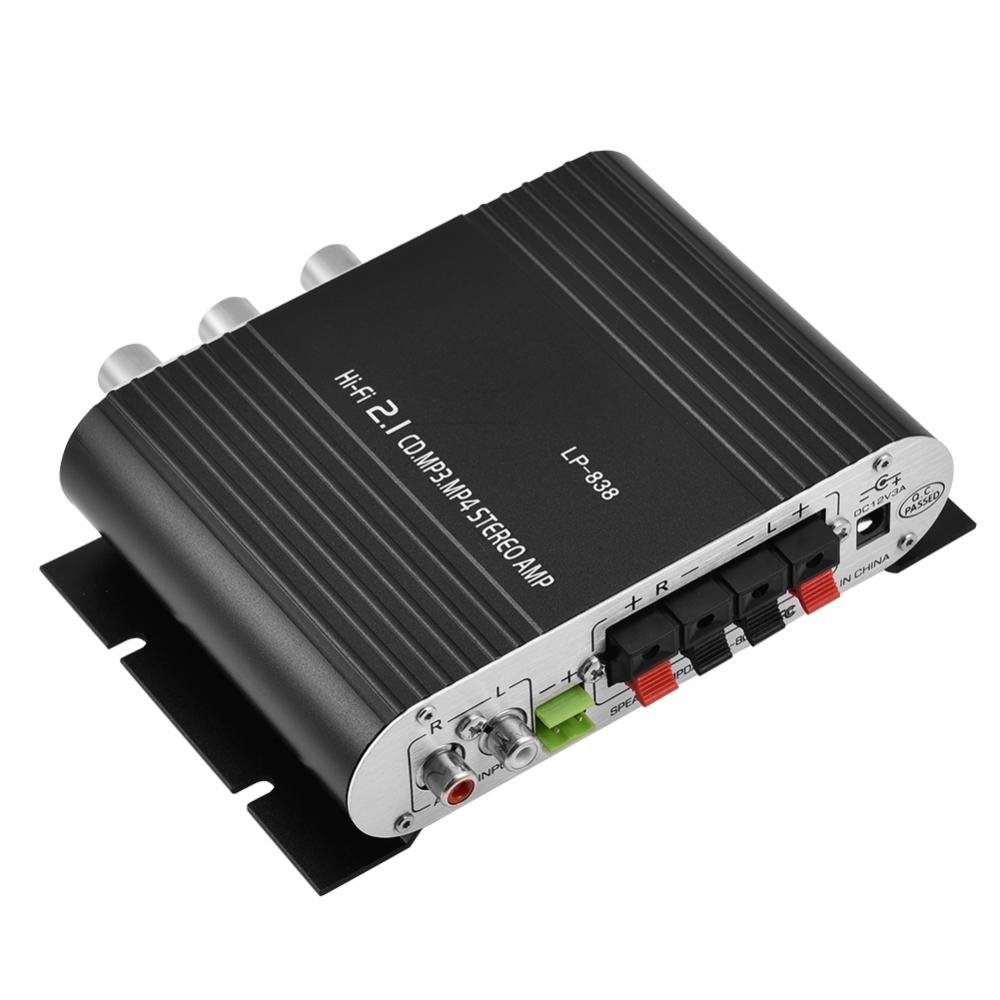
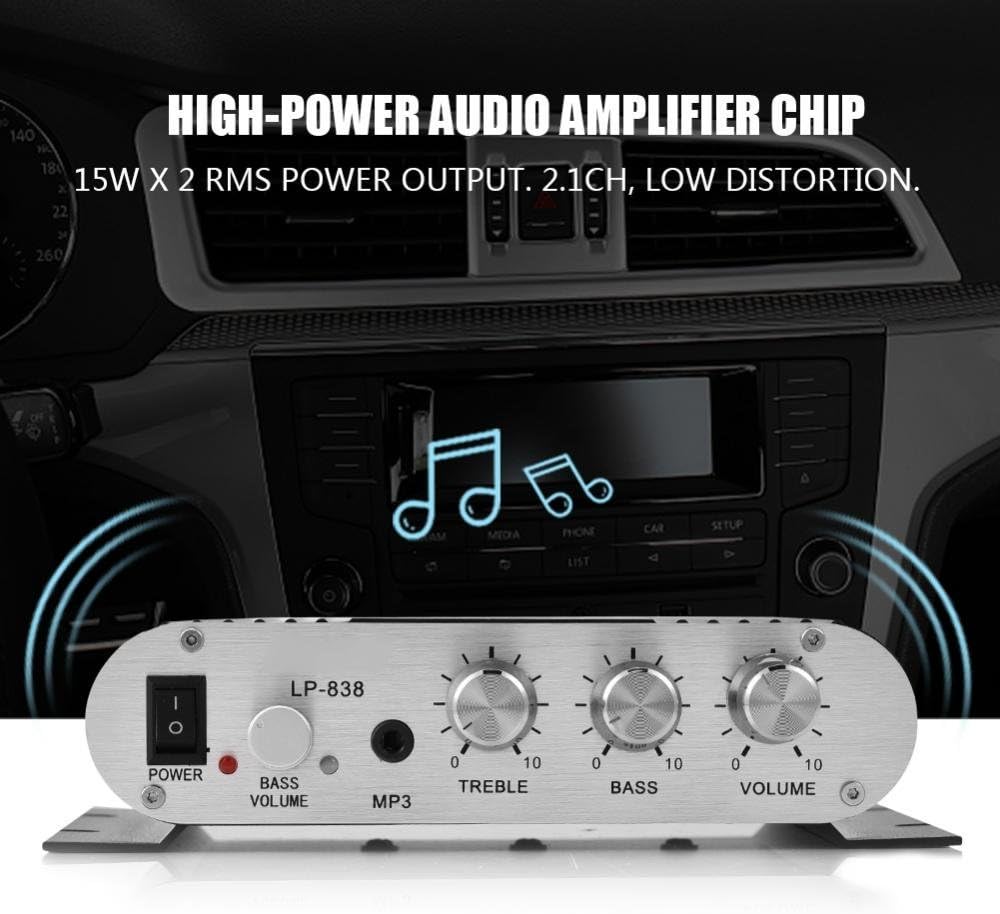
Figure 1: Front Panel Controls and Inputs
This image displays the front panel of the LP-838 amplifier. From left to right, it features a power switch, a bass volume knob, a 3.5mm MP3 input jack, and three rotary knobs for Treble, Bass, and Master Volume control. The unit also supports RCA audio input, as indicated by the text overlay.
איור 2: חיבורי הפאנל האחורי
This image shows the rear panel of the LP-838 amplifier. On the left are the RCA audio input jacks (red for right, white for left). In the center are the spring-clip speaker terminals for connecting left and right speakers. On the right is the DC 12V/3A power input jack and a 'Q.C. PASSED' stamp, indicating quality control.
פאנל קדמי:
- מתג הפעלה: מחליף את ampהפעלה/כיבוי של מגן.
- BASS VOLUME Knob: כוונון רמת הבס של פלט השמע.
- קלט MP3: 3.5mm jack for connecting portable audio devices.
- כפתור TREBLE: מכוונן את תגובת התדרים הגבוהים.
- כפתור BASS: מכוונן את תגובת התדרים הנמוכים.
- ידית VOLUME: שולט בעוצמת הפלט הכוללת.
לוח אחורי:
- AUDIO INPUT (RCA): Red and white RCA jacks for connecting audio sources (e.g., DVD players, computers).
- SPEAKER OUTPUTS (+R -R +L -L): Spring-clip terminals for connecting passive speakers. Ensure correct polarity (+ to + and - to -).
- קלט DC 12V/3A: Power input jack for connecting the external power adapter (not included).
3. התקנה
- חיבור רמקולים: Connect your passive speakers to the SPEAKER OUTPUT terminals on the rear panel. Ensure the positive (+) terminal of the ampהממיר מתחבר להדק החיובי (+) של הרמקול, ולהדק השלילי (-) של amplifier connects to the negative (-) terminal of the speaker. The amplifier supports speakers with an impedance of 4-8 Ohms.
- חיבור מקור שמע:
- For RCA input: Connect your audio source (e.g., CD player, TV, computer) to the RCA AUDIO INPUT jacks on the rear panel using an RCA cable.
- For 3.5mm input: Connect your portable audio device (e.g., smartphone, MP3 player) to the MP3 input jack on the front panel using a 3.5mm audio cable.
- חבר חשמל: Connect a compatible DC 12V/3A power adapter (not included) to the DC 12V/3A input jack on the rear panel. Plug the power adapter into a wall outlet.
Important: Ensure all connections are secure before powering on the ampחיים יותר.
4. הוראות הפעלה
- הפעלה: סובבו את מתג ההפעלה (POW) בלוח הקדמי למצב 'ON'. נורית חיווי ההפעלה תידלק.
- בחר קלט: ה amplifier automatically uses the active input. If both RCA and 3.5mm inputs are connected, the 3.5mm input may take precedence.
- התאם את עוצמת הקול: Start with the VOLUME knob set to a low level. Begin playing audio from your source, then slowly increase the VOLUME knob to your desired listening level.
- כוונון טון: Use the TREBLE and BASS knobs to fine-tune the high and low frequencies according to your preference. The BASS VOLUME knob provides additional control over the bass output.
- כיבוי: When finished, turn the VOLUME knob down to its minimum setting, then flip the POWER switch to the 'OFF' position.
5. תחזוקה
- ניקוי: השתמש במטלית רכה ויבשה כדי לנקות את החלק החיצוני של ampאין להשתמש בחומרי ניקוי נוזליים או ממסים.
- אוורור: להבטיח את amplifier is placed in a well-ventilated area to prevent overheating. Do not block the ventilation slots.
- אִחסוּן: When not in use for extended periods, disconnect the power adapter and store the amplifier in a cool, dry place.
6. פתרון תקלות
| בְּעָיָה | סיבה אפשרית | פִּתָרוֹן |
|---|---|---|
| אין כוח | מתאם החשמל אינו מחובר או פגום; כבה את המכשיר. | Ensure power adapter is securely connected and functional. Flip power switch to ON. |
| אין פלט קול | Incorrect audio input connection; speaker wires loose or incorrect polarity; volume too low; audio source issue. | Check audio input cables and connections. Verify speaker wire connections and polarity. Increase volume. Test audio source with another device. |
| צליל מעוות | Volume too high; incorrect tone settings; faulty audio source or cable. | Reduce volume. Adjust Treble and Bass knobs. Test with a different audio source or cable. |
| זמזום או רעש זמזום | Ground loop issue; interference from other electronics; faulty cables. | Ensure all components are properly grounded. Move amplifier away from other electronic devices. Try different audio cables. |
7. מפרטים
- מותג: אפס
- מספר דגם: Zeroneq8ae3d902g-02 (LP-838)
- כרך ידtage: 14.4 וולט (בפעולה)
- מספר ערוצים: 2
- עכבת רמקול: 4-8 אוהם
- סוג הרכבה: מתקן משטח
- משקל פריט: 7.8 אונקיות
- ASIN: B07DM4QJGX
- UPC: 763741184919
- תאריך זמין ראשון: 4 ביולי 2019
8. מידע על אחריות
For specific warranty terms and conditions, please refer to the documentation provided at the time of purchase or contact your retailer. Warranty coverage typically includes defects in materials and workmanship under normal use.
9. תמיכה
If you encounter issues that cannot be resolved using the troubleshooting guide, please contact the retailer or manufacturer for assistance. Provide your product model number (LP-838) and a detailed description of the problem when seeking support.