
1. המוצר נגמרview
The Zerone Multi-Language Translator Bluetooth Earphone is a portable wireless device designed for real-time language translation and audio playback. It features Bluetooth 4.1 connectivity, high-fidelity audio output, and a compact in-ear design for comfortable use during various activities.

תמונה 1.1: ראשי view of the Zerone Multi-Language Translator Bluetooth Earphone.
2. תכולת החבילה
אנא ודא שכל הפריטים המפורטים להלן כלולים בחבילה שלך:
- Zerone Multi-Language Translator Bluetooth Earphone
- כבל טעינה USB
- טיפים נוספים לאוזניים (בגדלים שונים)
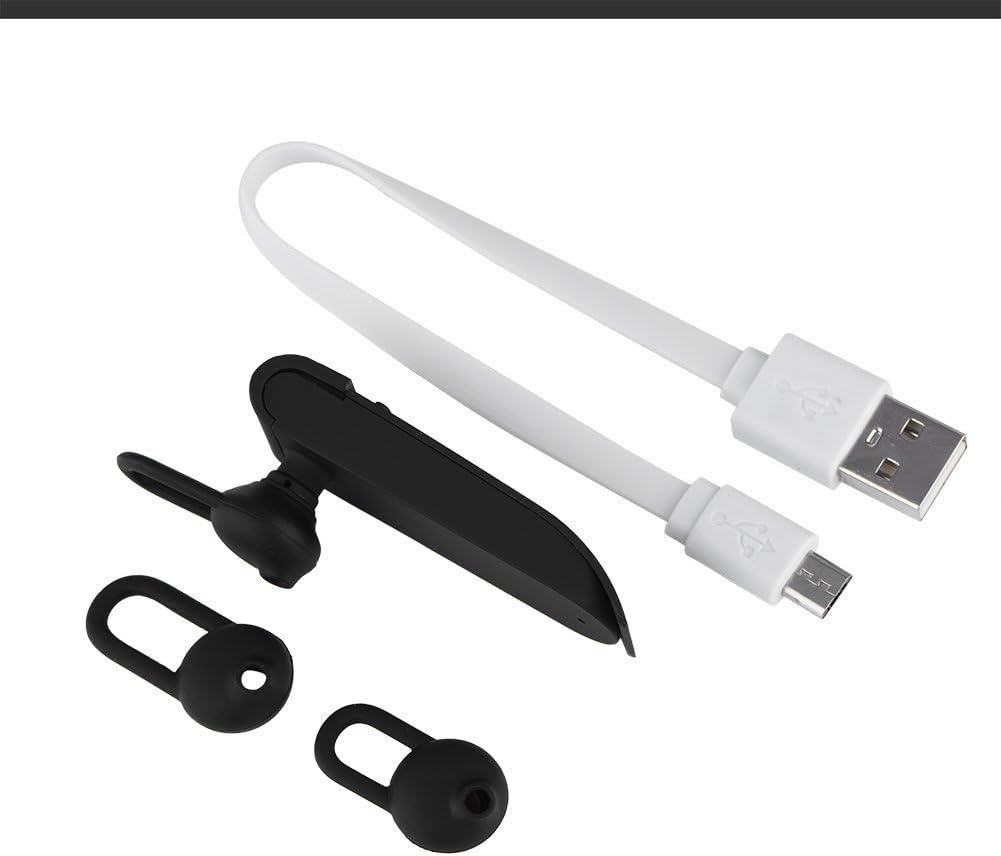
Image 2.1: The earphone with its charging cable and two additional ear tips.
3. תכונות מוצר
- Multi-Language Translation: Supports up to 16 languages for real-time translation. Speak into the earphone, and it will translate into the desired language.
- פלט שמע באיכות גבוהה: Equipped with an 8mm moving coil speaker for clear, smooth audio and enhanced bass.
- True Wireless In-Ear Design: Mini and compact, offering a stable and comfortable fit without tangled wires, suitable for various activities.
- קישוריות Bluetooth 4.1: Optimized Bluetooth 4.1 version ensures a stable and fast wireless connection with a range of up to 10 meters.
- חיי סוללה מורחבים: Built-in 90mAh rechargeable lithium battery provides approximately 5-8 hours of playback time and up to 13 hours of talk time.

Image 3.1: Visual representation of the 16 languages translation feature.

Image 3.2: Illustration of the high fidelity audio output with an 8mm moving coil speaker.

Image 3.3: Visual representation of the Bluetooth true wireless connection with a 10-meter transmission range.

Image 3.4: Details on the earphone's 90mAh rechargeable lithium battery and extended usage times.
4. התקנה
4.1 טעינת האוזניות
Before initial use, fully charge the earphone. Connect the provided USB charging cable to the earphone's charging port and the other end to a USB power source (e.g., computer, wall adapter). The charging time is approximately 2 hours.
4.2 זיווג בלוטות '
- Ensure the earphone is fully charged and powered off.
- Press and hold the multi-function button on the earphone until the indicator light flashes red and blue alternately, indicating pairing mode.
- בטלפון החכם או במכשיר התומך ב-Bluetooth שלך, נווט אל הגדרות ה-Bluetooth.
- חפש available devices and select "Zerone Translator Earphone" (or similar name) from the list.
- לאחר החיבור, נורית החיווי בדרך כלל תהפוך לכחולה קבועה או תהבהב בכחול באיטיות.
4.3 Companion Application (for Translation)
To utilize the multi-language translation feature, you will need to download and install a compatible companion application on your smartphone. Refer to the packaging or product documentation for the specific app name and download instructions. Ensure your phone is connected to the internet for translation services.
5. הוראות הפעלה
5.1 הפעלה/כיבוי
- הפעלה: Press and hold the multi-function button for approximately 3 seconds until the indicator light turns blue.
- כיבוי: לחץ והחזק את לחצן הרב-תכליתי למשך כ-5 שניות עד שנורית החיווי תידלק באדום.
5.2 השמעת מוזיקה
- הפעל/השהה: לחיצה קצרה על הכפתור הרב-תכליתי.
- הרצועה הבאה: לחץ פעמיים על כפתור הרב-תכליתי.
- רצועה קודמת: לחץ שלוש פעמים על כפתור הרב-תכליתי.
5.3 ניהול שיחות
- מענה/סיום שיחה: לחיצה קצרה על הכפתור הרב-תכליתי.
- דחה שיחה: לחץ לחיצה ארוכה על הלחצן הרב-פונקציונלי למשך 2 שניות.
5.4 שימוש בפונקציית התרגום
After successfully pairing the earphone with your device and setting up the companion application:
- Open the translation application on your smartphone.
- Select the source and target languages within the app.
- Activate the translation mode as instructed by the application (this may involve pressing a button on the earphone or within the app).
- Speak clearly into the earphone's microphone. Your speech will be translated and played back through the earphone or your phone's speaker, depending on the app's settings.

Image 5.1: A conceptual image demonstrating the earphone's translation capability between two languages.
6. תחזוקה
- ניקוי: Use a soft, dry cloth to clean the earphone. Do not use abrasive cleaners or immerse the device in water.
- אִחסוּן: יש לאחסן את האוזניות במקום קריר ויבש, הרחק מאור שמש ישיר וטמפרטורות קיצוניות.
- טיפול בסוללה: To prolong battery life, avoid fully discharging the earphone frequently. Charge it regularly, even if not in use for extended periods.
7. פתרון תקלות
| בְּעָיָה | סיבה אפשרית | פִּתָרוֹן |
|---|---|---|
| Earphone does not power on | סוללה חלשה | Charge the earphone for at least 30 minutes. |
| לא ניתן להתאים למכשיר | Earphone not in pairing mode; Bluetooth off on device; device too far | Ensure earphone is in pairing mode (flashing red/blue). Turn on Bluetooth on your device. Move device closer to earphone (within 10m). |
| No sound during playback/calls | Volume too low; earphone not connected; media output not selected | Increase volume on both earphone and connected device. Re-pair the earphone. Check device's audio output settings. |
| Translation function not working | Companion app not open/configured; no internet connection; microphone blocked | Ensure the companion app is open and correctly configured. Verify internet connectivity. Check if the earphone's microphone is clear. |
8. מפרטים
| תכונה | פְּרָט |
|---|---|
| מספר דגם | 4351510494 |
| טכנולוגיית קישוריות | אלחוטי (Bluetooth) |
| גרסת בלוטות' | 4.1 |
| טווח בלוטות' | עד 10 מטר |
| קיבולת סוללה | סוללת ליתיום 90mAh |
| זמן משחק | 5-8 שעות |
| זמן דיבור | עד 13 שעות |
| זמן טעינה | בערך שעתיים |
| שקע אוזניות | USB (לטעינה) |
| חוֹמֶר | פּלָסטִי |
| מיקום אוזניים | אין אוזן |
| גורם צורה | אין אוזן |
| סוג בקרה | בקרת מדיה, מגע |
| בקרת רעש | ביטול רעשים אקטיבי |
| משקל פריט | 2.39 אונקיות |
9. אחריות ותמיכה
For warranty information and technical support, please refer to the documentation included with your purchase or visit the official Zerone webאתר. שמור את הוכחת הרכישה שלך לצורך תביעות אחריות.