
מָבוֹא
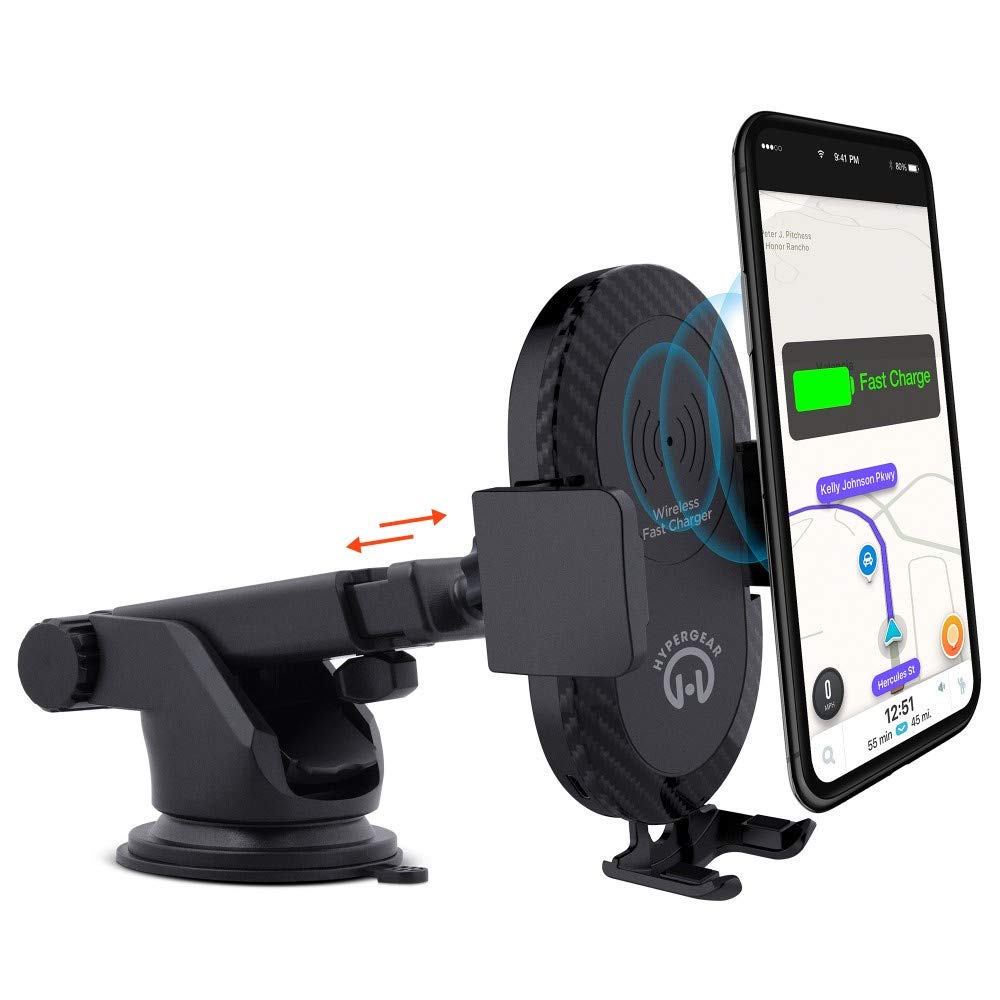
This manual provides instructions for the HyperGear HYG-14590 Wireless Fast Charging Car Dash Mount. This device is designed to securely hold and wirelessly charge Qi-enabled smartphones in your vehicle, offering hands-free navigation and communication.
תוכן החבילה
ודא שכל הפריטים נמצאים בחבילה:
- Telescopic Mount
- Fast Charge Car Adapter
- כבל מיקרו USB
- מדריך למשתמש (מסמך זה)
הוראות התקנה
- בחר מיקום הרכבה: Select a clean, flat surface on your dashboard or windshield. Ensure the location does not obstruct your view או להפריע לשלטי הרכב.
- צרף את ההר:
- Clean the chosen surface thoroughly.
- Remove the protective film from the sticky gel suction cup.
- Press the suction cup firmly onto the surface.
- Engage the 2-step locking lever to secure the mount in place.
- חבר חשמל:
- Insert the Micro USB cable into the charging port on the mount.
- Plug the other end of the Micro USB cable into the Fast Charge Car Adapter.
- Insert the Fast Charge Car Adapter into your vehicle's 12V power outlet (cigarette lighter socket).
- Adjust the Mount:
- Extend the telescopic arm up to 8 inches as needed.
- Pivot the arm up to 230° to achieve the desired angle.
- Rotate the cradle head 360° to switch between portrait and landscape orientation.
הוראות הפעלה
- הצבת המכשיר שלך: Gently open the adjustable padded cradle grips and place your Qi-enabled smartphone into the mount. The grips will automatically secure the device.
- טעינה אלחוטית: Once your device is placed in the mount and the mount is powered, wireless charging will begin automatically. Ensure your device is centered on the charging pad for optimal performance.
- הסרת המכשיר שלך: To remove your device, gently open the cradle grips and lift your smartphone out.
- שימוש ללא ידיים: The mount allows for hands-free use of navigation, calls, and other applications while driving. Always ensure your device is positioned safely and does not obstruct your view של הכביש.
תַחזוּקָה
- ניקוי: השתמשו במטלית רכה ויבשה לניקוי התושבת. אין להשתמש בחומרי ניקוי שוחקים או ממסים.
- טיפול בכוס יניקה: If the sticky gel suction cup loses adhesion, rinse it with warm water and let it air dry. This can help restore its stickiness.
- אִחסוּן: כאשר אינו בשימוש למשך תקופות ממושכות, יש לאחסן את המתקן במקום קריר ויבש הרחק מאור שמש ישיר.
פתרון בעיות
- מכשיר לא נטען באופן אלחוטי:
- Ensure your smartphone is Qi-enabled or has a Qi-enabled receiver.
- Verify the Micro USB cable is securely connected to both the mount and the car adapter.
- Check that the car adapter is firmly seated in the vehicle's 12V power outlet.
- Ensure your phone is centered on the charging pad of the mount.
- הסירו את כל הכיסויים העבים לטלפון שעלולים להפריע לטעינה האלחוטית.
- Mount not sticking to surface:
- Clean the dashboard or windshield surface thoroughly before attachment.
- Ensure the 2-step locking lever is fully engaged.
- Rinse the sticky gel suction cup with warm water and air dry to restore adhesion.
- הימנעו מהרכבה על משטחים בעלי מרקם או נקבוביות.
- Phone not held securely:
- Ensure the adjustable padded cradle grips are properly closed around your device.
- Verify that your phone's size is compatible with the mount's adjustable range.
מפרטים
| מספר דגם | HYG-14590 |
| מותג | HyperGear |
| טכנולוגיית קישוריות | אַלחוּט |
| סוג מחבר | USB, אלחוטי |
| מכשירים תואמים | Cellular Phones (Qi-enabled) |
| דגמי טלפונים תואמים | iPhone X/8/8 Plus, Samsung Galaxy S9/S9+, S8/S8+, Note 8, and other Qi-enabled devices |
| תכונה מיוחדת | טעינה מהירה, טעינה אלחוטית |
| מהtage | 10 וואט |
| מקור כוח | Vehicle 12V Power Outlet |
| סוג מחבר מתח ראשי | USB Type C (for car adapter) |
| משקל פריט | 11.84 אונקיות |
| חומר המארז | Gel (suction cup) |
| צֶבַע | שָׁחוֹר |
| UPC | 633755145902 |
מידע על אחריות
This HyperGear product comes with a אחריות ל-30 יום from the date of purchase. This warranty covers manufacturing defects. Please retain your proof of purchase for warranty claims. For further details or to initiate a claim, please refer to the HyperGear official webאתר או צור קשר עם תמיכת הלקוחות שלהם.
תמיכת לקוחות
For technical assistance, product inquiries, or warranty support, please visit the official HyperGear webבאתר או צרו קשר עם מחלקת שירות הלקוחות שלהם. פרטי התקשרות ניתן למצוא בדרך כלל על אריזת המוצר או בנוכחות המקוונת הרשמית של המותג.