1. הקדמה
The Launch Creader 6011 is a versatile diagnostic tool designed for automotive enthusiasts and professional technicians. It offers comprehensive OBDII/EOBD diagnostic capabilities, alongside specialized functions for Anti-lock Braking System (ABS) and Supplemental Restraint System (SRS) diagnostics. This manual provides detailed instructions for the proper use, setup, and maintenance of your Creader 6011 device.
2. המוצר נגמרview
The Creader 6011 features a large color display and an intuitive interface for easy navigation and data interpretation. Its robust design ensures durability for use in various automotive environments.

איור 2.1: The Launch Creader 6011 diagnostic scanner with its main menu displayed.

איור 2.2: מְפוֹרָט views of the Creader 6011, showing its various ports and control layout.
3. מפרטים
| תכונה | מִפרָט |
|---|---|
| מָסָך | 4.0" TFT 320*480 dpi |
| כרך ידtagטווח | 9-18V |
| טמפרטורת הפעלה | 0℃ ~ 50℃ |
| טמפרטורת סביבה | -20℃ ~ 70℃ |
| מידות | 195 מ"מ x 86 מ"מ x 32 מ"מ (7.6 "x 3.4" x 1.2 ") |
| מִשׁקָל | 460 גרם (1.01 פאונד) |
| מקור כוח | חשמלי עם כבל (דרך יציאת OBD II) |
| מספר דגם של פריט | Launch-IV06 |
| UPC | 680666198909 |
4. התקנה
The Creader 6011 is designed for ease of use and requires no external power source or batteries. It draws power directly from the vehicle's OBD II port.
- אתר את יציאת ה-OBD II: The OBD II port is typically located under the dashboard on the driver's side of the vehicle. Refer to your vehicle's owner's manual if you cannot find it.
- חבר את הסורק: Plug the diagnostic cable of the Creader 6011 into the vehicle's OBD II port. Ensure a secure connection.
- הפעלה: Once connected, the scanner will automatically power on and display the main menu. If it does not power on, check the vehicle's ignition status and the connection.
5. הוראות הפעלה
Navigate the menu using the directional buttons and confirm selections with the OK לַחְצָן. ה ESC הכפתור מחזיר למסך הקודם.

איור 5.1: Key components and button functions of the Creader 6011.
5.1. פונקציות OBDII/EOBD מלאות
The Creader 6011 supports all 10 modes of OBDII/EOBD diagnostics:
- קראו את הקודים: מאחזר קודי תקלות אבחון (DTC) ממחשב הרכב.
- מחק קודים: מנקה DTCs ומכבה את מחוון התקלה Lamp (מִיל).
- מוכנות I/M: בודק את מוכנותן של מערכות ניטור פליטות.
- זרם נתונים: מציג פרמטרים של נתונים בזמן אמת מחיישני הרכב.
- הקפאת מסגרת: Shows a snapshot of operating conditions at the time a fault occurred.
- מבחן חיישן O2: מאחזר תוצאות בדיקת ניטור חיישן חמצן.
- בדיקת ניטור על הלוח: מאחזר תוצאות עבור רכיבים ומערכות מערכת הנעה הקשורים לפליטות.
- בדיקת מערכת אידוי: Initiates a test of the Evaporative Emission System.
- מידע לגבי הרכב: מאחזר מספר זיהוי רכב (VIN), מזהה כיול ומספר אימות כיול (CVN).
- בדיקת רכיבים: Allows bi-directional control of certain components (if supported by vehicle).

איור 5.2: Example of the I/M Readiness screen, showing emission monitor status.
5.2. ABS and SRS System Diagnostic Functions
In addition to standard OBDII functions, the Creader 6011 provides specialized diagnostic capabilities for the Anti-lock Braking System (ABS) and Supplemental Restraint System (SRS).
- Read ABS/SRS DTCs: Retrieves specific trouble codes related to the ABS and SRS systems.
- Clear ABS/SRS DTCs: Erases fault codes from the ABS and SRS modules.
- Data Streams for ABS/SRS: Views live data parameters from ABS and SRS sensors, aiding in diagnosis.
6. עדכון תוכנה
The Creader 6011 supports lifetime free online updates to ensure compatibility with new vehicle models and to receive software enhancements. Follow these steps to update your device:
- Download Update Tool: בקרו באתר ההשקה הרשמי webאתר (www.dbscar.com). Navigate to 'Products' > 'creader 4001~9081', find 'creader 6011', and download the update tool to your computer.
- Install Update Tool: Install the downloaded update tool software on your computer.
- חבר מכשיר: Connect your Creader 6011 to your computer using the provided USB data cable.
- הפעל את כלי העדכון: Launch the update tool software. You will be prompted to enter the serial number and register code of your Creader 6011. These details will be displayed on the scanner's screen when it is connected to your PC.
- התחלת עדכון: Click the 'Update' button within the software. Ensure the device remains connected and your internet connection is stable throughout the update process.
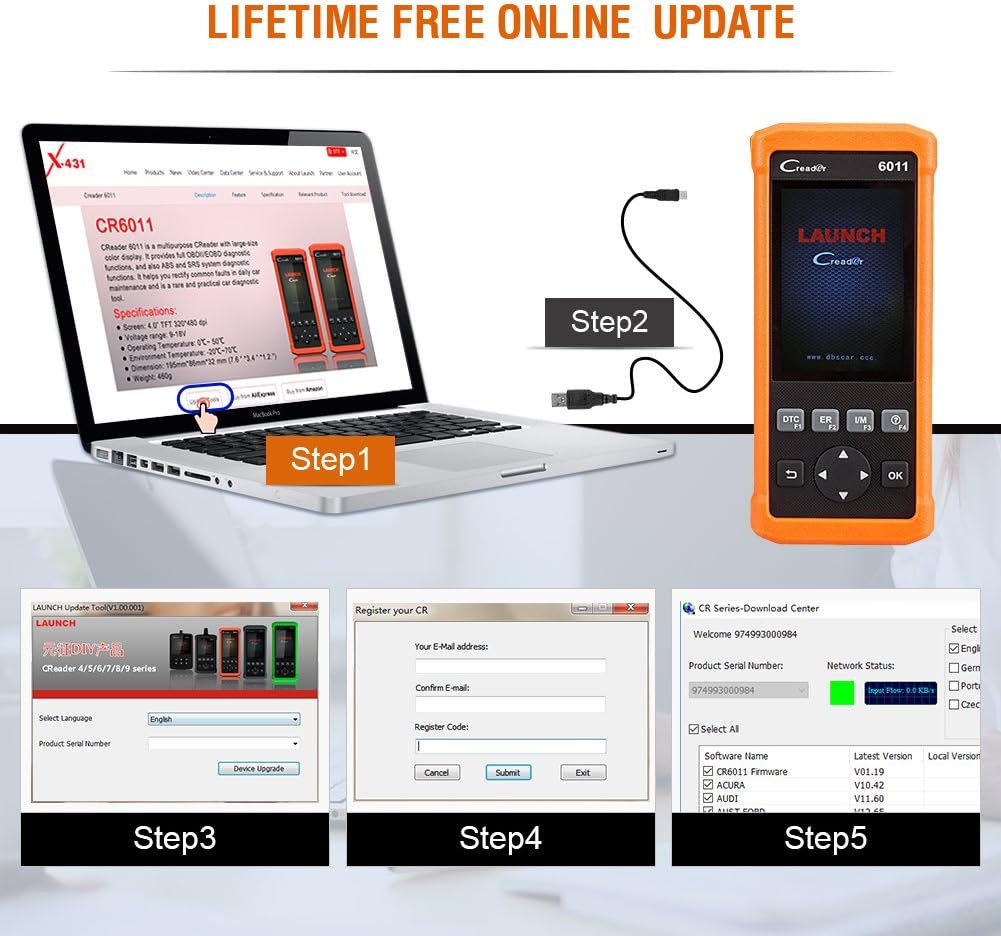
איור 6.1: Visual guide for the software update process.
7. כיסוי רכב
The Creader 6011 is compatible with most post-1996 vehicles (OBD II & CAN compliant), including domestic and imported 12V petrol vehicles. Below is a general list of supported car brands (2006-present):

איור 7.1: Partial list of car brands supported by the Creader 6011.
For a comprehensive and up-to-date list, please refer to the official LAUNCH website or the update tool software.
8. תחזוקה
To ensure the longevity and optimal performance of your Creader 6011, follow these maintenance guidelines:
- ניקוי: השתמשו במטלית רכה ויבשה לניקוי המכשיר. הימנעו משימוש בחומרי ניקוי שוחקים או ממסים.
- אִחסוּן: יש לאחסן את המכשיר בסביבה יבשה וקרירה, הרחק מאור שמש ישיר וטמפרטורות קיצוניות.
- טיפול בכבלים: Handle the diagnostic cable carefully. Avoid bending or twisting it excessively, which can damage internal wires.
- עדכוני תוכנה: Regularly perform software updates as described in Section 6 to maintain compatibility and access new features.
9. פתרון תקלות
If you encounter issues with your Creader 6011, consider the following common troubleshooting steps:
- המכשיר לא מופעל: Ensure the diagnostic cable is securely connected to the vehicle's OBD II port. Verify the vehicle's ignition is on. Check for any blown fuses in the vehicle's OBD II circuit.
- שגיאת תקשורת: Confirm the vehicle is OBD II compliant. Check for a stable connection between the scanner and the vehicle. Try the scanner on a different OBD II compliant vehicle to rule out vehicle-specific issues.
- המסך קופא/לא מגיב: נתק את המכשיר מהרכב וחבר אותו מחדש. אם הבעיה נמשכת, בצע עדכון תוכנה.
- כשל בעדכון: Ensure a stable internet connection during the update process. Verify the serial number and register code are entered correctly. Temporarily disable any firewall or antivirus software that might interfere with the update tool.
For persistent issues, contact LAUNCH technical support.
10. תכולת החבילה
Upon opening your Launch Creader 6011 package, you should find the following items:
- 1x Launch CReader 6011 OBD2/EOBD Diagnostic Scanner
- כבל נתונים USB אחד
- מדריך למשתמש אחד (מסמך זה)
- 1x Carrying Pouch (may vary by region/package)

איור 10.1: The typical contents included in the Creader 6011 package.
11. אחריות ותמיכה
The Launch Creader 6011 comes with a standard manufacturer's warranty. For specific warranty terms and conditions, please refer to the documentation included with your purchase or visit the official LAUNCH website. For technical support, product inquiries, or warranty claims, please contact LAUNCH customer service through their official channels.


