
1. מבוא ומעלהview
The Dio DiOCAMRI01 is an advanced 360° HD WiFi camera designed for indoor surveillance, offering comprehensive monitoring while prioritizing user privacy. This camera features a motorized lens, 1080p resolution, and infrared night vision, ensuring clear visuals day and night. Its unique geo-fencing capability automatically activates a privacy mode when you are home, retracting the lens to ensure your personal space remains private. The camera also includes motion and noise detection, two-way audio communication, and local recording options via a Micro SD card.
This manual provides essential information for the proper installation, operation, and maintenance of your DiOCAMRI01 camera.
2. מידע בטיחות
- קרא בעיון את כל ההוראות לפני השימוש.
- השתמש רק במתאם החשמל שסופק עם המכשיר.
- אין לחשוף את המצלמה למים, לחות או לטמפרטורות קיצוניות.
- הימנעו מהצבת המצלמה בקרבת מקורות חום או באור שמש ישיר.
- אל תנסה לפרק או לתקן את המצלמה בעצמך. יש לפנות לכל מטפל מוסמך בתחום התחזוקה.
- Ensure the camera is securely mounted if using wall or ceiling installation.
3. תכולת החבילה
ודא שכל הרכיבים נמצאים בחבילה שלך:
- DiOCAMRI01 HD WiFi Camera
- מתאם מתח
- Mounting Kit (screws, wall plugs, mounting bracket)
- מדריך למשתמש (מסמך זה)
4. תכונות מוצר
- ניטור מרחוק: Day and night vision (infrared night vision up to 10m).
- Wide-Angle Motorized Lens: מציע סיבוב אופקי של 360° וסיבוב אנכי של 150° לכיסוי מקיף.
- הגנת פרטיות: Geo-fencing feature automatically puts the camera in standby mode and closes the lens when the owner is present. Manual standby mode is also available via the app.
- Motion and Noise Detection: Adjustable sensitivity with 3 levels. Sends direct notifications to your smartphone.
- שמע דו כיווני: Built-in microphone and intercom function allow you to hear and speak through the camera.
- הקלטה מקומית: Supports Micro SD card (up to 128GB, not included) for manual or automatic recording upon detection. Remote viewing of recordings is available via the smartphone app.
- הגדרה קלה: Quick and intuitive installation via the DiO Cam+ mobile application.
- הרכבה גמישה: Designed for discreet integration, can be mounted on a wall, ceiling, or placed on a shelf.
5. התקנה
5.1 הגדרה ראשונית
- חיבור חשמל: Connect the camera to a power outlet using the provided power adapter. The camera will power on.
- Download DiO Cam+ App: חפש "DiO Cam+" in your smartphone's app store (iOS or Android) and download the application.
- הרשמה/התחברות: פתחו את האפליקציה ופעל לפי ההוראות שעל המסך כדי ליצור חשבון או להתחבר אם כבר יש לכם אחד.
- הוסף מצלמה: Within the DiO Cam+ app, select the option to add a new device. Follow the in-app wizard to connect your camera to your Wi-Fi network. This typically involves scanning a QR code on the camera or entering Wi-Fi credentials.
- מיקום: Position the camera in your desired location. It can be placed on a flat surface, or mounted on a wall or ceiling using the included mounting kit. Ensure the camera has a clear line of sight to the area you wish to monitor.
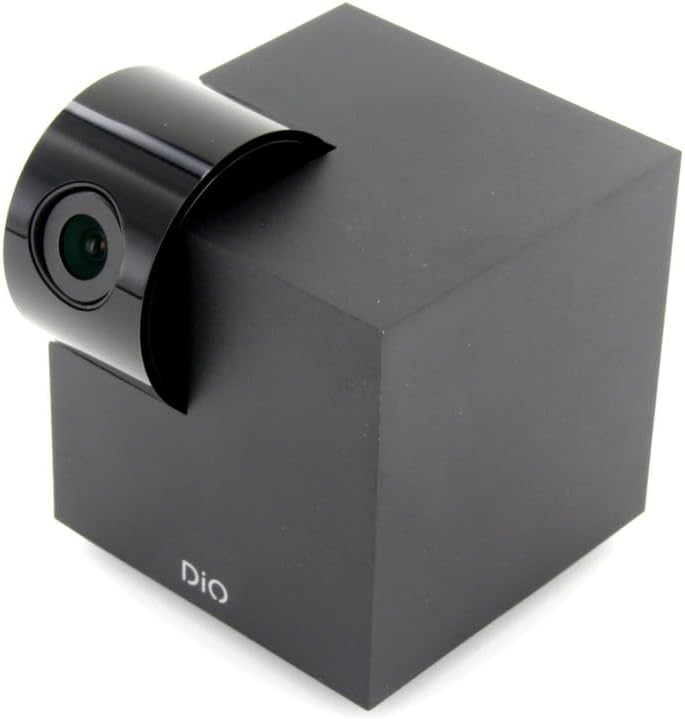
Figure 5.1: The DiOCAMRI01 camera in its standard upright position.

Figure 5.2: Camera placed on a shelf, demonstrating discreet integration.

Figure 5.3: Camera mounted on a ceiling for overhead surveillance.
5.2 התקנת כרטיס Micro SD (אופציונלי)
To enable local video recording, insert a Micro SD card (up to 128GB, not included) into the designated slot on the camera. Ensure the camera is powered off before inserting or removing the card.
5.3 שיתוף גישה למצלמה
The DiO Cam+ app allows you to easily share access to your camera with family members or trusted friends. Navigate to the camera settings within the app and select the sharing option to invite others to view השידור החי וההקלטות.
6. הוראות הפעלה
6.1 בשידור חי View ושלט רחוק
Once connected, open the DiO Cam+ app to access the live video feed from your camera. From the live view מסך, אתה יכול:
- לְהַתְאִים View זָוִית: Use the on-screen controls to remotely rotate the camera lens up to 350° horizontally and 150° vertically to cover all corners of your room.
- שמע דו כיווני: Tap the microphone icon to speak through the camera's speaker, and listen to audio from the camera's microphone.
- Take Snapshots/Record Video: Capture still images or start manual video recordings directly from the live view.

Figure 6.1: Camera interacting with the DiO Cam+ smartphone application.

איור 6.2: צד view of the camera, highlighting the rotating lens mechanism.
6.2 Privacy Features (Geo-Fencing and Manual Standby)
The DiOCAMRI01 camera offers advanced privacy protection:
- גיאו-פינסינג: Configure geo-fencing in the app to automatically switch the camera to privacy mode when your smartphone enters a predefined home zone. In privacy mode, the camera lens will retract, ensuring no recording or live viewing מתרחש.
- Manual Standby: You can manually activate or deactivate the camera's standby mode (privacy mode) at any time through the DiO Cam+ app.
- Scheduled Standby: Set a schedule within the app for the camera to automatically enter or exit standby mode at specific times.

Figure 6.3: Camera with lens retracted, indicating privacy mode.
6.3 Motion and Noise Detection
The camera can detect motion and noise within its field of view. When triggered, it will send a notification to your smartphone and can automatically begin recording to the Micro SD card.
- התאמת רגישות: Adjust the detection sensitivity (3 levels) in the app settings to minimize false alarms.
- אפשרויות הקלטה: Configure recording duration (1, 3, or 5 minutes per clip) or continuous recording if a Micro SD card is installed.
7. תחזוקה
- ניקוי: Use a soft, dry cloth to clean the camera body and lens. Do not use liquid cleaners or abrasive materials.
- עדכוני תוכנה: Regularly check the DiO Cam+ app for firmware updates to ensure optimal performance and security. Follow the in-app instructions for any available updates.
- ניהול כרטיסי מיקרו SD: מעת לעת מחדשview and manage recordings on your Micro SD card. Format the card through the app if necessary to maintain performance.
8. פתרון תקלות
- מצלמה במצב לא מקוון: Ensure the camera is powered on and connected to your Wi-Fi network. Check your Wi-Fi router and internet connection. Try restarting the camera and your router.
- לא ניתן להתחבר לאפליקציה: Verify your Wi-Fi password. Ensure your smartphone is connected to a 2.4GHz Wi-Fi network during initial setup, as the camera may not support 5GHz networks.
- איכות וידאו ירודה: Check your internet connection speed. Ensure the camera lens is clean and free from obstructions. Adjust camera placement for optimal lighting.
- Motion/Noise Detection Not Working: Check the sensitivity settings in the app. Ensure the detection zones are correctly configured.
- No Recording to SD Card: Ensure the Micro SD card is correctly inserted and formatted. Check if the card is full. The camera supports up to 128GB.
- Privacy Mode Not Activating: Verify that geo-fencing is enabled and configured correctly in the app, and that your smartphone's location services are active.
9. מפרטים
| תכונה | מִפרָט |
|---|---|
| מספר דגם | DIOCAM-RI01 |
| סוג הרכבה | מתקן קיר |
| רזולוציית לכידת וידאו | 1080p |
| צֶבַע | לָבָן |
| מספר פריטים | 1 |
| רכיבים כלולים | DiOCAMRI01 WiFi HD 360° Rotating 1080P 2MP Camera with Geo-Fencing |
| טכנולוגיית תקשורת אלחוטית | Wi-Fi |
| גורם צורה | Dome (Cube with rotating lens) |
| רזולוציית וידאו יעילה | 1080 |
| Viewזווית | 360 מעלות (אופקי) |
| טווח ראיית לילה | 10 מטר |
| חוֹמֶר | מַתֶכֶת |
| כרך ידtage | 5 וולט |
| מהtage | 5 וואט |
| מידות פריט (L x W x H) | 9.4 x 4.9 x 31.9 סנטימטרים |
| יַצרָן | צ'אקון |
| תכונות מיוחדות | Local Recording, Night Vision |
| סוללות כלולות | לֹא |
| סוללות נדרשות | לֹא |
| שימושים מומלצים | זיהוי תנועה, ראיית לילה |
| טכנולוגיית קישוריות | אַלחוּט |
| שימוש פנימי/חיצוני | מקורה |
| מכשירים תואמים | סמארטפון |
| מקור כוח | Battery Powered (Note: Product specs indicate 'No batteries required', implying external power) |
| פרוטוקול קישוריות | Wi-Fi |
| סוג בקר | דְמוּי אָדָם |
10. אחריות ותמיכה
For information regarding warranty coverage, technical support, or service, please refer to the official Dio webבאתר או צרו קשר עם נקודת הרכישה. שמרו את הוכחת הרכישה לצורך תביעות אחריות.
יַצרָן: צ'אקון