
1. הקדמה
This manual provides detailed instructions for the installation, configuration, operation, and maintenance of the Logicbus Z109REG2-H Universal Converter. The Z109REG2-H is designed to manage and convert various analog input signals (mA, V, PT100, Pt1000, Pt500, Ni100, TCs, Ohm) into standard mA/V output signals, ensuring reliable data integrity through 3-way galvanic isolation.
2. מידע בטיחות
Please read and understand all safety instructions before installing or operating the device. Failure to follow these instructions may result in equipment damage, personal injury, or death.
- התקנה ותחזוקה צריכות להתבצע אך ורק על ידי אנשי מקצוע מוסמכים.
- ודא שספק הכוח מנותק לפני ביצוע חיבורים חשמליים כלשהם.
- Verify correct wiring according to the connection diagrams to prevent damage.
- Do not operate the device in environments exceeding its specified operating conditions.
- הגן על המכשיר מפני לחות, אבק וטמפרטורות קיצוניות.
3. המוצר נגמרview
The Z109REG2-H is a compact, DIN-rail mountable universal converter. It features clearly labeled terminal blocks for inputs, outputs, and power, along with status indicators on the front panel.
3.1. Front Panel and Connections
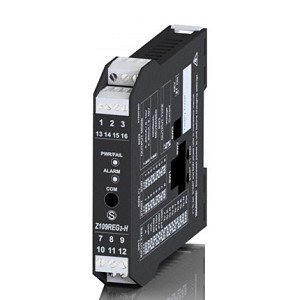
איור 1: חֲזִית view of the Logicbus Z109REG2-H Universal Converter. This image displays the device's compact black housing, designed for DIN rail mounting. Visible on the front are two sets of screw terminals, labeled 1-3 and 13-16 at the top, and 7-9 and 10-12 at the bottom. Between these terminals, three LED indicators are present: 'PWR/TAL' (Power/Talk), 'ALARM', and 'COM' (Communication). The model number 'Z109REG-H' is also clearly printed on the lower half of the device's front face.
הפאנל הקדמי כולל:
- בלוקים מסוף: Numbered 1-3, 13-16 (top) and 7-9, 10-12 (bottom) for various input, output, and power connections.
- PWR/TAL LED: Indicates power status and communication activity.
- נורית אזעקה: Illuminates when an alarm condition is detected.
- נורית COM: Indicates communication status.
- מספר דגם: Z109REG-H, identifying the device.
4. התקנה
4.1. הַרכָּבָה
The Z109REG2-H is designed for DIN rail mounting. Securely attach the device to a standard DIN rail in a suitable enclosure, ensuring adequate ventilation and clearance for wiring.
4.2. חיווט
Refer to the specific wiring diagrams provided with your product documentation for detailed connection instructions. General wiring principles are as follows:
- ספק כוח: Connect the 85-265 V AC/DC power supply to the designated terminals. Ensure the power source matches the device's requirements.
- אותות קלט: Connect your analog sensor (e.g., current, voltage, thermocouple, RTD, potentiometer) to the universal input terminals. The device supports 2-wire sensor powering (20 Vdc stabilized, 20mA max with short-circuit protection).
- אותות פלט: Connect the standard mA/V output signals to your receiving device (e.g., PLC, DCS).
- Digital Contact: The relay (SPST) output can be configured as an ALARM or STROBE contact. Connect as required for your application.
4.3. תצורה
The Z109REG2-H offers multiple configuration methods:
- מתגי DIP: Basic configuration for input type, START-END scale, output mode (zero elevation, scale inversion), and output voltage type (mA or V) can be set using the internal DIP-switches. Consult the product datasheet for switch settings.
- תוכנות מחשב: For advanced configuration, connect the device to a PC. The software allows programming of beginning and end scale, additional input types, square root extraction, filter settings, burn-out detection, and relay output parameters.
- Handheld Device: A compatible handheld device can also be used for field configuration.
5. הוראות הפעלה
Once properly installed and configured, the Z109REG2-H operates automatically.
- הפעלה: Apply power to the device. The PWR/TAL LED should illuminate, indicating normal operation.
- ניטור: Observe the ALARM LED for any fault conditions or out-of-scale readings. The COM LED indicates communication activity during configuration or data exchange.
- STROBE Input: If configured, the STROBE input can be used to activate the analog output on a PLC command, providing multiplexing capabilities.
6. תחזוקה
The Z109REG2-H is designed for minimal maintenance. Regular checks include:
- ניקוי: שמרו על ניקיון המכשיר וללא אבק. השתמשו במטלית רכה ויבשה לניקוי. אין להשתמש בחומרי ניקוי שוחקים או ממסים.
- שלמות החיבור: בדקו מעת לעת את כל חיבורי החיווט לאיתור הידוק וסימני קורוזיה.
- תנאים סביבתיים: ודא שסביבת ההפעלה נשארת בטווחי הטמפרטורה והלחות שצוינו.
7. פתרון תקלות
If the device is not functioning as expected, consider the following troubleshooting steps:
- No Power (PWR/TAL LED off): בדוק את חיבורי ספק הכוח ואת עוצמת הקולtage. Check for blown fuses in the power circuit.
- Incorrect Output Reading:
- Check input sensor wiring and functionality.
- Verify DIP-switch settings for input type and scale.
- Confirm PC software configuration parameters (scale, filter, burn-out).
- Ensure the output receiving device is correctly configured and calibrated.
- ALARM LED On: This indicates an out-of-scale condition or a setting error. Review input signal range and configuration settings.
- Communication Issues (COM LED): Ensure correct communication cable connection and PC software settings.
אם הבעיות נמשכות, פנו לתמיכה הטכנית.
8. מפרטים
| תכונה | מִפרָט |
|---|---|
| דֶגֶם | Z109REG2-H |
| סוגי קלט | כרך ידtage, Current, Thermocouples, Thermoresistances (PT100, Pt1000, Pt500, Ni100), Potentiometer, Rheostat |
| סוגי פלט | Isolated Analog Output (Voltage ו-Current) |
| ספק כוח | 85-265 וולט AC/DC |
| Sensor Power (2-wire) | 20 Vdc stabilized, 20mA max with short-circuit protection |
| תְצוּרָה | DIP-switches, PC software, Handheld device |
| בידוד גלווני | 3-way (Power supply // Input // Output) |
| Insulation (Supply to Output/Input) | 3750 ואק |
| Insulation (Output to Input) | 1500 ואק |
| Digital Contact | Relay (SPST), programmable as ALARM or STROBE |
| מידות | 5 x 1 x 4 אינץ' (כ-127 x 25.4 x 101.6 מ"מ) |
| מִשׁקָל | 7.05 אונקיות (כ-200 גרם) |
| יַצרָן | סנקה |
9. מידע על אחריות
Warranty terms and conditions for the Logicbus Z109REG2-H Universal Converter are provided by the manufacturer, Seneca, or your authorized reseller. Please refer to the documentation included with your purchase or contact your supplier for specific warranty details and duration.
10. תמיכה טכנית
For technical assistance, troubleshooting beyond the scope of this manual, or inquiries regarding product functionality, please contact your Logicbus supplier or the manufacturer, Seneca. Have your product model number (Z109REG2-H) and any relevant error messages or symptoms ready when contacting support.